

 microsoft
Implement MediaSet.ExportStream
If we use the code from standard NAV page Item Picture, we get several errors (see printscreen)
I think we need something like this:
Picture.EXPORTTOSTREAM(InStream)
DOWNLOADFROMSTREAM
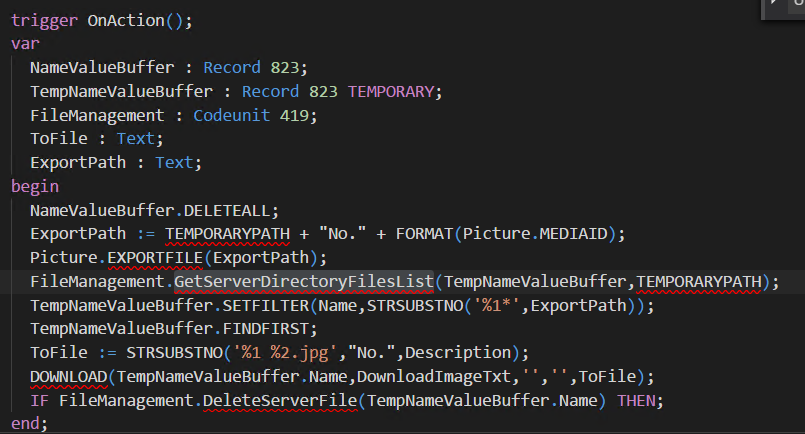

Item Picture as part of the base application is allowed to use files, but these are not allowed in Extensions. Like you mentioned you should use ExportToStream and DownloadFromStream

Ok, I understand now - we will look into adding MediaSet.ExportStream function.
ExportStream function seemed to be available. It creates an Outstream. The DOWNLOADFROMSTREAM functions needs an InStream and the COPYSTREAM function only copies an InStream to an Outsstream, right?
Example: Cover.ExportStream(NVOutStream); // TODO: How to convert to InStream? DOWNLOADFROMSTREAM(NVInStream,'Export','','All Files (.)|.',ToFile);

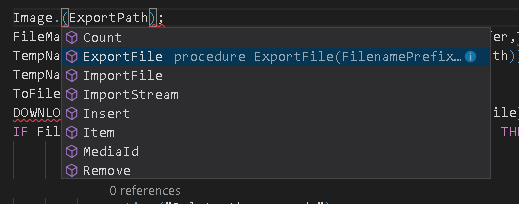
ExportStream function seemed NOT available for Mediaset.
How can I export picture from Mediaset ?

You can use the new stream functions to do this. See here: https://navbitsbytes.wordpress.com/2017/12/08/al-extensions-importing-and-exporting-media-sets/

ExportStream on the MediaSet is not available yet but please try following the process that Mike outlined above.
Thanks very much ! Really helped.
2018-02-23 11:42 GMT+03:00 Stanislaw Stempin [email protected]:
ExportStream on the MediaSet is not available yet but please try following the process that Mike outlined above.
— You are receiving this because you commented. Reply to this email directly, view it on GitHub https://github.com/Microsoft/AL/issues/692#issuecomment-367945593, or mute the thread https://github.com/notifications/unsubscribe-auth/AiSvpaDEGkLbEIQaZs0mDJtz7qon9Eqnks5tXnn2gaJpZM4Pajkg .
Is there any update on this issue? In 16.0 there is still no option to export a MediaSet. The Picture.ExportFile is still not available for extension development and yet in the base application still used by the Item Picture page. We have many other tables with a media set and want to be able to use standard functions to export (to local device).


Hi @RobertdeRoos ! Did the solution proposed by Mike not work?
The link is not working anymore, so I do not know what the solution proposed by Mike is...

Sorry, I moved my blog since then.....here is the new link: https://navbitsbytes.com/2017/12/08/al-extensions-importing-and-exporting-media-sets/
@MikeGlue could you please update your URL or remove it, since it leads to an spam website?
Are there any plans to implement this feature request on the platform?
My Workaround do deal with the current situation
for MediaObjectIndex := 1 to Rec."Picture".Count() do begin
    if TenantMedia.Get(Rec."Picture".Item(MediaObjectIndex)) then begin
        TenantMedia.CalcFields(Content);
        if TenantMedia.Content.HasValue() then begin
            TenantMedia.Content.CreateInStream(PictureInStream);
            DownloadFromStream(PictureInStream, '', '', '', ToFile);
        end;
    end;
end;

The mistake a lot of developers make is to first use calcfields on a blob before using HasValue. If a Blob field contains data the HasValue will return true without the use of calcfields. So correct code from pri-kise would be:
for MediaObjectIndex := 1 to Rec."Picture".Count() do begin
    if TenantMedia.Get(Rec."Picture".Item(MediaObjectIndex)) then begin
        if TenantMedia.Content.HasValue() then begin
            TenantMedia.CalcFields(Content);
            TenantMedia.Content.CreateInStream(PictureInStream);
            DownloadFromStream(PictureInStream, '', '', '', ToFile);
        end;
    end;
end;
