

 microsoft
Dependencies satisfied by higher version, but unpublish not allowed
Describe the bug
If I have two apps. Main 1.0 and Library 1.0. Main 1.0 depends on Library 1.0. If I upgrade Library 1.0 to Library 1.1 I can not unpublish Library 1.0 because it is required by Main 1.0 although the dependency would still be satisfied by having Library 1.1 present.
The error I get is this:
The Extension cannot be unpublished because it is required by the following apps: <...>
To Reproduce
- Publish & install
Library 1.0 - Publish & install
Main 1.0that has a dependency onLibrary 1.0 - Publish & install
Library 1.1 - Try to unpublish
Library 1.0: this step fails
Expected behavior
I expect Library 1.0 to be able to unpublish without problems since - following the principles of minimum version, no breaking changes and backward-compatibility - Library 1.1 must be fully compatible with Library 1.0 and as such Main 1.0 does no longer need Library 1.0 because Library 1.1 is there.
5. Versions:
- AL Language: v5.0.288712
- Business Central Platform: 16.0.14073.14195
- Business Central Application: 16.3.14085.14363

Hi @hemisphera, how are you publish/unpublish extensions? Are you doing this using the powershell cmdlets or from the extension management page?
I have tried reproducing this issue on our latest master without success with the following steps:
- Publish, sync and install Library 1.0
- Publish, sync and install Main
- Publish and sync Library 1.1
- Uninstall Library 1.0 and Main 1.0
- Upgrade Library 1.0 to 1.1 (with Start-NAVAppDataUpgrade)
- Install Main 1.0 (at this point Library 1.0 is published but not installed, Main and Library 1.1 are installed).
- Unpublish Library 1.0.
I also tried from VS Code and could not reproduce it either

I actually discovered just now that there is something more to it. Runtime packages play a part here. Here's exactly how to reproduce this
- Deploy
lib 1.0as a runtime package to the service via PowerShell - Deploy
main 1.0as a runtime package to the service via Powershell - Deploy
lib 1.1through VSCode. This obviously does not work exactly because at this point I have two versions oflibinstalled and VSCode does not know how to handle that. This is a common issue I face and I usually just resolve it by "manually" runningSync-NAVAppa.s.o. through Powershell onlib 1.1. - However, if I now try to unpublish
lib 1.0I run into the problem I described initially.
What happens if you also install the extension after step 3? From your comment it looks like the library version 1.1 is published and synced but not installed, while library 1.0 is still installed.
Get you run Get-NavAppInfo to give us the status (published/installed/sync) of the extensions before step 4?
Sorry for not being clearer. In step 3 I actually publish, sync and install (Start-NAVAppDataUpgrade in this case) lib 1.1. So when I run "Get-NAVAppInfo" after step 3 I get the following results:
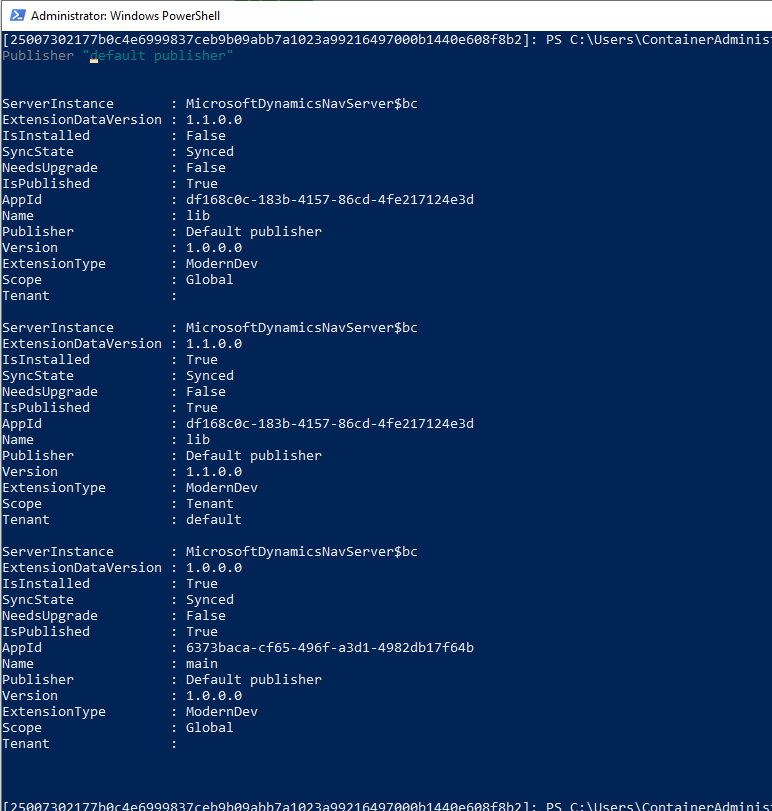
Maybe I've figured it out - I already thought about scope as I reiterated today and you can see the the apps have been published in different scopes (Global vs. Tenant). I reckon this is the cause?
Sorry for not being clearer. In step 3 I actually publish, sync and install (Start-NAVAppDataUpgrade in this case)
lib 1.1. So when I run "Get-NAVAppInfo" after step 3 I get the following results:
Maybe I've figured it out - I already thought about scope as I reiterated today and you can see the the apps have been published in different scopes (Global vs. Tenant). I reckon this is the cause?
I encountered the same issue. Looks like it is an issue with Global vs Tenant.

@hemisphera - Coming back to this issue after a long time.... Is this still something that you are experiencing on newer Business Central versions? Is it still impacting you? A lot has changed regarding how the server handle extension scopes since this was logged, so it might have been fixed already.
Yes this is still an issue at least OnPrem (BC23.4 W1).
For example I have installed app A with PowerShell long time ago and that app is dependant on app B (also installed with PowerShell). Now I publish (to test environment) a new version of app B from VSCode therefore I have now: App B, version 1, Scope Global, Not installed App B, version 2, Scope Tenant, Installed.
For some reason my App A is now automatically uninstalled and when I try to install it from BC I get error:
The extension A has a dependency on one or more extensions: App B, version 1
Do you want to install app A and all of its dependencies?
I select Yes and get error:
Cannot install the extension A published as Global application for the tenant default because it has one or more dependencies that are installed but have a conflicting version.
The following dependencies are not compatible with app A published as Global application:
App B version 1 published as Global application

AL call stack:
"Extension Installation Impl"(CodeUnit 2500).InstallExtensionSilently line 4 - System Application by Microsoft
"Extension Installation Impl"(CodeUnit 2500).InstallExtensionWithConfirmDialog line 27 - System Application by Microsoft
"Extension Details"(Page 2501)."Install - OnAction"(Trigger) line 2 - System Application by Microsoft
then when I try to unpublish the app B with version 1 (from PowerShell), I get also error:
The Extension cannot be unpublished because it is required by the following apps: App A
So running around in error circles - how to solve?
