

 microcks
Microcks Ui doesnt show APIs & Services
Hello,
It seems I have a problem with my k8s v1.20.11 installation of microcks. I´ve deployed microcks on two company clusters and local minikube instance. I have tested it with different versions locally and in the cluster. The minikube instance works fine but the cluster installations have a strange behaviour.
I can create APIs:
 But only get a blank page when try to list them.

The pods do not return any error messages except this warning:
Podlog
08:51:54.822 [DEBUG] io.github.microcks.web.InvocationController - Getting invocations stats for last 20 days
08:51:54.822 [DEBUG] io.github.microcks.web.InvocationController - Getting top 20 invocations stats for day 20211215
08:51:54.822 [WARN] org.keycloak.adapters.RequestAuthenticator - SSL is required to authenticate. Remote address 100.x.x.34 is secure: false, SSL required for: EXTERNAL .
The network analysis of Chrome and Firefox shows the following errors:


Thanks a lot for reporting this issue!
Are you using provided Keycloak or external one? In case of external one, are you using https endpoint?

Hi @lbroudoux
thanks for the reply. Yes we use a external Keycloak (Keycloak Operator) and a https endpoint because we also use a apicurio instance.
Here are some information about the configuration.
Helm Values
keycloak:
  install: false
  realm: apicurio
  url: apicurio.xxx.xxx.one
  privateUrl: https://apicurio.xxx.xxx.one/auth
Configured Keycloak Clients:

Mocking feature works but also displays a blank page on mickrocks:
The #526 seems to face the same odd empty page. Maybe related? I'm currently building a new cluster to test this out. Stay tuned
Looking at your settings, it seems that both keycloak.url and keycloak.privateUrl are pointing to the same URL. You wouldn't need keycloak.privateUrl though.
That said, I've tried with this setting - pointing on an external Keycloak using the same secured Ingress for both url and privateUrl and did not succeed reproducing it (yet!).
Hi @lbroudoux not yet. But we setting up a new Cluster right now. I'll keep you updated.
Hi @lbroudoux, I have the same empty page when I import an API specification (OCP 4.8.27, Microcks Operator 1.5.0)
Here is the log in the my-microcks Pod application :
16:01:48.879 [WARN] org.keycloak.adapters.RequestAuthenticator - SSL is required to authenticate. Remote address xxx.xx.xx.x is secure: false, SSL required for: EXTERNAL .

Hi @lbroudoux, We are experiencing the same problem and getting the same error when deployed with existing keycloak instance.
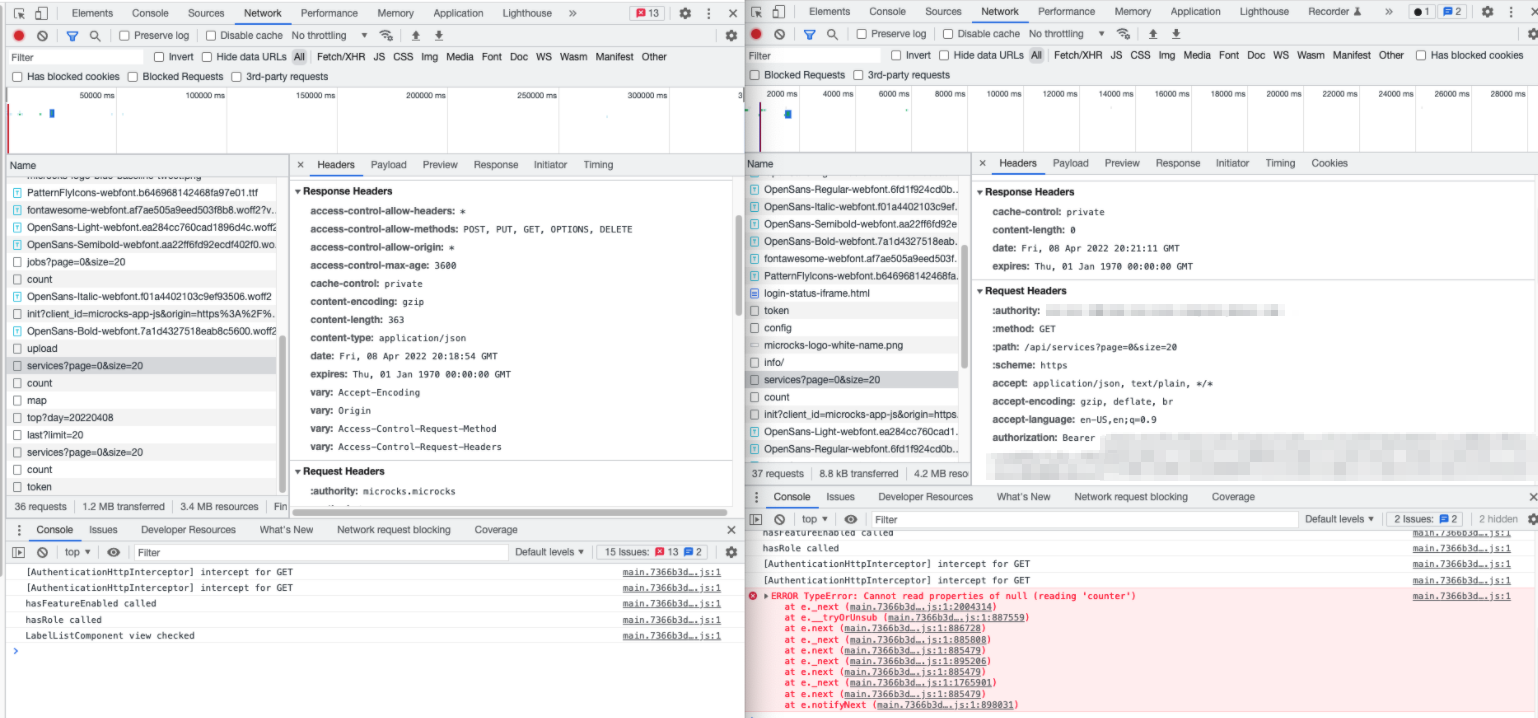
We deployed image and chart 1.2.1. Below image shows local deployment with internal keycloak on the left vs an environment cluster with external keycloak on the right.

I found a workaround. I entered part of my spec title in the 'Filter by Name...' field on the APIs & Services page and it found and listed my spec!
The hasRepositoryFilterFeatureEnabled check in ServicesPageComponent seems to prevent the service lookup unless something is entered in the filter.
Logs are still full of these errors: [WARN] org.keycloak.adapters.RequestAuthenticator - SSL is required to authenticate. Remote address xxx.xx.xx.x is secure: false, SSL required for: EXTERNAL .
Hey @carolgschwend
The hasRepositoryFilterFeatureEnabled check in ServicesPageComponent seems to prevent the service lookup unless something is entered in the filter.
This is a weird behavior as the hasRepositoryFilterFeatureEnabled should just condition the fetching of available services labels for filtering... Default is to fetch all services (see default) and entering a new name just call the /api/service/search endpoint that is also secured using Keycloak...
[WARN] org.keycloak.adapters.RequestAuthenticator - SSL is required to authenticate. Remote address xxx.xx.xx.x is secure: false, SSL required for: EXTERNAL .
I assume you've got this message on the cluster that is using external Keycloak. Please make sure this endpoints is actually secured. Microcks assumed it is (just prepending https:// to the keycloak.url param of your chart if you're not using a privateUrl) but I think the keycloak connector do extra checks that lead to above messages and bad behavior of the connector.
I'm tackling deep dive into this issue and I'm suspecting the problem is coming from the Ingress Controller / LB / Proxy that's handling the TLS termination in front of Keycloak. Keycloak provides some doc on how to correctly set up such a proxy so that it allows detection of externally handled TLS termination. Could you check https://www.keycloak.org/docs/latest/server_installation/index.html#_setting-up-a-load-balancer-or-proxy to see if your ingress controller or LB is configured accordingly?
We could eventually produce a fix for setting ssl-required=none but I think this is a terrible workaround ... I would say that if you need this, you can still edit the microcks-config ConfigMap and change the value within the application.properties entry of the ConfigMap.
Hi there!
Just added the help wanted label as I'm a bit out of resources on that topic ... I've tried redeploying everything - with both embedded Keycloak or external Keycloak - on a GKE cluster with standard nginx ingress controller with default settings and did not succeed reproducing this issue.
What I suspect so far is the problem should come from LB / Proxy / Ingress Controller / Network that is used to access the Keycloak instance from the Microcks pod. The Keycloak documentation proposes reference documentation on how things should be configured. See https://www.keycloak.org/docs/latest/server_installation/index.html#_setting-up-a-load-balancer-or-proxy
Every information/observation/troubleshooting hint is very welcomed on this issue! Please do contribute to help community ;-)
Hello,
have the same setup like @jennerEVRFLL (we know each other). I think the problem could be that we are both using "traefik" as ingress. I think this is the problem. If have time, i will redeploy the stack with nginx ingress and have a look if it is fixed. If yes, we have the answer.
Kind regards,
Michel

Yes please keep us updated on that issue! That would be awesome as I really struggle with this one.
Hello, we are testing different configurations of the keycloak access routes on an OpenShift 4 cluster. With the operator, we cannot easily modify the configurations hot for our tests. We want to test the installation with Helm Charts but the link https://microcks.io/helm is broken. Is it possible to get a link for access to the Helm repository?
Hi there! Sorry for delay in answer. https://microcks.io/helm/index.yaml seems to be up-and-running ...
What's your result when you're doing:
$ helm repo add microcks https://microcks.io/helm
"microcks" has been added to your repositories

$ helm inspect chart microcks/microcks
apiVersion: v2
appVersion: 1.5.2
description: Microcks - API Mocking and Testing
home: https://microcks.io
icon: https://microcks.io/images/microcks-big.png
keywords:
- mocks
- microservice
- api
- test
kubeVersion: '>=1.17.0-0'
maintainers:
- email: [email protected]
  name: Laurent Broudoux
name: microcks
sources:
- http://github.com/microcks/microcks/
- https://microcks.io
type: application
version: 1.5.2
Hi @lbroudoux,
We have found our issue can be resolved if we set a few properties of the embedded microcks tomcat server. Would you consider an update to the helm charts to give users the ability to conditionally specify additional application properties from a supplied yaml file to resolve this and potentially other scenarios they may face? This draft PR shows what worked for us.
With this approach we can simply do a helm install and enable extraProperties and pass in a file like so:
 --set microcks.extraProperties.enabled=true \
 -f  /path-to-my-extra-properties-file/application-extra.yaml
The application-extra.yaml file must contain 'extraProperties' key, then any extra properties should be listed below. For example:
extraProperties:
  server:
    forward-headers-strategy: native
    tomcat:
      remoteip:
        internal-proxies: .*
Hey @carolgschwend That's awesome! I was really stuck with this issue... Don't you think it should be included by default to avoid extra configuration steps? Do you see any risk including these settings? Also do you have an explanation on why it appears to be necessary on some installs and not some others? Is it related to specific requirements on your proxy? Lot of questions, sorry. But very curious about it.
cc @frdrcrlt @jennerEVRFLL @mbathe19
Hi @lbroudoux, the settings that we typically use inside of our internal clusters don't use .* for internal-proxies, but a regex that matches the cluster's configured pod IP subnet. The .* configuration is definitely not safe as a default if the tomcat server handles any traffic that comes from the internet.
This configuration is necessary for us because due to the size and number of our clusters, we can't use only the 3 typical private IPv4 address spaces, so we have to use a reserved IPv4 space such as 172.16.0.0/12. Since those IPs aren't part of the default configuration for the internal-proxies valve, we have to provide our own regex that matches it.
For example, incoming HTTPS traffic gets handled by an appliance that terminates TLS and then routes it to the cluster as HTTP with proxy headers such as X-Forwarded-Proto: https. In the cluster an ingress pod with an IP of say 172.16.0.1 routes it to an application pod. With the default configuration, tomcat in that application container will ignore the X-Forwarded.. headers because the internal-proxies regex only matches the 3 private IPv4 (and v6) blocks. However, since we configure the remoteip valve with a regex that will match 172.16.0.1, then it will treat that as an internal proxy and properly forward the proxy headers to the application code.

Hey @carolgschwend That's awesome! I was really stuck with this issue... Don't you think it should be included by default to avoid extra configuration steps? Do you see any risk including these settings? Also do you have an explanation on why it appears to be necessary on some installs and not some others? Is it related to specific requirements on your proxy? Lot of questions, sorry. But very curious about it.
cc @frdrcrlt @jennerEVRFLL @mbathe19
Thanks @aroak and @viswatejan!
Thank you @aroak and all for the explanations 🙌
I understand that the internal-proxies setting is very specific to network config and should be handled as suggested by @carolgschwend allowing usage of extra config file and adding an extra profile to the list of loaded ones.
Though it looks to me that the server.forward-headers-strategy=native is safe to add to default. Other strategies are none that does nothing and framework that needs to integrate custom code in Microcks which cannot be done. What do you think am I understanding things correctly?
I think that native is a safe default for this microcks image since it uses spring and an embedded tomcat server. Setting it to framework would have no benefit in this case, but it could be required if you for instance distributed microcks as a jar/war for people to deploy in some other servlet container. The framework option will just make Spring autoconfigure a filter to handle forwarding the proxy headers.
Now fixed and ready to use in nightly operator or 1.6.x branch for Helm chart.