

 mhutchie
Add "merge --abort"
With #248 the git option "--no-commit" for merging was introduced. However, what seems to be missing, is to abort a merge after having used that option.
So, "git merge --abort" is missing.
In addition, it would be nice if a pending merge could be displayed in the graph, e.g. by a dotted line between the involved branches.

Hi @chr7,
Thanks for raising this request, I’d been thinking about implementing both the ability to perform a git merge --abort from the Git Graph View, and displaying pending merges in the graph for a while, but up until now no users had requested it.
I think both of these requests should be implemented together, as by displaying the pending merge in the graph (included with a dedicated table row), it will provide users with a convenient & intuitive row that they can right-click on to perform the abort action.

@mhutchie I have though about this feature for a while.
I think, we could show an Abort button when we first see the Unable to Merge Commit error message.
This wont solve the problem shown by this issue, since, I do think, it should be something that is always available, but having this button here will boost productivity and help the most people that do face this problem.
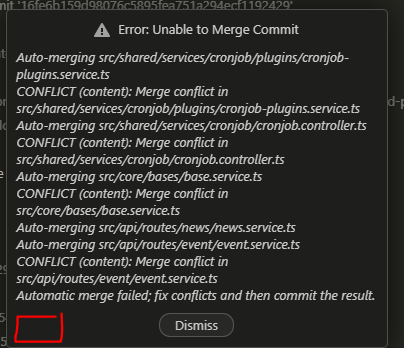
Use case
I'm responsible for controlling branches before they get merged into the develop and master branch.
When I try to test those branches, but that their aren't sync with the latest release of the develop branch, then I'll merge the develop back into it. If I face any error, then I abort the merge and give it back the whom developed this feature.
What do you think ?

+1
I really love this extension, but this is something that really frustrates me, especially since, unless I'm mistaken, even VSCode offers no way to abort a merge, other than via the commandline. Could this please be added so there's at least some way of aborting via the interface?
For those who, like me, aren't really familiar with git CLI, the only way I've found to abort a merge in VSCode is to:
Open the terminal, cd to the directory (if needed; it'll probably already be there), and then, as referenced above, run,
git merge --abort
