
Mohammad Hossein Amri




Mohammad Hossein Amri
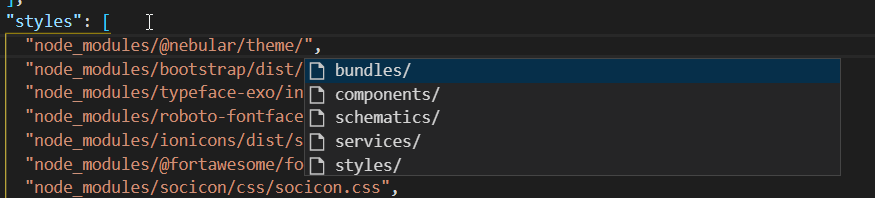 in angular.json, if i try to write a path i only get the folders, but here i would like to point to a file
look like the issue is with zrender lib, hardcoding the `overflow:hidden`. the lib should provide enough API to set these settings https://github.com/ecomfe/zrender/blob/e6d458c1e7bfeeb1949b3462d3a7d48d8dea12fc/src/svg/Painter.ts#L72
it's not an issue, but assuming the chart overflow should be hidden is limiting. There are cases that you want the chart to merge with the page, a good example...
apply a class to your dialog and set z-index. you can also create some ng::deep to do the same as it could be the case everywhere
in vscode make sure you having `pylance` extension installed  then set the `python.analysis.typeCheckingMode` to `strict`  usually I use `standard` but still if you are going to fix things...
update to node 20 solved the issue. (`pnpm start` works too) btw these need an update. additionally need adding instruction to add sharp in pnpm( `pnpm add sharp` ). node...
I wonder about what Angular did and used esbuild to bundle and vite to transpile. was it a good decision that should be replicated here too?
solved this by using exact version 3 update. otherwise it try to install version 3 `flutter pub add isar:3.1.0+1 isar_flutter_libs:3.1.0+1 path_provider` probably an update to documentation?
i created a new project and added isar, I have the same issue ``` Launching lib\main.dart on sdk gphone64 x86 64 in debug mode... FAILURE: Build failed with an exception....
@muharsln thanks, but how? it's not published yet https://pub.dev/packages/isar/versions