

 mgks
mgks
'Something is wrong' message with No Internet notification for Android Pie+
My app is running awesome in every other phones but not Android Pie. Need to know how to update the current app to Android Pie?

I've tested it recently, it's working fine on my Pie device. Can you elaborate what's actually happening on launching the app? If you can share log of failure.

Where can i find this log? Also, i have been testing it out on 2 other person's phone who would be using the App. Here is the screenshot of the error:
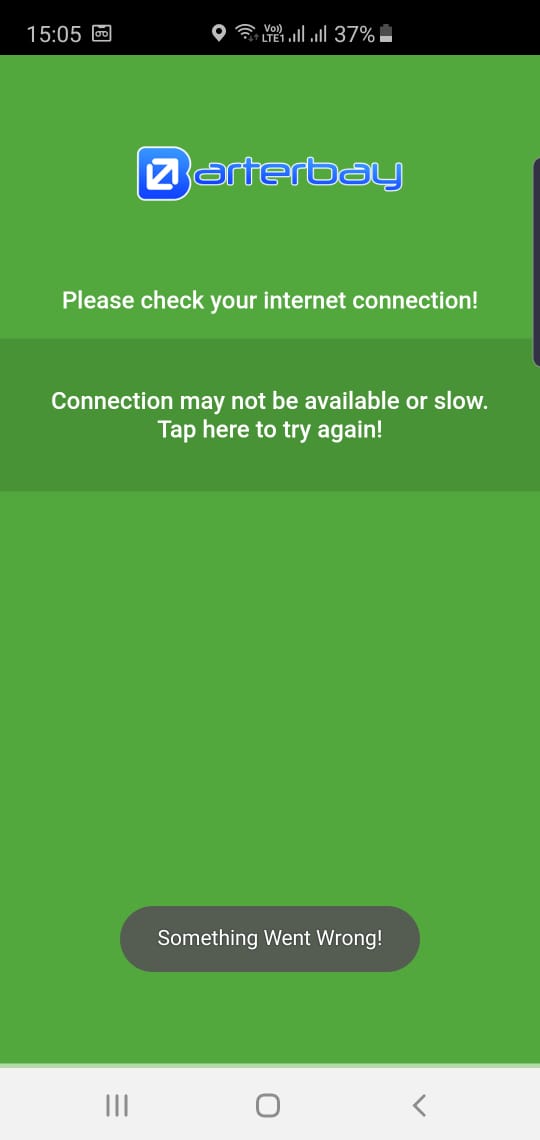
Here you can see at the top the internet connectivity is running in Wifi. But still the problem persists. But this is not the case for any phone below Pie.
I thought app is going down but internet error can be caused by number of reasons, you can get project log from Android Studio Log and without any log I can't help you any further.
I understand but the app isnt producing any errror logs during the build. Also this thing is occuring in all Pie phones. I have an Oreo phone. Hence no error is being shown on my end. But the moment the app runs in Pie, it shows this above error. I looked into the log. There is nothing there. As i said, this is happening on sets with Pie, not below.
this is happening on sets with Pie, not below.
so you tested it on multiple pie devices?
Yes. Did it on 4 Pie devices. And 1 Oreo & 2 Nougats. Only the Pie ones had the prob.
Hi, is that any suggest about this? @mgks it happen to me too.
This is the verbose Logs that I get :
/mgks.os.webview I/chromium: [INFO:CONSOLE(2)] "jQuery.Deferred exception: Cannot read property 'split' of undefined", source: file:///android_asset/jquery.js

Android Studio is loading source files into the build and while reading jquery.js file it found a property that build can't understand.
First keep your Android studio and dependencies updated. If the error still persists, you can remove the JS file from specific folder, it's just for the demo file, it doesn't impact the actual program.
Sorry my bad. I forget to add a tag in application metadata to allow cleartext communication android:usesCleartextTraffic="true"

@junedkh are you trying to run your localhost in the app? I'm not able to understand what you mean.