

 metakgp
Scrolling and selecting the professors list using arrow keys
What type of PR is this?
- [ ] Refactor
- [ ] Feature
- [ ] Bug Fix
- [x] Enhancement
Description
After merging this PR the user can
- Scroll the list using up or down arrow keys
- Select a particular professor using the enter key
Related Tickets & Documents
This Pull Request fixes this issue https://github.com/metakgp/wimp/issues/51

@wweverma1 I cannot test it on my end cause I do not have access to ERP anymore. If it works on your end, I'd be happy to go ahead and merge it since everything else looks good to me. Sorry for delay!

Thanks for working on this @wweverma1. Apologies for the delay. I'm really busy with my placements. @raivivek Thanks for responding. If you're free, kindly test this and merge. It's a +1 from me. I don't have the developer setup at the moment. This change is on frontend and the repo has the data generated from ERP with the token so it doesn't need access to ERP for testing. After you merge, it'll be deployed automatically.
Edit: Instructions to run (same as in README omitting main.py):
$ git clone https://github.com/metakgp/wimp.git
$ cd wimp
$ sudo pip3 install pipenv
$ pipenv --three && pipenv install && pipenv shell # loads .env file variables, install dependencies
$ python app.py # Locate your browser to the local address

Thanks! I tested on my end. Here are a few comments @wweverma1
(1) The dropdown should go away when pressing Esc key; currently it just stays on until I search a different text or refresh the page
(2) The contrast for highlight can be increased; either make it light blue or something like that. Likewise, in dark mode (using Dark Reader Firefox plugin for example), it is difficult to tell which item is highlighted, so something that works well in both modes is the best option.
(3) While it works with up/down keys, wondering if it could also work with Tab key
Thanks for the work so far!
@raivivek thanks for reviewing. I understood the first two improvements but can you explain 3rd point again. Also what is the expected behaviour on pressing esc key? just close the suggestion box or remove the text in the search bar too?
@wweverma1 Yes, closing the dropdown on Esc key is a good idea. Sorry about the 3rd point. I wrote <tab> in somewhere there but it didn't get displayed. In the testing that I did, I was not able to scroll through the drop-down items using <Tab> key. It'd be nice if it worked that way as well.
@raivivek I've done the changes as suggested.
- Suggestion Box and the current query disappears on pressing the
Esckey. - Highlighted the currently selected suggestion item with light blue colour.
- You can scroll down in the suggestion list using
Tabkey but for this you'll first have to go to the suggestion box using arrow key else it'll skip the suggestion box and go to footer.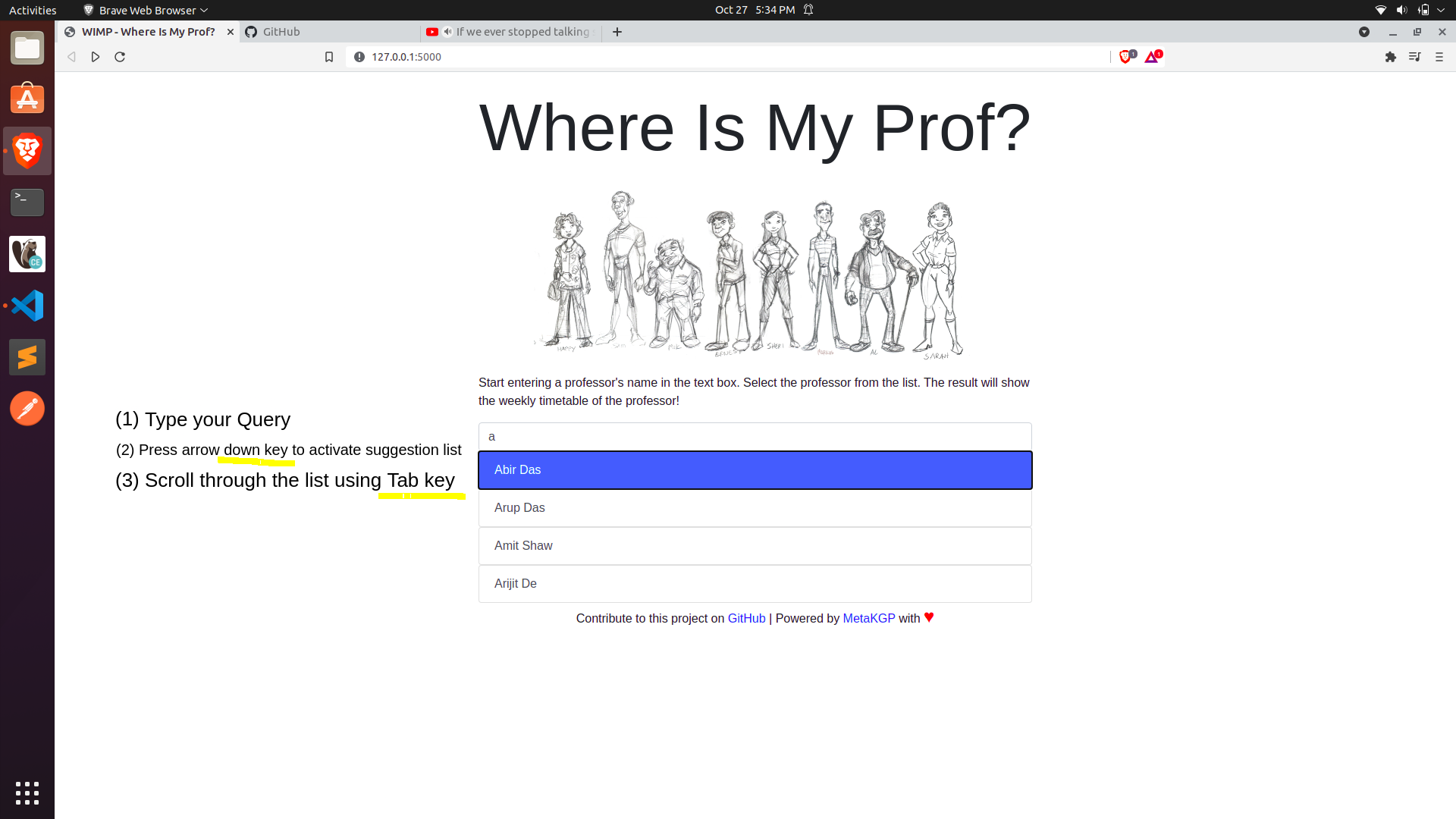
Please review and merge it.
