
docs-scraper
 docs-scraper copied to clipboard
 meilisearch
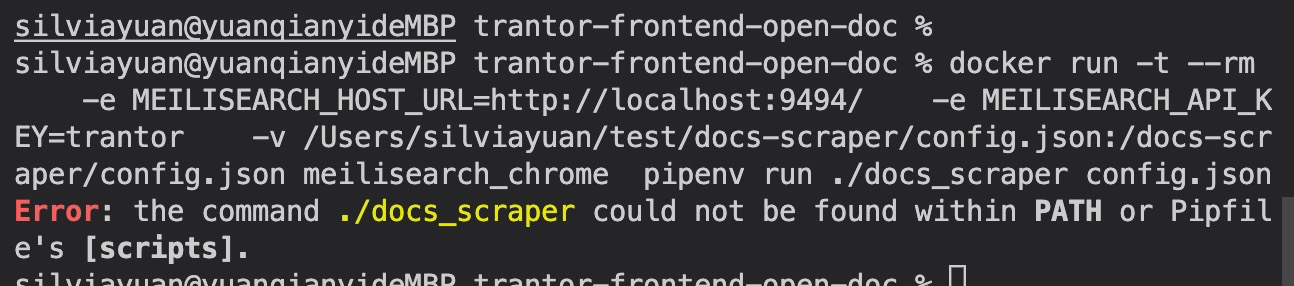
the command docs_scraper could not be found within PATH or Pipfile's [scripts].
hi
I have trouble in using the docker scraper, I try it on mac, when I run the docker, it tell me the command docs_scraper could not be found within PATH or Pipfile's [scripts].. I don't know what I did wrong.
Can you help me solve this problem?
#My steps
frist
docker run -d -it --rm -e MEILI_MASTER_KEY=trantor -p 9494:9494 -v $(pwd)/data.ms:/data.ms meilisearch_chrome
- meilisearch_chrome is my local image which in order to solve the
Env CHROMEDRIVER_PATH='/usr/bin/chromedriver' is not a path to a fileproblem
second
docker run -t --rm -e MEILISEARCH_HOST_URL=http://localhost:9494/ -e MEILISEARCH_API_KEY=trantor -v /Users/silviayuan/test/docs-scraper/config.json:/docs-scraper/config.json meilisearch_chrome pipenv run ./docs_scraper config.json
After my second step , it throw error.

Are you sure your port is correct? By default Meilisearch runs on port 7700 not 9494.
meilisearch_chrome, this should be the name of the image getmeili/docs-scraper:latest.
docker run -t --rm -e MEILISEARCH_HOST_URL=http://localhost:9494/ -e MEILISEARCH_API_KEY=trantor -v /Users/silviayuan/test/docs-scraper/config.json:/docs-scraper/config.json getmeili/docs-scraper-latest pipenv run ./docs_scraper config.json
Or did you build a custom image? Based on meilisearch_chrome I am guessing you are trying to scrape a JavaScript rendered page? If so you may still run into issues. Check this issue #139 if that is what you are trying to do.

Hi @silvia-YQY, Is any news on your issue? Do you figure out how to fix it?

Without news for a while, I close this issue. do not hesitate to reopen it if necessary.