

 meilisearch
Example configuration complains about invalid JSON
I've installed the latest Docker image locally and to start I cut and paste the example JSON you provided in your docs and changed a few properties but the JSON is 100% valid JSON and yet the container exists with the following error:
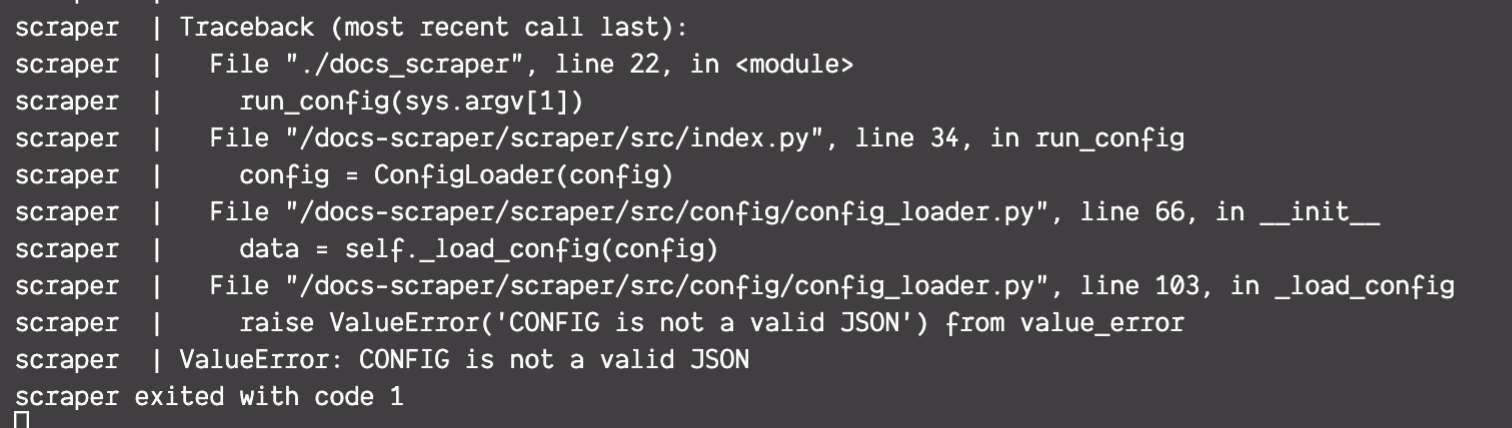
Here is the JSON that was used:
{
  "index_uid": "rust-api",
  "start_urls": ["https://docs.rs/tauri/latest/tauri"],
  "sitemap_urls": [],
  "selectors": {
    "lvl0": {
      "selector": "h1",
      "global": true,
      "default_value": "Title"
    },
    "lvl1": {
      "selector": "h2",
      "global": true,
      "default_value": "Section"
    },
    "lvl2": "[title=tauri::*]",
    "lvl3": ".docblock-short",
    "lvl4": ".theme-default-content h4",
    "lvl5": ".theme-default-content h5",
    "lvl6": "null",
    "text": "#main"
  },
  "strip_chars": " .,;:#",
  "scrap_start_urls": true,
  "custom_settings": {
    "synonyms": {
      "relevancy": ["relevant", "relevance"],
      "relevant": ["relevancy", "relevance"],
      "relevance": ["relevancy", "relevant"]
    }
  }
}

In your docker run do you have -v config.json:/docs-scraper/config.json? if yes try -v /path/to/config.json:/docs-scraper/config.json instead.
If that works you will probably get the error: raise SelectorSyntaxError(cssselect.parser.SelectorSyntaxError: Expected ']', got <DELIM ':' at 12>. It is not liking this part of the config: [title=tauri::*].

but that is a valid DOM selector, right? I tried replacing that line with just "null" and I still get the error.
I haven’t had a chance to look closely at the parser error yet, but I think it does not allow pseudo elements. Here are the docs for what I think the reason is. This is from a quick scan of the code in this section so I could be wrong about the reason.
when you say pseudo elements I presume you're referring to the wildcard character and not the standard syntax for an attribute selector? Also, bear in mind I get the same error with this line removed so while this may be another issue it is not the one causing this current situation.
when you say pseudo elements I presume you're referring to the wildcard character and not the standard syntax for an attribute selector?
Correct, this what I am thinking.
When you say same error are you referring to the ValueError or the SelectorSyntaxError? If the latter you just changed tauri::* in the config to null correct? If that is the case my first thought without having tested it yet is it is trying to parse null as an element. Not sure if that is it, but it would at least be a place to start looking.
I get the same value error with or without the tauri::* line being in the configuration. So if the wildcard is an error we've not seen it yet as something else is blocking (or at least that's my read).
With the value error what does your docker run look like. You will see the value error with docker run -v config.json:docs-scraper/config.json (I excluded all arguments but the -v), but docker run -v /full/path/to/config.json:docs-scraper/config.json should fix this error.
I'm going to give this some more attention today ... will let you know what I find but considering the RUST AST I'm using is considered unstable I really would like to be able to get this scraper to work for me.
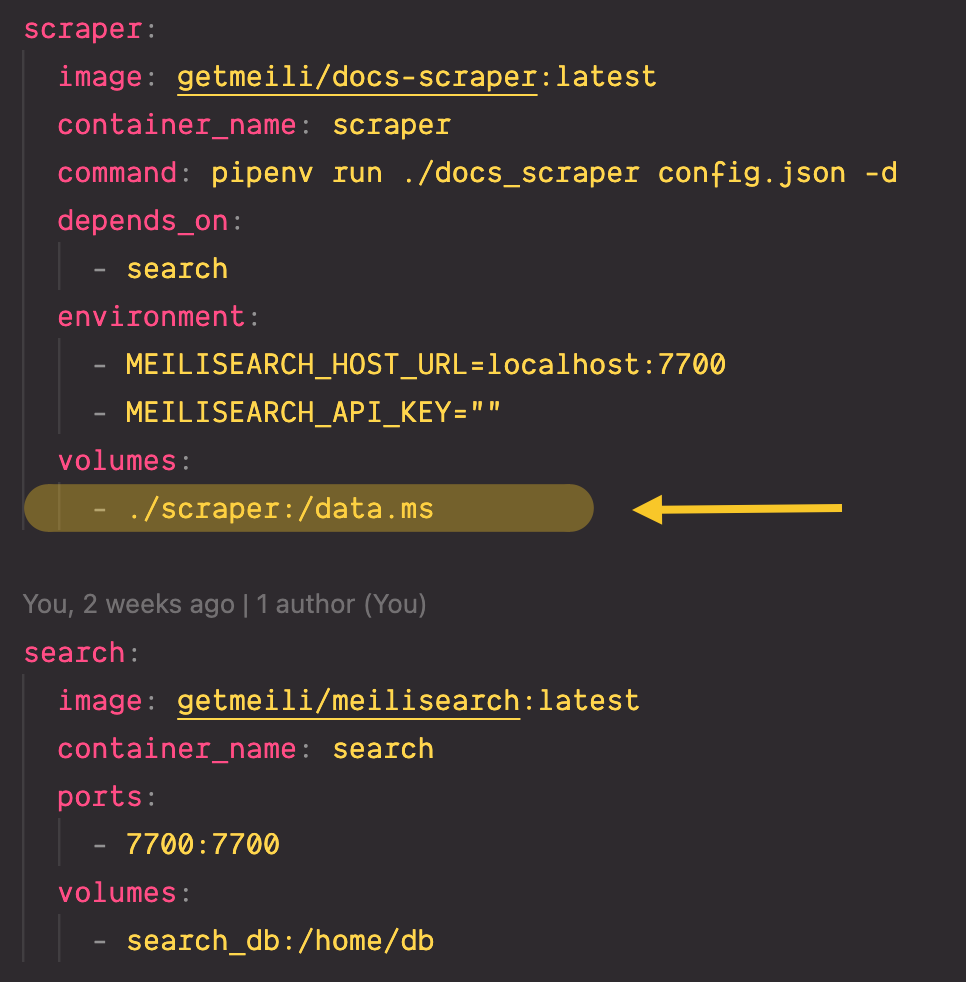
I use Docker Compose to boot up both the scraper and Meilisearch. As you can see above the volume is mapped to my local file system in the scraper directory.
In the root of the monorepo I have both the compose file and as you can see the directory structure I thought was needed based on the docs:
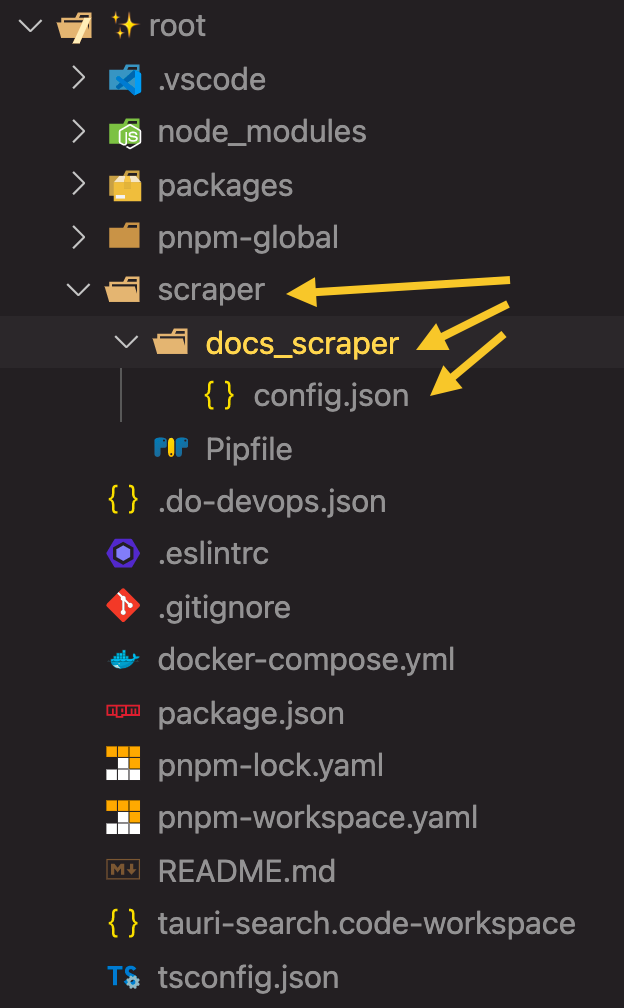
based on your comments above the first clear problem is that I had thought config.json was a second parameter to the run command ... but in fact there's only one command and no params.
running the command, however, leads to:
Error: the command ./docs_scraper/config.json could not be found within PATH or Pipfile's [scripts].
you'd think this kind of error message would lead to a simple solution but honestly I can't get it to work regardless of where I put the config file and/or adjust the run command. I'm not super up-to-speed on all things Docker so maybe I'm doing something obvious and dumb.
I think it is your volume path. If you change the volume from ./scraper:/data.ms to ./docs_scraper/config.json:/docs-scraper/config.json does it make a difference?
Sadly no that's where I started. I know this is a stretch but would you consider a quick pairing session to go over this. Totally understand if you don't have time for that.
@bidoubiwa has much more experience than I do with the day to day use, I've really just worked in the code base and know how to get it running from that. That said, I'm happy to try to help if I can. Are you an Meilisearch's Slack? I am Paul over there (There are a few Pauls, I'm the one with just Paul and no last name) if you want to send me a message to try to set something up.
i rarely boot up Slack anymore ... but yes I am connected it would seem. I'll say hello over there.
Hi @yankeeinlondon, I took back this repo, I come to the news to see if this problem was solved or not. Did you still need help?

Without news for a while, I close this issue. do not hesitate to reopen it if necessary.