

 meganz
Install date and version number not updated in Programs and Features (affects both MEGAsync and MEGAcmd)
On Windows, when upgrading to a newer version of MEGAsync and MEGAcmd, the 'Programs and Features' (aka Add/Remove Programs) doesn't get updated with the installation date of the new version, and the version field remains blank. Please see the attached screenshot. It would be nice if these fields were updated as they should be (for the purposes of, for example, sorting programs by installation date, seeing what versions I've got installed, etc.)
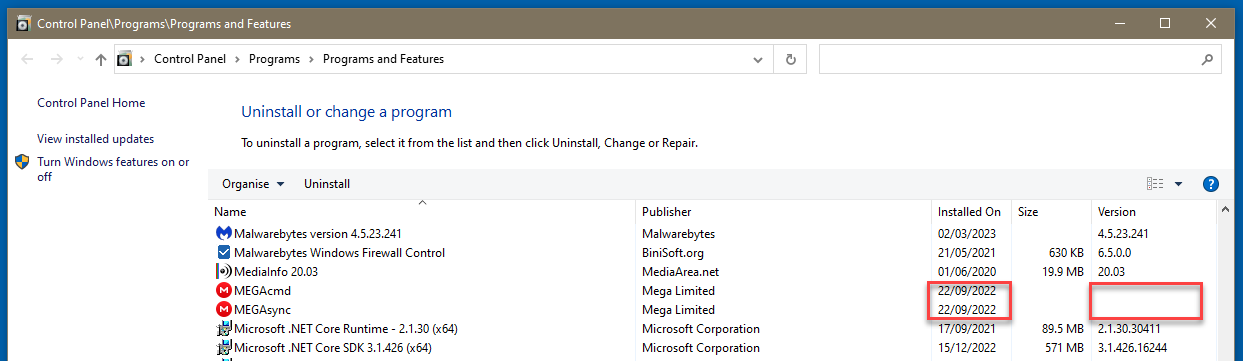

Perhaps more significantly, the lack of a File Version impacts winget:
C:\ProgramData\MEGAsync> winget upgrade megasync
This package's version number cannot be determined. To upgrade it anyway, add the argument --include-unknown to your previous command.
C:\ProgramData\MEGAsync> winget list megasync
Name     Id            Version Available Source
-----------------------------------------------
MEGAsync Mega.MEGASync Unknown 4.9.5.0   winget
here is the relevant Version Info via PowerShell:
PS C:\ProgramData\MEGAsync> (gi .\MEGAsync.exe).VersionInfo |fl OriginalFilename,*Version,*VersionRaw, @{n='FileVersionParts';e={$_.FileMajorPart,$_.FileMinorPart,$_.FileBuildPart,$_.FilePrivatePart}}, @{n='ProVersionParts';e={$_.ProductMajorPart,$_.ProductMinorPart,$_.ProductBuildPart,$_.ProductPrivatePart}}

OriginalFilename  :
FileVersion       :
ProductVersion    :
FileVersionRaw    : 4.9.6.0
ProductVersionRaw : 4.9.6.0
FileVersionParts  : {4, 9, 6, 0}
ProdVersionParts  : {4, 9, 6, 0}
here are results from SysInternals' SigCheck:
C:\ProgramData\MEGAsync>sigcheck -a c:\ProgramData\MEGAsync\MEGAsync.exe
Sigcheck v2.90 - File version and signature viewer
Copyright (C) 2004-2022 Mark Russinovich
Sysinternals - www.sysinternals.com

c:\programdata\megasync\MEGAsync.exe:
        Verified:       Signed
        Signing date:   04:08 2023-07-28
        Publisher:      Mega Limited
        Company:        Mega Limited
        Description:    MEGAsync
        Product:        MEGAsync
        Prod version:   4.9.6.0
        File version:   n/a
        MachineType:    64-bit
        Binary Version: 4.9.6.0
        Original Name:  MEGAsync.exe
        Internal Name:  MEGAsync.exe
        Copyright:      Mega Limited 2023
        Comments:       n/a
        Entropy:        6.772
and old FileVer.exe from Microsoft SDK or elsewhere:
C:\ProgramData\MEGAsync> filever MEGAsync.exe
--a-- Wx64 APP ENU         4.9.6.0 shp 70,124,720 07-28-2023 megasync.exe

Hi, winget is not supported. MEGAsync has its own update system. It seems winget added the app themselves without consulting us, and without any way for you to command it to skip MEGAsync. If we were to fill those in, the numbers would then be out of date after the first update (or the updater would need to ask for elevated permissions in order to update them). If winget wants to manage that, maybe they should fill in those entries. thanks

@OP here is .bat I wrote to fix your problem, USE AT OWN RISK, run as administrator etc, untested in a few months and actually I just updated it to use any profile (I had all users c:\ProgramData\Megasync\Megasync.exe hardcoded until just now) and to verify registry existed.
@echo off
 setlocal ENABLEEXTENSIONS ENABLEDELAYEDEXPANSION

 set x_megareg=HKLM\SOFTWARE\WOW6432Node\Microsoft\Windows\CurrentVersion\Uninstall\MEGAsync
 reg query %x_megareg% || (echo ERROR: MEGAsync Install reg not found & goto :EOF)

 for %%x in ( %ALLUSERSPROFILE% %LOCALAPPDATA% ) do if exist "%%x\MEGAsync\MEGAsync.exe" set x_megadir=%%x
 if not defined x_megadir (echo ERROR: MEGAsync not found & goto :EOF)

rem *** display file version and usage as seen in Uninstall
 for /F "tokens=1,3" %%a in ( 'reg query %x_megareg% /v DisplayVersion ' ) do (
  if "%%a" equ "DisplayVersion" echo r: %%b
  if "%%a" equ "EstimatedSize" echo z: %%b
 )


rem *** get EXE file version
 for /F "tokens=1,3" %%a in ( 'powershell "(gi %x_megadir%\MEGAsync\MEGAsync.exe).VersionInfo |fl FileVersionRaw"' ) do (
  if "%%a" equ "FileVersionRaw" echo u: %%b& set x_ver=%%b
 )

rem *** update file version as seen in Unistall
 reg add %x_megareg% /v DisplayVersion /d %x_ver% /t REG_SZ /F


rem *** calculate space usage
 set x_size=
 set x_dize=0
 for /F "tokens=2,3,4,5" %%a in ('dir /a/s %x_megadir%\MEGAsync'                  ) do if "%%~a %%~c %%~d" equ "File(s) bytes " set x_size=%%b
 for /F "tokens=2,3,4,5" %%a in ('dir /a/s "%LOCALAPPDATA%\Mega Limited\MEGAsync"') do if "%%~a %%~c %%~d" equ "File(s) bytes " set x_dize=%%b

 if not defined x_size (echo ERROR: no size found & goto :EOF)

 set /a x_kz=%x_size:,=%/1024
 set /a x_tz=%x_dize:,=%/1024+%x_kz%
 echo z: %x_size% bytes	%x_size:,=% %x_kz% %x_tz%

rem *** update space usage as seen in Uninstall
 reg add %x_megareg% /v EstimatedSize /d %x_tz% /t REG_DWORD /F

 endlocal