

 meganz
MEGAsync opens the first instance of browser Vivaldi and breaks sync of Vivaldi.
When I clicked any link of file in MEGAsync to open the first instance of the default browser Vivaldi in Manjaro KDE (Xorg), it broke sync of Vivaldi that removes all caches too.
I checked it in any Linux KDE (Xorg) VM that has the same issue, but Wayland has no issue.
See the forum: https://forum.vivaldi.net/topic/68334/mega-client-reset-all-passwords-and-cache-in-vivaldi-because-of-sync-issue
Maybe this is related to some poor function of the opening browser in MEGAsync?
Operating System: Manjaro Linux KDE Plasma Version: 5.22.5 KDE Frameworks Version: 5.87.0 Qt Version: 5.15.2 MEGAsync. 4.5.3 Vivaldi browser: 4.3.2439.63 stable version

HI @Zesko
just to be sure, what do you mean with any link of file in MEGAsync ?
if you are triggering the open browser functionality, that goes through a general qt QDesktopServices::openUrl.
If on the contrary you are trying to open the local location of a downloaded file (Show in folder functionality), then megasync tries to figure out which is the default app (and parameters) for folders.
Something like:
cat /usr/share/applications/`xdg-mime query default inode/directory` | grep Exec= | head -1
I wonder if that's the case :thinking: Would you mind answering the above question and providing the outputs of
xdg-mime query default inode/directory
and
cat /usr/share/applications/`xdg-mime query default inode/directory`

just to be sure, what do you mean with
any link of file in MEGAsync?
Click MEGAsync Icon in KDE panel -> Click menu -> Click Cloud Drive to open the default browser.
Can you check it in KDE Xorg?
~ ❯ cat /usr/share/applications/`xdg-mime query default inode/directory` | grep Exec= | head -1
Exec=dolphin %u
~ ❯ xdg-mime query default inode/directory
org.kde.dolphin.desktop
~ ❯ cat /usr/share/applications/`xdg-mime query default inode/directory`
[Desktop Entry]
Name=Dolphin
Name[ar]=دولفين
Name[ast]=Dolphin
Name[az]=Dolphin
Name[ca]=Dolphin
Name[ca@valencia]=Dolphin
Name[cs]=Dolphin
Name[da]=Dolphin
Name[de]=Dolphin
Name[el]=Dolphin
Name[en_GB]=Dolphin
Name[es]=Dolphin
Name[et]=Dolphin
Name[eu]=Dolphin
Name[fi]=Dolphin
Name[fr]=Dolphin
Name[gl]=Dolphin
Name[he]=Dolphin
Name[hi]=डॉल्फ़िन
Name[hu]=Dolphin
Name[ia]=Dolphin
Name[id]=Dolphin
Name[it]=Dolphin
Name[ja]=Dolphin
Name[ko]=Dolphin
Name[lt]=Dolphin
Name[lv]=Dolphin
Name[ml]=ഡോള്ഫിന്
Name[nb]=Dolphin
Name[nl]=Dolphin
Name[nn]=Dolphin
Name[pa]=ਡਾਲਫਿਨ
Name[pl]=Dolphin
Name[pt]=Dolphin
Name[pt_BR]=Dolphin
Name[ro]=Dolphin
Name[ru]=Dolphin
Name[se]=Dolphin
Name[sk]=Dolphin
Name[sl]=Dolphin
Name[sr]=Делфин
Name[sr@ijekavian]=Делфин
Name[sr@ijekavianlatin]=Dolphin
Name[sr@latin]=Dolphin
Name[sv]=Dolphin
Name[ta]=டால்பின்
Name[tr]=Dolphin
Name[uk]=Dolphin
Name[vi]=Dolphin
Name[x-test]=xxDolphinxx
Name[zh_CN]=Dolphin
Name[zh_TW]=Dolphin
Exec=dolphin %u
Icon=system-file-manager
Type=Application
X-DocPath=dolphin/index.html
Categories=Qt;KDE;System;FileTools;FileManager;
GenericName=File Manager
GenericName[ar]=مدير ملفّات
GenericName[ast]=Xestor de ficheros
GenericName[az]=Fayl meneceri
GenericName[ca]=Gestor de fitxers
GenericName[ca@valencia]=Gestor de fitxers
GenericName[cs]=Správce souborů
GenericName[da]=Filhåndtering
GenericName[de]=Dateiverwaltung
GenericName[el]=Διαχειριστής αρχείων
GenericName[en_GB]=File Manager
GenericName[es]=Gestor de archivos
GenericName[et]=Failihaldur
GenericName[eu]=Fitxategi-kudeatzailea
GenericName[fi]=Tiedostonhallinta
GenericName[fr]=Gestionnaire de fichiers
GenericName[gl]=Xestor de ficheiros
GenericName[he]=מנהל קבצים
GenericName[hi]=फ़ाइल प्रबंधक
GenericName[hu]=Fájlkezelő
GenericName[ia]=Gerente de file
GenericName[id]=Pengelola File
GenericName[it]=Gestore dei file
GenericName[ja]=ファイルマネージャ
GenericName[ko]=파일 관리자
GenericName[lt]=Failų tvarkytuvė
GenericName[lv]=Datņu pārvaldnieks
GenericName[ml]=ഫയല് മാനേജര്
GenericName[nb]=Filbehandler
GenericName[nl]=Bestandsbeheerder
GenericName[nn]=Filhandsamar
GenericName[pa]=ਫਾਇਲ ਮੈਨੇਜਰ
GenericName[pl]=Zarządzanie plikami
GenericName[pt]=Gestor de Ficheiros
GenericName[pt_BR]=Gerenciador de arquivos
GenericName[ro]=Gestionar de fișiere
GenericName[ru]=Диспетчер файлов
GenericName[se]=Fiilagieđahalli
GenericName[sk]=Správca súborov
GenericName[sl]=Upravljalnik datotek
GenericName[sr]=Менаџер фајлова
GenericName[sr@ijekavian]=Менаџер фајлова
GenericName[sr@ijekavianlatin]=Menadžer fajlova
GenericName[sr@latin]=Menadžer fajlova
GenericName[sv]=Filhanterare
GenericName[ta]=கோப்பு உலாவி
GenericName[tr]=Dosya Yöneticisi
GenericName[uk]=Менеджер файлів
GenericName[vi]=Trình quản lí tệp
GenericName[x-test]=xxFile Managerxx
GenericName[zh_CN]=文件管理器
GenericName[zh_TW]=檔案管理員
Terminal=false
MimeType=inode/directory;
InitialPreference=10
X-DBUS-ServiceName=org.kde.dolphin
X-KDE-Shortcuts=Meta+E
StartupWMClass=dolphin
And it can open the first instance of Firefox but Firefox's window looks bad, double bars.
See the screenshot:
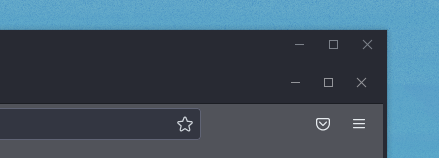
That means, probably the bug of open browser function in MEGA sync.
I checked other Chromium in VM, that has the same issue. But MEGAsync resets all passwords and caches in Chromium after opening the first instance of Chromium, it looks like new profile of browser.
mm ok, so no inode/directory, MEGAsync uses QDesktopServices::openUrl, which in turn should be similar to using xdg-open
e.g:
xdg-open https://github.com/meganz/MEGAsync/issues/641
Which in turn would use the browser set :
xdg-settings get default-web-browser
which would use the rules / parameters set in:
cat /usr/share/applications/`xdg-settings get default-web-browser`
xdg-open https://github.com/meganz/MEGAsync/issues/641
That works fine with any browser, no issue.
MEGAsync uses QDesktopServices::openUrl,
I guess it has the bug.
Can you replace it to xdg-open for Xorg?
Possibly ... that change has some extra implications, we shall investigate this further. Thanks for reporting that @Zesko !
Hi @Zesko,
Please follow these steps as a workaround.
-
create a file
/etc/profile.d/keep-xdg.sh -
write this line into the file
export DO_NOT_OVERRIDE_XDG_CURRENT_DESKTOP=1
- save the file and reboot the system.
We really appreciate the feedback. Thank you.

Hi @rex-mega
thanks, only export DO_NOT_OVERRIDE_XDG_CURRENT_DESKTOP=1 solved this issue.
But I wonder what is export DO_NOT_UNSET_XDG_SESSION_TYPE=1 needed for?
I hope it is not causing other problem of XDG.
Nevertheless, these two configurations are unfortunately not default in many different Linux distros.
Switch to xdg-open in Megasync, that's for sure.
I've updated the workaround steps per your further feedback. @Zesko Yes, the other env-var is not necessary for the setting.
We aim to handle this issue in a future release. Cheers.
export DO_NOT_OVERRIDE_XDG_CURRENT_DESKTOP=1
But it sometimes does not work after reboot PC. The browser cache was actually reset unfortunately.
Switch to
xdg-openin Megasync, that's for sure.
That should be fixed in the future. Thanks!
Merry Christmas and Happy New Year!
Is it possible to collect more information when that "does not work" happens? For example, from the command line do export. Could it be confirmed that the newly set env-var does really exist?
Do you mind further explaining the "browser cache was actually reset" issue? Is there something else missing, other than the username/password?
I found the problem, that /etc/profile.d/keep-xdg.sh is not executed after login/reboot.
- Create
/etc/profile.d/keep-xdg.sh - Edit it to add:
#!/bin/sh

export DO_NOT_OVERRIDE_XDG_CURRENT_DESKTOP=1
- Make it as the executable file:
sudo chmod +x /etc/profile.d/keep-xdg.sh - KDE autostart adds this file.
- Reboot or logout then login
- Check if the env variable exists:
printenv | grep DO_NOT_OVERRIDE_XDG, but it shows only empty (it does not exist).
~~Solution:~~
Edit ~/.bashrc to add export DO_NOT_OVERRIDE_XDG_CURRENT_DESKTOP=1 , then reboot. It exists in env.
I have the question, why is /etc/profile.d/keep-xdg.sh not executed after login?
Maybe it is just for reading of XDG, without execution?
Please try to FOLLOW the workaround steps by
- NOT adding the #!/bin/sh line to the keep-xdg.sh file
- NOT giving it the X permission
- NOT adding it to the KDE autostart
A /etc/profile.d/*.sh file is executed by the /etc/profile script.
The ~/.bashrc file is not a proper place in this case, because the file is prepared for interactively bash sessions.
- NOT adding the #!/bin/sh line to the keep-xdg.sh file
- NOT giving it the X permission
- NOT adding it to the KDE autostart
I did. I think you are right, but how can I check this env variable for all users?
I checked it with printenv | grep DO_NOT, env | grep DO_NOT and echo $DO_NOT_OVERRIDE_XDG_CURRENT_DESKTOP, but they show empty.
I remember that this script should work before last Manjaro stable update, then I suspect, it does not work after the Manjaro stable update. That means, some package broke it or called it out of date.
I can find some packages with name "X" in the Manjaro update history.
[2021-12-20T13:47:19+0100] [ALPM] upgraded xorg-server (21.1.2-0 -> 21.1.2-2)
[2021-12-20T13:47:18+0100] [ALPM] upgraded xorg-server-common (21.1.2-0 -> 21.1.2-2)
[2021-12-16T13:59:47+0100] [ALPM] upgraded xorg-server (21.1.1-3.1 -> 21.1.2-0)
[2021-12-16T13:59:47+0100] [ALPM] upgraded xorg-server-common (21.1.1-3 -> 21.1.2-0)
[2021-12-16T12:58:01+0100] [ALPM] upgraded libx11 (1.7.2-1 -> 1.7.3.1-1)
Interesting, sometimes the env variable (from the same script "/etc/profile.d/keep-xdg.sh") existed there after shutdown 10 hours on my other device. I could see it in env.
But if I deleted this script keep-xdg.sh and created it again, then after reboot the env variable is unfortunately gone in env, maybe I should wait a long time until the env variable will be there or not.
I can not understand what is going on in /etc/profile.d/xxx.sh this is special and read-only.
- Solution:
Edit
/etc/environmentto add:
DO_NOT_OVERRIDE_XDG_CURRENT_DESKTOP=1
This env variable always shows permanently for all users.
-
solution: You should execute the command line manually
source /etc/profile.d/keep-xdg.shafter login/reboot.
Reboot or login works randomly, but not good.. -
solution: it's an issue with the
fishshell being unable to run POSIX-compatible scripts. Switch back tobashorzshthat works fine.
I have installed all the updates for my Manjaro instance, and the steps still work.
I haven't reproduced the problem that you newly described. I'm happy to hear that you have found solutions.
A future release of the application will work properly without the workaround.