

 meganz
Won't work in foreground.
In gnome, if there are no extensions to the tray, the program refuses to work in the background, a window starts 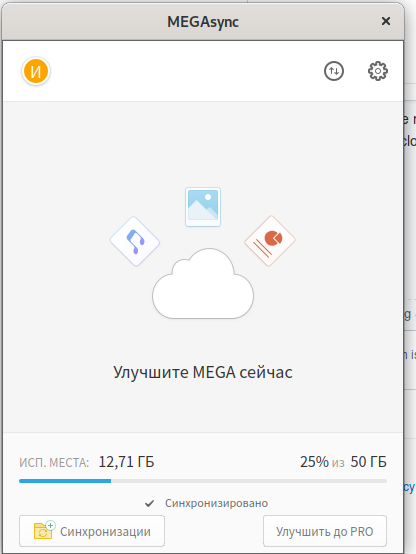 after closing which the program processes are killed and synchronization is suspended. Before upgrading to 4.2.3, the window itself disappeared after some time.
Info:
after closing which the program processes are killed and synchronization is suspended. Before upgrading to 4.2.3, the window itself disappeared after some time.
Info:
- OS Fedora 30
- App version: 4.2.3 from rpm-fusion non-free.

I can confirm I have the same issue in Fedora 30 with version 4.2.3.
Before this update, the window shown above would appear briefly after login and then disappear immediately after losing focus; this was far from perfect, but it was a sensible solution: the user knew that the application was running in background and the window would not get in the way all the time. Moreover, the window could be opened again just clicking on the application icon.
The current status is that the window is shown when the application is started but, instead of disappearing right after, it stays there and there is no way of getting rid of it while leaving the synchronization running in background. As a consequence, on GNOME, the user is currently forced to have the window on his desktop all the time.
As already discussed in #179, the perfect solution to properly support newer versions of GNOME is to add support for libcloudproviders (doc) which, as it is explained here, is the officially supported way to run a cloud synchronization client in GNOME.
However, if the developers are not willing to add support for that library, it would be nice to at least have the old behavior back.

@ivan-tretyak I would suggest changing the title of this issue to something like "MEGAsync window cannot be closed without blocking synchronization", so that the problem is clearer.
Hi @EliaGeretto , you can minimize the window, so that it goes to the "background". Right button on the title bar -> minimize. Hope that suits your needs.

First of all, thank you for your reply.
Yes, I am aware and I am already doing it. It is still an annoyance to have it always present when opening the "Activities" overview which, in GNOME, happens a lot by design. Is there a precise reason why you decided to change the original behavior?
Also, do you have any comment on the libcloudproviders support? Do you want me to open a separate feature request? I would also like to add a link to the migration guidelines after the removal of the status icon support from GNOME.
Former version might run unadvertedly in the background and we though it's better for users to be aware that it is there. Also, clicking outside would close the main UI which makes it hard to interact with specially in environments without systray.
As to libcloudproviders support. That's something that's on our mind, but haven't had the priority to be invested time in.
Do you want me to open a separate feature request?
Be my guest, please. If you open it, please do reference #179, which has a rather vague title. Thanks for your collaboration
Thanks to you for the reply, I will make a feature request for libcloudproviders then. Hopefully it will help pushing it up on your priority list. At the moment it is the most relevant UX paper cut in my case.
As for the behavior discussed in this issue, I am still convinced that the old was better than the current, but the final decision is obviously up to you. The only thing I can hope for is that more people will comment here asking to revert it.