

 meeb
meeb
Sudden problem indexing a particular channel
TubeSync has been reliably downloading videos daily from this channel since I started using it (September 3rd based on when I filed my first issue), but suddenly, it has trouble indexing the latest videos every so often. The channel releases at least one new video per day, but attached is a screenshot of my Latest Downloads box that shows it took three days to recognize Episode 1909 (and then caught up by downloading 1910 and 1911 during the same task), and currently, Episodes 1914 through 1916 are completely missing in action despite clearly being available on the channel. Will TubeSync resume recognizing episodes tomorrow? Has the channel stumped it permanently this time? Only time or meeb will tell.
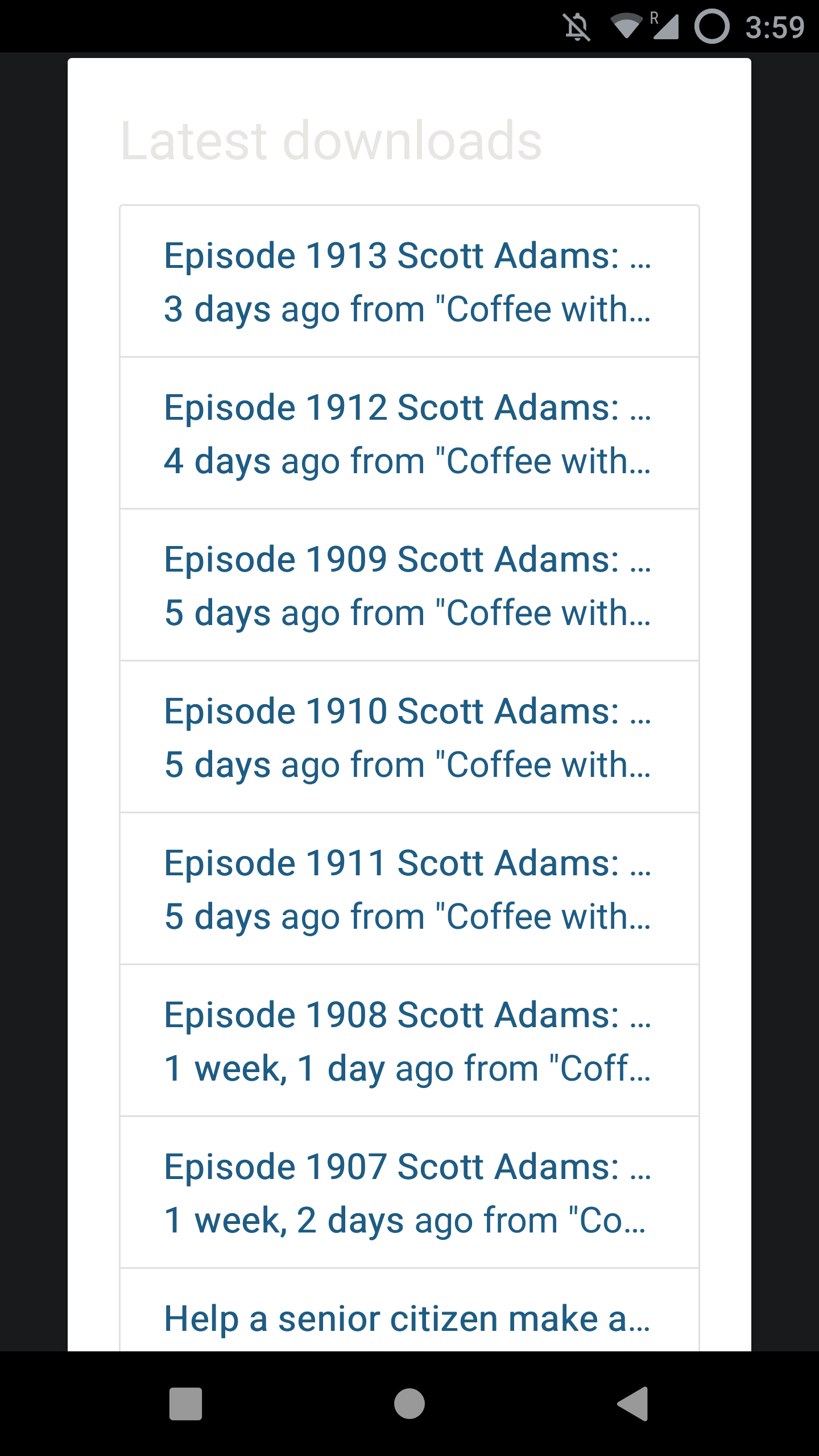
I've restarted TubeSync, I've run "reset tasks", I've combed through the task log and confirmed that the episodes aren't being spotted at all, I've combed through the Docker log for anything noteworthy to no avail, and I've confirmed I'm still running the same version I've been running all along. If there's anything else you need me to provide, let me know.


Typically the issue occasionally here is that YouTube makes live streams available as VoDs immediately with a very limited number of formats and then adds to these formats over the next several days. For example the video may only be available under H264 1080p for 2-3 days and then all the other transcoded formats appear later. Additionally, some of the immediately available stream formats may be DASH encoded and fail to be merged back into a single video file with ffmpeg due to a historical bug. Thanks to some PRs by others recently the DASH issue is likely to be fixed shortly.
Try going to a missing media item that's 3-4 days old and clicking "skip and delete", wait a few second and click "unskip/download" again. If the item then downloads then it's a live stream format availability issue at YouTube.
That's the thing, the items aren't being indexed at all. I had the problem you note initially when I was asking TubeSync to fetch AVC files but only VP9 were available sometimes (in the end, I just changed my setting to VP9 and lived with it), but here, TubeSync doesn't see the episodes at all.
OK, the media items aren't even in your library at all? Can you give me a URL to a video which is on YouTube but missing from your local TubeSync index?
Episode 1914: https://youtu.be/Pm-ejSLIrzA Episode 1915: https://youtu.be/LWj9BY1Jn3s Episode 1916: https://youtu.be/-Aua8cY-0PU
Thanks. What TubeSync does to dramatically improve indexing speeds and reduce requests to YouTube is when it indexes a channel it stops indexing once it finds a media item it's already indexed.
If there is a situation where YouTube has a list of media items, say item 1, 5, 9 in a list and TubeSync indexes up to 9, then YouTube adds in more items so the list is 1, 2, 3, 4, 5, 9 then the new items, 2, 3, 4 would not be indexed. Basically if YouTube retroactively injects media out of order into the video index there is a chance the media items might be missed.
This is something I've not seen before so I'll check the channel you've mentioned and see if I can find it. This may require a "items are missing, make sure you do a full index" button to be created if this is indeed the issue.
Yep, she's dead, Jim. We're up to Episode 1919 now and it just cannot find these episodes anymore.
Fair enough, from what I can tell it looks like non-chronologically added media items as discussed above. I'll look into adding a quick --full-reindex style command as a quick hack for now which should fix this particular source at least.
Is there no sort order parameter in the YouTube API? Or a way to limit the returned results to the last 30 days (or whichever time period was configured in TubeSync)? The issue as you've described it makes sense to me, but it feels like there should be an even simpler proper solution.
youtube-dl and forks including yt-dlp do not use the YouTube APIs, which require Google accounts and API keys. They basically just scrape the front end of YouTube with various methods. There are some URL parameters you can specify to tweak ordering on some URLs but that's about it. Generally what you get on the /videos URL for your channel or playlist is what TubeSync can index.
So, YouTube has split its Videos tab into Videos, Live, and Shorts tabs, and this is apparently why yt-dlp isn't picking up what I want anymore -- it only downloads from the Videos tab which no longer contains completed streams. The proper solution is to call the URL for each tab when indexing. But yt-dlp has trouble indexing tabs where the URL and tab name don't match (the Live tab's URL is /streams), so --compat-options no-youtube-channel-redirect needs to be passed.
See these issues:
https://github.com/yt-dlp/yt-dlp/issues/5419 https://github.com/yt-dlp/yt-dlp/issues/5430
Oh, and most critically: --full-reindex, therefore, should have no effect.
I think there are two solutions here:
- Add checkboxes to the source configuration page to configure exactly which video types (tabs) to download.
- Allow the user to specify the exact URL they want scraped (https://m.youtube.com/c/RealCoffeewithScottAdams/streams) instead of only the channel name or id.
Thanks for the investigative work! To set this up properly in TubeSync it's going to be a reasonable amount of work. Allowing people to enter a freeform text box is going to result in a lot of channels breaking for people as it really isn't entirely clear what to enter into the box unless you really know what you're doing. This is why it's as guided as possible right now and probably isn't sensible to change for everyone just for channels that have streams.
This likely needs an extra "also index streams" tick-box per source which also indexes /streams as well as /videos for a channel and in addition per-source TubeSync would need to store the "last indexed stream" media ID to prevent full re-indexing when updating the media items synced into TubeSync.
Any additional flags or arguments that might be required also need to be mapped into the yt-dlp embedded Python API as TubeSync doesn't call yt-dlp with flags.
I'll pop this on the wishlist, happy to take PRs as well of course.
Solution 3: Apparently they just fixed it in master and it should work exactly as it did before:
https://github.com/yt-dlp/yt-dlp/pull/5439
Should just need to release a new version of TubeSync with the latest yt-dlp bundled and all will be well again.
I don't believe this patch to yt-dlp will fix this issue, but it will be in the next TubeSync update when I next sync yt-dlp anyway. TubeSync specifically requests the /videos tab as the others do not seem to be, or at least last time I looked, chronologically order-able reliably. The only way TubeSync can detect new media items when using tabs with arbitrarily ordered media is to index everything on the channel every time. This is useful and the default behavior of yt-dlp to download a channel but not particularly useful if you want to just detect when new media has been added to a channel to sync it PVR-style as full channel indexes can quickly results in thousands of requests to YouTube and getting your IP throttled or blocked.
This will probably still require a "last stream media ID" to be recorded per source, and possibly a more general arbitrary tabs support per source to work.