

 meeb
meeb
'Get next best resolution or codec instead' wont download 144p video
Hello, thanks for this great tool! I've been enjoying it so far.
One issue that I ran into is that a video from a channel that I've added isn't downloading. The reason it gives is that it wasn't able to match the video format.
I have the fallback option set to 'Get next best resolution or codec instead'. My desired format is set to 1080p60fps fyi. It does list as VP9 so I would expect it to use ID 278.
Here's what the list of formats are for that video https://www.youtube.com/watch?v=UskJ8iSqryo
ID: sb1
ID: sb0
ID: 139 , audio:mp4a.40.5 @48.863k / 22050Hz
ID: 249 , audio:opus @52.691k / 48000Hz
ID: 250 , audio:opus @68.061k / 48000Hz
ID: 140 , audio:mp4a.40.2 @97.54k / 44100Hz
ID: 251 , audio:opus @98.835k / 48000Hz (matched)
ID: 17 , 144p (176x144), fps:10, video:mp4v.20.3 @78.211k , audio:mp4a.40.2 @0.0k / 22050Hz
ID: 133 , 144p (192x144), fps:10, video:avc1.4d400b @48.554k
ID: 160 , 144p (192x144), fps:10, video:avc1.4d400b @56.45k
ID: 242 , 144p (192x144), fps:10, video:vp9 @46.611k
ID: 278 , 144p (192x144), fps:10, video:vp9 @49.977k
ID: 18 , 144p (192x144), fps:10, video:avc1.42001E @249.081k , audio:mp4a.40.2 @0.0k / 44100Hz
There are 240p videos from the channel that it was able to download no problem, its just this single 144p video that's throwing tubesync into a circle. Any suggestions would be appreciated!
edit: dropping a screenshot which has moar info
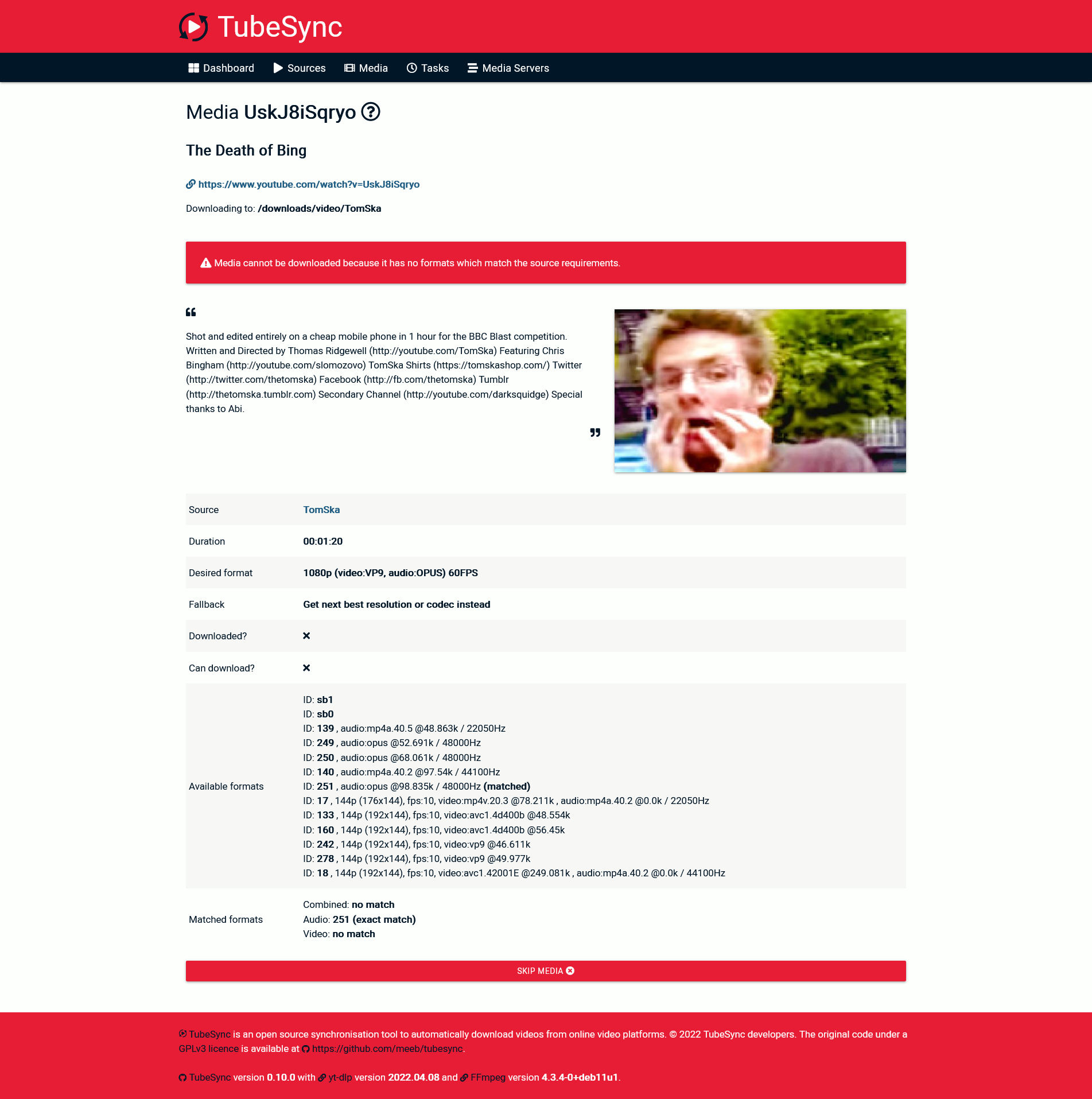

This is currently by design. TubeSync was originally designed as a PVR-like tool for YouTube so it was, at first release, capped to 720p or higher. This has been reduced over recent releases due to requests down to, if I recall the current hard cut-off, 240p. I may add in a "allow very low resolution downloads" toggle if there is a requirement for it.
The cut-off is to prevent a video that should have >=720p from failing a download, failing back too far and the download ends up being potato quality so it did have a function. I didn't really expect people to download 144p videos by choice.

That makes sense so you don't open your videos and get hit by potato-vision haha. And to be fair, this is the only video from that channel that is in 144p and its explained in the description as to why. This might be more important if a user is trying to archive a channel with lots of old videos in 144p. So having the option/bypass would be good.
Could implement like an adjustable lower limit cutoff for situations like this or where a user would want 1080p at minimum. It could be similar to how you can set the minimum quality in like radarr/sonarr/*arr. Though I can see how users could trip up on it, and then opening issues related to videos not downloading when its (hopefully) just user error.