

 mdn
mdn
forget-it options page looks ugly
I try to find good html code example of Options page for my extension, and find forget-it extension, but it Options page looks ugly:
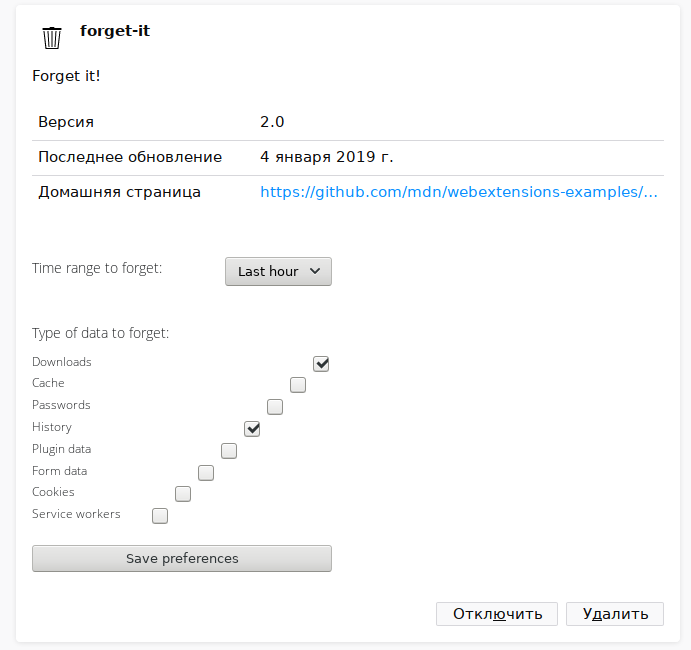 Why checkboxes are not aligned to right? What Mozilla recommended way to fix this?

Yes it does look ugly. It looks fine loaded as a standalone page, and it used to look fine. And it doesn't seem possible to inspect the options page bit of about:addons to see what's going on with it :(.
Setting "browser_style": false in the manifest fixes the ugliness (mostly - it now gets a scrollbar). But that is apparently not recommended. I'll try to see if someone from the add-ons team can comment on this.

Thanks, will be good to create separate extension with right example how to stylize options page (item label & description, checkboxes, dropdowns, radio, static and collapsible item groups, etc).
@ddurst , do you know why/when this started being broken, and what we should do to fix it?
@wbamberg the options page are running in a different process from the about:addons page and so they can't be reached from the devtools toolbox opened on the about:addons tab, but it can be reached and inspected by opening the Addon Debugging window from about:debugging and selecting the options page from the frame selector (after the extension options have been opened in an about:addons tab).
I briefly tried to reproduce this locally and interestingly it seems that it can't be reproduced on Linux, but it is consistently reproduced on Windows (I haven't tried it yet on mac), and so it seems to be a platform specific styling issue.
I briefly looked at the styles applied from the inspector (using the Addon Debugging window as described above), but I've not yet been able to spot the source of the styling issue.
It could be useful to try to bisect the source of the regression using mozregress.

@wbamberg the options page are running in a different process from the about:addons page and so they can't be reached from the devtools toolbox opened on the about:addons tab, but it can be reached and inspected by opening the Addon Debugging window from about:debugging and selecting the options page from the frame selector (after the extension options have been opened in an about:addons tab).
Oh of course. I should have thought of that. It's been a while :). From your response this seems quite likely to be a Firefox bug, so I'll cross-file it in Bugzilla.
From your response this seems quite likely to be a Firefox bug, so I'll cross-file it in Bugzilla.
yeah, it looks like a Firefox bug, do you mind to CC me on the bugzilla issue once you have filed it?
I also tried to see if I could quickly find the source with mozregress, unfortunately in that single mozregress run that I did mozregress failed to determine the regression in the range I've been trying.
Nevertheless, based on the mozregress results, it doesn't seem to be a recent issue, on Windows I've been able to trigger the issue even in Firefox versions as old as Firefox 57, and so it is likely an issue introduced before that version.
