
interactive-examples
 interactive-examples copied to clipboard
 mdn
mdn
CSS editor is confusing when the feature isn't supported
When a CSS feature isn't supported, the editor just displays a static version of the example choices, like this:

I think this is not ideal. Part of the original reason for displaying the static list of choices was that we thought the editor would replace the existing PRE list, but I now think we should keep the PRE list, as it is kind of complementary to the editor. But that makes the static list look quite repetitive, and when there are only a couple of choices, they look lost in the iframe and it's easy to think something is broken.
I'm not sure what would be better though. We could just hide the iframe completely, or could resize it and display in it a message like "this feature is not supported by your browser, so we can't display the interactive example". I'm not really sure how technically feasible these are though - I know we already do some postMessaging between the MDN page and the editor page, so perhaps it could use that.

Can't we take a screenshot from a browser supported to this property and show it in the other unspported browser as a static image in the example area with a title "This Feature is not supported by your browser, you can only display a static image" something like mirroring.
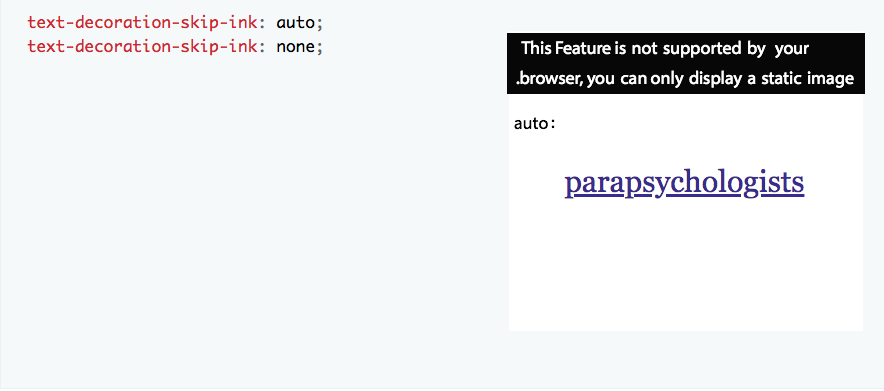

I've promised for ages to write something up about this. Here are some suggestions for discussion.
Dealing with unsupported CSS
One big weakness of the CSS interactive examples editor is that it doesn’t handle unsupported CSS well. At the moment this is stopping us from including examples for properties that don’t have good cross-browser support (including, for example, all the logical properties).
The current implementation
The current implementation goes like this: the example includes an attribute data-property whose value is the name of the property. The editor uses that to test whether the browser supports the property (https://github.com/mdn/interactive-examples/blob/master/js/editor-libs/mce-utils.js#L36-L54). If it does, all’s good. Otherwise, it displays a static rendering of just the example choices, like this: https://screenshots.firefox.com/q2euYmzsNczUT0ws/interactive-examples.mdn.mozilla.net.
There are a couple of problems with this. The first is that it confuses people. They just think the example is broken somehow (https://github.com/mdn/interactive-examples/issues/528). The second is that it’s not very fine-grained: it doesn’t help if the property is prefixed, or if some syntax forms are supported but not others.
What would we like to happen?
I’ll walk through one version of what we might like to happen here. I will try not to get into implementation here. I think implementation might get tricky though.
Is the property supported?
The first question the editor can ask is: is this property supported by this browser?
Perhaps we could ask that by trying all the values on an element, and if any of them apply, it is supported.
I can think of three answers:
-
yes: then we go on to the next question
-
yes, but prefixed: I think ideally in this case the editor should auto-prefix the values listed (and display the prefixed version in the left-hand-side choices). Maybe it should try to indicate to the user that it has added prefixed for this particular browser, but I suspect it’s not worth it and noone will understand that.
-
no: I think the best thing to do here is just hide the entire editor. Anything else will just confuse people and make them think things are broken. The main difficulty here is that - I think - it means the iframe containing the editor will appear and then disappear, which is gross. I don’t know if there are better options in the context of our current architecture though.
Are any of the example's value options unsupported?
Next the editor should test each value option to see if it’s supported. Perhaps it would be best here just to not show any options that are not supported.
Dealing with user edits
When the user edits an example, there’s an extra complication: the value they’ve entered may be unsupported, or may be invalid. We might want to distinguish these cases, which we don’t do at the moment. To do that we would need a way to check whether a value is valid according to the spec. We’d also need to think about the UX for this.
Actually I think dealing with edits is a nice-to-have - I could totally live with the current situation here.
This sounds mostly good to me.
There is a potential fourth option — the browser supports much the same thing, but using a non-standard property name, or even non-standard syntax. Take :matches / :any or :focus-visible / :-moz-focusring as examples. I think however that in these cases perhaps working out the exact nature of the support and what to do in each case is just too horrible, and we should consider them to be "no".
In. the case of "no", I have a suggestion — show the editor, show the example, but grey it out and display a message over the top saying something like "Your browser does not support this property/element. For full support details see the Browser compatibility section at the bottom of the page." This could serve to make the display less gross in terms of the editor appearing and disappearing, and also make the situation crystal clear.
In the case of "yes but prefixed", maybe double up the prefixed and non-prefixed versions of the properties, showing both, and then show a message somewhere saying "Your browser supports a prefixed version of this property".

I think however that in these cases perhaps working out the exact nature of the support and what to do in each case is just too horrible, and we should consider them to be "no".
Yes, I agree. We should also be pragmatic here: if there are lots of cases like this, we should try to do something nice. If there are only a few, omitting them is fine. I don't think there are enough to be worth our time designing something tricky for.
In. the case of "no", I have a suggestion — show the editor, show the example, but grey it out and display a message over the top saying something like "Your browser does not support this property/element. For full support details see the Browser compatibility section at the bottom of the page."
I feel like this kind of approach obtrudes the page design into the docs. I think it is cleaner to omit the editor. Someone, say, using Chrome to look up docs on logical properties doesn't want to see big error banners, which is what this looks like. They just want to see the best docs we can give them. But it would fix the problem of the editor disappearing, and would be better than what we have now.
In the case of "yes but prefixed", maybe double up the prefixed and non-prefixed versions of the properties, showing both, and then show a message somewhere saying "Your browser supports a prefixed version of this property".
This is tricky because many of the examples choose the right number of examples to fit vertically. If we double up, they will then overflow. So I think it is better not to do this.
Yes, I agree. We should also be pragmatic here: if there are lots of cases like this, we should try to do something nice. If there are only a few, omitting them is fine. I don't think there are enough to be worth our time designing something tricky for.
Yup, for sure. I would agree with this.
I feel like this kind of approach obtrudes the page design into the docs. I think it is cleaner to omit the editor. Someone, say, using Chrome to look up docs on logical properties doesn't want to see big error banners, which is what this looks like. They just want to see the best docs we can give them. But it would fix the problem of the editor disappearing, and would be better than what we have now.
I do understand and agree with your counter-point here. I guess it's a trade off between slightly messier doc design for newer readers ("eewww, big box with error message in looks messy") versus less confusing design for more experienced readers with learned behaviour ("where is the interactive example? This page looks broken"). Could do with some user testing.
This is tricky because many of the examples choose the right number of examples to fit vertically. If we double up, they will then overflow. So I think it is better not to do this.
OK, point taken.
Thanks Will! This all sounds good to me. I'd add that prefixes are going to be less and less of a concern moving forward, same with non-standard features. So it seems fine to me to ignore them, especially in an initial implementation.

@schalkneethling , this continues to confuse people: https://github.com/mdn/interactive-examples/issues/1826. Do you think there's any likelihood that we could implement something that completely hides the editor if a property isn't supported?
If not, maybe we should consider just permanently removing examples for features that are not supported by Chrome :(.
@schalkneethling , this continues to confuse people: #1826. Do you think there's any likelihood that we could implement something that completely hides the editor if a property isn't supported?
If not, maybe we should consider just permanently removing examples for features that are not supported by Chrome :(.
Hey Will, so currently I believe we just show the code as plain text, what we can is as suggested, just not show it all. If we can all agree to do this, then I can put this on my to-do. Let me know, thanks!

I'm not sure who "we all" should be here :) but I think hiding the entire editor is the best practical option, and definitely better than what we have now.
I'm not sure who "we all" should be here :)
I think me and you is a large enough "we" :) I will get stuck into making this change.
Ok, I dug into this some today and because of the cross-origin aspect, this is not something that can be handled from just one of the "role players" so to speak.
Here is my proposal.
- In Yari we hide all interactive examples by default.
- Inside each of the editors (https://github.com/mdn/bob/tree/master/editor/js) we currently have some code that shows, hides, and enables aspects of the editor based on 1) whether JS is enabled and/or 2) whether a specific feature is enabled.
The idea was, as discussed here, that we will show some fallback content if either JS was disabled or the specific feature was not supported in the browser. Also, as discussed here, turns out that is not ideal and we would rather just not show the interactive example at all.
So now, instead of it enabling, showing, or hiding elements it will always render fully functional but, we flip the logic around.
~~So, if JS is enabled~~(We do not have to worry about that really. If JS is not enabled it will affect Yari as well and it will serve the static "unhydrated" HTML in which case the IEx will be hidden anyway).
So, if this is not a supported browser or the feature is not supported do an early return and do nothing(i.e. the IEx remain hidden). If all is well, we send a postMessage to Yari saying "show the interactive example". When Yari receives this, it will remove the hidden class from the interactive example and all is well.
If it does not receive this postMessage it will do nothing and as such, the entire interactive example will be hidden.
I would appreciate all your input here before I proceed:
ping @Gregoor @peterbe @wbamberg - Thanks!
So, if this is not a supported browser or the feature is not supported do an early return and do nothing(i.e. the IEx remain hidden). If all is well, we send a postMessage to Yari saying "show the interactive example". When Yari receives this, it will remove the hidden class from the interactive example and all is well. If it does not receive this postMessage it will do nothing and as such, the entire interactive example will be hidden.
I think your proposal sounds great @schalkneethling ! This utilization of postMessage is also needing to be investigated in #1834 so this is a nice segue to that. Using postMessage for toggling a .hidden class and determining the state of each interactive example display makes sense. Nice work!

If JS is not enabled it will affect Yari as well and it will serve the static "unhydrated" HTML in which case the IEx will be hidden anyway).
Nitpicking here; if you have JS disabled, you still get interactive examples. But you only get the raw code, no syntax highlighting or "Run" button.
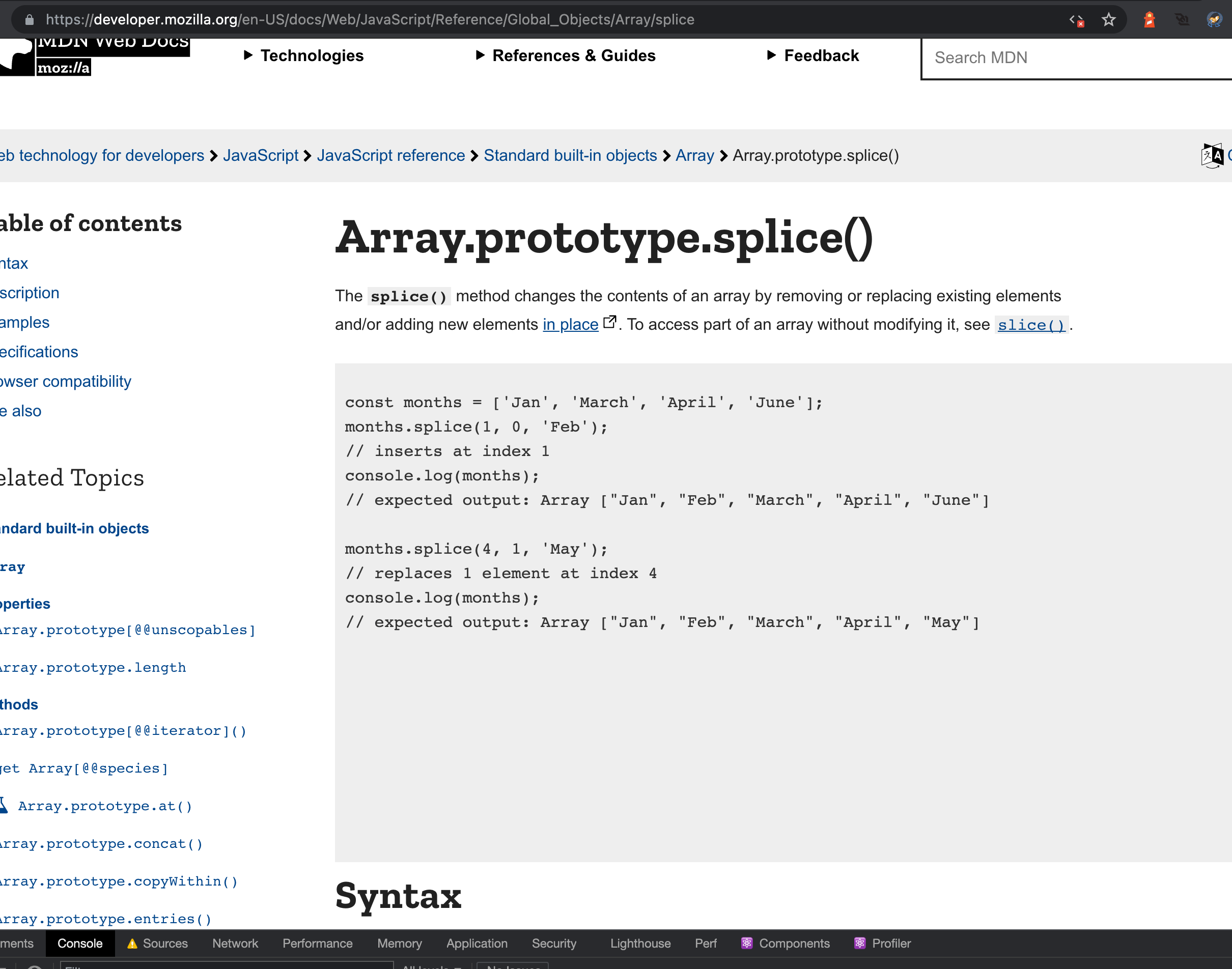
So by default, it's not hidden (if JS is disabled but the browser still supports <iframe>).

I'm so confused. Why is https://interactive-examples.mdn.mozilla.net/pages/css/offset-anchor.html not working in Chrome?
Suppose offset-anchor doesn't work in Chrome (even though it should)

If there's something in the bob JS that is broken, why is there no error in the console?
If there's some code that swallows errors, can't that be addressed and dealt with there instead of residing to telling the iframe parent to "Hide me because I'm not working!"?
Eager to help but not sure what's going on yet.
I'm so confused. Why is https://interactive-examples.mdn.mozilla.net/pages/css/offset-anchor.html not working in Chrome?
I was a bit confused when first seeing the http://127.0.0.1:9090/pages/css/offset-anchor.html too, it is indeed supported in Chrome caniuse and should display as expected but has a hardcoded .hidden class on the #output container so all that displays is the example choices. After removing that hidden class the output displays and the demo runs, but the choices aren't clickable and things seem a bit wonky,
- example missing styles
- the example choices don't have copy to clipboard icon
- output isn't styled
so maybe it is being hidden for some reason that I'm not seeing. There aren't any errors in the console when running locally, I'm still trying to understand why it behaves the way it does as well.
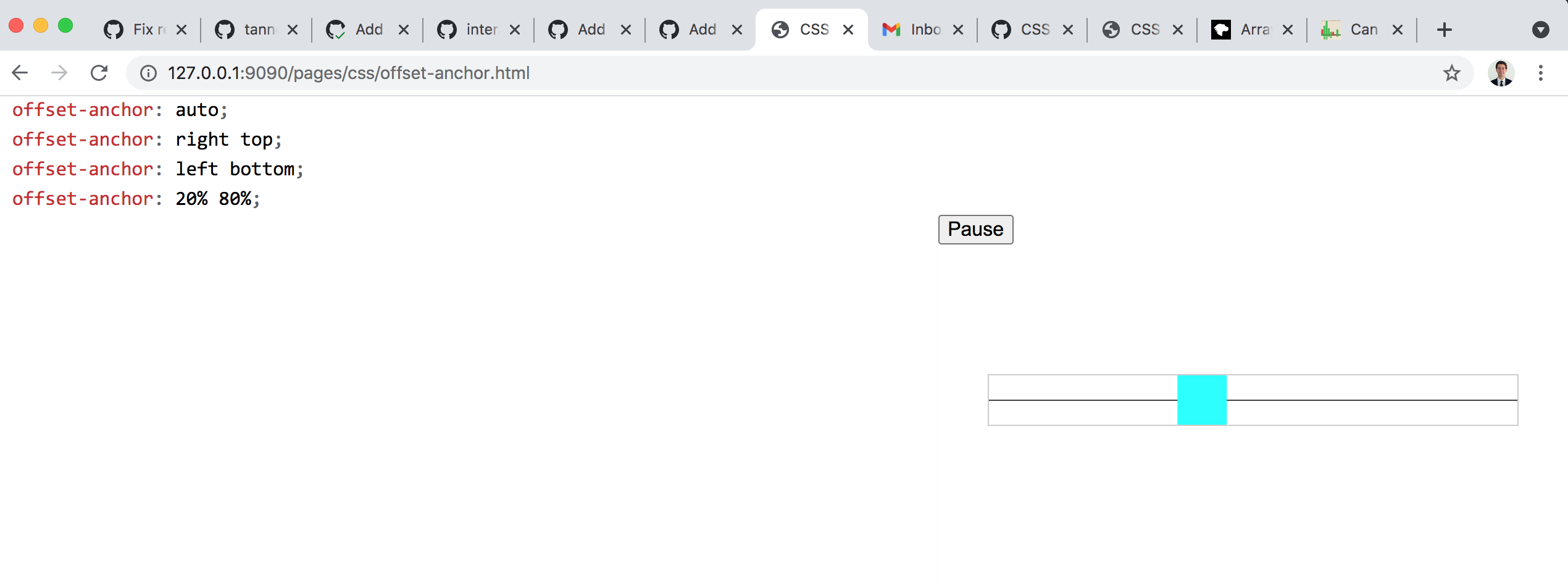
The offset-distance example works fine https://interactive-examples.mdn.mozilla.net/pages/css/offset-distance.html
Oh I see.
if (
        mceUtils.isPropertySupported(exampleChoiceList.dataset) &&
        !document.all
    ) {
        enableLiveEditor();
        ...
}
And enableLiveEditor() is what removes the default hardcoded hidden class names.
(from editable-css.js).
I think the best solution would be if there was an else statement on that. Like this:
if (
        mceUtils.isPropertySupported(exampleChoiceList.dataset) &&
        !document.all
    ) {
        enableLiveEditor();
        ...
} else {
  enablePropertyNotSupportedWarning();
}
I think the header.output-header should always be shown but the "Reset" button in the upper right-hand corner could remain hidden.
This would much better explain the reader: "This property is not supported in your current browser so the interactive example can not be initialized."
Which brings me to my second question, why is mceUtils.isPropertySupported(exampleChoiceList.dataset) becoming false on that page when the BCD table says offset-anchor should work in Chrome (since version 79)??
One thing I also notice is that the offset-anchor interactive example isn't getting the .live class added to the first child <section> in .editor-wrapper, which is making it not receive a bunch of styles from .example-choice.list.large.live selectors. When I hardcoded the .live class into the section element for offset-anchor the interactive example displays with the expected styling.
<section id="example-choice-list" class="example-choice-list large" data-property="offset-anchor">...</section>
like it does on the offset-distance
<section id="example-choice-list" class="example-choice-list large live" data-property="offset-distance"></section>
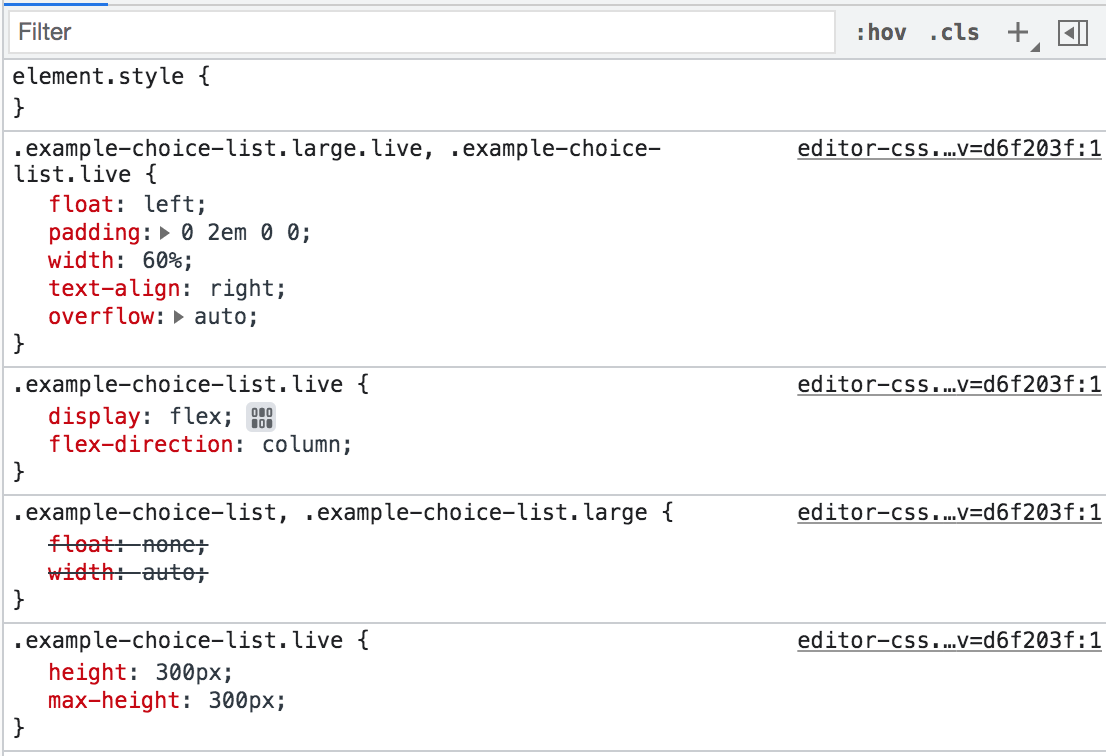
Problem: The <section class="example-choice-list large"> element is not receiving the .live class like the other offset-* interactive examples.
When I add the .live class into the <section class="example-choice-list large"> it uses the scss styles and displays normally like the offset-distance example. The demo runs, but the example choices aren't responding, that highlights the fact the .live class is MIA for this example choice list section @peterbe
What if you do:
-if (
-       mceUtils.isPropertySupported(exampleChoiceList.dataset) &&
-       !document.all
-   ) {
+ if (1) {
        enableLiveEditor();
does the example start to work in Chrome?
If so, does that mean that mceUtils.isPropertySupported is broken?
Let me take a look. Is editable-css.js located in mdn/interactive-examples? I cant find it with git grep -n "enableLiveEditor()"
Let me take a look. Is
editable-css.jslocated inmdn/interactive-examples? I cant find it withgit grep -n "enableLiveEditor()"
https://github.com/mdn/bob/blob/master/editor/js/editable-css.js
Good ole mdn/bob, I haven't ventured over there before. Will have a look now, thanks @peterbe !
Nitpicking here; if you have JS disabled, you still get interactive examples. But you only get the raw code, no syntax highlighting or "Run" button.
Right now yes, but once my proposal is implemented it will actually not show the interactive example anymore because it would require JS to remove the class that hides the iframe by default.
If so, does that mean that
mceUtils.isPropertySupportedis broken?
It certainly has not been touched in a loooong time and is not bulletproof for sure. We should look at that as well but, perhaps a separate issue?
If so, does that mean that
mceUtils.isPropertySupportedis broken?It certainly has not been touched in a loooong time and is not bulletproof for sure. We should look at that as well but, perhaps a separate issue?
But isn't it potentially the root of the problem? Instead of entirely hiding the offset-anchor interactive example from Chrome users, we go after the bug that causes the interactive example to fail and end up a "disabled state".
If so, does that mean that
mceUtils.isPropertySupportedis broken?It certainly has not been touched in a loooong time and is not bulletproof for sure. We should look at that as well but, perhaps a separate issue?
But isn't it potentially the root of the problem? Instead of entirely hiding the
offset-anchorinteractive example from Chrome users, we go after the bug that causes the interactive example to fail and end up a "disabled state".
Not entirely no. It is two-fold:
- That is a problem that needs to be addressed but,
- we will most likely always have some examples that do not work on all browsers and so, in those cases, we want to rather just hide the entire IEx instead of showing the fallback content
The second item above is what this issue morphed into :)
What if you do... does the example start to work in Chrome?
When I updated mdn/bob with if (1) and then added it mdn/interactive-examples with npx install-local ~/bob && node node_modules/.bin/mdn-bob the interactive example loads as expected and the <section class="example-choice-list large"> receives the .live class, I'm not entirely sure if the example choices should produce any different output from eachother but below is a quick demo to verify the display is as expected.
https://user-images.githubusercontent.com/48612525/121383513-5ea33480-c8fc-11eb-86fc-24f5b231677d.mov
The second item above is what this issue morphed into :)
Gotcha! Good summary. Thanks for explaining that status.
Comparatively, having some iframe postMessage thing to tell the parent to disable the iframe is like one of those fire blast doors (they have on submarines) that we currently don't have.
Solving the actual problem with CSS examples and feature detection is like preventing a fire in the first place.
Then the question is; if time is limited, which one do you solve first? :)
I am reasonably sure that contra BCD, offset-anchor is not supported in Chrome. Forget the interactive example, look at the live sample and compare Firefox and Chrome.
offset-anchor, as the description says, sets the point in the box that's actually moving along the path. So when you set it to something different you will see that the box is in a different place relative to the path in Firefox:
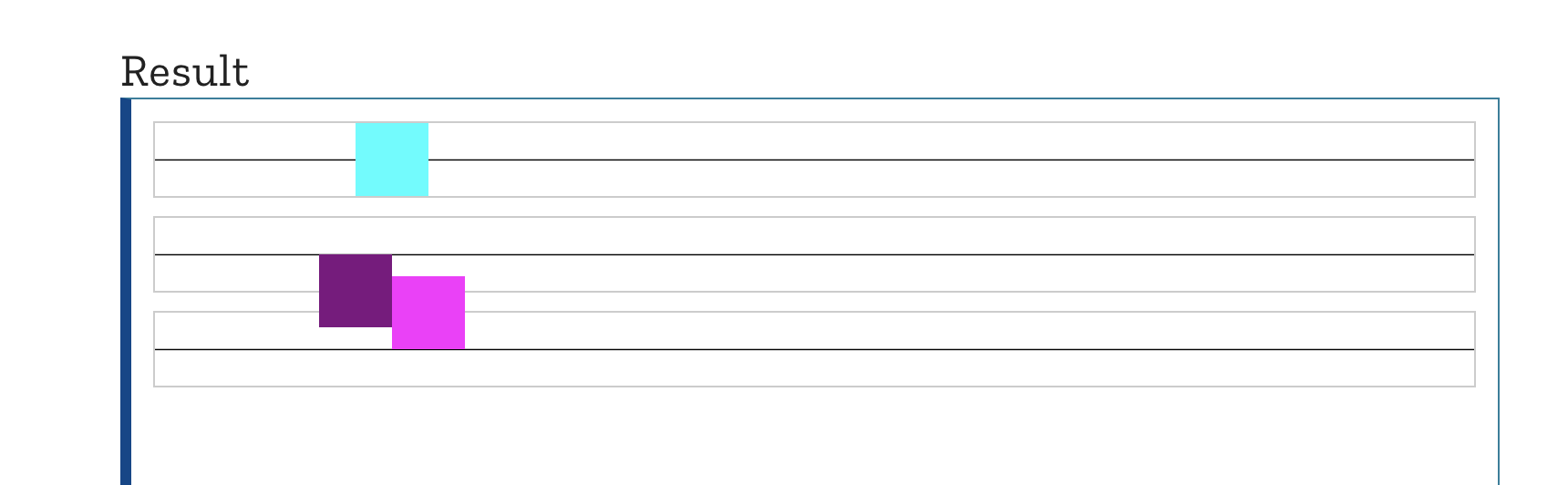
...but not in Chrome:
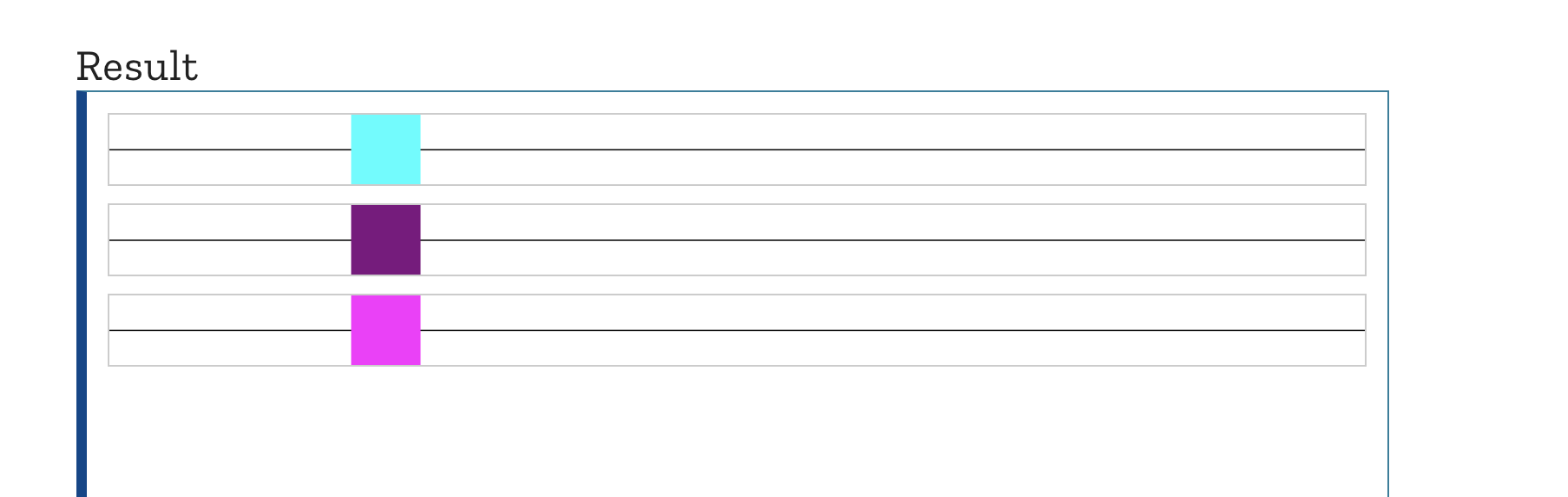
The interactive example editor does feature detection for CSS properties and shows the static fallback if the property isn't supported. That's why the output is hidden. Un-hiding it does not fix the problem, it just shows an editor that's not demonstrating the property, because the browser does not support it.
But isn't it potentially the root of the problem? Instead of entirely hiding the offset-anchor interactive example from Chrome users, we go after the bug that causes the interactive example to fail and end up a "disabled state".
I think the interactive example editor is working exactly as intended here. The issue is that the "disabled state" confuses people into thinking that the editor is broken somehow.
Here is my proposal.
In Yari we hide all interactive examples by default.
Inside each of the editors (https://github.com/mdn/bob/tree/master/editor/js) we currently have some code that shows, hides, and enables aspects of the editor based on 1) whether JS is enabled and/or 2) whether a specific feature is enabled.
The idea was, as discussed here, that we will show some fallback content if either JS was disabled or the specific feature was not supported in the browser. Also, as discussed here, turns out that is not ideal and we would rather just not show the interactive example at all.
So now, instead of it enabling, showing, or hiding elements it will always render fully functional but, we flip the logic around.
~So, if JS is enabled~(We do not have to worry about that really. If JS is not enabled it will affect Yari as well and it will serve the static "unhydrated" HTML in which case the IEx will be hidden anyway).
So, if this is not a supported browser or the feature is not supported do an early return and do nothing(i.e. the IEx remain hidden). If all is well, we send a
postMessageto Yari saying "show the interactive example". When Yari receives this, it will remove thehiddenclass from the interactive example and all is well.If it does not receive this
postMessageit will do nothing and as such, the entire interactive example will be hidden.I would appreciate all your input here before I proceed:
As I said upthread, I think hiding the editor completely when the thing is not supported is the best way to go. But I guess the concern would be, will this cause either or both of:
- pages to load more slowly as this dance has to be done now
- the page will load then the interactive example will pop into existence some perceptible time after the page has loaded
?
And if that is the case, maybe this isn't really fixable at all in the context of this iframe architecture.