
hassio_lovelace_multiremote
 hassio_lovelace_multiremote copied to clipboard
Published
20 hours ago •
 mcfrojd
mcfrojd
Keyboard for NVidia Shield
I don't use this but use something similar that I built which suits my styling better. Perhaps you could add this keyboard to the NVIidia Shield section?
Reason for this post is to share my keyboard config for NVidia shield. Using ADB commands. Makes searching for things in Netflix easier if voice control doesn't work from where you are....
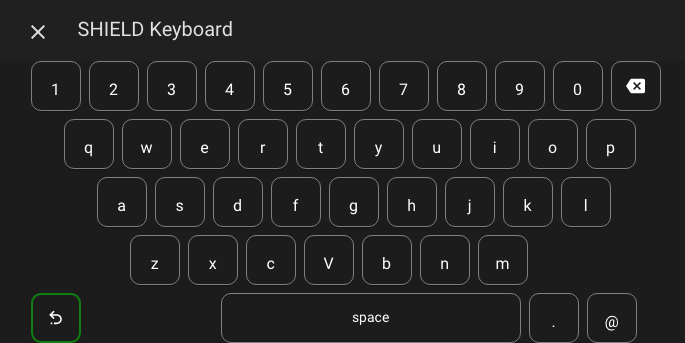
I use the awesome Button-card from RomRider (including templates and variables) and Browser Mod from Thomas Loven to get Popup cards.
Templates:
button_card_templates:
  keyboard_button_name_only:
    hold_action: none
    show_icon: false
    show_picture: false
    show_label: false
    tap_action:
      action: call-service
      service: androidtv.adb_command
      service_data:
        command: '[[[ return variables.command ]]]'
        entity_id: media_player.smartvu_2
    styles:
      card:
        - border-radius: 10px
        - height: 50px
        - width: 50px
        - border: solid 1px
        - border-color: gray
      name:
        - align-self: end
        - padding: 9px 10px
        - font-size: 16px
        - color: white
    variables:
      command: command
  keyboard_button_icon_only:
    hold_action: none
    show_icon: true
    show_picture: false
    show_label: false
    show_name: false
    tap_action:
      action: call-service
      service: androidtv.adb_command
      service_data:
        command: '[[[ return variables.command ]]]'
        entity_id: media_player.smartvu_2
    styles:
      card:
        - border-radius: 10px
        - height: 50px
        - width: 50px
        - border: solid 1px
        - border-color: gray
      icon:
        - padding: 9px 10px
        - color: white
    variables:
      command: command
  blank_keyboard:
    color_type: blank-card
    styles:
      card:
        - width: 25px
Popup config:
  media_player.smartvu_2:
    title: SHIELD Keyboard
    large: true
    card:
      type: vertical-stack
      cards:
        - type: horizontal-stack
          cards:
            - template: blank_keyboard
              type: 'custom:button-card'
            - Card: null
              entity: media_player.smartvu_2
              name: 1
              template: keyboard_button_name_only
              variables:
                command: input keyevent 7
              type: 'custom:button-card'
            - Card: null
              entity: media_player.smartvu_2
              name: 2
              template: keyboard_button_name_only
              variables:
                command: input keyevent 8
              type: 'custom:button-card'
            - Card: null
              entity: media_player.smartvu_2
              name: 3
              template: keyboard_button_name_only
              variables:
                command: input keyevent 9
              type: 'custom:button-card'
            - Card: null
              entity: media_player.smartvu_2
              name: 4
              template: keyboard_button_name_only
              variables:
                command: input keyevent 10
              type: 'custom:button-card'
            - Card: null
              entity: media_player.smartvu_2
              name: 5
              template: keyboard_button_name_only
              variables:
                command: input keyevent 11
              type: 'custom:button-card'
            - Card: null
              entity: media_player.smartvu_2
              name: 6
              template: keyboard_button_name_only
              variables:
                command: input keyevent 12
              type: 'custom:button-card'
            - Card: null
              entity: media_player.smartvu_2
              name: 7
              template: keyboard_button_name_only
              variables:
                command: input keyevent 13
              type: 'custom:button-card'
            - Card: null
              entity: media_player.smartvu_2
              name: 8
              template: keyboard_button_name_only
              variables:
                command: input keyevent 14
              type: 'custom:button-card'
            - Card: null
              entity: media_player.smartvu_2
              name: 9
              template: keyboard_button_name_only
              variables:
                command: input keyevent 15
              type: 'custom:button-card'
            - Card: null
              entity: media_player.smartvu_2
              name: '0'
              template: keyboard_button_name_only
              variables:
                command: input keyevent 16
              type: 'custom:button-card'
            - Card: null
              entity: media_player.smartvu_2
              name: DEL
              icon: 'mdi:backspace'
              template: keyboard_button_icon_only
              variables:
                command: input keyevent 67
              type: 'custom:button-card'
        - type: horizontal-stack
          cards:
            - template: blank_keyboard
              type: 'custom:button-card'
            - template: blank_keyboard
              type: 'custom:button-card'
            - Card: null
              entity: media_player.smartvu_2
              name: q
              template: keyboard_button_name_only
              variables:
                command: input keyevent 45
              type: 'custom:button-card'
            - Card: null
              entity: media_player.smartvu_2
              name: w
              template: keyboard_button_name_only
              variables:
                command: input keyevent 51
              type: 'custom:button-card'
            - Card: null
              entity: media_player.smartvu_2
              name: e
              template: keyboard_button_name_only
              variables:
                command: input keyevent 33
              type: 'custom:button-card'
            - Card: null
              entity: media_player.smartvu_2
              name: r
              template: keyboard_button_name_only
              variables:
                command: input keyevent 46
              type: 'custom:button-card'
            - Card: null
              entity: media_player.smartvu_2
              name: t
              template: keyboard_button_name_only
              variables:
                command: input keyevent 48
              type: 'custom:button-card'
            - Card: null
              entity: media_player.smartvu_2
              name: 'y'
              template: keyboard_button_name_only
              variables:
                command: input keyevent 53
              type: 'custom:button-card'
            - Card: null
              entity: media_player.smartvu_2
              name: u
              template: keyboard_button_name_only
              variables:
                command: input keyevent 49
              type: 'custom:button-card'
            - Card: null
              entity: media_player.smartvu_2
              name: i
              template: keyboard_button_name_only
              variables:
                command: input keyevent 37
              type: 'custom:button-card'
            - Card: null
              entity: media_player.smartvu_2
              name: o
              template: keyboard_button_name_only
              variables:
                command: input keyevent 43
              type: 'custom:button-card'
            - Card: null
              entity: media_player.smartvu_2
              name: p
              template: keyboard_button_name_only
              variables:
                command: input keyevent 44
              type: 'custom:button-card'
        - type: horizontal-stack
          cards:
            - template: blank_keyboard
              type: 'custom:button-card'
            - template: blank_keyboard
              type: 'custom:button-card'
            - template: blank_keyboard
              type: 'custom:button-card'
            - Card: null
              entity: media_player.smartvu_2
              name: a
              template: keyboard_button_name_only
              variables:
                command: input keyevent 29
              type: 'custom:button-card'
            - Card: null
              entity: media_player.smartvu_2
              name: s
              template: keyboard_button_name_only
              variables:
                command: input keyevent 47
              type: 'custom:button-card'
            - Card: null
              entity: media_player.smartvu_2
              name: d
              template: keyboard_button_name_only
              variables:
                command: input keyevent 32
              type: 'custom:button-card'
            - Card: null
              entity: media_player.smartvu_2
              name: f
              template: keyboard_button_name_only
              variables:
                command: input keyevent 34
              type: 'custom:button-card'
            - Card: null
              entity: media_player.smartvu_2
              name: g
              template: keyboard_button_name_only
              variables:
                command: input keyevent 35
              type: 'custom:button-card'
            - Card: null
              entity: media_player.smartvu_2
              name: h
              template: keyboard_button_name_only
              variables:
                command: input keyevent 36
              type: 'custom:button-card'
            - Card: null
              entity: media_player.smartvu_2
              name: j
              template: keyboard_button_name_only
              variables:
                command: input keyevent 38
              type: 'custom:button-card'
            - Card: null
              entity: media_player.smartvu_2
              name: k
              template: keyboard_button_name_only
              variables:
                command: input keyevent 39
              type: 'custom:button-card'
            - Card: null
              entity: media_player.smartvu_2
              name: l
              template: keyboard_button_name_only
              variables:
                command: input keyevent 40
              type: 'custom:button-card'
        - type: horizontal-stack
          cards:
            - template: blank_keyboard
              type: 'custom:button-card'
            - template: blank_keyboard
              type: 'custom:button-card'
            - template: blank_keyboard
              type: 'custom:button-card'
            - template: blank_keyboard
              type: 'custom:button-card'
            - Card: null
              entity: media_player.smartvu_2
              name: z
              template: keyboard_button_name_only
              variables:
                command: input keyevent 54
              type: 'custom:button-card'
            - Card: null
              entity: media_player.smartvu_2
              name: x
              template: keyboard_button_name_only
              variables:
                command: input keyevent 52
              type: 'custom:button-card'
            - Card: null
              entity: media_player.smartvu_2
              name: c
              template: keyboard_button_name_only
              variables:
                command: input keyevent 31
              type: 'custom:button-card'
            - Card: null
              entity: media_player.smartvu_2
              name: V
              template: keyboard_button_name_only
              variables:
                command: input keyevent 50
              type: 'custom:button-card'
            - Card: null
              entity: media_player.smartvu_2
              name: b
              template: keyboard_button_name_only
              variables:
                command: input keyevent 30
              type: 'custom:button-card'
            - Card: null
              entity: media_player.smartvu_2
              name: 'n'
              template: keyboard_button_name_only
              variables:
                command: input keyevent 42
              type: 'custom:button-card'
            - Card: null
              entity: media_player.smartvu_2
              name: m
              template: keyboard_button_name_only
              variables:
                command: input keyevent 41
              type: 'custom:button-card'
        - type: horizontal-stack
          cards:
            - template: blank_keyboard
              type: 'custom:button-card'
            - Card: null
              entity: media_player.smartvu_2
              name: Back
              icon: 'mdi:undo-variant'
              template: keyboard_button_icon_only
              variables:
                command: BACK
              type: 'custom:button-card'
              styles:
                card:
                  - border-color: green
                  - border: solid 2px
            - template: blank_keyboard
              type: 'custom:button-card'
            - template: blank_keyboard
              type: 'custom:button-card'
            - template: blank_keyboard
              type: 'custom:button-card'
            - template: blank_keyboard
              type: 'custom:button-card'
            - Card: null
              entity: media_player.smartvu_2
              name: space
              template: keyboard_button_name_only
              type: 'custom:button-card'
              hold_action: none
              tap_action:
                action: call-service
                service: androidtv.adb_command
                service_data:
                  command: input keyevent 62
                  entity_id: media_player.smartvu_2
              styles:
                card:
                  - border-radius: 10px
                  - height: 50px
                  - width: 300px
                name:
                  - align-self: end
                  - padding: 5px 0px
                  - font-size: 14px
                  - color: white
            - Card: null
              entity: media_player.smartvu_2
              name: .
              template: keyboard_button_name_only
              variables:
                command: input keyevent 158
              type: 'custom:button-card'
            - Card: null
              entity: media_player.smartvu_2
              name: '@'
              template: keyboard_button_name_only
              variables:
                command: input keyevent 77
              type: 'custom:button-card'

Hello mate! This is exactly what I'm trying to set up right now.
Is this working for you? Looks like the template has changed and is giving some issue.
