

 mavlink
Add camera polygon footprint instead of camera trigger icon
It is good that we see the camera footprint of each image during the survey. so we can see the area of images and monitor overlap of images during flight. properties of the camera can be adjusted in the setting of software.
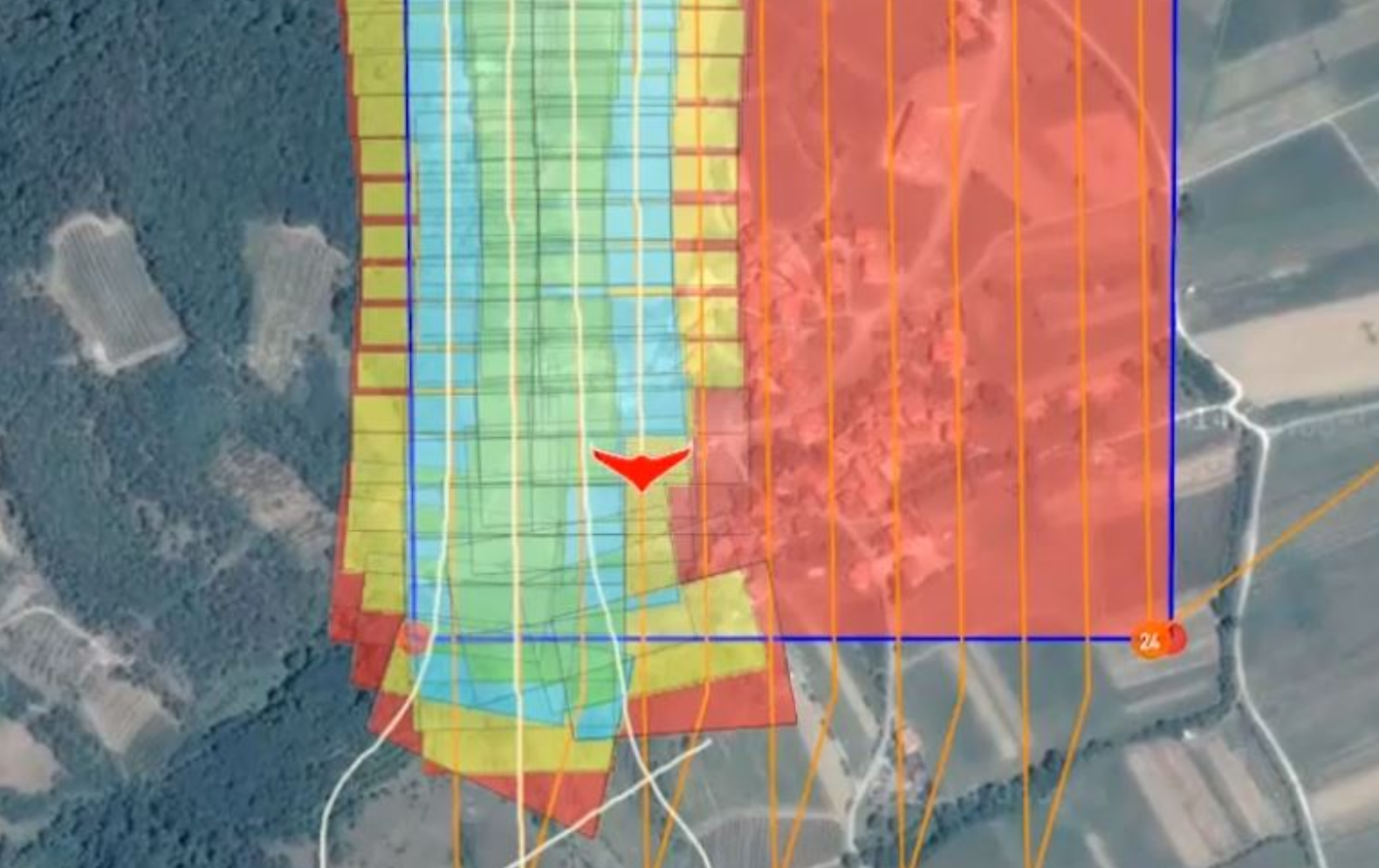

If you know the overlaps specified on the survey plan what additional information does showing it on the map provide? I guess you could verify that your turnarounds are large enough, but you can do that from the flight path by itself I think.

plane rotation during flight change orientation angle of camera and overlaps will different.
Sure, but if your turnarounds are setup correctly that should happen outside the survey area. And you can determine if that is a problem with the flight path itself overlayed over the transect line. As you can see in the image you posted the entry and exit of the survey area are bad in that the flight path start to deviate prior to leaving the survey polygon. You don't need camera footprint overlays to determine that.
To me that is not a good enough reason to justify the work for this.
@antiheavy Maybe you have better examples as to why this would be useful and tell you things you don't already know for other information?
This is a useful feature request. The graphical example in the original issue post not only shows coverage, but shows level of redundant overlap (different colors) which is critical when mapping using 3D point cloud stitching software. You'd want this as a layer you could toggle on and off, maybe swapping between the dots and the wire-frame image projections. Once you are calculating the image projections you can do all sorts of neat things like paint low resulution previews of the images into each wireframe and other things potentially.

So you create a survey. In the survey you specify overlaps for the images you want. Why does the visual representation tell you something which you don't already know?
So you create a survey. In the survey you specify overlaps for the images you want. Why does the visual representation tell you something which you don't already know?
the orientation of the camera (yaw , pitch , roll) will change the polygon of image and overlap designed between images.
the orientation of the camera (yaw , pitch , roll) will change the polygon of image and overlap designed between images.
That would only be for a manual survey pattern where you are not using a camera spec, custom gimbal angles and are specifying trigger distances manually. I'm just not sure how often that is used. A standard survey with a camera spec has known overlaps.
The reason I push back on this stuff is that folks need to understand it's mostly just me doing the work here for these sorts of things. And I only do the work for fun not money. So I need to prioritize my time to the most important stuff. I'm still not hearing anything that tells me this is important yet.
That would only be for a manual survey pattern where you are not using a camera spec, custom gimbal angles and are specifying trigger distances manually. I'm just not sure how often that is used. A standard survey with a camera spec has known overlaps.
we design overlaps with camera spec, but the design is for a condition that we use a 3 axis gimbal (zero rotation) but in fixed-wing drone we do not use any gimbal and camera rotate with rotation of the body in gust winds.
but in fixed-wing drone we do not use any gimbal and camera rotate with rotation of the body in gust winds.
Ah, there it is. So by seeing this while flying you can abort the mission, possibly increase overlaps and/or just give up and wait for a day with less wing.
The more likely scenario is that people will just takeoff and fly the mission with whatever the last used settings are (not paying attention). A giant visual representation of the actual overlap when flying could be a better confirmation for the user that they are flying the profile they intended. In my experience, some users are going to LOVE something like what is proposed here (mapping users) and some are going to prefer the existing “photo dot” visualization. Having said that, this feature seems like a ton of work to implement....