
ShaderGlass
 ShaderGlass copied to clipboard
 mausimus
Only 60 fps?

And VRR doesn't work. 144 Hz screen = stuttering all the time. Or change screen refresh rate every time, so also you cannot do on most laptops

Could you try the latest beta? It has a new timing mechanism independent of Capture API so perhaps will help with the stuttering. I only have a 60fps monitor so not much I can do at the moment.

Could you try the latest beta? It has a new timing mechanism independent of Capture API so perhaps will help with the stuttering. I only have a 60fps monitor so not much I can do at the moment.
Already tested, even tried to lock fps at 60, but VRR still not working with software, maybe because of forced Vsync or something. Software is really good, don't get me wrong
can you try to rise the limiter (or timing) that keep the program at ~64 to something that the user can change?, maybe that by default but to be change to any value up to 1000

Tried to use SpecialK with ShaderGlass, and disable Vsync - and it worked, stuttering is almost disappeared. But with SpecialK it crashes a lot, and it's not a solution. And I noticed a thing - my framerate in ShaderGlass is bouncing from 60 to 120 when monitor at 120hz mode.
you can also use FastSync making an nvidia profile for example for ShaderGlass, but if you make a skip test, you will see even if it shows ~165 FPS in my 165Hz monitor (and even RTSS shows that), it skips frames and still only processes around ~60 fps, so I think is hard locked / timed
you can also use FastSync making an nvidia profile for example for ShaderGlass, but if you make a skip test, you will see even if it shows ~165 FPS in my 165Hz monitor (and even RTSS shows that), it skips frames and still only processes around ~60 fps, so I think is hard locked / timed
On most laptops its not possible, because of absence of mux switch. I'll try it later with external monitor. On AMD its also posible, their drivers have a similar function
+1, would like to also see the framelimit raised!
60fps just isn't the same when you have a 360Hz display :)
But for a less selfish reason - let's say you want to emulate a CRT, as many people do. We had fast CRTs back in the day, so while a 60Hz limit still covers most of them - 75Hz, 85Hz, 100Hz, etc modes were used a lot (and still are!). That's my official excuse for asking for higher processing limits ;)

There's no set fps limit in ShaderGlass, if you set FPS to 100% it will run at VSync. But I don't have a high refresh monitor to confirm how things (mainly Windows Capture API) work in such cases.
There's no set fps limit in ShaderGlass, if you set FPS to 100% it will run at VSync. But I don't have a high refresh monitor to confirm how things (mainly Windows Capture API) work in such cases.
There's definitely some limit in place, mate.
Let's just say that I don't even need to guess, because 63fps (seemingly the maximum reported in the title bar) definitely looks like 60 on my 360Hz display 😃 (especially obvious when using the "capture mouse" setting, that way I can easily see the mouse skipping a LOT of frames). This is all with the "100% (Vsync)" setting enabled, of course.
That being said - I hope you can figure out what is causing it! 👍
(oh and the rig is appropriately high-end, I have a 4090+3090 in the rig, so I'd imagine it's not a GPU processing problem)
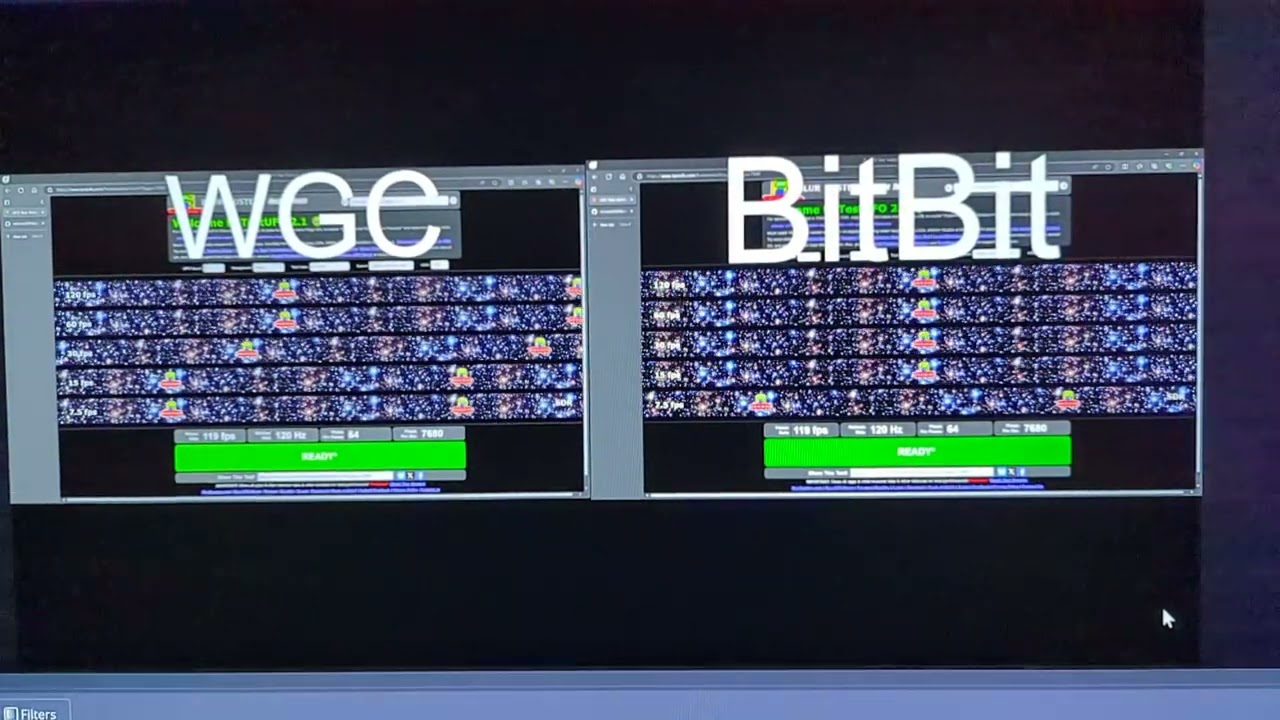
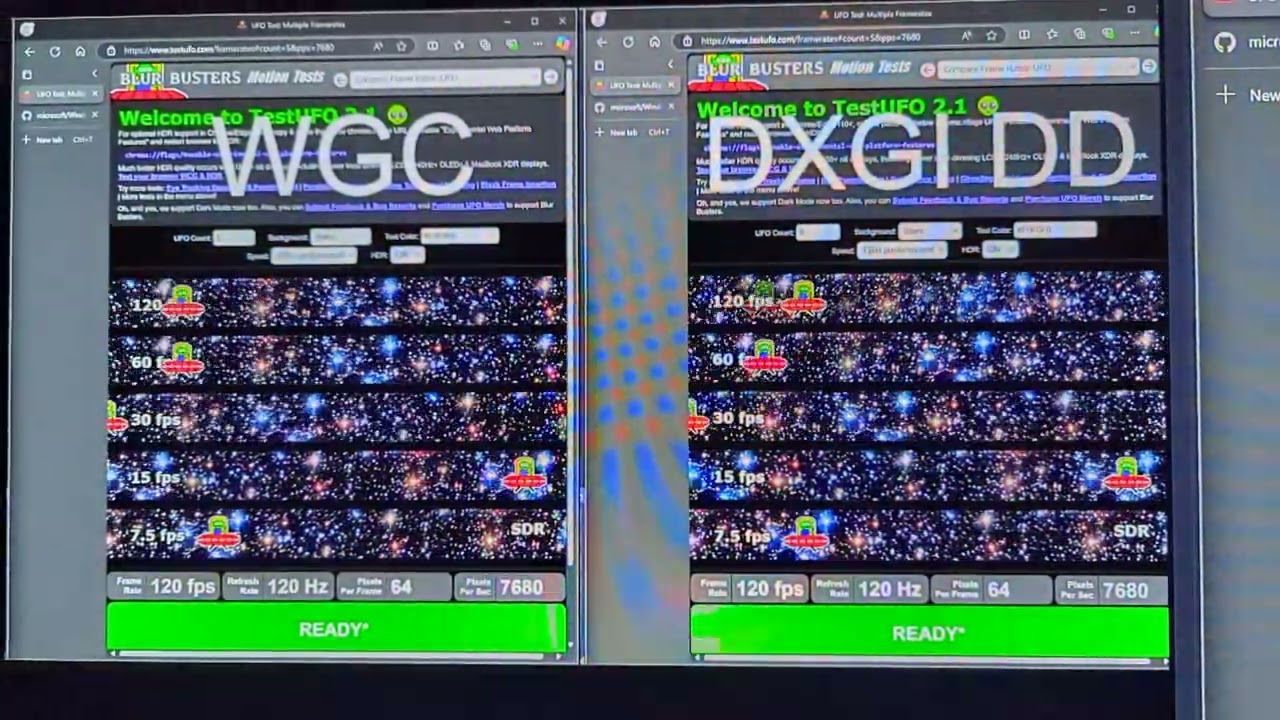
Looks to me like it's a Windows Graphics Capture API issue. (will refer as WGC) Decided to record some slow-mo videos on my phone.
All videos are recorded on my Pixel 7 at 1/8 speed. (max I can do on my phone). UFO test ware done on my LG B4 OLED TV (OLED48B4PSA) to negate blurring.
Just click on the images to open the video, they should just re-direct to unlisted YT video.
I used OBS as it's pretty mature and reliable software. I'd expect if WGC could capture at higher FPS, OBS team would've already implemented it. Plus every "screen recorder" sample project on GitHub that uses WGC (even Microsoft's samples) seem to have this exact same issue.
Shader Glass vs Native
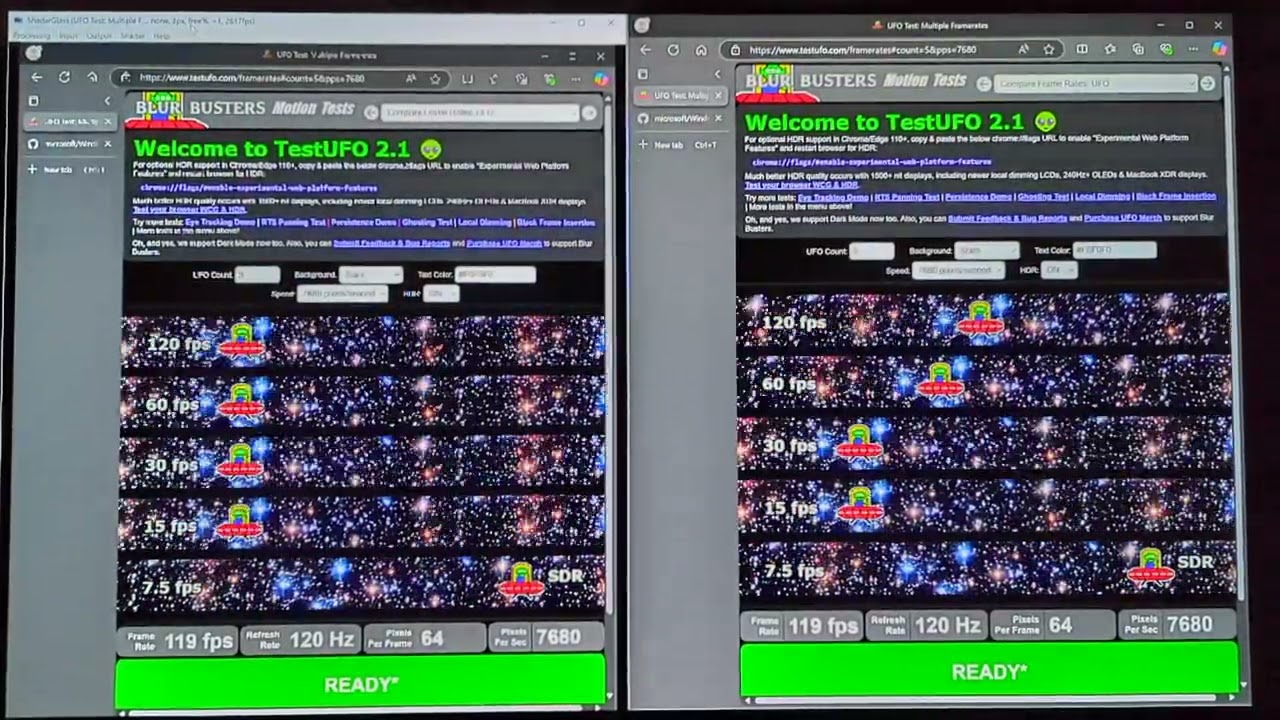 OBS WGC (Window Capture) vs OBS BitBit (Window Capture)
 OBS WGC (Desktop Capture) vs OBS DXGI DD (Desktop Capture)
Didn't do Game Capture as OBS doesn't advice it. Redirecting users to use Window or Desktop capture. Also Game Capture uses injection to pull frames.
Link to UFO Test by Blur Busters
30 fps looks choppy in videos because I am running at MAX Speed (7680 pixels / second). When doing 1/8 speed recordings on my phone, videos only output at 30 fps (sorry). But even at 30 fps, the difference can still be seen. I think it really shows the difference for having a refresh rate above 60hz. But anyone with high refresh rate display will already vouch for this.
I currently only use ShaderGlass for overlaying on top of Kodi Player that streams my Jellyfin Library. Which it works perfectly for minus HDR. Most games I just inject ReShade over anyways (Kodi just crashes with it).
Keep up the good work though!

Why isn't this app using the Desktop Duplication API? I have an app that mirrors your desktop sans shaders but the performance is great (e.g. 240fps at 4k@240hz). Take a look at my repo called MirrorVerse. Or this code sample: https://github.com/Ericvf/Cpp-DirectX-DesktopDuplication/tree/master/DirectX11app

I released a new beta (1.0.3) which adds an "Advanced" menu where you can:
- switch to Flip presentation model (there are some WGC bugs when on Windows 10, move window to fix...)
- allow tearing (only with Flip presentation)
- enable Max Capture Rate from WGC; this unfortunately is only available from Win11 24H2... before that it's limited to 60 None of these options make much of a difference on my 60Hz setup... but there's also a new frame timing mechanism which even with BitBlts results in smoother capture and less stutter.
the problem is still there, even if it can now capture up to my monitor refresh 165, it only presents the hard tick cap of 64, so it says 165 -> 64
I released a new beta (1.0.3) which adds an "Advanced" menu where you can:
- switch to Flip presentation model (there are some WGC bugs when on Windows 10, move window to fix...)
- allow tearing (only with Flip presentation)
- enable Max Capture Rate from WGC; this unfortunately is only available from Win11 24H2... before that it's limited to 60 None of these options make much of a difference on my 60Hz setup... but there's also a new frame timing mechanism which even with BitBlts results in smoother capture and less stutter.
VRR is now works! thanks! Yes there is something like 64 fps lock, but now is much better!
Still stuck at 64fps (on a 360Hz display). Can't try the "max capture rate" setting because I'm on W10. Would be cool to see this resolved some day. 60fps output is more limiting than you'd realize (at least for anyone who owns a high refresh rate display. The last time I used a 60Hz display was like...2012..?)
Max Capture Rate on Win11 24H2 is a good addition but this is still unfortunately not usable for me since it still samples down to ~60fps on my 240hz monitor. Would love to see this fixed someday.

Can confirm that the fps swings wildly from 64fps to 120 or 144 depending on the monitor i'm using. It would be nice to just have uncapped fps in ShaderGlass while also having flawless VRR support. I capped my refresh rate from 120hz to 60hz for a game that's locked at 60fps anyways. I also capped fps to 60 using rivatuner. The game was 90% smooth where it wasn't before the refresh rate and fps cap change. It still suffered from stutters in areas that were fine without ShaderGlass though. Love this program and hope to see these issues fully resolved. Thank you for the efforts mausimus!
Edit to elaborate, at the top of the ShaderGlass window, there's two numbers representing the framerate. 144 ->64fps, FTM is what it says. The first number will swing from 64fps and anywhere between 144fps. Even at the desktop, the first number doesn't stay at 144fps. This seems to be causing the stuttering i'm seeing in games. I'm using 13700K, RTX 3090, and 32GB of DDR5.

I Hope for higher FPS support as well. I have a 120hz VRR display, 5800x CPU and 3060 12GB GPU.
EDIT: The stutter issues I was having is fixed by using the "Lock Current Area" Option. "Clone" Mode works too but it doesn't save the selected input window to my preset (I load game + shaderglass simutaneuosly via a vbscript / commandline), I think because in the window bar the "title" changes with current FPS dynamically
https://github.com/asfasagag/ShaderGlass/commit/27bc2dcd37300db5ee461b72bbbad5b71897c0c7 a minor change to this file allows the program to run at 120FPS for me, confirmed working with the UFO test but I have 0 Idea what I am doing to implement that properly.

I Hope for higher FPS support as well. I have a 120hz VRR display, 5800x CPU and 3060 12GB GPU.
EDIT: The stutter issues I was having is fixed by using the "Lock Current Area" Option. "Clone" Mode works too but it doesn't save the selected input window to my preset (I load game + shaderglass simutaneuosly via a vbscript / commandline), I think because in the window bar the "title" changes with current FPS dynamically
asfasagag@27bc2dc a minor change to this file allows the program to run at 120FPS for me, confirmed working with the UFO test but I have 0 Idea what I am doing to implement that properly.
Nice find. I wonder if that limit can be set to something really high to give us unlimited fps from ShaderGlass so the game/app we're using it with is the decider of the framerate instead?
Ok I think I might have fixed the 65 fps ceiling; turns out the Windows timer I was using to time frames has ~15ms resolution so a lot of frames were getting skipped as duplicates. I also discovered my monitor CAN do 75 Hz if I lower resolution to 720p :tired_face: and was able to test this, but I'd appreciate if someone with a proper high refresh monitor could try the nightly build with the fix! Please remember to tick Advanced -> Max Capture Rate (you need recent Win11) so that Windows Capture doesn't throttle anything either. This would also have caused stutter at >60 fps so maybe the situation improved there?
Nightly build with the fix: https://github.com/mausimus/ShaderGlass/actions/runs/16071383577/artifacts/3465101249
BTW on the title bar display, the first number is how many FPS Windows Capture is supplying (I can't control this, but if you tick Max Capture Rate, Shader Glass will ask for up to 250 fps), the second is number of frames rendered by ShaderGlass. Windows Capture has these "power saving" mechanisms where it lowers capture rate when there's nothing going on and there is no way to suppress them (I asked). I really need to get a better monitor to understand these quirks more.
Lastly, regarding the code changes you posted, these parameters only kick in when input frame didn't change (to make sure the shader internally renders at least 60 fps even if you're looking at a static image - for time-based effects) so with my fix there should be no need to make changes there.
but I'd appreciate if someone with a proper high refresh monitor could try the nightly build with the fix!
Worked for me. Seems like stable 144 FPS. Thank you!
High refresh rates are working for me as well on my 120Hz display Thank you for taking the time to look into this!
This would also have caused stutter at >60 fps so maybe the situation improved there?
Yes the stutters are also gone for me - I can disable the "Lock Current Area" Option I mentioned previously, and use "Glass" mode now
I have noticed two issues so far - when the ShaderGlass window is focused, there is still a 60 / 64 fps limit. It also now limits the entire system to 60 fps when the window is focused, not just ShaderGlass:
When its window is not focused, the higher refresh rates work nicely:
The second issue I noticed is that the higher refresh rates only work if I disable the "Dynamic refresh rate" in Windows Settings. When this is enabled it stays at 60 unless I am moving my mouse, but works regardless of window focus
Thank you for testing, I pushed the fix to 1.1.4 stable. Regarding these remaining issues around focus and VRR I'm afraid they will need to wait until I can test this on my setup.
Thank you for testing, I pushed the fix to 1.1.4 stable. Regarding these remaining issues around focus and VRR I'm afraid they will need to wait until I can test this on my setup.
Just tested on my 1440p/144hz monitor. Enabled the "Max Capture Rate" option. Restarted the app and smooth as butter now. Will test on my LG C4 120hz and report back if there are issues.
Edit - Just tested on my 120hz TV. Having Vsync enabled(I use force on in Nvidia Control Panel), the fps goes above the 120hz(I think it was 188fps). Disabling Vsync for shaderglass produces same result. It looks smoother than before, but the frametimes are not as smooth as running the game without shaderglass. Another thing, i'm running Lunar Remastered Collection and using RTX HDR. When I enable ShaderGlass, the HDR seems to disable itself and game gets dimmer. When I close ShaderGlass the image goes back to being brighter with RTX HDR enabled again.
It looks like the Max Capture Rate is exclusively a Windows 11 feature. Are there plans to implement something similar for Windows 10 or older?

I am having trouble with shaderglass being stuck at 60fps. I am using a multiple monitor setup. One monitor is 300hz and I want to use BFI at 300fps in shaderglass.
