
mattermost-plugin-jira
 mattermost-plugin-jira copied to clipboard
 mattermost
Subscriptions has poor UX when user attempts to Edit when they have no access to the project
When a user has access to to view the subscription modal - It is possible that some of the subscriptions are for projects they do not have access to. In this case, the UX is poor. The subscription (name and project) will be listed along with Edit and Delete options.
If a user attempts to Edit the subscription they will get the error The project <name> is unavailable. Please contact your system administrator.
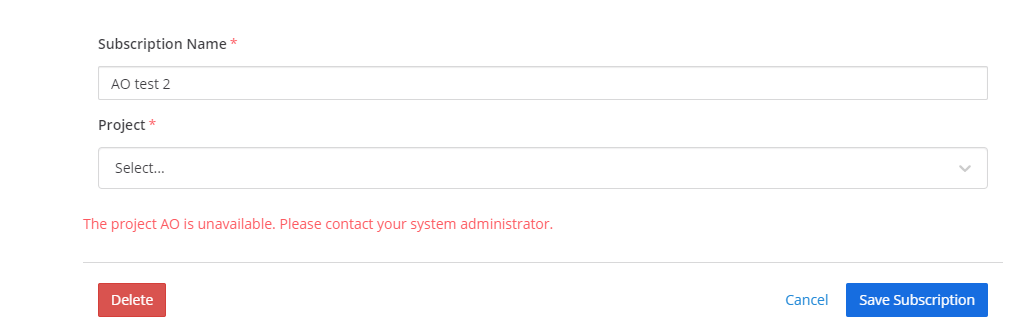
This is valid as the user has no access in Jira to this project and info within it but, they should not be permitted to attempt the edit. 0/5 We should check the permission access before opening the modal and concider hidding subscriptions the user has no access to Edit. At the very least we should not show the edit button in the UI.
Steps:
- Login as a user and create a subscription for a target project
- Login as a different user who has access to the subscribe modal but does note have browse or create permissions to the target project.
- Open the subscribe modal Observed: User can attempt to edit the subscription.

Also see https://github.com/mattermost/mattermost-plugin-jira/issues/496, tangentially related

This also happens when the selected project does not allow the user to clone tickets (see https://github.com/mattermost/mattermost-plugin-jira/issues/885)
