

 mattermost
No notifications after initial setup according to setup guide
Hello, I have configured the plugin according to the documentation in the readme of this repository. I have connected my github account successfully and have subscribed to one of my private repositories and have enabled notifications for pushes.
If I now push to the repository I am not receiving a notification, nor are any notifications coming in in case of issue creations or alike.
Can you suggest a way to debug why?

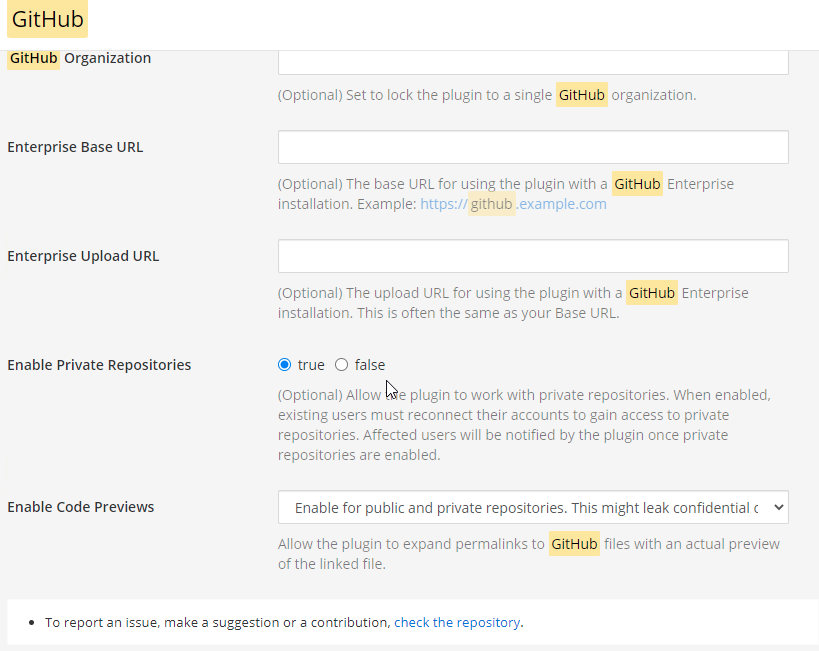
@chwba Do you have the Enable Private Repositories setting enabled in this plugin's settings?

@chwba Are you able to monitor requests coming from GitHub to your Mattermost instance, using something like https://ngrok.io?
@chwba Are you able to monitor requests coming from GitHub to your Mattermost instance, using something like https://ngrok.io?
As of now mattermost is configured to listen to :443, would ngrok work with it configured like that? Can you advise a minmal "how-to set up ngrok" and dont we have logs inside mattermost to extract this information?
EDIT: had taken a quick look at mitmproxy in the meantime, seems quite complicated to setup - especially on a VPS.. Any help with this is highly appreciated. EDIT2: well I managed to get mitmproxy working on the VPS but id have to know how I can add mitmproxys root cert as trusted to mattermost - It works in the browser after adding the root crt to firefox.. or a different approach.. in any case quite complicated, dont we have logs from mattermost for this?
Hello,
I've reacted with the +1 because I'm facing the same problem as @chwba. It stops working from one to another day without anything changed.
Tried to make it work again with a complete reinstallation of the plugin on the affected server. The private repository settings is enabled, too.
The following represents an request from yesterday after the reinstallation und reconfiguration (complete new setup with the help of the documentation) of the plugin.
The repository shows the web hook as fired:
Request URL: https://example.com/plugins/github/webhook
Request method: POST
Accept: */*
content-type: application/json
User-Agent: GitHub-Hookshot/8d33975
X-GitHub-Delivery: cc4ca9f6-05e9-11ec-8e54-3fec7a1eefc4
X-GitHub-Event: push
X-GitHub-Hook-ID: REDACTED
X-GitHub-Hook-Installation-Target-ID: REDACTED
X-GitHub-Hook-Installation-Target-Type: repository
X-Hub-Signature: sha1=dbdf9a128ab231bda0a8436efe755f9dbe308f2f
X-Hub-Signature-256: sha256=4ec36ca10a2e4d07ecea403c33434041a0ab4137131d7b6fa27b154667a2a795
And the webserver responded with the following a result of the request of GitHub:
Content-Length: 0
Date: Wed, 25 Aug 2021 10:17:06 GMT
Server: nginx
In the access_log of the affected NGNIX reverse proxy server the below mentioned POST-request is visible. But nothing shows up in the affected channel in mattermost where push notifications should be visible to the users.
140.82.115.243 - - [25/Aug/2021:10:17:06 +0200] "POST /plugins/github/webhook HTTP/1.1" 200 0 "-" "GitHub-Hookshot/8d33975"
Accessing (copied the header and payload into PostMan) the API endpoint https://example.com/plugins/github/webhook without OAuth authentication results in an 401 Unauthorized as expected. Therefore the endpoint and the configuration of the proxy cannot be the problem.
BTW: The daily reminder works fine.
Any advice?
@chwba Maybe you can check your installation like me?

As of now mattermost is configured to listen to :443, would ngrok work with it configured like that? Can you advise a minmal "how-to set up ngrok"?
I believe you'll just need to download the ngrok binary, then run ngrok http 443. Then the program will give you a URL to use on GitHub's webhook side. You can then point your browser at (SERVER_URL):4040 to see the ngrok monitoring tool's UI, and inspect requests and responses for the webhook requests.
dont we have logs inside mattermost to extract this information?
It looks like there isn't a log message for the general case of receiving a webhook message. You can see by reading the code for the function below. Thanks for pointing this out, I'm making a ticket for this now.
https://github.com/mattermost/mattermost-plugin-github/blob/1fc5017ae13300e645f8a97d17751c6eeb89f0ae/server/plugin/webhook.go#L61
As a followup question, do you receive notifications correctly for public repositories? cc @hanzei for visibility
Actually I want make sure I understand what you are asking to be logged here @chwba, because I'm not sure if my original interpretation of "we have received a webhook request" fits your request.
As an aside, @hanzei it looks like we aren't logging nor writing a response to the webhook request in these two cases:
https://github.com/mattermost/mattermost-plugin-github/blob/1fc5017ae13300e645f8a97d17751c6eeb89f0ae/server/plugin/webhook.go#L167-L173
@hanzei @mickmister
@chwba Maybe you can check your installation like me?
Sadly for me its not as easy because I don't have the nginx reverse proxy running.
As a followup question, do you receive notifications correctly for public repositories?
Just tested, no notifications for public either. (Just like for @Fighter456, the daily reminder works fine)
I believe you'll just need to download the ngrok binary, then run ngrok http 443. Then the program will give you a URL to use on GitHub's webhook side. You can then point your browser at (SERVER_URL):4040 to see the ngrok monitoring tool's UI, and inspect requests and responses for the webhook requests.
I tried that but it does not seem to catch any requests, on both of the the test urls (1-2-3-4.ngrok.io) I see this one:

I did try to add and remove a subscription for a repository, push to the repository and create an issue, no requests were captured, or at least none of them is visible in ngroks ui at http://127.0.0.1:4040/inspect/http.
Do note, that my mattermost instance is already configured to run on a domain and uses the included letsencrypt for the ssl certificate. Then it might be helpful to add, that before I had an instance of rocketchat running and the webhooks were working fine, so nothing is getting firewalled.
As an aside, @hanzei it looks like we aren't logging nor writing a response to the webhook request in these two cases:
https://github.com/mattermost/mattermost-plugin-github/blob/1fc5017ae13300e645f8a97d17751c6eeb89f0ae/server/plugin/webhook.go#L167-L173
AFAIK the http server returns an empty body and a 200 by default. Should we one anything special here?

@hanzei If it was me I would simply build in a "debug" switch for the logging in mattermost which, if enabled, logs all the requests coming in or going out in a format something like [URL] GET -> (response_code) body or so. - This way we a user can much easier debug if a problem occurs.
In any case, if @Fighter456 and mine are the same problems (seems like it), its not the webhook but, that the message is not being posted in the channel. - I dont really know what else I can do from my end without investing tremendous amounts of time into reinstalling the whole server/trying to get ngrok to work or installing a reverse proxy.
If you can provide me an easy step by step procedure, that I can follow id sure be willing to follow it, in order to get the network requests of the webhooks.
@mickmister Meta: This seems like another case of https://github.com/mattermost/mattermost-plugin-skype4business/issues/58. Maybe we should start implementing this kind of logging for every plugin that makes uses of a webhook? 2/5 implement it for one then stamp it down on the others.
@hanzei - please open the Meta ticket for handling incoming webhooks logging similar to the Skype plugin.

See https://community-daily.mattermost.com/boards/workspace/6njtzeo53prh3j46ad6873hc5r/fd5a60f3-3908-412f-8911-1ff61040d85a/e895dc00-c8c8-4a3e-8c96-910a2410719b?c=9eb9910f-241a-465b-8ba6-1e5bef73d09c