

 matplotlib
[Bug]: Horizontal colorbars drawn incorrectly with hatches
Bug summary
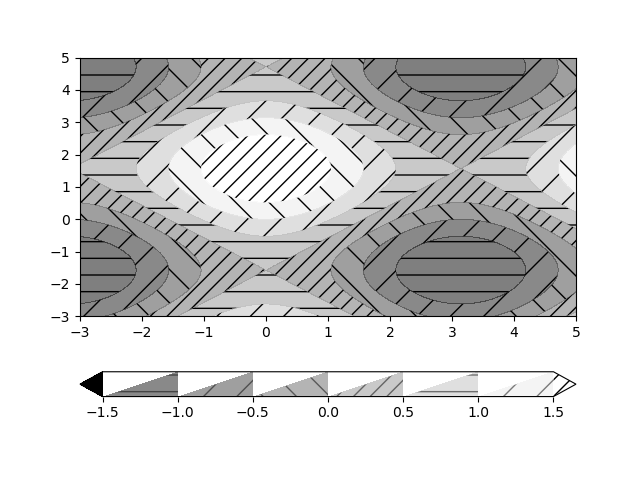
When specifying hatches for contourf, the colorbar is drawn correctly for vertical colorbars but not for horizontal ones. The Hatches and colorfill only fill the lower diagonal of the colorbar boxes.
Code for reproduction
import matplotlib.pyplot as plt
import numpy as np

import matplotlib.pyplot as plt
import numpy as np

# invent some numbers, turning the x and y arrays into simple
# 2d arrays, which make combining them together easier.
x = np.linspace(-3, 5, 150).reshape(1, -1)
y = np.linspace(-3, 5, 120).reshape(-1, 1)
z = np.cos(x) + np.sin(y)

# we no longer need x and y to be 2 dimensional, so flatten them.
x, y = x.flatten(), y.flatten()

fig1, ax1 = plt.subplots()
cs = ax1.contourf(x, y, z, hatches=['-', '/', '\\', '//'],
                  cmap='gray', extend='both', alpha=0.5)

fig1.colorbar(cs, orientation='horizontal')
plt.show()
Actual outcome
Expected outcome

Additional information
The bug occurs when the colorbar is horizontal and the contourf call uses hatches. Changing the kwargs extend, cmap, colors, alpha, etc when calling contourf does not resolve the bug.
The bug does not occur when the colorbar is vertical with hatches nor when the colorbar is horizontal and no hatches are used.
Potential Solution:
In colorbar.py, change line 637 to the following:
xy = np.array([[X[i, 0], Y[i, 1]],
This doesn't cause issues when hatches are not used. It also doesn't cause problems with vertical colorbars.
Operating system
macOS Big Sur Version 11.3.1 with Intel Silicon
Matplotlib Version
3.5.2
Matplotlib Backend
module://backend_interagg
Python version
3.10.5
Jupyter version
No response
Installation
conda

Did this work before and we broke it, or did it never work? There were some changes to colorbars, but I'm not sure why they would cause this to happen. Thanks.

I'm not sure but I can try running my code using older versions of matplotlib. What version do you think might be the culprit?
Try 3.4.2. But if you don't know if this ever worked it probably never did. My guess would be there is a typo in the code that makes the hatch. Maybe east to fix if you grep hatch in the colorbar.py
The bug still happens in v3.4.2. I did find a solution that fixes the issue without messing up vertical colorbars with hatches. I works in both 3.5.2 and 3.4.2
In _add_solids_patches, change the indices for creating xy from
    def _add_solids_patches(self, X, Y, C, mappable):
        hatches = mappable.hatches * len(C)  # Have enough hatches.
        patches = []
        for i in range(len(X) - 1):
           xy = np.array([[X[i, 0], Y[i, 0]],
                           [X[i, 1], Y[i, 0]],
                           [X[i + 1, 1], Y[i + 1, 0]],
                           [X[i + 1, 0], Y[i + 1, 1]]])
To this
    def _add_solids_patches(self, X, Y, C, mappable):
        hatches = mappable.hatches * len(C)  # Have enough hatches.
        patches = []
        for i in range(len(X) - 1):
           xy = np.array([[X[i, 0], Y[i, 1]],  # this is the only line that needs a change
                           [X[i, 1], Y[i, 0]],
                           [X[i + 1, 1], Y[i + 1, 0]],
                           [X[i + 1, 0], Y[i + 1, 1]]])
Yep, that looks like an indexing bug... If you have a patch, feel free to try a pull request. Maybe also add a test to test_colorbar.py? It would require an image comparison. https://matplotlib.org/stable/devel/index.html for more guidance, also feel free to ask at https://gitter.im/matplotlib/matplotlib
I was about to implement this, but I found another issue as well. A slightly different setting gave this (after the patch above was introduced):

Clearly the colors and hatches are off by one.
That seems to be a problem for vertical as well (and maybe easier to see there):

The same thing can be seen in the original picture although not as obvious there. Rather, there are eight different levels in both the contour and the colorbar, but the left extended level in the colorbar is not matching the darkest in the contour. However, of the three lightest/right-most three levels in the contour, only two of them are in the colorbar.
Not sure if it is worthwhile doing a patch to get the rectangle correct as it probably doesn't make sense to add a test image since the colorbar in itself doesn't match the contour-levels.

So, _add_solids_patches duplicates the hatches:
https://github.com/matplotlib/matplotlib/blob/9b1fcf67c4228c4a2788af5bcaf0c6fde09a55bf/lib/matplotlib/colorbar.py#L610
and then picks one at a time starting from 0:
https://github.com/matplotlib/matplotlib/blob/9b1fcf67c4228c4a2788af5bcaf0c6fde09a55bf/lib/matplotlib/colorbar.py#L619
The extend patches picks the first and last hatch pattern of the original list: https://github.com/matplotlib/matplotlib/blob/9b1fcf67c4228c4a2788af5bcaf0c6fde09a55bf/lib/matplotlib/colorbar.py#L685
https://github.com/matplotlib/matplotlib/blob/9b1fcf67c4228c4a2788af5bcaf0c6fde09a55bf/lib/matplotlib/colorbar.py#L706