
MathJax

MathJax copied to clipboard
 mathjax
Unexpected space between text and number in \operatorname{}
Issue Summary
When rendering
\operatorname{atan2}(y,x)
using MathJax v3, a space was mistakenly inserted between “atan” and “2”.
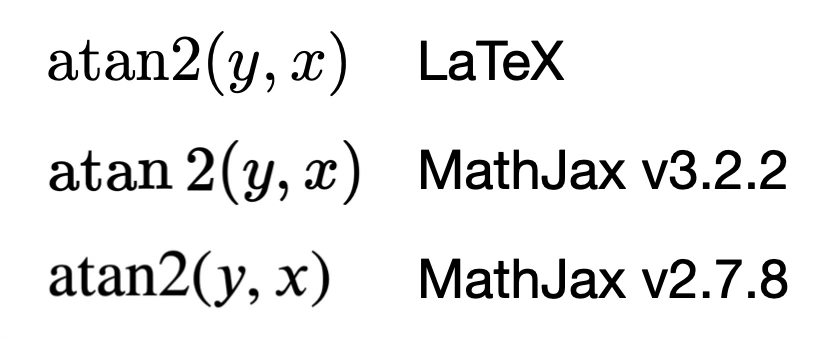
Steps to Reproduce:
Use MathJax v3 to render:
\operatorname{atan2}(y,x)
or
\DeclareMathOperator{\atantwo}{atan2}
\atantwo(y,x)
Below is MathML produced by MathJax v3:
<math xmlns="http://www.w3.org/1998/Math/MathML" display="block">
  <mrow data-mjx-texclass="OP">
    <mi>atan</mi>
    <mn>2</mn>
  </mrow>
  <mo stretchy="false">(</mo>
  <mi>y</mi>
  <mo>,</mo>
  <mi>x</mi>
  <mo stretchy="false">)</mo>
</math>
While MathJax v2 generates:
<math xmlns="http://www.w3.org/1998/Math/MathML" display="block">
<mstyle displaystyle="true" scriptlevel="0">
<mrow class="MJX-TeXAtom-ORD">
<mi>atan2</mi>
<mo>⁡<!-- --></mo>
<mo stretchy="false">(</mo>
<mi>y</mi>
<mo>,</mo>
<mi>x</mi>
<mo stretchy="false">)</mo>
</mrow>
</mstyle>
</math>
Technical details:
- MathJax Version: 3.2.2 (Latest, using official example)
- Client OS: macOS 13.0 (22A380)
- Browser: Safari 16.1 (18614.2.9.1.12)
Supporting information:
The result of MathJax v2 was generated by this online demo.


I have made a pull request that will resolve the issue in the next release.
For now, you can use \operatorname{{atan}2} to get the proper spacing as a work-around.
I have made a pull request that will resolve the issue in the next release.
For now, you can use
\operatorname{{atan}2}to get the proper spacing as a work-around.
Thanks a lot!