

 mathjax
Operators closed up in mfrac in inline-formula
Issue Summary
I noticed that operators like plus and minus signs are closed up when located in mfrac within an inline-formula (i.e., m:math with display="inline"). I am used to some changes occurring between display="block" and "inline", e.g., the limits of summations either being under/over or sub/sup, but I've not seen operator spacing affected like this before. Is this normal, expected behavior? We don't see the same behavior in our PDFs.
MathJax (plus and minus signs closed up):

PDF (plus and minus signs are spaced):

MathML:
<m:math altimg="jz1c00702_m042.gif" display="inline"
other="C:\DOCUME~1\jem00\LOCALS~1\Temp\MMLIMG4420269.png"
xmlns:dsi="http://www.dessci.com/uri/2003/MathML">
<m:msub><m:mrow><m:mi>E</m:mi></m:mrow><m:mrow><m:mi>ct</m:mi></m:mrow>
</m:msub><m:mo>≃</m:mo><m:mfrac><m:mrow><m:msup><m:mrow><m:mo
stretchy="false">(</m:mo><m:mi>η</m:mi><m:msub><m:mrow><m:mi
mathvariant="italic">eQ</m:mi></m:mrow><m:mrow><m:mi
mathvariant="normal">d</m:mi></m:mrow></m:msub><m:mo stretchy="false"
>)</m:mo></m:mrow><m:mrow><m:mn>2</m:mn></m:mrow></m:msup><m:msub>
<m:mrow><m:mi>l</m:mi></m:mrow><m:mrow><m:mi>ct</m:mi></m:mrow></m:msub>
</m:mrow><m:mrow><m:mn>2</m:mn><m:mi>A</m:mi><m:msub><m:mrow><m:mi
>ε</m:mi></m:mrow><m:mrow><m:mn>0</m:mn></m:mrow></m:msub>
</m:mrow></m:mfrac><m:mo>−</m:mo><m:mrow><m:mo stretchy="false"
>|</m:mo><m:msub><m:mrow><m:mi>Q</m:mi></m:mrow><m:mrow><m:mi
mathvariant="normal">d</m:mi></m:mrow></m:msub><m:mo stretchy="false"
>|</m:mo></m:mrow><m:mi>η</m:mi><m:mi mathvariant="normal">Δ</m:mi>
<m:mi>W</m:mi><m:mfrac><m:mrow><m:msub><m:mrow><m:mi>ε</m:mi>
</m:mrow><m:mrow><m:mi mathvariant="normal">r</m:mi></m:mrow></m:msub>
<m:msub><m:mrow><m:mi>l</m:mi></m:mrow><m:mrow><m:mi>ct</m:mi></m:mrow>
</m:msub></m:mrow><m:mrow><m:mi>l</m:mi><m:mo>+</m:mo><m:mrow><m:mo
stretchy="false">(</m:mo><m:msub><m:mrow><m:mi>ε</m:mi></m:mrow>
<m:mrow><m:mi mathvariant="normal">r</m:mi></m:mrow></m:msub><m:mo
>−</m:mo><m:mn>1</m:mn><m:mo stretchy="false">)</m:mo></m:mrow>
<m:msub><m:mrow><m:mi>l</m:mi></m:mrow><m:mrow><m:mi>ct</m:mi></m:mrow>
</m:msub></m:mrow></m:mfrac>
</m:math>
Technical details:
MathJax Version: master - latest commit: MathJax.js v2.7.5 Client OS: Windows Browser: Chrome Version 91.0.4472.114 (Official Build) (64-bit) Renderer: HTML-CSS

I noticed that operators like plus and minus signs are closed up when located in mfrac within an inline-formula
This is following the TeX rules for spacing. TeX has three styles (display, text, script, and script-script), and a fraction in in-line mode has its numerator and denominator in script style. In script and script-script styles, the spacing is collapsed, as in your example. Here is actual TeX output for this expression:
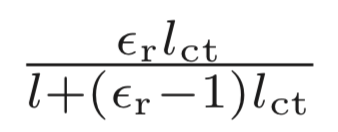
You could use
MathJax.Hub.Register.StartupHook("mml Jax Ready", function () {
  var MML = MathJax.ElementJax.mml;
  MML.mbase.Augment({
    texSpacing: function () {
      var prev = (this.prevClass != null ? this.prevClass : MML.TEXCLASS.NONE);
      var tex = (this.Get("texClass") || MML.TEXCLASS.ORD);
      if (prev === MML.TEXCLASS.NONE || tex === MML.TEXCLASS.NONE) {return ""}
      if (prev === MML.TEXCLASS.VCENTER) {prev = MML.TEXCLASS.ORD}
      if (tex  === MML.TEXCLASS.VCENTER) {tex  = MML.TEXCLASS.ORD}
      var space = this.TEXSPACE[prev][tex];
      if ((this.prevLevel > 0 || this.Get("scriptlevel") > 0) && space >= 0) {return "verythinmathspace"}
      return this.TEXSPACELENGTH[Math.abs(space)];
    }
  });
});
to use a verythinmathspace for these situations instead of no space, if you prefer (or whatever width you want).
