

 mathjax
Strange rendering in Microsoft Edge
Issue Summary
Strange rendering behaviour on Microsoft Edge
User-Agent: Mozilla/5.0 (Windows NT 10.0; Win64; x64) AppleWebKit/537.36 (KHTML, like Gecko) Chrome/70.0.3538.102 Safari/537.36 Edge/18.18363
Here's a comparison of Microsoft Edge and Google Chrome:
- Edge

- Chrome

Steps to Reproduce:
You can visit the following link to reproduce: https://yscale.cf/2020/04/22/hello-world.html
Technical details:
- MathJax Version: 3.0.5 (CDN: https://cdn.bootcdn.net/ajax/libs/mathjax/3.0.5/es5/tex-mml-chtml.js)
- MathJax Config
window.MathJax = {
    tex: {
        inlineMath: [['$','$'], ['\\(','\\)']],
        macros: {
            abs: ['{\\left|{#1}\\right|}', 1]
        },
        autoload: {
            color: [],
            colorV2: ['color']
        },
        packages: {'[+]': ['noerrors']}
    },
    options: {
        renderActions: {
            addMenu: [],
            checkLoading: [],
            findScript: [10, function (doc) {
                for (const node of document.querySelectorAll('script[type^="math/tex"]')) {
                const display = !!node.type.match(/; *mode=display/);
                const math = new doc.options.MathItem(node.textContent, doc.inputJax[0], display);
                const text = document.createTextNode('');
                node.parentNode.replaceChild(text, node);
                math.start = {node: text, delim: '', n: 0};
                math.end = {node: text, delim: '', n: 0};
                doc.math.push(math);
                }
            }, '']
        },
        ignoreHtmlClass: 'tex2jax_ignore',
        processHtmlClass: 'tex2jax_process'
    },
    loader: {
        load: ['input/asciimath', '[tex]/noerrors']
    }
};
- Client OS: Windows

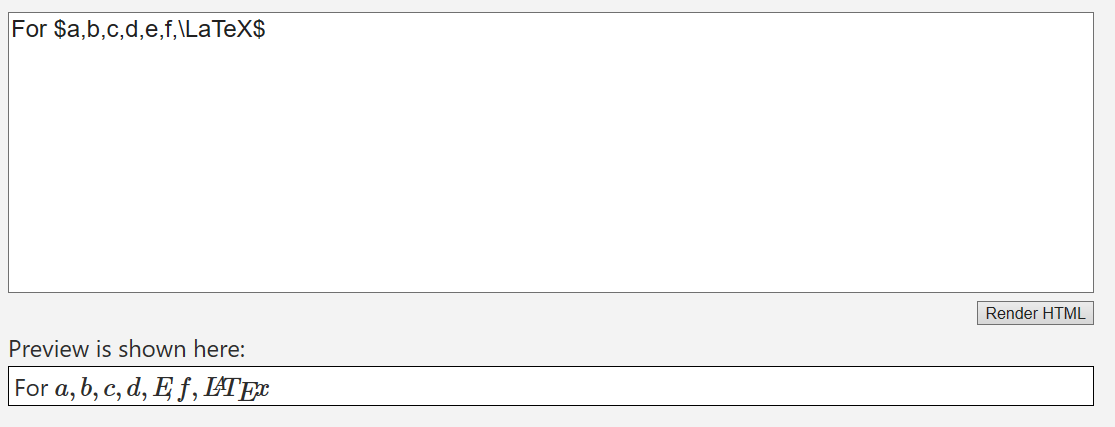
Thanks for the report. I can confirm that something is going seriously wrong with Edge. Its handling of the fonts seems to be completely broken (and the results depend on what has already been displayed, so that is weird).
I will have to look into it further.

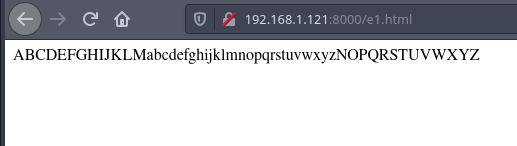
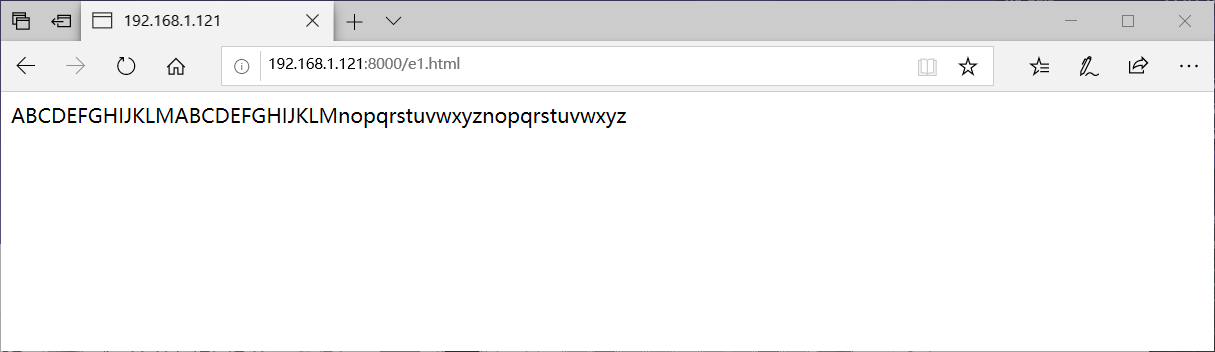
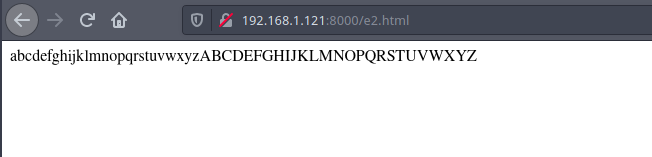
After some tests, I can also confirm that it's exactly attributed to the bugs (or features???) from Microsoft Edge, on the CSS property content. Here are two tests.
<!doctype html>
<html>
    <head>
        <style>
            .a::before { content: "a"; } .b::before { content: "b"; } .c::before { content: "c"; } .d::before { content: "d"; } .e::before { content: "e"; } .f::before { content: "f"; } .g::before { content: "g"; } .h::before { content: "h"; } .i::before { content: "i"; } .j::before { content: "j"; } .k::before { content: "k"; } .l::before { content: "l"; } .m::before { content: "m"; } .n::before { content: "n"; } .o::before { content: "o"; } .p::before { content: "p"; } .q::before { content: "q"; } .r::before { content: "r"; } .s::before { content: "s"; } .t::before { content: "t"; } .u::before { content: "u"; } .v::before { content: "v"; } .w::before { content: "w"; } .x::before { content: "x"; } .y::before { content: "y"; } .z::before { content: "z"; } .A::before { content: "A"; } .B::before { content: "B"; } .C::before { content: "C"; } .D::before { content: "D"; } .E::before { content: "E"; } .F::before { content: "F"; } .G::before { content: "G"; } .H::before { content: "H"; } .I::before { content: "I"; } .J::before { content: "J"; } .K::before { content: "K"; } .L::before { content: "L"; } .M::before { content: "M"; } .N::before { content: "N"; } .O::before { content: "O"; } .P::before { content: "P"; } .Q::before { content: "Q"; } .R::before { content: "R"; } .S::before { content: "S"; } .T::before { content: "T"; } .U::before { content: "U"; } .V::before { content: "V"; } .W::before { content: "W"; } .X::before { content: "X"; } .Y::before { content: "Y"; } .Z::before { content: "Z"; }
        </style>
    </head>
    <body>
        <span class="A"></span><span class="B"></span><span class="C"></span><span class="D"></span><span class="E"></span><span class="F"></span><span class="G"></span><span class="H"></span><span class="I"></span><span class="J"></span><span class="K"></span><span class="L"></span><span class="M"></span><span class="a"></span><span class="b"></span><span class="c"></span><span class="d"></span><span class="e"></span><span class="f"></span><span class="g"></span><span class="h"></span><span class="i"></span><span class="j"></span><span class="k"></span><span class="l"></span><span class="m"></span><span class="n"></span><span class="o"></span><span class="p"></span><span class="q"></span><span class="r"></span><span class="s"></span><span class="t"></span><span class="u"></span><span class="v"></span><span class="w"></span><span class="x"></span><span class="y"></span><span class="z"></span><span class="N"></span><span class="O"></span><span class="P"></span><span class="Q"></span><span class="R"></span><span class="S"></span><span class="T"></span><span class="U"></span><span class="V"></span><span class="W"></span><span class="X"></span><span class="Y"></span><span class="Z"></span>
    </body>
</html>
| Firefox | Edge |
|---|---|
 |
 |
<!doctype html>
<html>
    <head>
        <style>
            .a::before { content: "a"; } .b::before { content: "b"; } .c::before { content: "c"; } .d::before { content: "d"; } .e::before { content: "e"; } .f::before { content: "f"; } .g::before { content: "g"; } .h::before { content: "h"; } .i::before { content: "i"; } .j::before { content: "j"; } .k::before { content: "k"; } .l::before { content: "l"; } .m::before { content: "m"; } .n::before { content: "n"; } .o::before { content: "o"; } .p::before { content: "p"; } .q::before { content: "q"; } .r::before { content: "r"; } .s::before { content: "s"; } .t::before { content: "t"; } .u::before { content: "u"; } .v::before { content: "v"; } .w::before { content: "w"; } .x::before { content: "x"; } .y::before { content: "y"; } .z::before { content: "z"; } .A::before { content: "A"; } .B::before { content: "B"; } .C::before { content: "C"; } .D::before { content: "D"; } .E::before { content: "E"; } .F::before { content: "F"; } .G::before { content: "G"; } .H::before { content: "H"; } .I::before { content: "I"; } .J::before { content: "J"; } .K::before { content: "K"; } .L::before { content: "L"; } .M::before { content: "M"; } .N::before { content: "N"; } .O::before { content: "O"; } .P::before { content: "P"; } .Q::before { content: "Q"; } .R::before { content: "R"; } .S::before { content: "S"; } .T::before { content: "T"; } .U::before { content: "U"; } .V::before { content: "V"; } .W::before { content: "W"; } .X::before { content: "X"; } .Y::before { content: "Y"; } .Z::before { content: "Z"; }
        </style>
    </head>
    <body>
        <span class="a"></span><span class="b"></span><span class="c"></span><span class="d"></span><span class="e"></span><span class="f"></span><span class="g"></span><span class="h"></span><span class="i"></span><span class="j"></span><span class="k"></span><span class="l"></span><span class="m"></span><span class="n"></span><span class="o"></span><span class="p"></span><span class="q"></span><span class="r"></span><span class="s"></span><span class="t"></span><span class="u"></span><span class="v"></span><span class="w"></span><span class="x"></span><span class="y"></span><span class="z"></span><span class="A"></span><span class="B"></span><span class="C"></span><span class="D"></span><span class="E"></span><span class="F"></span><span class="G"></span><span class="H"></span><span class="I"></span><span class="J"></span><span class="K"></span><span class="L"></span><span class="M"></span><span class="N"></span><span class="O"></span><span class="P"></span><span class="Q"></span><span class="R"></span><span class="S"></span><span class="T"></span><span class="U"></span><span class="V"></span><span class="W"></span><span class="X"></span><span class="Y"></span><span class="Z"></span>
    </body>
</html>
| Firefox | Edge |
|---|---|
 |
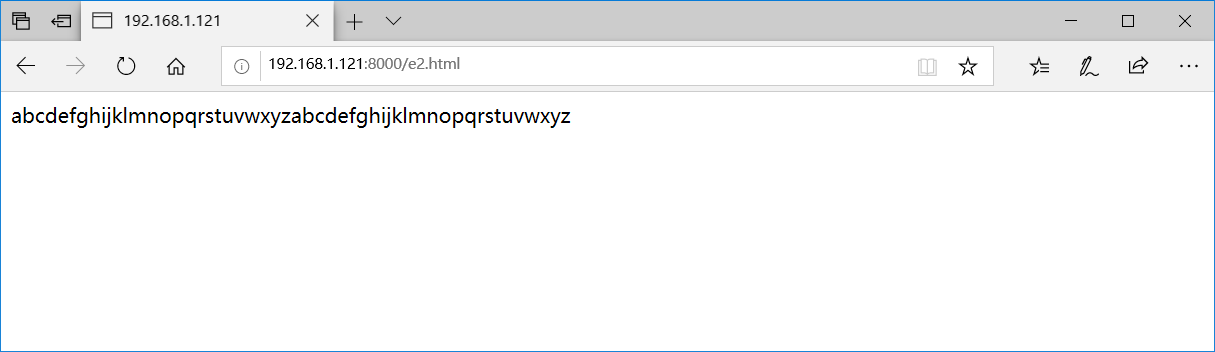 |
And I found a temporary solution was to add text-transform based on the content, and Edge will display normally.
Anyhow, I think I should tell the Edge team to fix it once and for all.
I had come to a similar conclusion. Thanks for the test pages and suggestion for text-transform. I hadn't gotten to test that, but was planning to see if that helped. I will look into using that as a work-around.
