material-web
 material-web copied to clipboard
 material-components
mwc-button height is always fixed
mwc-button doesn't adjust it's height when it's content's height is bigger than the default, ie when using code like
<mwc-button><img src="image.png"/></mwc-button>
the width of the button will grow according to the width of the image but height stays fixed so that the bottom part of the image is cut off.
The paper-button of the Polymer 2 adjusted it's size so that the whole image is visible.

We'll need to figure out if the material-components-web MDCButton is supposed to adjust its height with children.

This was incredibly straightforward with paper-button - just add content.
https://material.io/design/components/buttons.html#anatomy shows an example of a button flowing to adjust to inline content.
A use case for adjusting height is for image buttons

https://material.io/design/components/buttons.html#usage has only 4 types of buttons, non of them an image button.

I tried this in the latest material-components-web, results below.
Image with mdc-button__icon class
Images inside buttons will be resized to fit (left side). Trying to force the height of the image with explicit styling (right side) causes undefined behavior.

Just an image tag as button content
Images inside buttons will expand the width of the button, but not the height (left). Forcing the height causes the same behavior (right).


Image buttons are far from the only use case here
consider this grid:

in which the button is misaligned and shorter than the inputs.
The button has height controls in SASS. It should have in the browser as well.
Note that the Shrine theme calls for customizing the button size. From the images, it looks like they're using 360px x 48px for contained buttons. We can't currently do this with MWC.
See "Contained buttons" in the Components section:
https://material.io/design/material-studies/shrine.html#components

Even if the size isn't updated automatically, could there be a custom property exposed that controls the height? I just wrote the line this.shadowRoot.querySelector('.some-button').shadowRoot.querySelector('button').style.height = '60px'; and it didn't feel great :)
I can open this as a separate issue if it doesn't fit here.

There will eventually be a way to change the height that is part of the density system that we're working on.


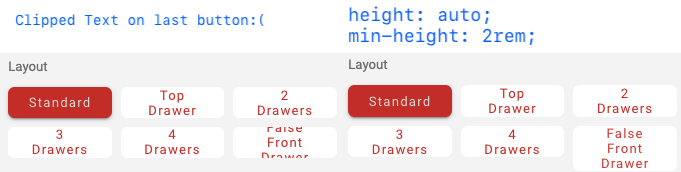
I don't believe this is resolved yet, and this point wasn't raised: it would be nice to have control over both height and min-height. In the following screenshot I've done similar styling as @notwaldorf to fix the issue, and it didn't feel great for me as well:)