
material-components-ios
 material-components-ios copied to clipboard
 material-components
[CHIPS] are overlapping
For usage questions: ask on Stack Overflow.
A clear and concise description of what the bug is.
Reproduction steps
Steps to reproduce the behavior: in viewDidLoad
    chipsCollectionView.collectionViewLayout = MDCChipCollectionViewFlowLayout()

    chipsCollectionView.register(MDCChipCollectionViewCell.self, forCellWithReuseIdentifier: "identifier")

    chipsCollectionView.delegate = self
    chipsCollectionView.dataSource = self
    chipsCollectionView.allowsMultipleSelection = true


    func collectionView(_ collectionView: UICollectionView, cellForItemAt indexPath: IndexPath) -> UICollectionViewCell {
    let cell: MDCChipCollectionViewCell = collectionView.dequeueReusableCell(withReuseIdentifier: "identifier", for: indexPath) as! MDCChipCollectionViewCell

    let chipView = cell.chipView

    chipView.titleFont = UIFont.systemFont(ofSize: 20)
    chipView.titleLabel.text = viewModel.categories.value[indexPath.row].name
    chipView.contentPadding = UIEdgeInsetsMake(8, 8, 8, 8)
    chipView.setBackgroundColor(UIColor.init(hexString: viewModel.categories.value[indexPath.row].colour!), for: UIControlState.selected)
    chipView.setBackgroundColor(AppColor.ChipSelectCategory.backgroundNormal, for: UIControlState.normal)
    chipView.setTitleColor(AppColor.ChipSelectCategory.titleColor, for: UIControlState.normal)
    chipView.setBorderWidth(2, for: UIControlState.normal)
    chipView.setBorderColor(UIColor.init(hexString: viewModel.categories.value[indexPath.row].colour!), for: UIControlState.normal)

    chipView.sizeToFit()
    cell.layoutIfNeeded()
    return cell

}
this is how it show:
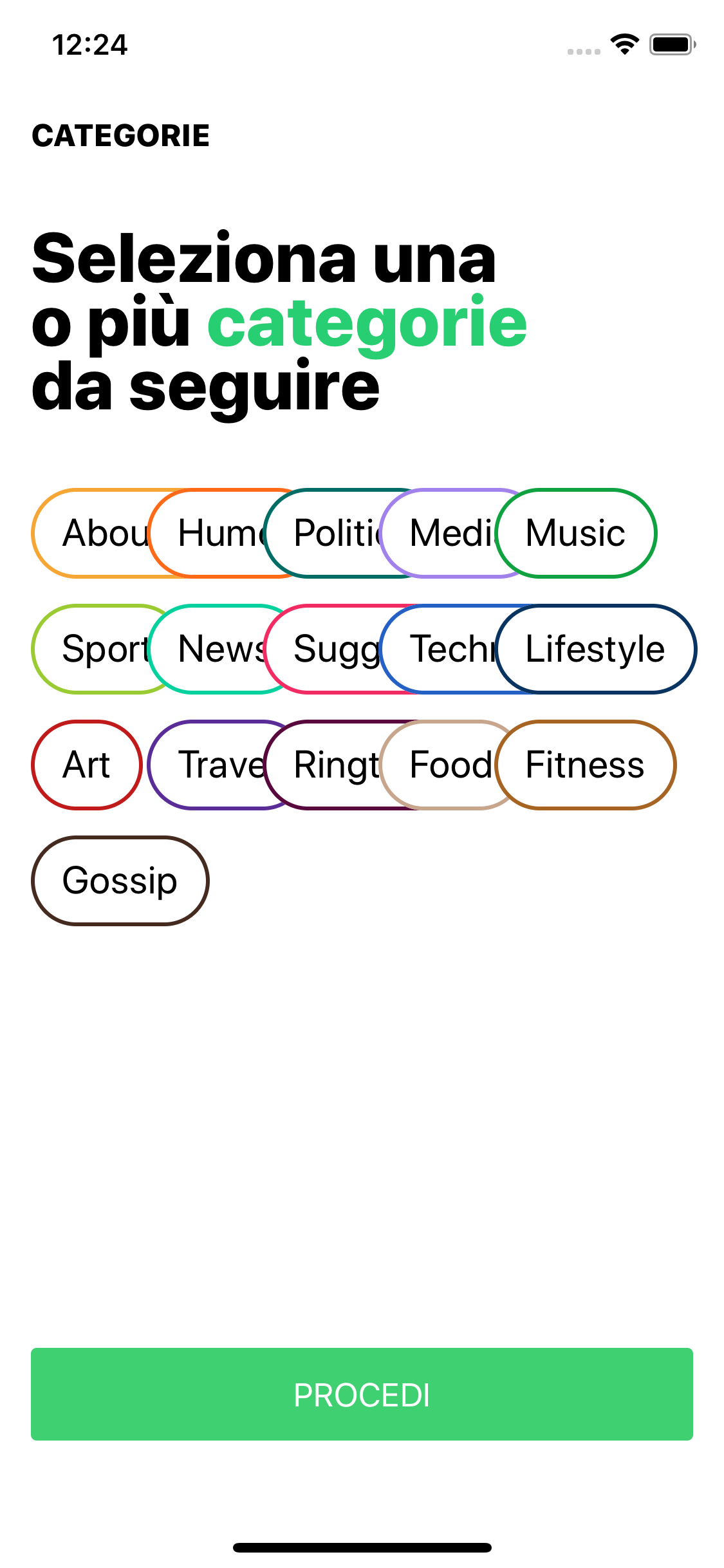
Expected behavior
Chips should not overlapping
Actual behavior
Chips are overlapping
Platform (please complete the following information)
- Device: Simulator iPhone XS
- OS: 12
Additional context
Add any other context about the problem here.
Internal data
- Associated internal bug: b/121147133

![material-automation[bot] avatar](https://avatars.githubusercontent.com/u/19556314?v=4 "Published by a pub.dev verified publisher")
+1. This is still happening and the collectionView cannot be scrolled on horizontal scroll direction, any solution?

Have you tried to set estimatedItemSize to UICollectionViewFlowLayout.automaticSize for example above try to replace first line with:
let layout = MDCChipCollectionViewFlowLayout()
layout.estimatedItemSize = UICollectionViewFlowLayout.automaticSize
chipsCollectionView.collectionViewLayout = layout
Because MDCChipCollectionViewFlowLayout extends UICollectionViewFlowLayout it might work.
And then you don't need to call
chipView.sizeToFit()
cell.layoutIfNeeded()

Thanks @Rokanank, estimatedItemSize works for vertically scrolled UICollectionView.
This should probably included into the docs here: https://github.com/material-components/material-components-ios/tree/develop/components/Chips#choice-chip
But for horizontally scrolled UICollectionView I still get a broken layout with overlapping items.
