
material-components-ios
 material-components-ios copied to clipboard
 material-components
Floating Label text and placeholder text is breaking while using MDCOutlinedTextField.
Hello EveryOne I am using this library, MDCOutlinedTextField, SWIFT 5, XCODE Version 13.1 (13A1030d).
I am facing these issues when I run the app through test flight or without Xcode run, But when I run through Xcode it works perfectly fine. I am attaching the issue screenshot below.
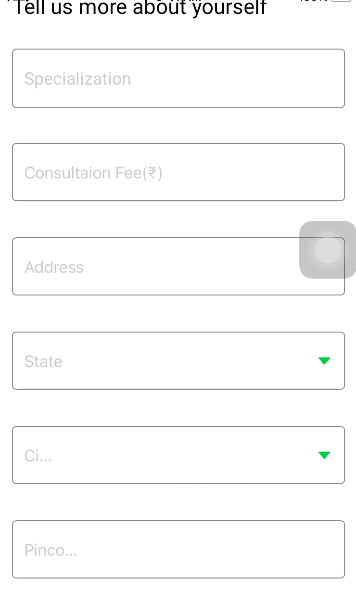
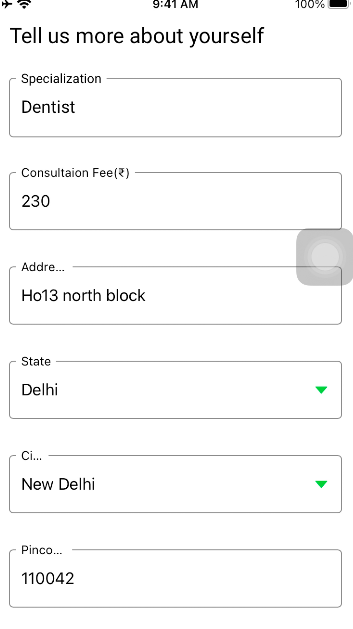
In the first picture city and pin code placeholder text is breaking (in most of the cases only the last two words are not displaying), and when I write something inside the text field address label text is breaking as we can see in the second picture. I don't why this is happening, And I am attaching my code below
lazy var stateTextField: MDCOutlinedTextField = { var textField = MDCOutlinedTextField() textField.label.text = "State" textField.setNormalLabelColor( .textDisplayColor, for: .normal) textField.attributedPlaceholder = NSAttributedString(string: "Select your state ", attributes: [NSAttributedString.Key.foregroundColor : UIColor.placeHolderColor]) textField.setOutlineColor(UIColor.textFieldOutlineNormalColor, for: .normal) textField.setOutlineColor(UIColor.textFieldOutlineEditColor, for: .editing) textField.trailingView = UIImageView(image: UIImage(named: "drop_down_icon")) textField.trailingViewMode = .always textField.translatesAutoresizingMaskIntoConstraints = false return textField }()
lazy var cityTextField: MDCOutlinedTextField = {
    var textField = MDCOutlinedTextField()
    textField.label.text = "City"
    textField.setNormalLabelColor(.textDisplayColor, for: .normal)
    textField.attributedPlaceholder = NSAttributedString(string: "Select your city", attributes: [NSAttributedString.Key.foregroundColor : UIColor.placeHolderColor])
    textField.setOutlineColor(UIColor.textFieldOutlineNormalColor, for: .normal)
    textField.setOutlineColor(UIColor.textFieldOutlineEditColor, for: .editing)
    textField.trailingView = UIImageView(image: UIImage(named: "drop_down_icon"))
    textField.trailingViewMode = .always
    textField.translatesAutoresizingMaskIntoConstraints = false
    return textField
}()

lazy var pincodeTextField: MDCOutlinedTextField = {
    var textField = MDCOutlinedTextField()
    textField.label.text = "Pincode"
    textField.keyboardType = .numberPad
    textField.setNormalLabelColor( .textDisplayColor, for: .normal)
   // textField.font = UIFont.customRegular.withSize(18)
    textField.label.adjustsFontForContentSizeCategory = true
    textField.attributedPlaceholder = NSAttributedString(string: "Enter your pincode", attributes: [NSAttributedString.Key.foregroundColor : UIColor.placeHolderColor])
    textField.setOutlineColor(UIColor.textFieldOutlineNormalColor, for: .normal)
    textField.setOutlineColor(UIColor.textFieldOutlineEditColor, for: .editing)
    textField.translatesAutoresizingMaskIntoConstraints = false
    return textField
}()
lazy var addressTextField: MDCOutlinedTextField = { var textField = MDCOutlinedTextField() textField.label.text = "Address" textField.setNormalLabelColor( .textDisplayColor, for: .normal) //textField.font = UIFont.customRegular.withSize(18) textField.label.adjustsFontForContentSizeCategory = true textField.attributedPlaceholder = NSAttributedString(string: " Enter your address ", attributes: [NSAttributedString.Key.foregroundColor : UIColor.placeHolderColor]) textField.setOutlineColor(UIColor.textFieldOutlineNormalColor, for: .normal) textField.setOutlineColor(UIColor.textFieldOutlineEditColor, for: .editing) textField.translatesAutoresizingMaskIntoConstraints = false return textField }()
If anyone know this solution please share it with me Thank you.
