

 material-components
[TextFields] Broken Textfield Placeholder Behavior
Hi everyone, we are using material textfield (latest pod version 123.0.0) for setting up password form. We customize the material textfield to accommodate small button to hide/unhide the password characters.
Somehow the placeholder floats successfully until it's stuck midway when we try to click it on certain area outside the box (but align with the eye icon). Heard that this issue has been fixed on the latest version as I read this stackoverflow thread, but mine happened with pod version 123.0.0: https://stackoverflow.com/questions/52584513/swift-materialcomponents-textfields-unexpected-placeholder-behavior-when-clicki
This only happened in this particular textfield password
Reproduction steps
Steps to reproduce the behavior:
- Go to a material textfield that has icon/button which can hide/unhide the character inside it
- Tap on anywhere outside the box but it should be align with the icon:
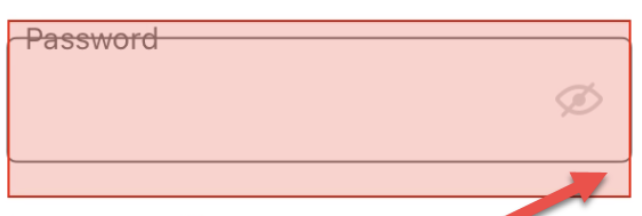
Expected behavior
The placeholder on all text field should not broken
Actual behavior
The placeholder on all text field is broken
https://user-images.githubusercontent.com/67780698/109805469-0e11a080-7c56-11eb-93cf-9d05721c53d7.mov
Platform (please complete the following information)
- Device: [iPhone XR]
- OS: [e.g. iOS12.4]

Hi @kamiliapegi, which text field are you using? If you are using the newly deprecated MDCTextField, I encourage you to switch to our newer text field offerings, specifically the MDCOutlinedTextField. To use it add TextControls+OutlinedTextFields and/or TextControls+OutlinedTextFieldsTheming to your Podfile, and then #import "MaterialTextControls+OutlinedTextFields.h". See these docs for more info. If the new text fields have the same issue please let us know! Thanks.
