
material-components-ios
 material-components-ios copied to clipboard
Published
20 hours ago •
 material-components
material-components
[FlexibleHeader] Header jumping on scroll up after UITableView reloadData.
Using MDCFlexibleHeaderView, with set 'headerView.canAlwaysExpandToMaximumHeight = true'. After reloadData is called on UITableView (and table has more rows than before), when scrolling up to the top of the table view flexible header is jumping. Getting the same result if I use headerView.shiftBehavior = .enabled.
Reproduction steps
- Using the following code, add to catalog, open the 'App Bar' - 'Issue with UITableView reloadData' example.
- When scrolling to the bottom of UITableView, we have endless scroll - in the example number of rows is increased and UITableView 'reloadData' method is called.
- Scroll up to the top of the table view.
Expected behavior
Flexible header should be visible all the time.
Actual behavior
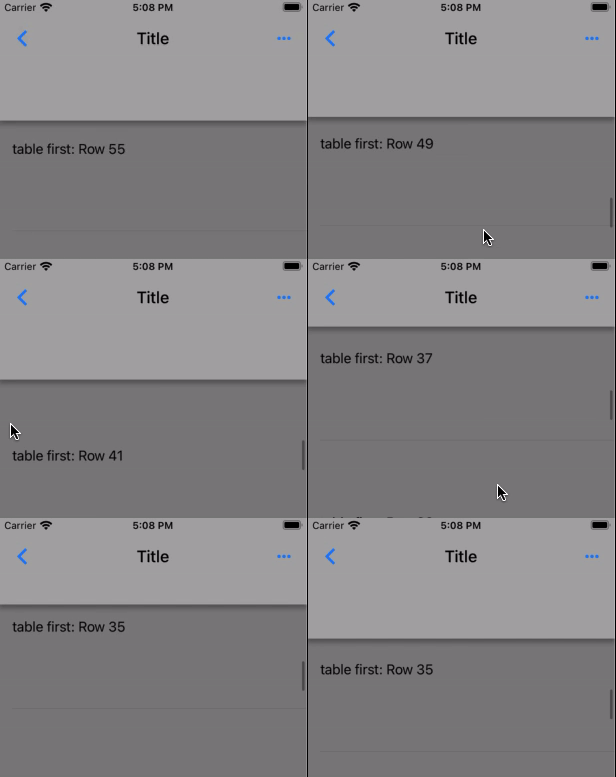
Flexible header is jumping (hiding and showing):
Platform (please complete the following information)
- Device: iPhone7, iPhone12
- OS: iOS14.2
Code to repro:
// Copyright 2021-present the Material Components for iOS authors. All Rights Reserved.
//
// Licensed under the Apache License, Version 2.0 (the "License");
// you may not use this file except in compliance with the License.
// You may obtain a copy of the License at
//
// http://www.apache.org/licenses/LICENSE-2.0
//
// Unless required by applicable law or agreed to in writing, software
// distributed under the License is distributed on an "AS IS" BASIS,
// WITHOUT WARRANTIES OR CONDITIONS OF ANY KIND, either express or implied.
// See the License for the specific language governing permissions and
// limitations under the License.

import UIKit
import CoreGraphics

import MaterialComponents.MaterialTabs

class HeaderTabViewController: UIViewController, UITableViewDelegate, UITableViewDataSource {

    var headerView: MDCFlexibleHeaderView?
    var tableView = UITableView()
    var tableRows = 50

    override func loadView() {
        super.loadView()

        view.addSubview(tableView)
        tableView.translatesAutoresizingMaskIntoConstraints = false
        tableView.topAnchor.constraint(equalTo: view.topAnchor).isActive = true
        tableView.leftAnchor.constraint(equalTo: view.leftAnchor).isActive = true
        tableView.bottomAnchor.constraint(equalTo: view.bottomAnchor).isActive = true
        tableView.rightAnchor.constraint(equalTo: view.rightAnchor).isActive = true
    }

    override func viewDidLoad() {
        super.viewDidLoad()

        tableView.register(UITableViewCell.self, forCellReuseIdentifier: "Cell")
        tableView.delegate = self
        tableView.dataSource = self
    }

    func numberOfSections(in tableView: UITableView) -> Int {
        return 1
    }

    func tableView(_ tableView: UITableView, numberOfRowsInSection section: Int) -> Int {
        return tableRows
    }

    func tableView(_ tableView: UITableView, cellForRowAt indexPath: IndexPath) -> UITableViewCell {
        let cell = tableView.dequeueReusableCell(withIdentifier: "Cell", for: indexPath)
        cell.textLabel!.text = "table first: Row \(indexPath.item)"
        cell.backgroundColor = .gray
        return cell
    }

    func tableView(_ tableView: UITableView, heightForRowAt indexPath: IndexPath) -> CGFloat {
        return 200
    }

    func tableView(_ tableView: UITableView, willDisplay cell: UITableViewCell, forRowAt indexPath: IndexPath) {
        let lastSectionIndex = tableView.numberOfSections - 1
        let lastRowIndex = tableView.numberOfRows(inSection: lastSectionIndex) - 1
        if indexPath.section ==  lastSectionIndex && indexPath.row == lastRowIndex
            && tableView.contentOffset.y > 0 {
            loadMoreRows()
        }
    }

    func scrollViewDidScroll(_ scrollView: UIScrollView) {
        headerView?.trackingScrollDidScroll()
    }

    func scrollViewDidEndDecelerating(_ scrollView: UIScrollView) {
        headerView?.trackingScrollDidEndDecelerating()
    }

    func scrollViewWillEndDragging(_ scrollView: UIScrollView, withVelocity velocity: CGPoint, targetContentOffset: UnsafeMutablePointer<CGPoint>) {
        headerView?.trackingScrollWillEndDragging(withVelocity: velocity, targetContentOffset: targetContentOffset)
    }

    func scrollViewDidEndDragging(_ scrollView: UIScrollView, willDecelerate decelerate: Bool) {
        headerView?.trackingScrollDidEndDraggingWillDecelerate(decelerate)
    }

    func loadMoreRows(){
        if  tableRows == 50 {
            tableRows += 50
            tableView.reloadData()
        }
    }
}

class HeaderTabBarExample: UIViewController {

  lazy var appBarViewController: MDCAppBarViewController = self.makeAppBar()

  let tab = HeaderTabViewController()

  override func viewDidLoad() {
    super.viewDidLoad()

    view.backgroundColor = UIColor.white
    view.addSubview(appBarViewController.view)
    appBarViewController.didMove(toParent: self)

    self.title = "Title"

    self.appBarViewController.headerView.trackingScrollWillChange(toScroll: tab.tableView)

    self.view.addSubview(tab.view)
    self.view.sendSubviewToBack(tab.view)
    tab.didMove(toParent: self)

    tab.headerView = self.appBarViewController.headerView

    let tabView = tab.view!
    tabView.translatesAutoresizingMaskIntoConstraints = false
    tabView.topAnchor.constraint(equalTo: self.view.topAnchor).isActive = true
    tabView.bottomAnchor.constraint(equalTo: self.view.bottomAnchor).isActive = true
    tabView.leftAnchor.constraint(equalTo: self.view.leftAnchor).isActive = true
    tabView.rightAnchor.constraint(equalTo: self.view.rightAnchor).isActive = true

    self.appBarViewController.headerView.trackingScrollView = tab.tableView
  }

  // MARK: Private

  func makeAppBar() -> MDCAppBarViewController {
      let appBarViewController = MDCAppBarViewController()

    self.addChild(appBarViewController)

      // Give the tab bar enough height to accomodate all possible item appearances.
      appBarViewController.headerView.minMaxHeightIncludesSafeArea = false
      appBarViewController.headerView.canAlwaysExpandToMaximumHeight = true

      appBarViewController.headerView.minimumHeight = 56
      appBarViewController.headerView.maximumHeight = 128
      appBarViewController.headerStackView.setNeedsLayout()

      return appBarViewController
  }

    override var childForStatusBarStyle: UIViewController? {
      return appBarViewController
  }
}

extension HeaderTabBarExample {

    @objc class func catalogMetadata() -> [String: Any] {
        return [
            "breadcrumbs": ["App Bar", "Issue with UITableView reloadData"],
            "primaryDemo": false,
            "presentable": true,
        ]
    }

    func catalogShouldHideNavigation() -> Bool {
        return true
    }
}
