

 material-components
[Material Theme] The style on this component requires your app theme to be Theme.AppCompat (or a descendant)
Description: When using the theme material and material in conjunction with the new google splash screen api and using it in xml layouts, the component material breaks the layout preview, an error occurs in the logs. Everything works in runtime. Android studio swears only at the component material. Layout with standard android components work fine and show previews.
Expected behavior:
In the manifest, the application is inherited from the App.Starting theme, which is inherited from Theme.SplashScreen.

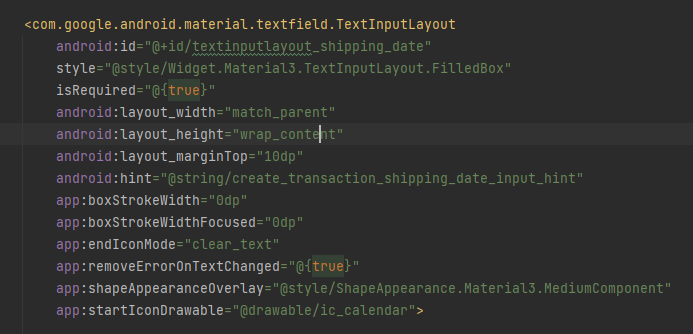
Component realisation example:
Exception:
The following classes could not be instantiated: - com.google.android.material.textfield.TextInputEditText (Open Class, Show Exception, Clear Cache) - com.google.android.material.textfield.MaterialAutoCompleteTextView (Open Class, Show Exception, Clear Cache) - com.google.android.material.textfield.TextInputLayout (Open Class, Show Exception, Clear Cache) Tip: Use View.isInEditMode() in your custom views to skip code or show sample data when shown in the IDE. If this is an unexpected error you can also try to build the project, then manually refresh the layout. java.lang.IllegalArgumentException: The style on this component requires your app theme to be Theme.AppCompat (or a descendant). at com.google.android.material.internal.ThemeEnforcement.checkTheme(ThemeEnforcement.java:247) at com.google.android.material.internal.ThemeEnforcement.checkAppCompatTheme(ThemeEnforcement.java:212) at com.google.android.material.internal.ThemeEnforcement.checkCompatibleTheme(ThemeEnforcement.java:147) at com.google.android.material.internal.ThemeEnforcement.obtainStyledAttributes(ThemeEnforcement.java:76) at com.google.android.material.textfield.TextInputEditText.<init>(TextInputEditText.java:70) at com.google.android.material.textfield.TextInputEditText.<init>(TextInputEditText.java:63) at java.base/jdk.internal.reflect.NativeConstructorAccessorImpl.newInstance0(Native Method) at java.base/jdk.internal.reflect.NativeConstructorAccessorImpl.newInstance(NativeConstructorAccessorImpl.java:62) at java.base/jdk.internal.reflect.DelegatingConstructorAccessorImpl.newInstance(DelegatingConstructorAccessorImpl.java:45) at java.base/java.lang.reflect.Constructor.newInstance(Constructor.java:490) at org.jetbrains.android.uipreview.ViewLoader.createNewInstance(ViewLoader.java:351) at org.jetbrains.android.uipreview.ViewLoader.loadClass(ViewLoader.java:200) at org.jetbrains.android.uipreview.ViewLoader.loadView(ViewLoader.java:161) at com.android.tools.idea.rendering.LayoutlibCallbackImpl.loadView(LayoutlibCallbackImpl.java:294) at android.view.BridgeInflater.loadCustomView(BridgeInflater.java:417) at android.view.BridgeInflater.loadCustomView(BridgeInflater.java:428) at android.view.BridgeInflater.createViewFromTag(BridgeInflater.java:332) at android.view.LayoutInflater.createViewFromTag(LayoutInflater.java:965) at android.view.LayoutInflater.rInflate_Original(LayoutInflater.java:1127) at android.view.LayoutInflater_Delegate.rInflate(LayoutInflater_Delegate.java:72) at android.view.LayoutInflater.rInflate(LayoutInflater.java:1101) at android.view.LayoutInflater.rInflateChildren(LayoutInflater.java:1088) at android.view.LayoutInflater.rInflate_Original(LayoutInflater.java:1130) at android.view.LayoutInflater_Delegate.rInflate(LayoutInflater_Delegate.java:72) at android.view.LayoutInflater.rInflate(LayoutInflater.java:1101) at android.view.LayoutInflater.rInflateChildren(LayoutInflater.java:1088) at android.view.LayoutInflater.rInflate_Original(LayoutInflater.java:1130) at android.view.LayoutInflater_Delegate.rInflate(LayoutInflater_Delegate.java:72) at android.view.LayoutInflater.rInflate(LayoutInflater.java:1101) at android.view.LayoutInflater.rInflateChildren(LayoutInflater.java:1088) at android.view.LayoutInflater.inflate(LayoutInflater.java:686) at android.view.LayoutInflater.inflate(LayoutInflater.java:505) at com.android.layoutlib.bridge.impl.RenderSessionImpl.inflate(RenderSessionImpl.java:359) at com.android.layoutlib.bridge.Bridge.createSession(Bridge.java:436) at com.android.tools.idea.layoutlib.LayoutLibrary.createSession(LayoutLibrary.java:121) at com.android.tools.idea.rendering.RenderTask.createRenderSession(RenderTask.java:717) at com.android.tools.idea.rendering.RenderTask.lambda$inflate$9(RenderTask.java:873) at com.android.tools.idea.rendering.RenderExecutor$runAsyncActionWithTimeout$3.run(RenderExecutor.kt:192) at java.base/java.util.concurrent.ThreadPoolExecutor.runWorker(ThreadPoolExecutor.java:1128) at java.base/java.util.concurrent.ThreadPoolExecutor$Worker.run(ThreadPoolExecutor.java:628) at java.base/java.lang.Thread.run(Thread.java:829)
Android API version: Android Api from 23 to 33. compile version is 33 Android Studio Dolphine
Material Library version: com.google.android.material:material:1.6.1

Hi, just want to clarify certain details -
Is the problematic TextInputEditText being used in your splash screen or the main activity after the splash screen? I assume Theme.SplashScreen doesn't inherit from a Material theme, right?
My initial guess is that It looks like an Android Studio issue to me - Splash Screen API is pretty new so it may not work very well with it. Let us know more details. : )

Hi, just want to clarify certain details -
Is the problematic TextInputEditText being used in your splash screen or the main activity after the splash screen? I assume Theme.SplashScreen doesn't inherit from a Material theme, right?
My initial guess is that It looks like an Android Studio issue to me - Splash Screen API is pretty new so it may not work very well with it. Let us know more details. : )
Its used after splash screen, at the many of the project layouts, but after splash screen api integration.
Cool. So if this does not happen at runtime, it's apparently an Android Studio theme resolution issue with the new Splash screen API. I'm afraid that there's not much we can do about it. Maybe try to report feedback in your Android Studio. : )