

 martinrotter
[FR]: Add per item proxy option
Brief description of the feature request.
Add an option for disabling proxy to the network tab of the feed items, where you edit feed items. Liferea has this feature and it's very useful for websites which block your proxy.

In RSS Guard, you can set global application proxy in app settings or you cen set account/plugin-level proxy.
You want me to add option "Disable all proxies" to properties of feed?

Yes. Although maybe account/plugin-level proxy could work as well, but it seems dragging a feed to another account is not supported.
Yes. Although maybe account/plugin-level proxy could work as well, but it seems dragging a feed to another account is not supported.
No, you cannot do almost any operations between accounts, they are very much separated.
May I ask which services/plugins do you use in RSS Guard? Standard feeds? Or some synchronized like TT-RSS?
Also there are even more questions, if I add "Do not use proxies for this feed" option to feed's edit dialog, should this option, if activated, use application-level proxy (if configured), or skip even this global proxy?
The this is, user can set global proxy and then some different account-level proxy, how should the feed with "disabled" proxies option work?
I use Standard feeds. For me disabling all proxies, even global proxy for a feed would be enough. But I don't know about others.
If you want to cover everything, maybe it could be a drop-down option where the default is the account's proxy, and the other options are global proxy and no proxy.
@CIAvash Do you actually have any global application-wide proxy set up in RSS Guard? If not then it would work nicely as if "disabling" would be activated, then app-level proxy would be used but only if set up...
@CIAvash OK, I will think it through and implement, probably as "drop-down":
"Network proxy behavior:"
- "Use service-level proxy" (default)
- "Use application-level proxy"
- "Do not use any proxy"
Like this?
... probably as "drop-down": ....
@martinrotter, Sorry, I cannot quite follow. The drop-down for every feed?
Like,
RSS feed name1 -> "Use application-level proxy" (which is set)
RSS feed name2 -> "Use service-level proxy" (if none is set then none is used)
Right?
I cannot but ask for such feature would be out of this world to me.
As for the request overall, to me it appears to be much more useful the other way around, i.e. enable proxy only for certain feeds. However, the solution seem to satisfy both?

@sakkamade Yes, for every feed.
The inverse behavior, yes, it is very questionable which approach to choose. Maybe it would be just best add allow specific proxy setting for each feed, not just drop down.
OK, that is good news for me. As for the options, little explanation:
"Use service-level proxy" (default, if no service-level proxy is configured, fallback to application-level proxy IF CONFIGURED too)
"Use application-level proxy" (skip service-level proxy setting and use application-level proxy directly IF CONFIGURED)
"Do not use any proxy" (skip all proxies and use raw system/os settings if any)
As for the options, little explanation ...
This made me all the more confused :cry:
Would it look like so?
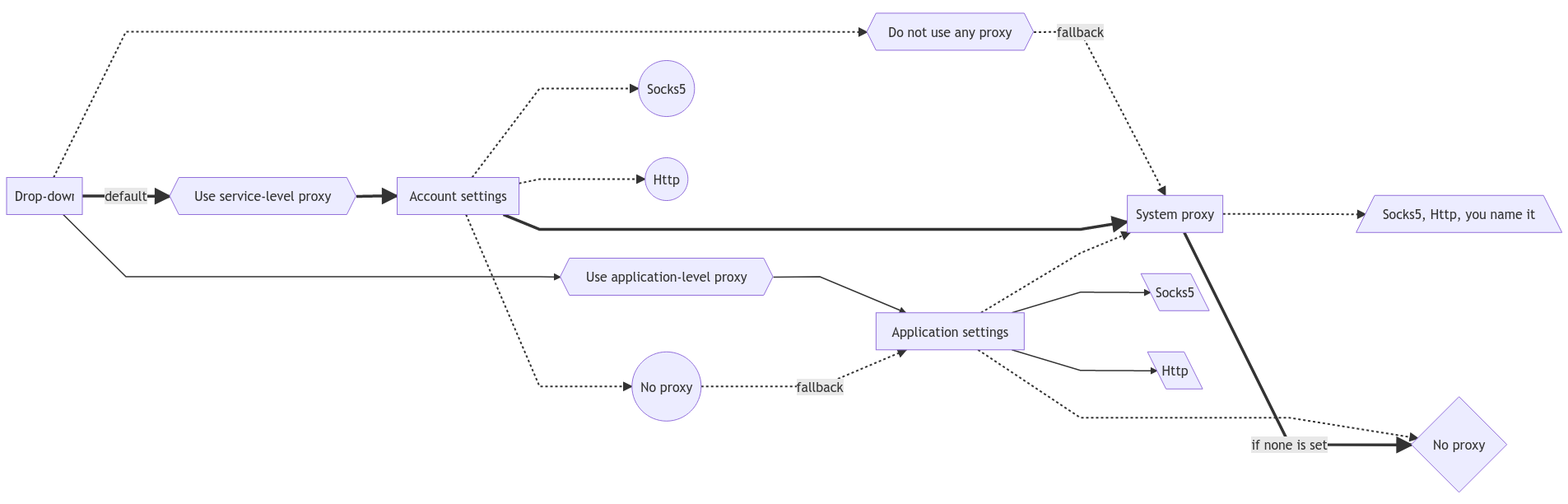
EDIT: (Changed links styles.) Important for my understanding links are thick-solid and solid ones.
EDIT2: (updated flowchart to be more correct, although now it looks messy)
@sakkamade You hit the nail. That's pretty much of how I thought it would/should work. Is it okay?
Well, in Qt (library used to develop RSS Guard), you can use this enumeration.
https://doc.qt.io/qt-5/qnetworkproxy.html#ProxyType-enum
You can either set some specific (HTTPS, socks) proxy, or you can use application-wide proxy, or you can use "no" proxy. Unfortunately, documentation does not clearly state what "no" proxy is. If it is really NO proxy or SYSTEM proxy.)
Therefore, if selected:
- "Use account-level proxy" - will use account-level proxy IF configured. If account-level proxy is not configured in the account, fallback to application-level proxy.
- "Use application-level proxy" - will use application-level proxy IF configured. If application-level proxy behavior is not configured, use "default" operating system proxy.
- "Use system proxy" - it will not use neither account-level nor application-level proxies and will use use "default" operating system proxy.
Note that this workflow/logic is not that easy to implement, but I will include it into initial 4.0.0 release if possible as it requires DB structure change which is good to do before major release.
Unfortunately, documentation does not clearly state what "no" proxy is. If it is really NO proxy or SYSTEM proxy.)
Will become clear after some tests :heart:
Unfortunately, documentation does not clearly state what "no" proxy is. If it is really NO proxy or SYSTEM proxy.)
What about the current settings—the "Network proxy" tab? It also has "System proxy" and "No proxy" options, and they both does work accordingly, with latter bypassing environment variable.