

 mars-sim
Downloading Mars Sim
Hello,
I attempted to download mars sim 3 days ago, and since then I have learned of several necessary requirements that I was previously unaware of. I'm not experienced at all with any of this, and I'm afraid I need assistance.
Could someone walk me through the process of downloading and launching it? I couldn't find any tutorials online and the website offered no information I could understand. (Again, I have no experience). My pc, (a windows 10 surface pro 4), currently does not have any versions of Java installed, nor does it have a way to decompress the file, (such as winRAR or 7-zip), as I've tried those and they didn't work), and while I have tried to download oracle 11, 8, etc., launching the program did not work. I've tried reinstalling Java many times without any luck.
Any help is appreciated, and I apologize for being needy. I also may be "asking" a question wrong, as this is my first time on here.
Thank you!
- Aloysious

Hi there.
We don't seem to have a page on our website https://mars-sim.github.io/ of how to install the pre-requisites sorry. @mokun I'm sure I have seen one previously ? Basically it should be fairly straight forward. I would:
- If you've not using Java for anything else uninstall any Java you have already installed and go for the AWS Corretto. Version 11 of the JDK is perfect. Make sure you add Java to your PATH.
- Then you should be able to run % java --version in a command prompt to prove Java has installed.
- I suggest you download the 3.3.0 swing version of mars sim which should give you a JAR file.
- Then from Explorer double click on that file and it should fire up. Depending how you have set-up your Windows installation that may not work so you may need to run it from a command prompt as % java -jar 3.3.0_swing_java11.jar
- Then have a look at the Wiki which should explain a lot of the concepts.
The project is in quite a state of change/improvement at the moment so you may be interested getting on a more rapidly changing version. Good Luck.

Many thanks.
However, I unfortunately believe I have a few questions:
- By saying "add Java to your PATH", do you mean something like this video: https://www.bing.com/videos/search?q=how+to+add+java+to+PATH&view=detail&mid=BFB282B2691BF5489ACBBFB282B2691BF5489ACB&FORM=VIRE As I've said before, I'm extremely inexperienced and I don't want to damage by PC, nor do something wrong the first time.
*I apologize if the links don't work directly
-
Is there a video you may be able to find or explain "how to" on step 2? Naturally I am oblivious to this process as well.
-
How do run the swing JAR file from a command prompt? I hope I won't need this later, but I believe it's a good idea to acquire the information now.
Thank you for any help as this is a lifesaver.
- Aloysious Tasch
Modifying your environment variables wrong CAN cause some problems, but nothing that can't be fixed, so don't worry too much. I know that its a more advanced topic than for the average user, but not doing it yourself and manually can result in weird Java behaviour, like some obscure 8.x version still reporting, despite you having installed Java 16.
For testing which java version you are using as default, just run cmd (Searching for these three letters in the Windows 10 start menu will get you to the command prompt) and enter the instruction "java -version" there.
In my case, I read something like that:
java version "16.0.2" 2021-07-20
Java(TM) SE Runtime Environment (build 16.0.2+7-67)
Java HotSpot(TM) 64-Bit Server VM (build 16.0.2+7-67, mixed mode, sharing)
Important: The first number of the version should be 11 or higher by now.
For running a JAR file from the command prompt, you again begin with the java command, for example:
java -jar 6679_console_java11.jar or java -jar 6679_swing_java11.jar
That should solve most simple problems by now.
I wish we would have a start script with a smoke test here, we used to have one, but its outdated.

When you install Java there is commonly a check box on the installer saying add to PATH or so etching like that.
@AloysiousTasch ,
Could someone walk me through the process of downloading
So, which version did you download and try out so far ?
We recommend using an open source version of Java 11 JDK (not JRE).
Oracle's Java 11 works but it has some proprietary things inside.
That's why most developers use open source Java these days.
By saying "add Java to your PATH", do you mean something like this video: https://www.bing.com/videos/search?q=how+to+add+java+to+PATH&view=detail&mid=BFB282B2691BF5489ACBBFB282B2691BF5489ACB&FORM=VIRE
Yes if you look at under the OS Platforms in the README.md file that can be viewed here at the front page, it shows how to identity the Path setting in Windows 10/11. Can you see it ?
To me, in Windows 10, in the search bar, I type "env" and the "Edit environment variables for you..." would come up. I click on it. See below :
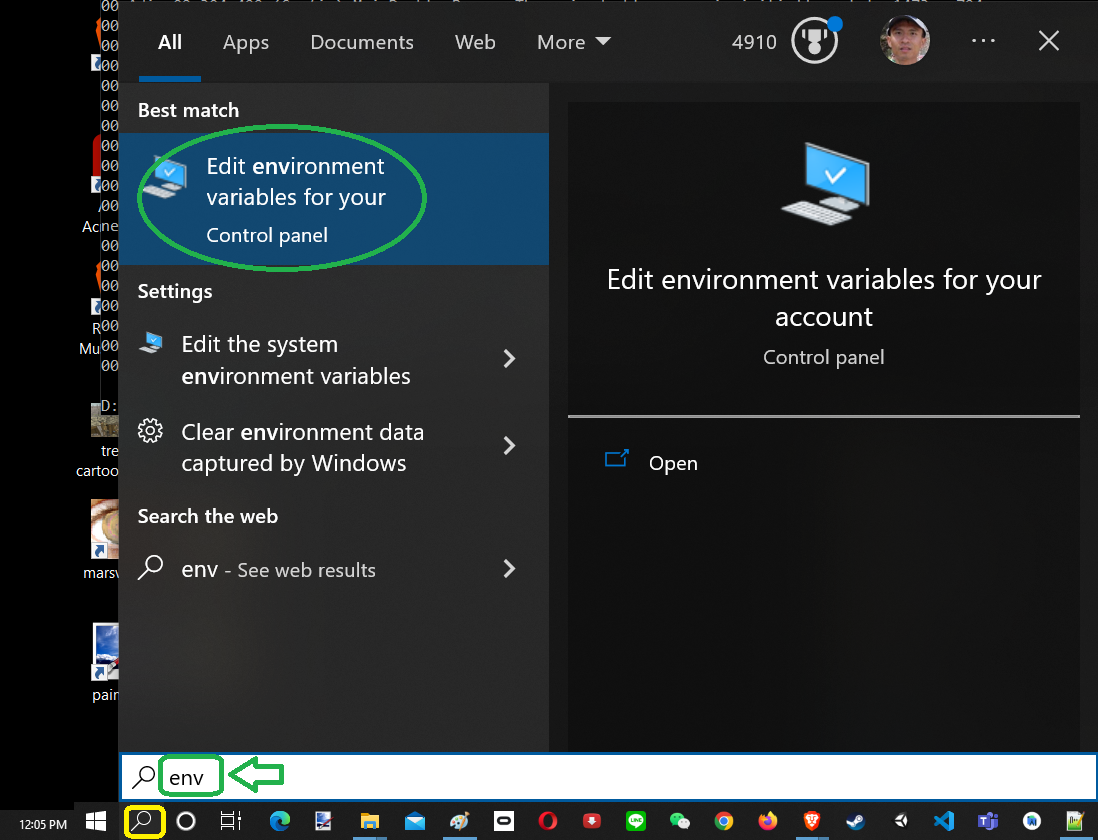
This would open up a window panel as follows :
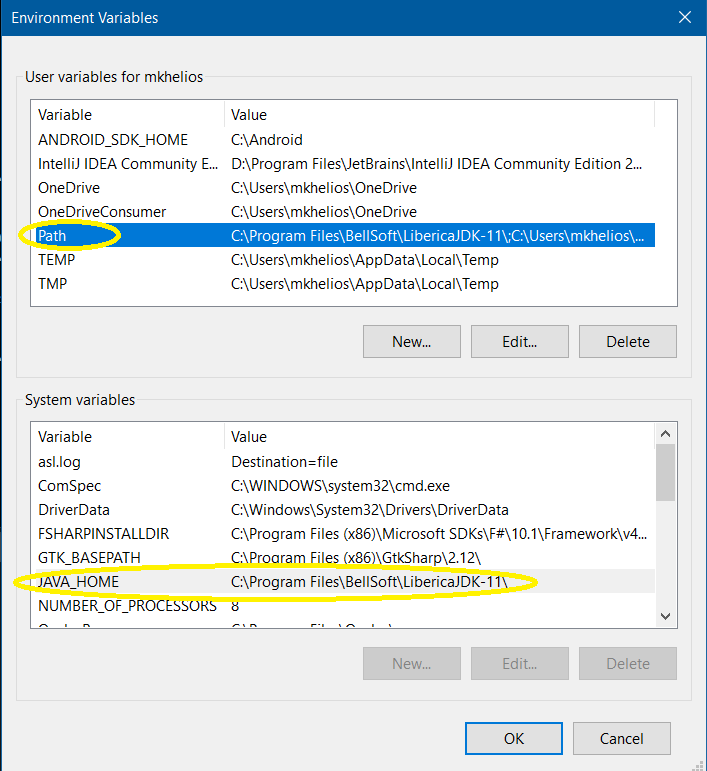
On either "Path" variable or "JAVA_HOME" variable, you can edit them to access the version of Java 11 JDK that you want your Java app to run.
To me, I have 6 or 7 different version of Java installed on my computer over time, so I have to make sure the Path variable would point to the one I really want, namely, the path C:\Program Files\BellSoft\LibericaJDK-11\ would be the one I'm interested in having mars-sim accessing it.
Don't hesitate and let us know at exactly which step you are having trouble.

Thank you both for your help. I have managed to install the program successfully, but I have to do a few extra things to get it running. It's not much of an inconvenience though and I am elated, (and relieved), after four days of failure.
I really am enjoying the simulation. It's complex in all the necessary ways, while not giving you the extra pointless features, and I'm sure I will have some suggestions in the future, but for now it is still a well-functioning and impressive sim. I especially like the style it is presented in.
The only feature I am concerned about is the lag, which is excessive on my pc. If someone has a successful remedy to this, advice would be much appreciated. However, my temporary fix is slowing down the speed of the sim to level 3 or 4 so things don't happen so quickly.
Thanks, Aloysious
It appears I missed two comments, as they only loaded when I looked back on this page. Perhaps a bug? Anyways, thank you three for your help, even if I only used information from the first two comments. I suppose this made the process significantly harder for myself with the limited information. Again, thank you for your assistance. You all have been lifesavers.
have to do a few extra things to get it running. It's not much of an inconvenience though and I am elated, (and relieved), after four days of failure.
Sorry about the fact that sometimes it's not easy to prep the machines to get it running.
Java has significantly reinvented itself in recent years.
I can see that in a future nearer than we thought, we won't have to install Java VM separately in order to run Java app. The Java VM would be bundled with the Java application itself.
the lag, which is excessive on my pc. If someone has a successful remedy to this, advice would be much appreciated.
Can I get the specs of the machine you're running mars-sim ?
My usual workspace is my 5 year-old Asus predator Windows 10 laptop. It has 16 GB memory and the 8th intel i7 CPU (8 threads) with 256 GB SSD.
However, my temporary fix is slowing down the speed of the sim to level 3 or 4 so things don't happen so quickly.
What is the most comfortable speed or time ratio when running mars-sim on your machine ?
To me, if I start a 9-settlement simulation, I typically choose 1024x so as to see things happening faster in them.
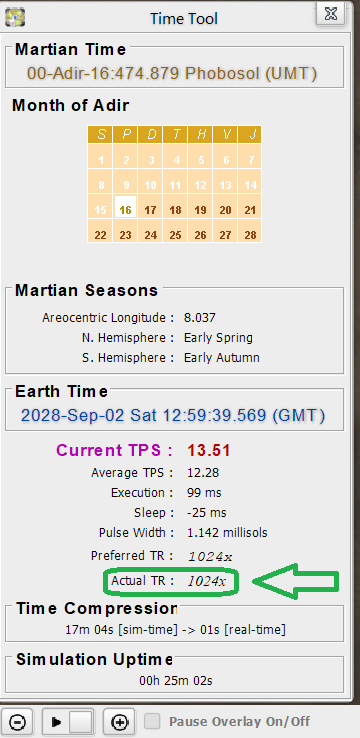
It could potentially use between ~12% to 28% of my laptop CPU utilization.
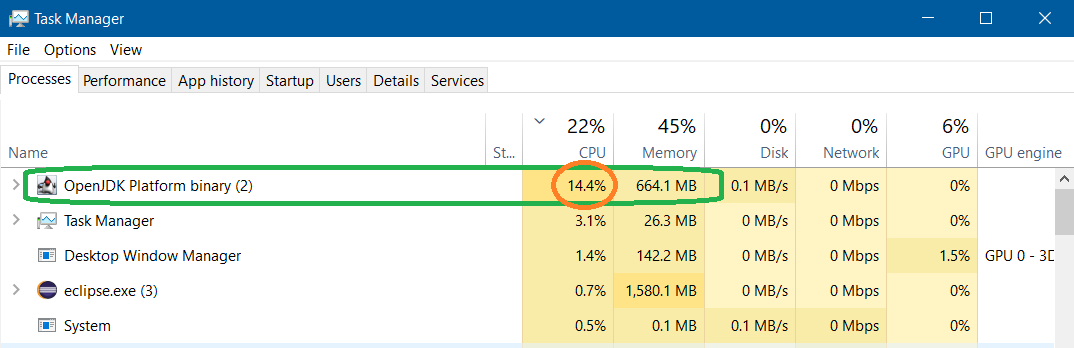
I apologize for this being so late, as it probably isn't necessary, but I have a Surface Pro 4 with a 2.4 GHz processor. So far, the lag has decreased, (thankfully), and the sim barely has any effect on my already pathetic battery life (typically less than five hours with no programs running).
For my time ratio, I typically use MarsNet, (one of my favorite features in the sim), to slow it down. Currently, I am operating on x16 speed but sometimes I speed it up or slow it down.
Again, I'm sorry for not responding when you commented. Thanks for helping out!
No problem. Good to know you are using the simulation. MarsNet is a great way to interact with the simulation.