

 marktext
Cannot install MarkText 0.17.0rc2-arm64 on M1 MacBook Air
Description
Hi, I'm on an M1 MacBook Air and the ARM64 release candidate application is corrupted no matter how many times I download it (be it the .dmg or the .zip). The checksum works out fine, so I'm confused as to what could be causing this. The x64 version works perfectly fine, in contrast.
- [x] Can you reproduce the issue?
Steps to reproduce
Download the 0.17.0rc2-arm64 version and try to install it.
Expected behavior:
Normal installation
Actual behavior:

Versions
- MarkText version: 0.17.0rc2-arm64
- Operating system: macOS 12.2 Monterey

New in macOS 11 on Macs with Apple silicon, and starting in macOS Big Sur 11 beta 6, the operating system enforces that any executable must be signed before it’s allowed to run. There isn’t a specific identity requirement for this signature: a simple ad-hoc signature is sufficient. [...] This new policy doesn’t apply to translated x86 binaries running under Rosetta 2, nor does it apply to macOS 11 running on Intel-based platforms.
@Jocs We need code signing on macOS to fix this, but notarization isn't required. Both can be done via electron-builder and integrated into the CI pipeline.
Source: https://developer.apple.com/documentation/macos-release-notes/macos-big-sur-11_0_1-universal-apps-release-notes

This requires registration of an apple developer account before code sign, which costs about $99/year, and we do not plan to sign marktext now, one reason is that marktext is not stable enough, and the other is that we do not have a stable financial donations to pay $99/year.

Hi, I know it is sort of a hot-fix to get MarkText running, but the following command did the trick for me on an M1 MBA running macOS v12.1:
xattr -cr /Applications/MarkText.app

Hi, I know it is sort of a hot-fix to get MarkText running, but the following command did the trick for me on an M1 MBA running macOS v12.1:
xattr -cr /Applications/MarkText.app
That worked for me as well, thank you so much!
We decided to not release an Apple M1 (arm64) package for version 0.17.0 because the package is block by macOS without code signing. We'll consider this issues in future releases but we don't want to confuse users with "broken binaries". You can still install the x64 binary or build MarkText for arm64 on macOS and install it yourself bypassing security mechanism.
Edit: Maybe the Homebrew maintainers can get this working because they install MarkText locally?
Most macOS users have seen this "damaged application" message and have learned to easily work around it by right clicking the application icon and choosing "Open."
It's only needed the first time. macOS remembers from that point on that the application is not in fact damaged at all. It's no longer in quarantine.

@johnblommers Definitely also think it's not an issue for users. It's normal

Most macOS users have seen this "damaged application" message and have learned to easily work around it by right clicking the application icon and choosing "Open."
Hey, thanks for your feedback. As far as I know is code signing required on M1 devices and manually running xattr is the only way bypassing it. Normally there shouldn't be an "open" option, but I don't own a macOS device. After a quick research I come to the conclusion that
- each user have to run
xattrafter downloading the app or - we have to sign the package using apple developer id.
I'm happy to hear other suggestions to fix this.
We decided to not release an Apple M1 (arm64) package for version 0.17.0 because the package is block by macOS without code signing. We'll consider this issues in future releases but we don't want to confuse users with "broken binaries". You can still install the x64 binary or build MarkText for arm64 on macOS and install it yourself bypassing security mechanism.
Hi!
What are your thoughts on providing an arm64 build accompanied by an explicit disclaimer about the issues and possible steps, such as xattr, sufficient to bypass the error?
It must be much easier for users than building an arm64 binary manually and should provide a better experience than an x64 one.
From my personal experience as a long-time Macintosh user it is common for application developers to include instructions for downloaders to deal with code signing warning messages. I'd encourage that here.
Personally I have never had to deal with xattr. I've found that locating the application icon in the /Applications folder, right clicking on the application's icon, and choosing open from the contextual menu (possibly two or three times) always lets me subsequently launch the application without fanfare.
Hi, I know it is sort of a hot-fix to get MarkText running, but the following command did the trick for me on an M1 MBA running macOS v12.1:
xattr -cr /Applications/MarkText.app
This isn't the recommended command since it removes all app attribute (metadata). A simple sudo xattr -r -d com.apple.quarantine /Applications/MarkText.app was sufficient for me to get the ARM64 build working.
The Eclectic Light Company has a good writeup about xattr and Quarantine here.
I haven't measured the performance difference between the x64 and ARM64 builds of MarkText, but in other instances have seen huge performance gains by using an ARM64 build and large resource draws by using an x64 build.
For now I'm opting to build it from source, prefer not to use Rosetta 2 when I can.

@fxha this is not a bug. he is overreacting , x64 build marktext-x64.dmg will also show the broken warning, that is for every single app not codesigned. He just need right click to open the app in local disk, not in DMG mount

@ryh Two distinct error messages are being given once the application is placed in the /Applications folder
You're correct about the x64 build, this is solved by allowing it through GateKeeper. This error associates with code signing.

The arm64 build however throws this error that can only be fixed using the xattr command.
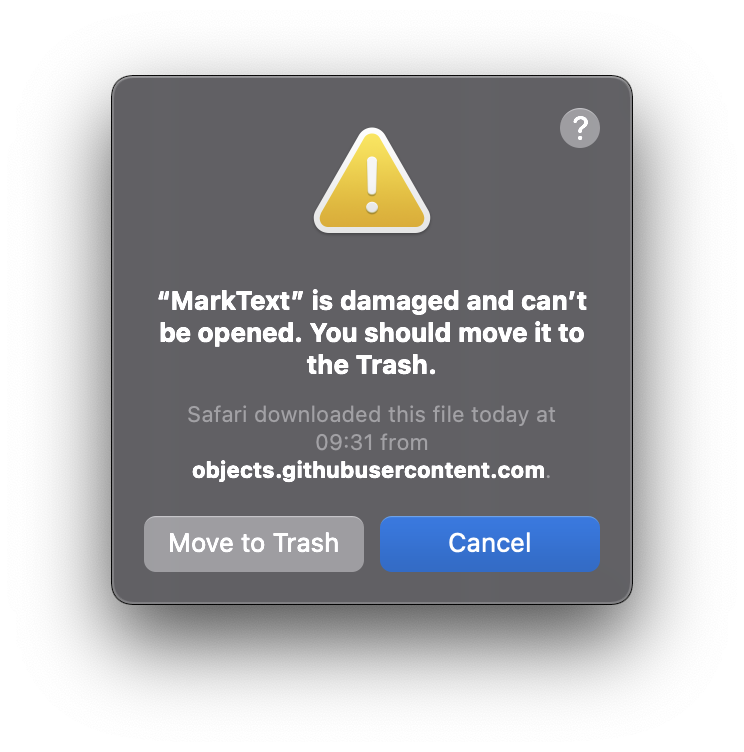 I think this is due to Apple Silicon builds requiring signed code (or at least a valid developer account). Again, Eclectic Light Company has another good writeup about this here.
@AwlsomeAlex users also can just right click to open the app, choose open on the popup menu. if they authorize to open,and from that time, won't show this warning for this build again.
@ryh This doesn't work with the arm64 build. Only the x64 build.
More info here from Apple:
A Mac with Apple silicon doesn’t permit native arm64 code to execute unless a valid signature is attached.
For binary compatibility, translated x86_64 code is permitted to execute through Rosetta with no signature information at all.
The top requirement of a valid signature is why the arm64 build is gaining the Quarantine flag in the first place.
Solution would be to attach an Ad-Hoc signature before distributing the arm64 build. Then the user would only encounter the error you receive on the x64 build, which your method of clicking Open or allowing through GateKeeper will work.
Well, and signing with a free apple developer account doesn't work? I thought you only had to pay for it if you wanted to release apps on iOS or use specific frameworks (like in-app purchases).

Well, and signing with a free apple developer account doesn't work? I thought you only had to pay for it if you wanted to release apps on iOS or use specific frameworks (like in-app purchases).
object is not signed at all 😔
~ ❯❯❯ codesign -v /Volumes/MarkText\ 0.17.1/MarkText.app                                                     ✘ 1
/Volumes/MarkText 0.17.1/MarkText.app: code object is not signed at all
In architecture: x86_64
~ ❯❯❯ codesign -v /Volumes/MarkText\ 0.17.1-arm64/MarkText.app                                               ✘ 1
/Volumes/MarkText 0.17.1-arm64/MarkText.app: code has no resources but signature indicates they must be present
A simple
sudo xattr -r -d com.apple.quarantine /Applications/MarkText.appwas sufficient for me to get the ARM64 build working.
Thank you, this worked like a charm.

Minor comment, it is not a good idea to run anything you don't under sudo.
To remove the quantine element from the app, you guys don't need to remove it with sudo, just run xattr -r -d com.apple.quarantine /Applications/MarkText.app and that should be enough

Minor comment, it is not a good idea to run anything you don't under sudo.
To remove the quantine element from the app, you guys don't need to remove it with
sudo, just runxattr -r -d com.apple.quarantine /Applications/MarkText.appand that should be enough
yeah without sudo this command worked for me on a m2 macbook

Hi, I know it is sort of a hot-fix to get MarkText running, but the following command did the trick for me on an M1 MBA running macOS v12.1:
xattr -cr /Applications/MarkText.app
Worked for me as well!

This is a fairly major issue but looks to have been around for a while. Is a fix planned?

My sense is that the developer is loathe to pay Apple a recurring annual hostage fee for the priviledge of getting a developer account with which to cryptographically sign the MarkText binary. Note that Microsoft also practices this extortion on its Windows OS.
It's a major issue NOT as surely every macOS user has encountered this BS issue frequently enough to recognize it for what it is.
The fix is to donate $99/year to the developer to pay off Apple. Are you game @AlexanderTerp ?
I see, that's frustrating from Apple.
I think we should at least update the installation instructions on the README so that people don't have to go into the issues and find the command that got posted here, given that it appears to be a known issue. How many potential users give up before getting here?
I think we should at least update the installation instructions on the README so that people don't have to go into the issues and find the command that got posted here, given that it appears to be a known issue. How many potential users give up before getting here?
Here we find our selves in complete agreement. Note that sending users to the commandline isn't required. The user can also right click over the MarkText icon and choose Open. That brings up a dialog about the app being broken. Dismiss the dialog. Do the same thing again and this time you get an option to run the app anyway. Afterwards this is not longer needed, at least until the next update.
When I tried to install on MacOs using Homebrew I got the following warning:
The Apple Silicon (arm) version of mark-text is not signed, and
will display an error stating it is damaged and can't be opened.
That's no problem, I thought, I'll just switch to the Intel version of Homebrew (I run both versions on my M2 Mac), and I'll bypass the problem:
eval "$(/usr/local/Homebrew/bin/brew shellenv)"
Then I ran the install again. But it still grabbed the arm DMG. I don't know if this is a bug for the Homebrew people, or this project, or just my system setup. Reading the discussion here, I wonder how things like gnu-tar get to run, does FSF pay the fee?
Anyway, what would be completely awesome is if the work-arounds discussed here somehow made their way into that helpful message that Homebrew prints.

There's no need to use Homebrew. Download the marktext-arm64.dmg release file version 0.17.1, mount the DMG, drag the MarkText app into the /Applications directory, right click over it and choose open. You may have to do this again. Then it works and you have the proper Apple Silicion edition working. Just tried this myself.
There's no need to use Homebrew. Download the
marktext-arm64.dmgrelease file version 0.17.1, mount the DMG, drag the MarkText app into the/Applicationsdirectory, right click over it and choose open. You may have to do this again. Then it works and you have the proper Apple Silicion edition working. Just tried this myself.
Hmm, this still isn't working :( This trick works for me for many other unsigned packages, but not Marktext. And usually that error message is slightly different.
In this case, it just keeps showing the same error over and over again, no matter how many times I right-click to open it and dismiss the dialogue:
I've tried the Homebrew version, the 0.17.1 .dmg and also the -mac.zip files. Same with all of them.
The x64 version does work, after dismissing the unsigned dev warning twice:
(But again, that's different from the arm64 version's warning)

Hi, I know it is sort of a hot-fix to get MarkText running, but the following command did the trick for me on an M1 MBA running macOS v12.1:
xattr -cr /Applications/MarkText.app
Thank you! This worked for me too.