

 markhuot
CraftQL performance
Apologies if this issue is related of #150 and/or #166 so let me know if I should add to one or both of those threads.
We're running into pretty long response times when trying to run queries -- either from the frontend, gatsby builds, or in graphiql -- and we are not sure why.
For example, the following query is taking 4+ seconds and we are at a loss as to why this might be happening in our staging environment (that mirrors our production environment when we go live).
{
  entry(id: 52187) {
    ... on Blog {
      thumbnail {
        url
      }
    }
  }
}
Locally queries are a tad faster in our Docker setup but they still take longer than than they do if pulling the same data out into a template.
Are there any known performance issues that are not outlined in the docs that can help us reduce the response times of some our queries before we go down the road of adding a caching layer in front of our graphql endpoint (which is a whole can of worms)?
Server: Heroku Standard-2x-Dyno (1Gb ram) PHP: 7.2.14 Postgres: 10.6 (Heroku Postres Standard 0) Craft 3.0.40 CraftQL: dev-master 3a8329b
@timkelty are you still running your branch on production? Has your fork been updated with any of the latest CraftQL updates?
Huge thanks for any pointers you can send our way!

@markhuot it'd make profiling things super nice if you stuck in some profiling code around bottlenecks ala:
https://nystudio107.com/blog/profiling-your-website-with-craft-cms-3s-debug-toolbar#plugin-developers
Craft::beginProfile('someUniqueIdentifier', __METHOD__);
// Insert code here
Craft::endProfile('someUniqueIdentifier', __METHOD__);

@pauloelias Indeed I am still running my branch in production, unfortunately.
Here's my changes: https://github.com/markhuot/craftql/compare/master...timkelty:dlr2018
I kept it up to date with changes for a while, but haven't recently. I did just try to rebase my branch off markhuot/master and it rebased with no conflicts, but I haven't tested it. Here's everything the between current master and when I last updated my branch: https://github.com/timkelty/craftql/compare/dlr2018...markhuot:master
From my experience, you long load times likely are not the result of the specific query, but in the size/complexity of your Craft installation (namely fields/field layouts). As the amount of fields increase, the GQL schema build time increases, which has to happen EVERY request.
The difficulty lies in the fact that the schema contains closures, and therefore is not easily cacheable.
To get around this, my branch caches the entire response. It is by no means a good solution, but is my only option at the moment.

@timkelty Thank you for your response!
The scheme regeneration on each request sounds like the issue we are dealing with so I will chat with you in slack about it.
This has been a rather interesting and troubling issue to work on. However, I can tell you all a few things,
- when you're pulling a lot of data it's slow because Craft has to make model objects for everything. Creating all those
Entryelements takes time. I don't have a great way to fix this but keeping your limits< 100definitely helps. - as @timkelty mentions the more complex your Craft build the longer it takes GraphQL to build the schema. I've been doing a good amount of research on this and there are ways to work around the "PHP caching closures" issue. However, an even better approach is to have the schema lazy load, which I'm working on. Currently if you're requesting
{ entries { id } }it's going to also instantiate every single Volume object, Matrix object, Section object and Entry Type Object even though they're not needed. I'm very close to pushing a branch that removes those unneeded objects lazy loads only what is needed. In my testing it took a pull of 700+ entries from 30 seconds down to 4 seconds. For more realistic pulls of 100 entries it went from 5 seconds down to 800ms.
I'm continuing to see what else can be done to improve speeds, but hopefully this lazy schema update should help!
I'm attaching a flame graph of the before and after so you can see the improvements in a visual fashion as well (also because I love me some flame graphs). The left is before and the right is the after. The most notable updates are called out in colored boxes,
- orange shows the schema generation has been shortened from 18 seconds to around 1 second
- green shows the actual
craft.entriesquery takes approximately the same 7-8 seconds - red shows the actual loop over the query results turning the results in to GraphQL objects which takes around the same 5 seconds. The big difference is how much less dense that area is because I've reduced redundant DB queries and extraneous
$entry->section->handlelookups that would continuously hit the DB asking for the Section just to get the handle.
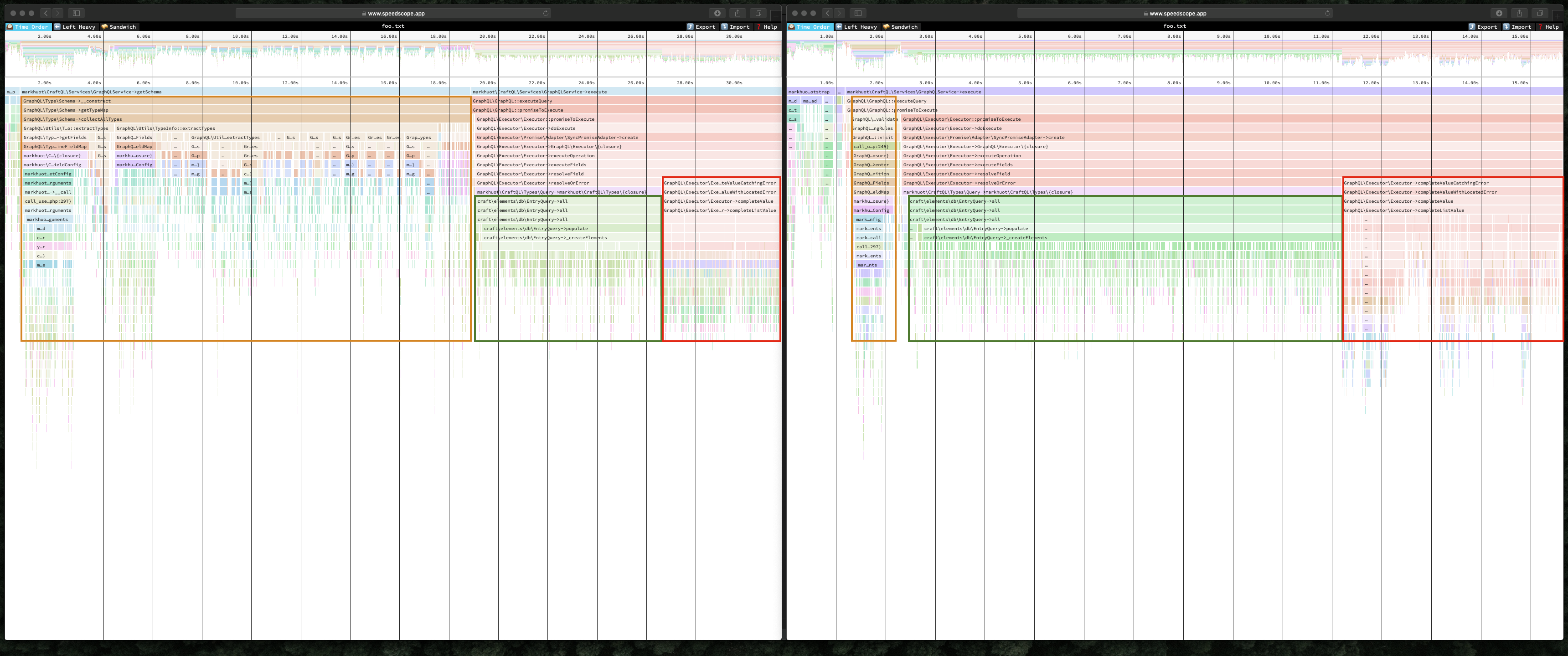
Anyway, I'll keep you all updated as I progress. The work is currently on the builder-refactor3 branch but it's not even close to stable yet so I wouldn't use it yet.
Regarding a few specific points,
Are there any known performance issues that are not outlined in the docs that can help us reduce the response times of some our queries before we go down the road of adding a caching layer in front of our graphql endpoint (which is a whole can of worms)?
Complex schemas are the worst offender. Also running debugMode adds a validateSchema call which definitely slows things down. If speeds are painful I'd try disabling debugMode and see if it helps.
it'd make profiling things super nice if you stuck in some profiling code around bottlenecks ala:
Agreed. However, when I put those in I saw my times increase from a second to four seconds. The profiling really seems to slow things down.
To get around this, my branch caches the entire response. It is by no means a good solution, but is my only option at the moment.
Yup, after I get this lazy loading in place I'd like to get Apollo Engine supported so we can use their per-key caching layers.

Yup, after I get this lazy loading in place I'd like to get Apollo Engine supported so we can use their per-key caching layers.
🥇
Thanks all!
I am really excited to see where this plugin is heading. Top notch work all around!
Indeed it's good to hear the progress and directions on this, Mark, Tim, et al. Thanks, as it will make CraftQL as something many want to use.

The 2.x branch is pushed with some significant performance improvements. Typically I'm seeing silly expensive queries go from 30s down to 1s. You can test it with,
composer require markhuot/craftql ~2@beta
This should have feature parity with the 1.x versions but I haven't confirmed everything yet so don't go run and enable this in production or anything.
@markhuot this is AMAZING!
Thank you so much for getting this pushed up. We'll try it out and report back.
@markhuot is there a trick to updating to this beta from dev-master? I was able to install on 3.0.40 so it doesn't look like 3.1 is a requirement.
The graphql endpoint errors out with a 404 when I hit from the frontend or curl.
I did the following after the update:
- Double checked my user permissions
- API endpoint setting
- Tried running the test
curlcommand - Error displayed in graphiql:
"error": "Unable to verify your data submission." - Schema does not load in the "Schema docs" with a
No Schema Availablemessage
yii\web\NotFoundHttpException: Template not found: api in /usr/share/nginx/vendor/craftcms/cms/src/controllers/TemplatesController.php:70
Stack trace:
#0 [internal function]: craft\controllers\TemplatesController->actionRender('api', Array)
#1 /usr/share/nginx/vendor/yiisoft/yii2/base/InlineAction.php(57): call_user_func_array(Array, Array)
#2 /usr/share/nginx/vendor/yiisoft/yii2/base/Controller.php(157): yii\base\InlineAction->runWithParams(Array)
#3 /usr/share/nginx/vendor/craftcms/cms/src/web/Controller.php(104): yii\base\Controller->runAction('render', Array)
#4 /usr/share/nginx/vendor/yiisoft/yii2/base/Module.php(528): craft\web\Controller->runAction('render', Array)
#5 /usr/share/nginx/vendor/craftcms/cms/src/web/Application.php(284): yii\base\Module->runAction('templates/rende...', Array)
#6 /usr/share/nginx/vendor/yiisoft/yii2/web/Application.php(103): craft\web\Application->runAction('templates/rende...', Array)
#7 /usr/share/nginx/vendor/craftcms/cms/src/web/Application.php(273): yii\web\Application->handleRequest(Object(craft\web\Request))
#8 /usr/share/nginx/vendor/yiisoft/yii2/base/Application.php(386): craft\web\Application->handleRequest(Object(craft\web\Request))
#9 /usr/share/nginx/web/index.php(21): yii\base\Application->run()
#10 {main}```
No trick, that I'm aware of ;). It should work on 3.0 or 3.1. Although, let me confirm that… (more in a bit).
The updates were to the schema generation so the routing and /api endpoint should remain unchanged.
Okay, yea, 3.0.40 and the latest 3.1 both work okay with ~2@beta for me.
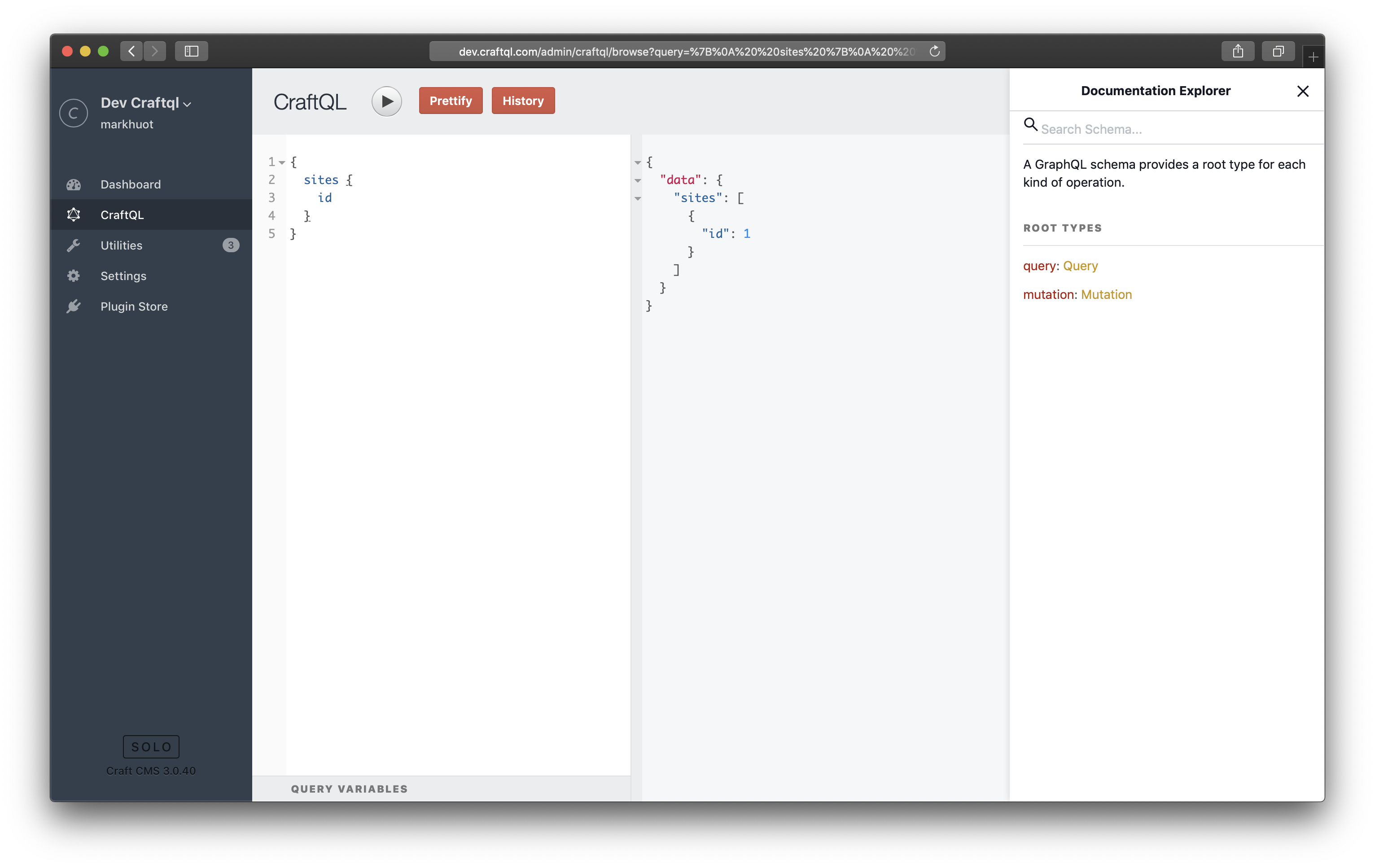
Regarding the error, "error": "Unable to verify your data submission.". That comes from Yii's CSRF protection, which is disabled for the API endpoint. Based on CSRF running, the 404 on /api, and the "No Schema Available" it really feels like the plugin isn't installed any more. For my own sanity can you try uninstalling it and re-installing it? You'll lose your tokens though so only do this as a test and don't do it in production unless you're okay with generating new tokens.
@markhuot I've been trying that...
- Uninstall from the CP then reinstall
- Uninstall from the CP, remove from composer.json file,remove
vendordir, and then reinstall via composer
I just reverted to dev-master just to make sure I am not going crazy but here's a weird catch:
- I can hit the endpoint via curl without a problem
- I get the same error and the schema won't load either
my siteUrl is set to null but that wasn't an issue before.
Other things I am doing:
- logging in and out of the site
- Clearing cookies and site data for the domain
- Clearing cache via the `craft' CLI and the web interface
I am about to restart my damn computer to see if that works :P
Very odd. The 2.x branch shouldn't have altered anything (config or database-wise) so going back and forth between the two branches should be possible.
Let me know what I can do to help here. If you're able to—feel free to email me a database export and I'll try to recreate it locally.
Before I bother you offline I decided to try and see if I could get this working remotely in our staging instance to make sure my local docker setup isn't all wonky.
With 2.0.0.beta.1 I am able to hit the endpoint using the helloWorld query. When I try to use graphiql in the browser, though, the schema doesn't load and I get the following error:
TypeError: Cannot read property 'types' of undefined
    at buildClientSchema (https://XXXXX.herokuapp.com/cpresources/a6a16/ajax/libs/graphiql/0.11.10/graphiql.js?v=1549488114:31008:72)
    at https://XXXXX.herokuapp.com/cpresources/a6a16/ajax/libs/graphiql/0.11.10/graphiql.js?v=1549488114:2190:55
I clear caches and run migrations on deploy so cpresources should be empty before I hit the CP. The remote server does not have devMode enabled and that is the only real config difference between my local setup and the remote instance.
Of course, downgrading to 1.1.3 works fine 🤷♂️
That graphiql resource shouldn't have updated with the 2.0.0 beta so I wouldn't worry about that.
"Cannot read property 'types' of undefined" sounds like the GraphiQL introspection query isn't returning anything/everything. This feels like the 2.0.0 update is failing on your schema for some reason. If you can share a database that would be ideal. If not, could you try running the following and seeing if it will generate a schema file?
./craft craftql/tools/print-schema > /path/to/some/file.graphql
If it's useful here, I've run back and forth between dev-master and ~2@beta several times just now, with results:
- 2@beta works fine run inside Craft via the service
- it also runs fine called externally on its Craft api from command line gatsby build
- performance gain looks like 14 queries/sec vs 11, according to gatsby build logging
- times for gatsby access look rational for query rate
- CraftiQL feels a bit snappier, as do my Live Vue CP editing updates on the Gatsby site
- the entries portion of schema is very simple for this case - just a body and an image
- a full schema query which I borrowed from the PhpStorm GraphQL JS plugin displays fine - query is large, thus takes noticeable seconds to run
This is running all parts on an i7 laptop, Chrome Canary w/nginx serving Gatsby and Craft/GrafQL on a Vagrant vm, Win10 latest underneath. Timings taken with devMode false. Craft 3.1 dev-develop
Thank you so much for taking your time to help me out with this. I REALLY appreciate it!
Running ./craft craftql/tools/print-schema > schema.graphql inside my local docker container:
root@752b70d4043c:/usr/share/nginx# ./craft craftql/tools/print-schema > schema.graphql
Exception 'GraphQL\Error\InvariantViolation' with message 'Each entry of schema types must be instance of GraphQL\Type\Definition\Type but entry at 44 is false'

in /usr/share/nginx/vendor/webonyx/graphql-php/src/Type/Schema.php:254

Stack trace:
#0 /usr/share/nginx/vendor/webonyx/graphql-php/src/Type/Schema.php(227): GraphQL\Type\Schema->resolveAdditionalTypes()
#1 /usr/share/nginx/vendor/webonyx/graphql-php/src/Type/Schema.php(195): GraphQL\Type\Schema->collectAllTypes()
#2 /usr/share/nginx/vendor/webonyx/graphql-php/src/Type/Schema.php(418): GraphQL\Type\Schema->getTypeMap()
#3 /usr/share/nginx/vendor/markhuot/craftql/src/Services/GraphQLService.php(183): GraphQL\Type\Schema->assertValid()
#4 /usr/share/nginx/vendor/markhuot/craftql/src/Console/ToolsController.php(572): markhuot\CraftQL\Services\GraphQLService->getSchema(Object(markhuot\CraftQL\Models\Token))
#5 [internal function]: markhuot\CraftQL\Console\ToolsController->actionPrintSchema()
#6 /usr/share/nginx/vendor/yiisoft/yii2/base/InlineAction.php(57): call_user_func_array(Array, Array)
#7 /usr/share/nginx/vendor/yiisoft/yii2/base/Controller.php(157): yii\base\InlineAction->runWithParams(Array)
#8 /usr/share/nginx/vendor/yiisoft/yii2/console/Controller.php(148): yii\base\Controller->runAction('print-schema', Array)
#9 /usr/share/nginx/vendor/yiisoft/yii2/base/Module.php(528): yii\console\Controller->runAction('print-schema', Array)
#10 /usr/share/nginx/vendor/yiisoft/yii2/console/Application.php(180): yii\base\Module->runAction('craftql/tools/p...', Array)
#11 /usr/share/nginx/vendor/yiisoft/yii2/console/Application.php(147): yii\console\Application->runAction('craftql/tools/p...', Array)
#12 /usr/share/nginx/vendor/yiisoft/yii2/base/Application.php(386): yii\console\Application->handleRequest(Object(craft\console\Request))
#13 /usr/share/nginx/craft(22): yii\base\Application->run()
#14 {main}
Running ./craft craftql/tools/print-schema > schema.graphql inside a Heroku dyno works fine though 🤷♂️
I'll shoot over the DB because something seems super wonky.
I was able to get 1.3.1 working locally by specifying a siteUrl (used to be null which worked fine until recently):
'siteUrl' => 'http://localhost'
2.0 beta is still not working for some reason. When trying to use the beta I am noticing this in browser's console:
Unless I am misreading this the Authorization header doesn't seem to set token:
Accept: application/json
Accept-Encoding: gzip, deflate, br
Accept-Language: en-US,en;q=0.9,zh-CN;q=0.8,zh;q=0.7
Authorization: Bearer
Cache-Control: no-cache
Connection: keep-alive
Content-Length: 1550
Content-Type: application/json
Cookie: 1031b8c41dfff97a311a7ac99863bdc5_username=fc06311a99ef5df805075748d2d1728f36f6fc3dc3523c956e52576dc47b803fa%3A2%3A%7Bi%3A0%3Bs%3A41%3A%221031b8c41dfff97a311a7ac99863bdc5_username%22%3Bi%3A1%3Bs%3A14%3A%22paulo%40ideo.com%22%3B%7D; PHPSESSID=b6o133o7nfb7vgfluaa3ds4kij; 1031b8c41dfff97a311a7ac99863bdc5_identity=8329857fca203a31a477d50116a094c0c3df43b7c74c989c450901d3c1259dbca%3A2%3A%7Bi%3A0%3Bs%3A41%3A%221031b8c41dfff97a311a7ac99863bdc5_identity%22%3Bi%3A1%3Bs%3A288%3A%22%5B2%2C%22%5B%5C%22dhX8l1rWalXsOacpvoUKFwUNUKnMtxRLbTNDrvguLqxNMJvzI8VgM1ENpLnmvm7bpxBXf7c_ysyY_Ee_-5Jfy2p2ALBMuwqOvfS5%5C%22%2C%5C%228d8fa0ae-239d-4f2a-87ac-e0d05dfe03f2%5C%22%2C%5C%22Mozilla%2F5.0+%28Macintosh%3B+Intel+Mac+OS+X+10_13_6%29+AppleWebKit%2F537.36+%28KHTML%2C+like+Gecko%29+Chrome%2F74.0.3694.0+Safari%2F537.36%5C%22%5D%22%2C3187209600%5D%22%3B%7D; CRAFT_CSRF_TOKEN=88f8358120f9611e100832449cf549d11065ff8b5a3d3ad70140ca915f5fcb4fa%3A2%3A%7Bi%3A0%3Bs%3A16%3A%22CRAFT_CSRF_TOKEN%22%3Bi%3A1%3Bs%3A208%3A%22o4WWJBLjawY1GNgnriMpWl6DWoucHb7mfBGndJgI%7C65f2a8c9cb5faccb99e72a50492895b112e0ebf17b3b3880aa52c08245a24286o4WWJBLjawY1GNgnriMpWl6DWoucHb7mfBGndJgI%7C2%7C%242y%2413%24lBxP5zeX6GDQOBsxZvH3WOIeMumq8VJo00lw9Yno84aa4UdNm%2FiYy%22%3B%7D
DNT: 1
Host: localhost
Origin: http://localhost
Pragma: no-cache
Referer: http://localhost/cp/craftql/browse
User-Agent: Mozilla/5.0 (Macintosh; Intel Mac OS X 10_13_6) AppleWebKit/537.36 (KHTML, like Gecko) Chrome/74.0.3694.0 Safari/537.36
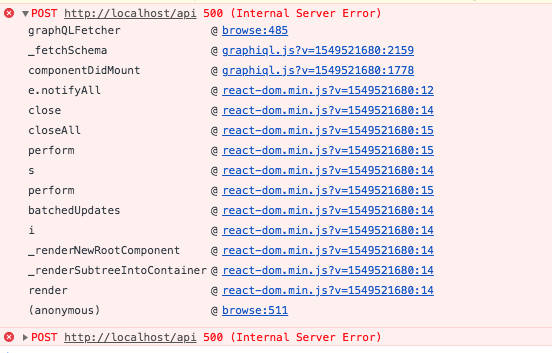
browse:485 points to this:
    function graphQLFetcher(graphQLParams) {
        // This example expects a GraphQL server at the path /graphql.
        // Change this to point wherever you host your GraphQL server.
        return fetch('http://localhost/api', {
          method: 'post',
          headers: {
            'Accept': 'application/json',
            'Content-Type': 'application/json',
            'Authorization': 'Bearer ',
          },
          body: JSON.stringify(graphQLParams),
          credentials: 'include',
        }).then(function (response) {
          return response.text();
        }).then(function (responseBody) {
          try {
            return JSON.parse(responseBody);
          } catch (error) {
            return responseBody;
          }
        });
      }
I'm assuming the 500 server error has something to do with not being able to run ./craft craftql/tools/print-schema > schema.graphql in my docker container:
root@6aed303eb0cc:/usr/share/nginx# ./craft craftql/tools/print-schema > schema.graphql
Exception 'GraphQL\Error\InvariantViolation' with message 'Each entry of schema types must be instance of GraphQL\Type\Definition\Type but entry at 44 is false'

in /usr/share/nginx/vendor/webonyx/graphql-php/src/Type/Schema.php:254

Stack trace:
#0 /usr/share/nginx/vendor/webonyx/graphql-php/src/Type/Schema.php(227): GraphQL\Type\Schema->resolveAdditionalTypes()
#1 /usr/share/nginx/vendor/webonyx/graphql-php/src/Type/Schema.php(195): GraphQL\Type\Schema->collectAllTypes()
#2 /usr/share/nginx/vendor/webonyx/graphql-php/src/Type/Schema.php(418): GraphQL\Type\Schema->getTypeMap()
#3 /usr/share/nginx/vendor/markhuot/craftql/src/Services/GraphQLService.php(183): GraphQL\Type\Schema->assertValid()
#4 /usr/share/nginx/vendor/markhuot/craftql/src/Console/ToolsController.php(572): markhuot\CraftQL\Services\GraphQLService->getSchema(Object(markhuot\CraftQL\Models\Token))
#5 [internal function]: markhuot\CraftQL\Console\ToolsController->actionPrintSchema()
#6 /usr/share/nginx/vendor/yiisoft/yii2/base/InlineAction.php(57): call_user_func_array(Array, Array)
#7 /usr/share/nginx/vendor/yiisoft/yii2/base/Controller.php(157): yii\base\InlineAction->runWithParams(Array)
#8 /usr/share/nginx/vendor/yiisoft/yii2/console/Controller.php(148): yii\base\Controller->runAction('print-schema', Array)
#9 /usr/share/nginx/vendor/yiisoft/yii2/base/Module.php(528): yii\console\Controller->runAction('print-schema', Array)
#10 /usr/share/nginx/vendor/yiisoft/yii2/console/Application.php(180): yii\base\Module->runAction('craftql/tools/p...', Array)
#11 /usr/share/nginx/vendor/yiisoft/yii2/console/Application.php(147): yii\console\Application->runAction('craftql/tools/p...', Array)
#12 /usr/share/nginx/vendor/yiisoft/yii2/base/Application.php(386): yii\console\Application->handleRequest(Object(craft\console\Request))
#13 /usr/share/nginx/craft(22): yii\base\Application->run()
#14 {main}
@pauloelias my setup is dockerized too, so I'll try this today and see what I get
Hmmm for me on 3.0.40 (and on 3.1) on markhuot/[email protected] I'm getting the same as @pauloelias :
$ docker-compose --file='./ops/docker/dlr_craftcms/docker-compose.yml' exec app bin/craft craftql/tools/print-schema
Exception 'GraphQL\Error\InvariantViolation' with message 'Each entry of schema types must be instance of GraphQL\Type\Definition\Type but entry at 55 is false'

in /app/vendor/composer/webonyx/graphql-php/src/Type/Schema.php:254

Stack trace:
#0 /app/vendor/composer/webonyx/graphql-php/src/Type/Schema.php(227): GraphQL\Type\Schema->resolveAdditionalTypes()
#1 /app/vendor/composer/webonyx/graphql-php/src/Type/Schema.php(195): GraphQL\Type\Schema->collectAllTypes()
#2 /app/vendor/composer/webonyx/graphql-php/src/Type/Schema.php(418): GraphQL\Type\Schema->getTypeMap()
#3 /app/vendor/composer/markhuot/craftql/src/Services/GraphQLService.php(183): GraphQL\Type\Schema->assertValid()
#4 /app/vendor/composer/markhuot/craftql/src/Console/ToolsController.php(572): markhuot\CraftQL\Services\GraphQLService->getSchema(Object(markhuot\CraftQL\Models\Token))
#5 [internal function]: markhuot\CraftQL\Console\ToolsController->actionPrintSchema()
#6 /app/vendor/composer/yiisoft/yii2/base/InlineAction.php(57): call_user_func_array(Array, Array)
#7 /app/vendor/composer/yiisoft/yii2/base/Controller.php(157): yii\base\InlineAction->runWithParams(Array)
#8 /app/vendor/composer/yiisoft/yii2/console/Controller.php(148): yii\base\Controller->runAction('print-schema', Array)
#9 /app/vendor/composer/yiisoft/yii2/base/Module.php(528): yii\console\Controller->runAction('print-schema', Array)
#10 /app/vendor/composer/yiisoft/yii2/console/Application.php(180): yii\base\Module->runAction('craftql/tools/p...', Array)
#11 /app/vendor/composer/yiisoft/yii2/console/Application.php(147): yii\console\Application->runAction('craftql/tools/p...', Array)
#12 /app/vendor/composer/yiisoft/yii2/base/Application.php(386): yii\console\Application->handleRequest(Object(craft\console\Request))
#13 /app/bin/craft(26): yii\base\Application->run()
#14 {main}
error Command failed with exit code 1.
info Visit https://yarnpkg.com/en/docs/cli/run for documentation about this command.
– when I try and run craftql/tools/print-schema
Where that exception is thrown, $type is bool(false)
UPDATE:
After some debugging, it appears the GraphQL\Error\InvariantViolation exceptions were being thrown from Tag fields/groups. If I delete my tag fields and groups, I can successfully run craftql/tools/print-schema
/cc @pauloelias @markhuot
Ah, so the issue has to do with how the Tag Group object types are created. I'm working on a fix for this now. Thanks for bearing with me everyone.
When you guys get done, I would sincerely like to hear how this problem relates to running in a container.
Tight work, anyway, by all concerned. And for your black humor/fellow-feeling side, it happens that Wells Fargo Bank has lost just about their entire customer-facing IT, for all of today so far.
Without any evidence, I will blame containers; containers R fun...
@markhuot thank you again!
@timkelty yup, it has to be our tags/tag groups
@narration-sd turns out it's a DB issue, not a container issue. I made a mistake and though 2.0beta was working when it was deployed to Heroku but it ended up flagging the same error when I tried to generate the schema. To much time staring at the darn screen.
@pauloelias definitely can identify with the screen-staring ;) and glad this is on road to being sorted.
Wells Fargo’s ‘container’ turned out to be a server building that burned down. They’ve got all operating again, if working slowly. A bit of a surprise there wasn‘t full failover geographic diversity, but then, AT&T, if you remember that one.
Thanks for the note on cause, and take care
@pauloelias if you're still considering using my branch to get you by in the interim, I rebased it off markhuot/master. Nothing appears to have conflicted or broken:
https://github.com/timkelty/craftql/tree/response-caching
Okay, the 2.x-dev branch should include fixes for the tags problem. @pauloelias, you should be able to run 2.x-dev against your schema now without issue. I'm still trying to optimize it further but you should see improvements from 5s down to 1.2s.
@markhuot 2.x-dev runs fine here. Not seeing any performance change, still circa 14 queries/sec on this testbed for quite other things, with its minimal number of sections and entries to be schema'd and queried.
Quite possibly the optimizing you mention is for other things, even the tags, but thought you'd like to see some reply as early as possible...cheers on all the work!
@markhuot 2.x-dev seems to be running beautifully, thank you so much!
We'll do more testing over the next few days and report back if we see anything amiss.
@timkelty thank you sir! I really appreciate your help too.