

 mark-wiemer
Keep code preview being shown while you are typing
On AutoHotkeyScite it displays the snippet (not sure if this thing is called "snippet") of the function while you are typing:

On vscode, when I type anything it disappears:

Is possible to do the same?

Hmm, I'll have to look into this. Unfortunately I'm a bit busy through the end of this month. But I can say snippets are usually meant to be autocompleted in VS Code. When you first type iniread, you should be able to press Tab or Enter to auto-expand the snippet into the editor and then fill in the values. ~~I know this extension doesn't do it so well, I do think it would be worth spending some time to update.~~ (Edit: Looks like it works just fine, I may be misremembering. Please open a new issue if there are commands where auto-expansion has issues.) Thanks for the report.
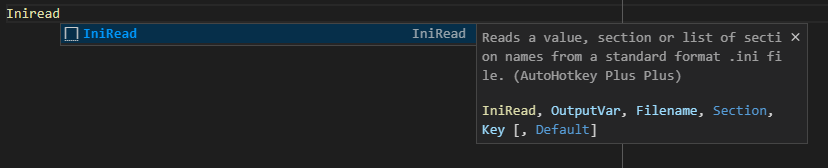
Snippet when first typing command (you can also press Ctrl+Space to "trigger suggest" / open these suggestions):
Result of selecting that snippet:

Once a value has been filled in, you can press Tab to navigate to the next value. VS Code snippets are pretty neat once you get the hang of them. Further reading: Snippets in Visual Studio Code
I'll put this in the May backlog for further investigation, but I think the behavior is pretty well-covered in the current implementation, please let me know if I'm misunderstanding your use-case. I don't think I can implement the persistent suggestion/snippet behavior that AHKScite has, but that's a limitation of what an extension can do and what VS Code is built for.

As an alternative, there is an IntelliSense AHK script that might be worth trying: Script Showcase | AutoHotkey
I see, but sometimes when you press tab it fills the line with a lot of things you'll not use atm, like optional parameters.
About the auto format as you could see there are a lot of issues like on switch and on labels that have no return at the ending, any plans in fixing it?
Do you ever have seen this AutoHotkey 'Prettyfy'? https://www.autohotkey.com/boards/viewtopic.php?t=8678
You can quickly remove optional parameters by pressing Backspace or Delete when your cursor is moved to them, I highly recommend trying it out, it works really well.
Formatting issues are also a priority, but I think they should be discussed in their respective threads, not this one. If you know of a specific issue that isn't currently listed, feel free to open a new issue. The prettify link looks nice, I'll see if I can find the source code and get some info from there.
Had to sanity check that this is indeed possible. JavaScript has it, looks like we'd need to update the completion provider based on whether it detected the user as inside of a method's parameter list?
That said, keeping this one on the back burner. AHK v2 support remains top priority.