

 marcingminski
Extend documentation to change sql agent defaults
By default the SQL Agent limits the job history like this:
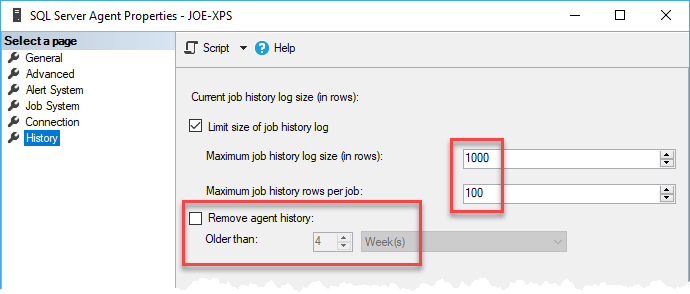
Due to the increase of the collection intervall, this limits aren't enough for long term monitoring of agents jobs. Please give an advice to change this to more reasonable defaults in the documentation

Hi,
Thanks for this. Documentation is also Open Source, and you are free to submit a change.
However, I would be wary as increasing history, especially from 1000 records to 4 weeks will increase size of the msdb and could impact storage and all sorts of other things. It could even break SQL Agent due to slow access to the data - Try opening agent history with 4 weeks' worth of history, it will often crash SSMS.
If we put this in documentation and someone who has hundreds of jobs and keeps msdb on C drive follows it, they could quickly run out of space and cause outage.
This is a standard SQL Server maintenance task that most DBAs are familiar with. I would leave this for each DBA to decide how they want to handle agent retention. Not having the history is less risk.
My personal advice would be to keep agent history small and write any critical job failures to the event log.
Thanks

Okay, I will submit a PR for documentation. What is the theoretical amount of SQL Agent log entries due to the increased polling intervall?
I have not done any analysis on that; hence I was not ready to make any recommendations but assuming it makes one entry per execution every 10 seconds, we'd be looking at 6 entries per minute so to accommodate 24-hour period, the row limit would be 8640 per job.
Hello, on my side I configure sql agent history as follow
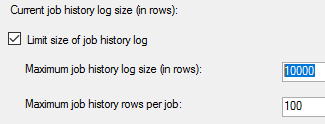 The remove agent history check box trigger a stored procedure called sp_purge_jobhistory which has been employed as folllow in a job trigerred every day.
DECLARE @PurgeDate datetime = DATEADD(dd,-31,GETDATE())
EXEC msdb.dbo.sp_purge_jobhistory @oldest_date=@PurgeDate;
The remove agent history check box trigger a stored procedure called sp_purge_jobhistory which has been employed as folllow in a job trigerred every day.
DECLARE @PurgeDate datetime = DATEADD(dd,-31,GETDATE())
EXEC msdb.dbo.sp_purge_jobhistory @oldest_date=@PurgeDate;
As the SQLWATCH-EXTERNAL-IMPORT import job blowing history, I changed the command
D:\Apps\SqlWatch\Import\SqlWatchImport.exe > NUL
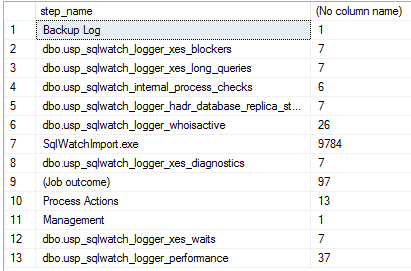 Query : select step_name,count(1) from msdb.dbo.sysjobhistory group by step_name
PS : I had to stop the job because it never stops.
Query : select step_name,count(1) from msdb.dbo.sysjobhistory group by step_name
PS : I had to stop the job because it never stops.
Many thanks to Marcin and the community!

Hi,
You can also schedule SqlWatchImport.exe via Windows Task Scheduler. It's only scheduled via Agent to start with for
simplicity but there's nothing stopping you form changing it to your liking.
Also, you can change the SqlWatchImport.exe no to not generate any log to start with, rather than redirecting to NULL. If you tell it to not generate any , it will run even faster.
There are few options in the app.config:
    <!-- Whether to output to log file or not. If set to false,
         nothing will be output to the log file -->
    <add key="PrintToLogFile" value="true"/>

    <!-- The application will write messages to the Log defined in the Log config
         Optionally, you can enable writing to the Console.
         If you're running it via SQL Agent job, the console output will appear
         in the agent job history which may be handy but not always desired due
         to the potential size of the log output -->
    <add key="PrintToConsole" value="true"/>
if you set both of the above to false, the application will not output anything at all. However that way you will also lose any errors. I would keep the following:
<add key="PrintToLogFile" value="true"/>
<add key="PrintToConsole" value="false"/>
This will save messages only to the log file and not to the console so will not impact agent job. Also, the below give you control over the size and the number of log files to make sure they're not too big either:
    <!-- Log file parameters -->
    <add key="LogFile" value="SqlWatchImport.log" />
    <!-- Max size of a single log file -->
    <add key="MaxLogSizeMB" value="10" />
    <!-- Max number of log files to keep -->
    <add key="MaxLogFiles" value="10" />
Finally, the tracelevel gives you an option what to save to the log file:
      <!-- TraceLevel Enum
            0 - Off - Output no tracing and debugging messages.
            1 - Error - Output error-handling messages.
            2 - Warning - Output warnings and error-handling messages.
            3 - Info - Output informational messages, warnings, and error-handling messages.
            4 - Verbose	- Output all debugging and tracing messages. -->
      <add name="GeneralTraceSwitch" value="Error" />
so if you select Error, it will only spit out Errors, hopefully keeping the file very small as there should not be too many errors.
PS : I had to stop the job because it never stops.
This does not sound right. Tell me more. The import should not take more than few seconds to run.
Thanks for your feedback Marcin!
I use a sql server as concentrator of 4 sqlserver using login/password to connect. my version is Microsoft SQL Server 2019 (RTM) - 15.0.2000.5 (X64) Sep 24 2019 13:48:23 Copyright (C) 2019 Microsoft Corporation Enterprise Edition: Core-based Licensing (64-bit) on Windows Server 2016 Standard 10.0 <X64> (Build 14393: ) (Hypervisor) SQLWATCH 3.0.9.18505 SQLWATCH Remote Instance Importer 1.1.7757.27362
The job is always running when the command is not with > NUL. This is one message for example Date 21/04/2021 14:50:00 Log Job History (SQLWATCH-EXTERNAL-IMPORT)
Step ID 1 Server SERVERNAME Job Name SQLWATCH-EXTERNAL-IMPORT Step Name SqlWatchImport.exe Duration 00:31:20 Sql Severity 0 Sql Message ID 0 Operator Emailed Operator Net sent Operator Paged Retries Attempted 0
Message nnerInvoke() at System.Threading.Tasks.Task.InnerInvokeWithArg(Task childTask) at System.Threading.Tasks.Task.<>c__DisplayClass176_0.<ExecuteSelfReplicating>b__0(Object )<---
---> (Inner Exception #1) System.IndexOutOfRangeException: Index was outside the bounds of the array.
at System.Collections.Generic.List1.Add(T item) at SqlWatchImport.SqlWatchInstance.<>c__DisplayClass47_1.<ImportAsync>b__3(SqlWatchTable Table) at System.Threading.Tasks.Parallel.<>c__DisplayClass31_02.<ForEachWorker>b__0(Int32 i)
at System.Threading.Tasks.Parallel.<>c__DisplayClass17_0`1.<ForWorker>b__1()
at System.Threading.Tasks.Task.InnerInvoke()
at System.Threading.Tasks.Task.InnerInvokeWithArg(Task childTask)
at System.Threading.Tasks.Task.<>c__DisplayClass176_0.<ExecuteSelfReplicating>b__0(Object )<---
---> (Inner Exception #2) System.IndexOutOfRangeException: Index was outside the bounds of the array.
at System.Collections.Generic.List1.Add(T item) at SqlWatchImport.SqlWatchInstance.<>c__DisplayClass47_1.<ImportAsync>b__3(SqlWatchTable Table) at System.Threading.Tasks.Parallel.<>c__DisplayClass31_02.<ForEachWorker>b__0(Int32 i)
at System.Threading.Tasks.Parallel.<>c__DisplayClass17_0`1.<ForWorker>b__1()
at System.Threading.Tasks.Task.InnerInvoke()
at System.Threading.Tasks.Task.InnerInvokeWithArg(Task childTask)
at System.Threading.Tasks.Task.<>c__DisplayClass176_0.<ExecuteSelfReplicating>b__0(Object )<---
---> (Inner Exception #3) System.IndexOutOfRangeException: Index was outside the bounds of the array.
at System.Collections.Generic.List1.Add(T item) at SqlWatchImport.SqlWatchInstance.<>c__DisplayClass47_1.<ImportAsync>b__3(SqlWatchTable Table) at System.Threading.Tasks.Parallel.<>c__DisplayClass31_02.<ForEachWorker>b__0(Int32 i)
at System.Threading.Tasks.Parallel.<>c__DisplayClass17_0`1.<ForWorker>b__1()
at System.Threading.Tasks.Task.InnerInvoke()
at System.Threading.Tasks.Task.InnerInvokeWithArg(Task childTask)
at System.Threading.Tasks.Task.<>c__DisplayClass176_0.<ExecuteSelfReplicating>b__0(Object )<---
---> (Inner Exception #4) System.IndexOutOfRangeException: Index was outside the bounds of the array.
at System.Collections.Generic.List1.Add(T item) at SqlWatchImport.SqlWatchInstance.<>c__DisplayClass47_1.<ImportAsync>b__3(SqlWatchTable Table) at System.Threading.Tasks.Parallel.<>c__DisplayClass31_02.<ForEachWorker>b__0(Int32 i)
at System.Threading.Tasks.Parallel.<>c__DisplayClass17_0`1.<ForWorker>b__1()
at System.Threading.Tasks.Task.InnerInvoke()
at System.Threading.Tasks.Task.InnerInvokeWithArg(Task childTask)
at System.Threading.Tasks.Task.<>c__DisplayClass176_0.<ExecuteSelfReplicating>b__0(Object )<---
<---
---> (Inner Exception #7) System.ArgumentException: The tasks argument included a null value.
Parameter name: tasks
at System.Threading.Tasks.Task.WhenAll[TResult](IEnumerable1 tasks) at SqlWatchImport.SqlWatchInstance.<>c__DisplayClass47_0.<ImportAsync>b__0() at System.Threading.Tasks.Task.InnerInvoke() at System.Threading.Tasks.Task.Execute() --- End of stack trace from previous location where exception was thrown --- at System.Runtime.CompilerServices.TaskAwaiter.ThrowForNonSuccess(Task task) at System.Runtime.CompilerServices.TaskAwaiter.HandleNonSuccessAndDebuggerNotification(Task task) at System.Runtime.CompilerServices.TaskAwaiter.GetResult() at SqlWatchImport.SqlWatchInstance.<ImportAsync>d__47.MoveNext() --- End of stack trace from previous location where exception was thrown --- at System.Runtime.CompilerServices.TaskAwaiter.ThrowForNonSuccess(Task task) at System.Runtime.CompilerServices.TaskAwaiter.HandleNonSuccessAndDebuggerNotification(Task task) at System.Runtime.CompilerServices.TaskAwaiter1.GetResult()
at SqlWatchImport.Program.<>c__DisplayClass0_2.<<Main>b__2>d.MoveNext()<---
(Thread: 1)
This error does happen occasionally in my lab, but I am not sure why. When it happens, the application just quits and then it invoked again via schedule. How often does it happen in your environment?
Oh, unless, when it throws the error, it never closes because it's waiting for a user to close it? that would be a strange behaviour but the only one I can think of
Very strange Marcin! I compared the versions and found one only minor change in SqlWatchInstance.cs like [SQLWATCH]. has been removed. With your build version (SQLWATCH Remote Instance Importer 1.1.7757.27362) I have the following error
2021-04-21 15:42:00.629 ERROR System.AggregateException: One or more errors occurred. ---> System.ArgumentException: The tasks argument included a null value.
With my own version (SQLWATCH Remote Instance Importer 1.1.7690.19519) compiled on January 20, 2021, I have no errors and the job stops cleanly.
I used Microsoft Visual Studio Professional 2019 Version 16.8.2 with Microsoft .NET Framework Version 4.8.03752.
If you want more details please advise. Many thanks for your support.
Is the app config the same? Sounds like a threading issue?
On Wed, 21 Apr 2021 at 16:47, LionelFremondiere @.***> wrote:
Very strange Marcin! I compared the versions and found one only minor change in SqlWatchInstance.cs like [SQLWATCH]. has been removed. With your build version (SQLWATCH Remote Instance Importer 1.1.7757.27362) I have the following error
2021-04-21 15:42:00.629 ERROR System.AggregateException: One or more errors occurred. ---> System.ArgumentException: The tasks argument included a null value.
With my own version (SQLWATCH Remote Instance Importer 1.1.7690.19519) compiled on January 20, 2021, I have no errors and the job stops cleanly.
I used Microsoft Visual Studio Professional 2019 Version 16.8.2 with Microsoft .NET Framework Version 4.8.03752.
If you want more details please advise. Many thanks for your support.
— You are receiving this because you commented. Reply to this email directly, view it on GitHub https://github.com/marcingminski/sqlwatch/issues/263#issuecomment-824167028, or unsubscribe https://github.com/notifications/unsubscribe-auth/AB7HQTODMDEXLDNX5Z6R3GLTJ3XRTANCNFSM43BBSFFQ .
for reference, I will test this: https://stackoverflow.com/questions/34357166/the-tasks-argument-included-a-null-value