maptz
maptz
Regions Only Recognized when Contained Code is Indented
I have these two regions defined next to each other in my javascript file, but only the second region is recognized. My linter gets angry with me if I break conventional indentation rules, so is there a way to configure custom folding so it does not require indenting the code contained in the region?
/* #region default Not a Recognized Region */
const data = super.getData();
const actorData = data.data;
const panthData = CONFIG.scion.PANTHEONS;
const godData = CONFIG.scion.GODS;
/* #endregion */

/* #region default Valid Region */
    const data = super.getData();
    const actorData = data.data;
    const panthData = CONFIG.scion.PANTHEONS;
    const godData = CONFIG.scion.GODS;
/* #endregion */
For reference, here are my settings:
"maptz.regionfolder": {
    "[javascript]": {
        "foldEnd": "/* #endregion */",
        "foldEndRegex": "/\\*[\\s]*#endregion",
        "foldStart": "/* #region [NAME] */",
        "foldStartRegex": "^[\\s]*/\\*[\\s]*#region[\\s]*(.*)[\\s]*\\*/[\\s]*$",
        "defaultFoldStartRegex": "^[\\s]*/\\*[\\s]*#region[\\s]*default\\s(.*)[\\s]*\\*/[\\s]*$"
    }
}

Hmm. Not sure why this is happening. It doesn't happen on my system. Can you try doing the same with another language and seeing if you get the same behaviour?

VS itself will do folding based on indentation, no addons required. This bug is more likely that the extension isn't working at all and you are seeing default VS behaviour.

Hi,
Yes. I can't reproduce this behaviour I'm afraid. Are you still having issues?
I also have this same issue. I wonder if that's my regex pattern but it seems like a bug though. Here is a preview of the behavior:
https://i.vgy.me/QDqoXW.gif
Which makes this unsuable as is. These are the settings I use:
"maptz.regionfolder": {
    "collapseDefaultRegionsOnOpen": true,
    "[liquid]": {
      "foldStart": "{%- # region [] -%}",
      "foldEnd": "{%- # endregion -%}",
      "foldStartRegex": "\\s*{%-\\s*#\\s*region\\s*(.*)",
      "foldEndRegex": "\\s*{%-\\s*#\\s*endregion\\s*(.*)",
      "disableFolding": false,
      "defaultFoldStartRegex": "\\s*{%-\\s*#\\s*region\\s*(collapsed)\\s*(.*)",
    }
  }
This is in a .liquid file, but I also tried in an ordinary .css file and I have the same behaviour.
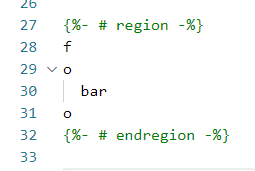
Edit: actually, I found out the culprit, even though I still believe it's a bug. It seems this vscode setting: "editor.foldingStrategy": "indentation", prevents your extension to fold a region when there is no indentation within this region. Without this setting it works as expected:
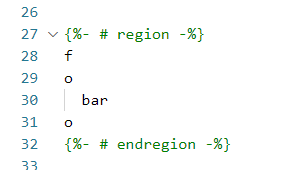
But with this setting on, indentation behaves as expected, except the region does not fold, probably because it conflicts with the setting I mentioned (which is very important for most templating language):