

 mapbox
Auto zoom working inconsistently
I'm using Mapbox (1.4) to display a choropleth with a custom tileset. I have a slicer that filters the map content down to a small selection of areas, but when I change the slicer selection auto zoom doesn't consistently zoom in to the selected areas. When it fails, it zooms out to a country-wide view and stays there.
It seems to work better if it's moving from one part of the map to somewhere nearby, but not if it's moving across the country.
The filter always returns areas that are contiguous with each other, so it should be able to auto zoom.
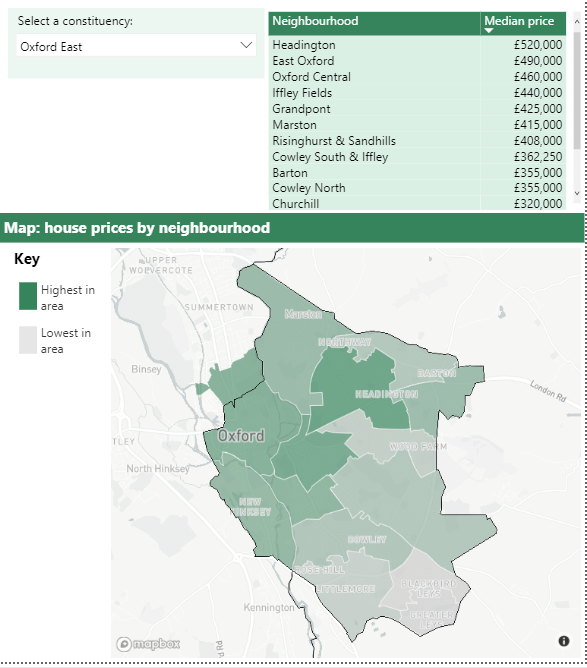
Successful zoom looks like this:
(The slicer is selecting a group of areas for the table and the map)
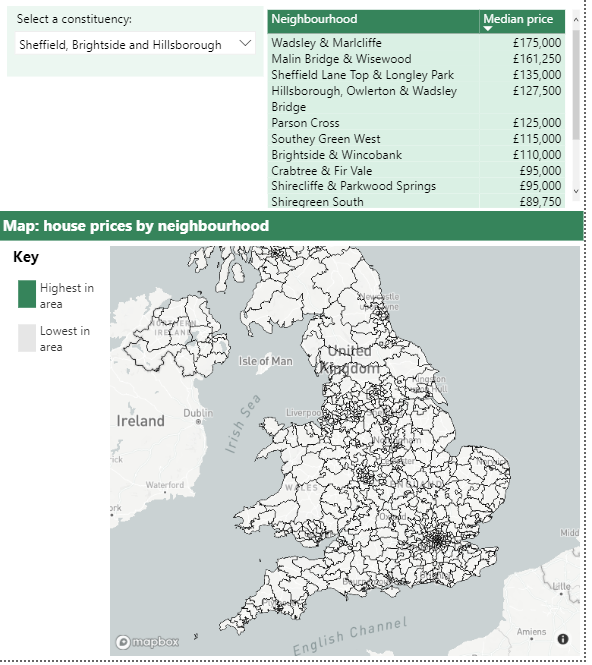
Failed zoom looks like this:
(Note that the tileset isn't visible here, the lines are just a style I applied to the basemap)

Same issue for me. From other posts regarding this, I believe the issue is to do with the Zoom range of the underlying tileset.
However, the methods available to extend the Zoom range are hit or miss. I've seen reference to Tippecanoe, which requires Unix (? not happening), Mapbox Desktop which I'm unable to find where you download it and any references to it imply its no longer supported and simplifying the boundary layer through Mapshaper.
I've done a Mapshaper simplification to a shapefile. It's relatively painless but, results are not significant as an example a Tileset of 65,000 polygons has a default zoom range of Z6-11, the simplified version (25%) results in a zoom range improvement of Z5-10.

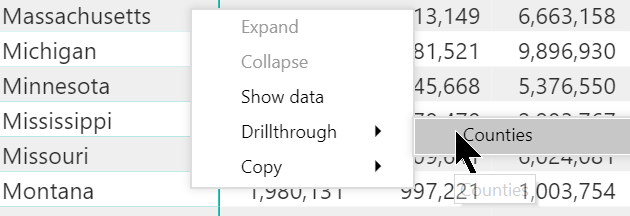
I can replicate the lack of proper autozoom using the Drillthrough functionality, with similar behavior as described by @cassier-barton :
- I drillthrough from a table of US states to a report featuring a Mapbox map of the US detailed by counties (based on a custom tileset)
-
the Mapbox map loads zoomed out at the worldwide level even though it has autozoom on.
-
If I zoom on the overall US and switch autozoom off then on, it will succeed in zooming into the right state.

Related ticket: https://github.com/mapbox/mapboxgl-powerbi/issues/300 which is what I assume @steved-MarketGrunt was referring to, specifically:
"The Mapbox Visual Autozoom feature requires that features to autozoom to are visible at low zoom levels."
My county shapefile (TIGER/Line) indeed does not display at low zoom levels, even though it's set at 0-22 in Mapbox Studio. I'm guessing this is because its boundaries are too detailed. I'll crunch my shapefile through Mapshaper and will update this message.
Edit after tests: even extreme levels of simplification through Mapshaper didn't seem to force Mapbox to show my tileset at zoom z0, leading to the aforementioned autozoom issues. After I did the Tippecanoe dance, the tileset did show from zoom z0 and autozoom works properly, whether via drillthrough or tooltip.
@ryanbaumann if this feature cannot be changed to be more user friendly, may I suggest adding this restriction to the Power BI Mapbox documentation?
I'm not familiar with how to adjust the zoom extent of a tileset. I can try to adjust the settings using these instructions, but I'm not sure what zoom extent I should be aiming for. At the moment It's at z7 ~ z13. Do I need to reduce the lower bound, increase the upper bound, or both?
@cassier-barton you'll need to adjust the lower bound, i.e. use Tippecanoe so that the tileset can be visualized from a minimum zoom level of z0 instead of z7.