
mapbox-maps-ios
 mapbox-maps-ios copied to clipboard
 mapbox
mapView.camera.fly(to:, duration:, completion:) sometimes not working correctly
Environment
- Xcode version: 14.0
- iOS version: 16.0
- Devices affected: iPhone 12 pro, iPhone 14 pro, iPhone 6s (all I could test on, I am guessing all devices are)
- Maps SDK Version: 10.6.0
Observed behavior and steps to reproduce
When using a mapView and using mapView.camera.fly(to:, duration:, completion:), mapViews camera will sometimes not fly to desired bounds. -Create a MapView -Generate custom Bounds (in my case a Function returns the most south, West, North & East coordinates of all steps of a route to make sure to fit the whole route on the screen (function very well tested, works for sure)) and use them to... -Create a camera object using mapView.mapboxMap.camera(for:, padding: , bearing: , pitch: ) -Use mapView.camera.fly(to:, duration:, completion:) to fly to the camera we've just created
This will work most of the time, but will sometimes just not work without any error. It just does not move the screen at all. I have tested a lot but can't seem to find a pattern as to whether it works or not. It fails most of the time when being zoomed in to the max, but also fails sometimes when doing the exact same thing I did the time before when it worked... I am printing the bounds I calculated and I am plotting them on a map to check if they are correct - that's never the issue.
When drawing a route, for example, the route is currently sometimes mostly off-screen, which is bad.
Expected behavior
The MapView should fly to fit the bounds we have set, at any cost, or at least give back an error that we can work with. Right now, I cannot find what causes this because of missing feedback.
Notes / preliminary analysis
Additional links and references

@JanTG1 thank you for reporting. To better assist you, can you please provide a screen recording or code snippet of the the errant behavior so that we can investigate further?

@ZiZasaurus sure, if it helps. I will try to explain how I am trying to get this to work with screenshots.
First of all, my goal is it to either show all search results on a map, or to correctly show a whole route (make it fit on the screen). I do this with a helper method I wrote, which aims to calculate Map Bounds SW and NE for a given set of Coordinates I pull out of the route's shape. The Function is shown a bit further down my comment.
So for example, I am at coordinates Lat 52,514774, Lng 13,389212 and looking for a route heading to Lat 52.5352990, Lng 13.3580410, which should look like the following according to some random plotting website:
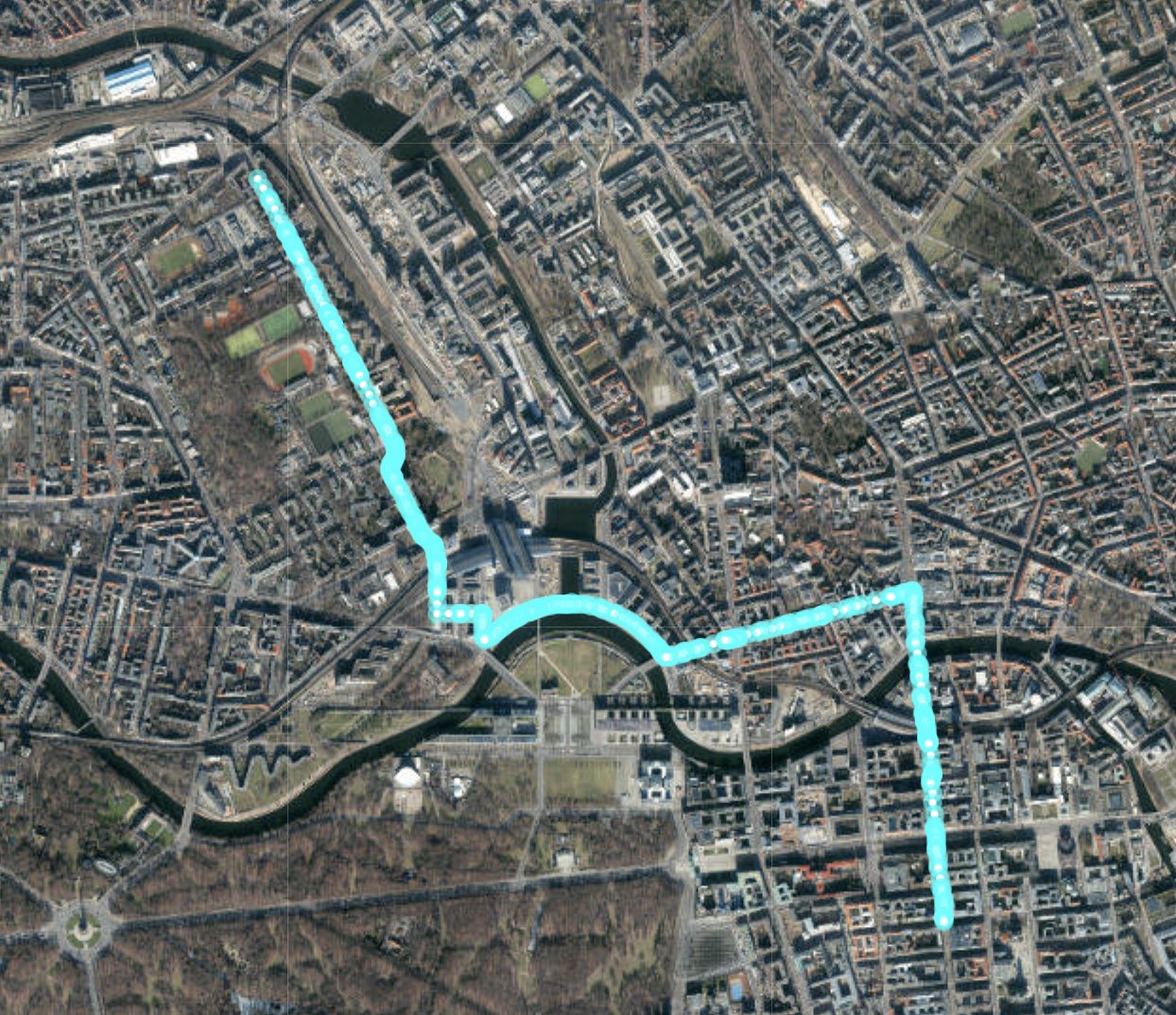
My Function is now supposed to calculate SW and NE Coordinates that would make the whole route be in those bounds. It takes the most north, the most south, the most east, and the most west coordinates of every single point and checks it. The function works, as the returned coordinates are: SW: CLLocationCoordinate2D(latitude: 52.514763, longitude: 13.358040999999991), NE: CLLocationCoordinate2D(latitude: 52.53529899999997, longitude: 13.38918).
Plotting this, again, shows the rectangle which has the complete route in it (ignore the lines, just look at the points):
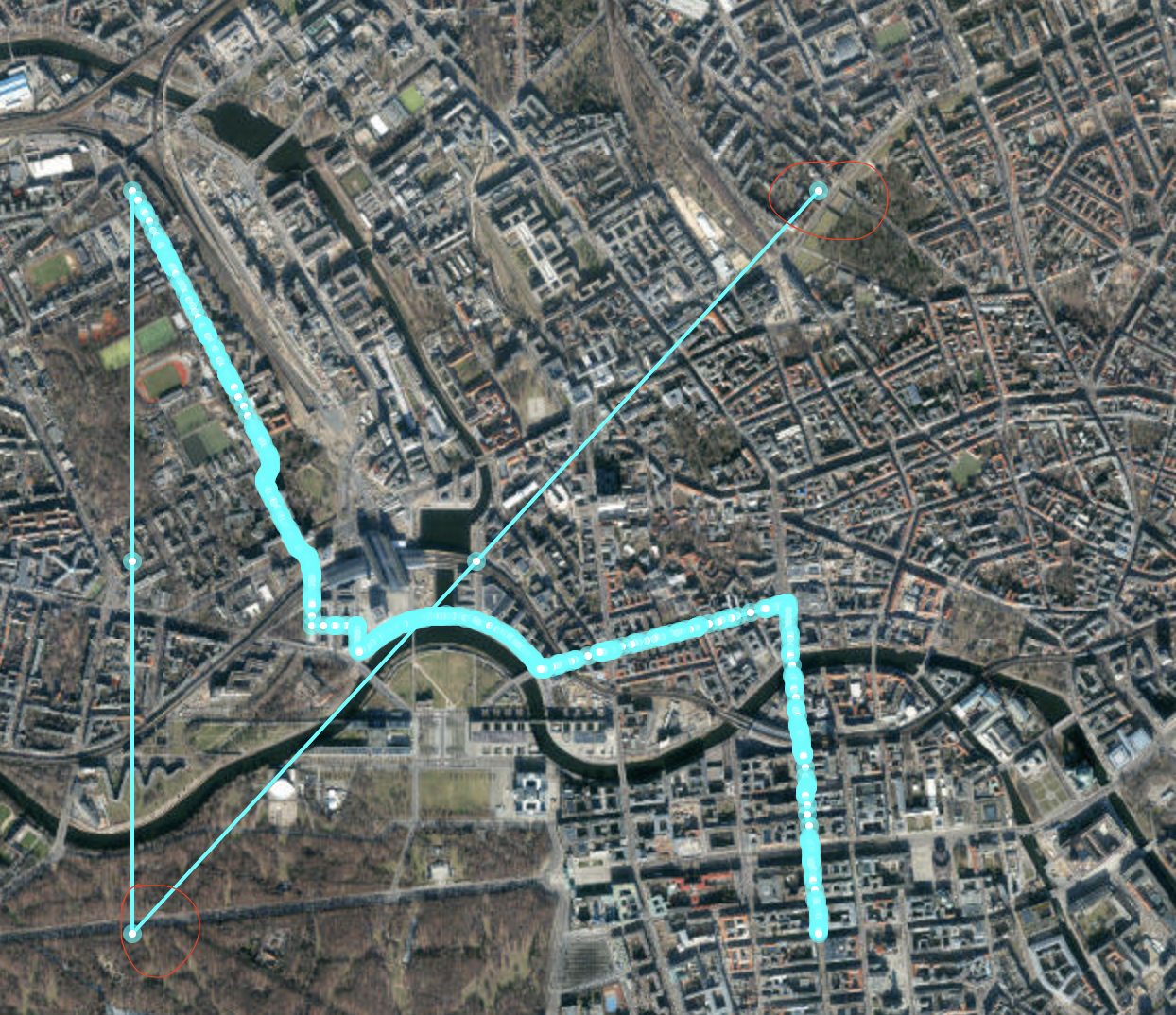
This clearly shows that the function works. Nevertheless, here it is:
`
//MARK: - generateCameraBoundsForWayPoints
//Gets a list of coordinates and Generates Camera Bounds to fit all coordinates on the screen / mapview
static func generateCameraBoundsForPoints(coordinates: [CLLocationCoordinate2D]) -> CoordinateBounds {
    var minLong: Double = 90.0
    var maxLong: Double = -90.0
    var minLat: Double = 90.0
    var maxLat: Double = -90.0

    for coordinate in coordinates {
        //Check Longitude
        if coordinate.longitude > maxLong {
            maxLong = coordinate.longitude
        }
        if coordinate.longitude < minLong {
            minLong = coordinate.longitude
        }

        //Check Latitude
        if coordinate.latitude > maxLat {
            maxLat = coordinate.latitude
        }
        if coordinate.latitude < minLat {
            minLat = coordinate.latitude
        }
    }

    //Generate SW and NE Coordinates
    //SW Coordinate consists of MinLong and MinLat without correction
    var sw = CLLocationCoordinate2D(latitude: minLat, longitude: minLong)
    var ne = CLLocationCoordinate2D(latitude: maxLat, longitude: maxLong)

    let correction = 0.001
    if calculateGeographicDistance(from: coordinates.first!, to: coordinates.last!) < 0.5 { //correct sw and ne to zoom out further when the trip is less than 0.5 km
        //SW Coordinate consists of MinLong and MinLat with corrections to zoom out more
        sw = CLLocationCoordinate2D(latitude: minLat-correction, longitude: minLong-correction)
        ne = CLLocationCoordinate2D(latitude: maxLat+correction, longitude: maxLong+correction)
    }
    print("Map Bounds: SW: \(sw), NE: \(ne)")
    return CoordinateBounds(southwest: sw, northeast: ne)
}`
My App then uses this to make the camera fly there, as to be seen here:
`let mybounds = Utilities.generateCameraBoundsForPoints(coordinates: (response.routes?.first?.shape!.coordinates)!)
                    // Center the camera on the bounds
                    let camera = self!.mapView.mapboxMap.camera(for: mybounds, padding: UIEdgeInsets(top: 30, left: 30, bottom: self!.view.frame.height * 0.25, right: 30), bearing: 0, pitch: 0)
                    // Set the camera's center coordinate.
                    //Animate Camera movement
                    self!.mapView.camera.fly(to: camera, duration: 1, completion: nil)`
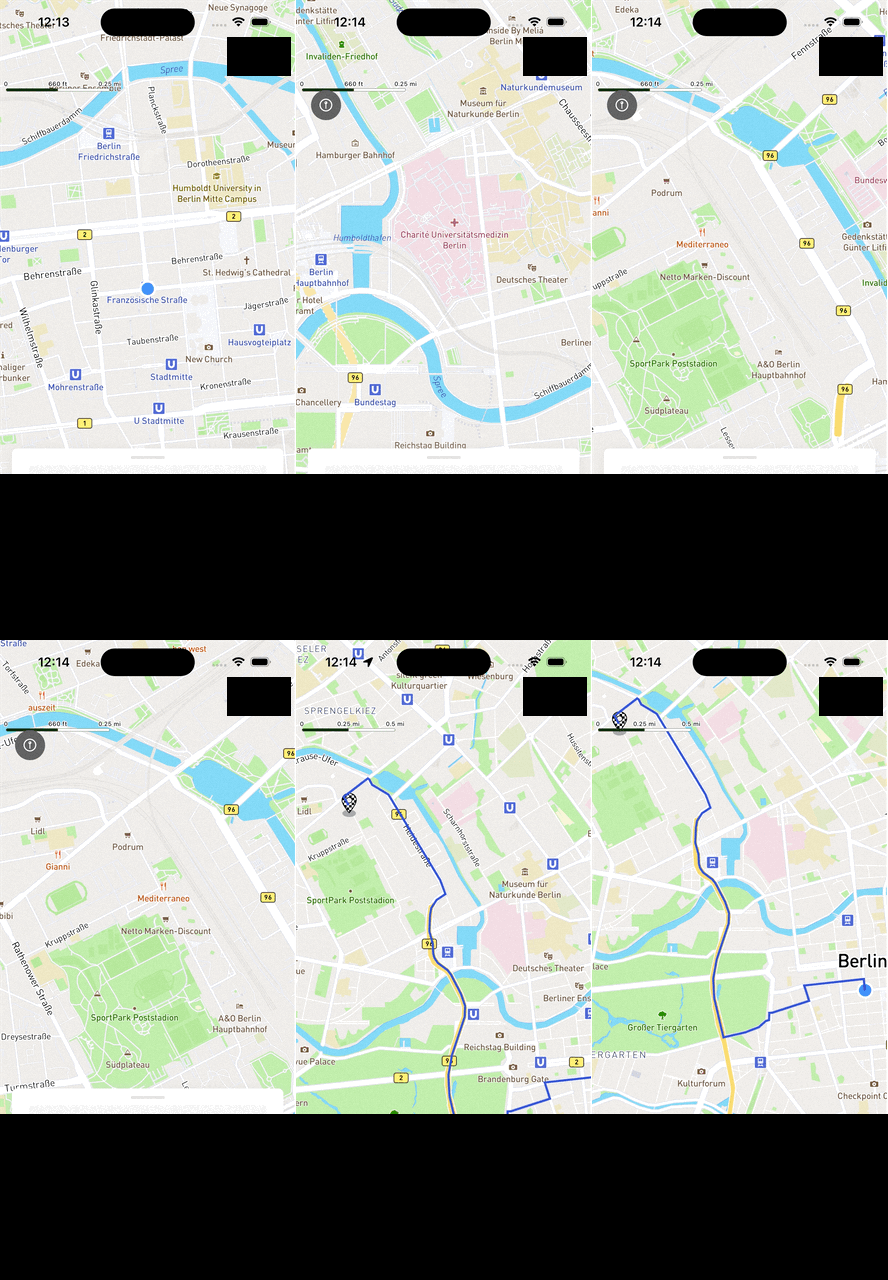
Now if I try to do that inside my map, it works, but only if it is the first time I look for a route since first opening the app. If it is the second time, It won't work. I had to censor some stuff because it shows sensitive information, but it's not important for the demo:
Here it is working:
And here it is not woking:
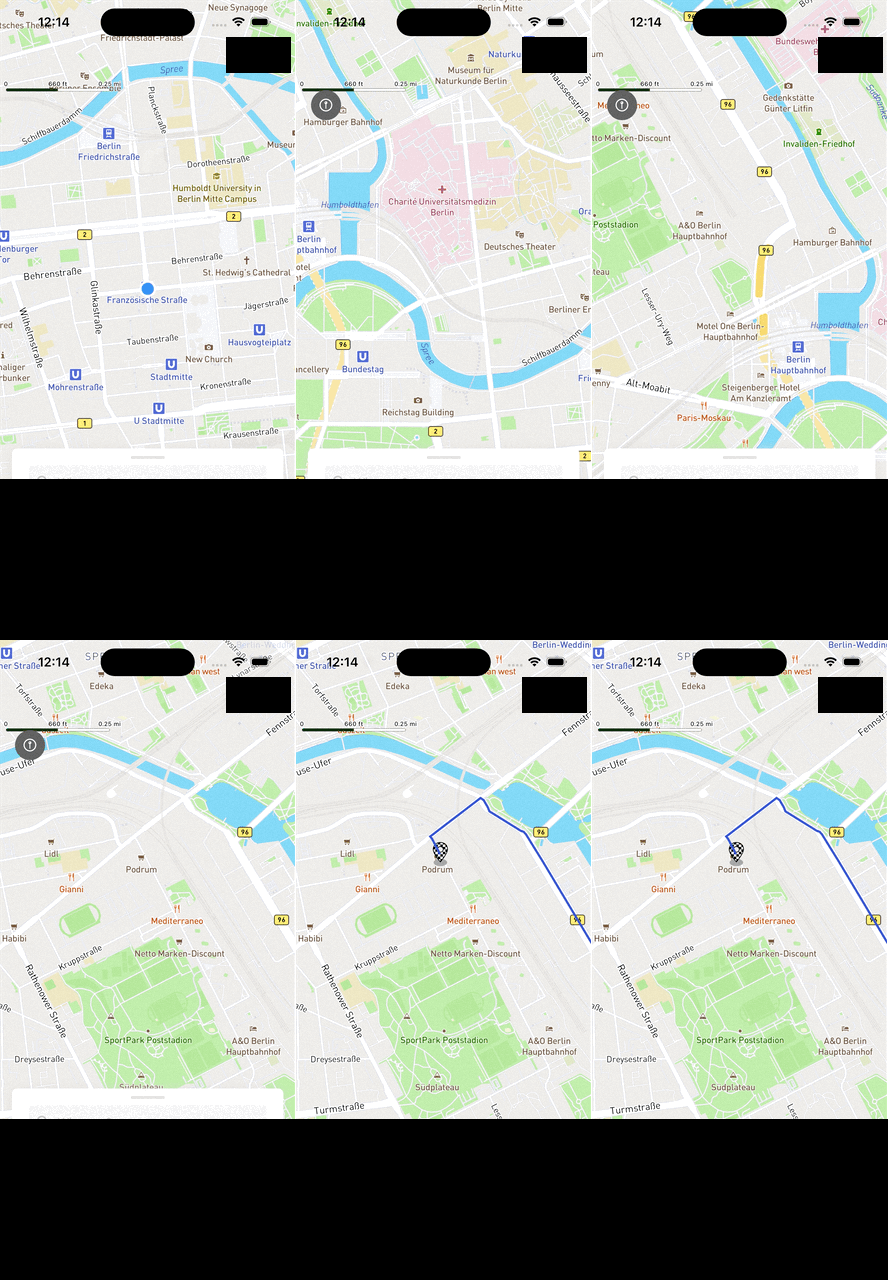
I really don't get it. My Function works, I don't change any variables or anything when doing it for the second time. My guess is that something in Mapbox is broken, but I have no idea what it could be.
@JanTG1, can you share where you're creating and navigating to your route? I am unable to reproduce this behavior when I create a route using a set of coordinates, create the bounds and then fly to them. I'm using a button to return to the route if I navigate away.
https://user-images.githubusercontent.com/44972592/193165991-24182e7a-d5d0-48e6-8db4-655bc1e4adde.mp4
Closing this ticket, but please feel free to reopen if you continue to experience this issue.