

 mapbox
CustomAnnotationView from Example Not Visible in MapView
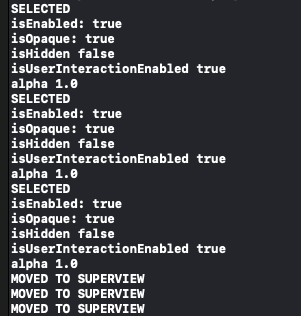
I created a new Xcode Project for a Single View App to learn how to use Mapbox. I installed the pods and followed the installation guide. Everything compiles and runs, but the CustomAnnotationView is not visible. However, it still detects touches because it displays callouts. it seems like layoutSubviews() is not being called because it does not print. Also the print state mets attached occurred before I even tapped the view
Steps to reproduce
- Create new Xcode single view application with storyboard.
- Add Api Tokens
- Copy the code from https://docs.mapbox.com/ios/maps/examples/annotation-views/ and paste into ViewController.swift
- Run on iPhone X
Code: ViewController.swift
import UIKit
import Mapbox

// Example view controller
class ViewController: UIViewController, MGLMapViewDelegate {
    override func viewDidLoad() {
        super.viewDidLoad()

        let mapView = MGLMapView(frame: view.bounds)
        mapView.autoresizingMask = [.flexibleWidth, .flexibleHeight]
        mapView.styleURL = MGLStyle.darkStyleURL
        mapView.tintColor = .lightGray
        mapView.centerCoordinate = CLLocationCoordinate2D(latitude: 0, longitude: 66)
        mapView.zoomLevel = 2
        mapView.delegate = self
        view.addSubview(mapView)

        // Specify coordinates for our annotations.
        let coordinates = [
            CLLocationCoordinate2D(latitude: 0, longitude: 33),
            CLLocationCoordinate2D(latitude: 0, longitude: 66),
            CLLocationCoordinate2D(latitude: 0, longitude: 99)
        ]

        // Fill an array with point annotations and add it to the map.
        var pointAnnotations = [MGLPointAnnotation]()
        for coordinate in coordinates {
            let point = MGLPointAnnotation()
            point.coordinate = coordinate
            point.title = "\(coordinate.latitude), \(coordinate.longitude)"
            pointAnnotations.append(point)
        }

        mapView.addAnnotations(pointAnnotations)
    }

    // MARK: - MGLMapViewDelegate methods

    // This delegate method is where you tell the map to load a view for a specific annotation. To load a static MGLAnnotationImage, you would use `-mapView:imageForAnnotation:`.
    func mapView(_ mapView: MGLMapView, viewFor annotation: MGLAnnotation) -> MGLAnnotationView? {
        // This example is only concerned with point annotations.
        guard annotation is MGLPointAnnotation else {
            return nil
        }

        // Use the point annotation’s longitude value (as a string) as the reuse identifier for its view.
        let reuseIdentifier = "\(annotation.coordinate.longitude)"

        // For better performance, always try to reuse existing annotations.
        var annotationView = mapView.dequeueReusableAnnotationView(withIdentifier: reuseIdentifier)

        // If there’s no reusable annotation view available, initialize a new one.
        if annotationView == nil {
            annotationView = CustomAnnotationView(reuseIdentifier: reuseIdentifier)
            annotationView!.bounds = CGRect(x: 0, y: 0, width: 40, height: 40)

            // Set the annotation view’s background color to a value determined by its longitude.
            let hue = CGFloat(annotation.coordinate.longitude) / 100
            annotationView!.backgroundColor = UIColor(hue: hue, saturation: 0.5, brightness: 1, alpha: 1)
        }

        return annotationView
    }

    func mapView(_ mapView: MGLMapView, annotationCanShowCallout annotation: MGLAnnotation) -> Bool {
        return true
    }
}
class CustomAnnotationView: MGLAnnotationView {
    override func layoutSubviews() {
        super.layoutSubviews()
        print("LAYOUT SUBVIEWS")

        // Use CALayer’s corner radius to turn this view into a circle.
        layer.cornerRadius = bounds.width / 2
        layer.borderWidth = 2
        layer.borderColor = UIColor.white.cgColor
    }
    override func didMoveToWindow() {
        super.didMoveToWindow()
        print("MOVED TO WINDOW")
    }

    override func didMoveToSuperview() {
        print("MOVED TO SUPERVIEW")
    }


    override func setSelected(_ selected: Bool, animated: Bool) {
        super.setSelected(selected, animated: animated)
        print("SELECTED")
        print("isEnabled: \(isEnabled)")
        print("isOpaque: \(isOpaque)")
        print("isHidden \(isHidden)")
        print("isUserInteractionEnabled \(isUserInteractionEnabled)")
        print("alpha \(alpha)")


        // Animate the border width in/out, creating an iris effect.
        let animation = CABasicAnimation(keyPath: "borderWidth")
        animation.duration = 0.1
        layer.borderWidth = selected ? bounds.width / 4 : 2
        layer.add(animation, forKey: "borderWidth")

    }
}
Expected behavior
I want the map to appear exactly as described in this example https://docs.mapbox.com/ios/maps/examples/annotation-views/
Actual behavior
Map appears with the desired style, but no custom annotations are visible. The when I tap, the correct callout appears


this printed before I tapped anywhere on the iPhone screen
Configuration
Mapbox SDK versions: 5.9 iOS/macOS versions: IOS: 13.5 Device/simulator models: iPhone X, iPhone 8 Xcode version: 11.5

After more attempts, I was able to get it to display. Here was the info I gathered followed by the solution:
The function .layoutSubviews() for each CustomAnnotationView was never being called, even if I called .layoutIfNeeded() on the mapView. This implies that the CustomAnnotationViews are not in the View Hierarchy. To verify this I implemented this function in the MapViewDelegate:
func mapView(_ mapView: MGLMapView, didSelect annotationView: MGLAnnotationView) {
        print("\nCustom Annotation View Info: \n")
        print(annotationView.annotation?.title)
        print(annotationView.superview)
        print(annotationView.superview?.superview)
    }
Which printed this when I tapped the location of the invisible AnnotationView:

Because the third print is "nil" , it seems that MGLAnnoatationContainerView has never been added as a subview to the MapView
I then added the next to lines to do so:
func mapView(_ mapView: MGLMapView, didSelect annotationView: MGLAnnotationView) {
        print("\nCustom Annotation View Info: \n")
        print(annotationView.annotation?.title)
        print(annotationView.superview)
        print(annotationView.superview?.superview)

        //Add to View Hierarchy
        mapView.addSubview(annotationView.superview!)
        mapView.layoutIfNeeded()
    }
Now I get this functionality
Before Tapping

After Tapping

Conclusion
Is this a safe solution? Adding MGLAnnoatationContainerView directly as a subview of MapView does not feel safe because I believe this should have been handled by the SDK after I provide a view in
func mapView(_ mapView: MGLMapView, viewFor annotation: MGLAnnotation) -> MGLAnnotationView? {
        // This example is only concerned with point annotations.
        guard annotation is MGLPointAnnotation else {
            return nil
        }

        // Use the point annotation’s longitude value (as a string) as the reuse identifier for its view.
        let reuseIdentifier = "\(annotation.coordinate.longitude)"

        // For better performance, always try to reuse existing annotations.
        var annotationView = mapView.dequeueReusableAnnotationView(withIdentifier: reuseIdentifier)

        // If there’s no reusable annotation view available, initialize a new one.
        if annotationView == nil {
            annotationView = CustomAnnotationView(reuseIdentifier: reuseIdentifier)
            annotationView!.bounds = CGRect(x: 0, y: 0, width: 40, height: 40)
            //annotationView!.translatesAutoresizingMaskIntoConstraints = true

            // Set the annotation view’s background color to a value determined by its longitude.
            let hue = CGFloat(annotation.coordinate.longitude) / 100
            annotationView!.backgroundColor = UIColor(hue: hue, saturation: 0.5, brightness: 1, alpha: 1)
        }

        return annotationView
    }
Better Solution
in the example, the annotations were added to the mapView just after it has been initialized. If instead you add them after the map had loaded, everything works as expected
In other words, do this instead for ViewController.swift
import UIKit
import Mapbox

// Example view controller
class ViewController: UIViewController, MGLMapViewDelegate {

    var mv: MGLMapView!
    override func viewDidLoad() {
        super.viewDidLoad()

        mv = MGLMapView(frame: view.bounds)
        mv.autoresizingMask = [.flexibleWidth, .flexibleHeight]
        mv.styleURL = MGLStyle.darkStyleURL
        mv.tintColor = .lightGray
        mv.centerCoordinate = CLLocationCoordinate2D(latitude: 0, longitude: 66)
        mv.zoomLevel = 2
        mv.delegate = self


        view.addSubview(mv)
    }


    func mapViewDidFinishLoadingMap(_ mapView: MGLMapView) {
        // Specify coordinates for our annotations.
        let coordinates = [
        CLLocationCoordinate2D(latitude: 0, longitude: 33),
        CLLocationCoordinate2D(latitude: 0, longitude: 66),
        CLLocationCoordinate2D(latitude: 0, longitude: 99)
        ]

        // Fill an array with point annotations and add it to the map.
        var pointAnnotations = [MGLPointAnnotation]()
        for coordinate in coordinates {
        let point = MGLPointAnnotation()
        point.coordinate = coordinate
        point.title = "\(coordinate.latitude), \(coordinate.longitude)"
        pointAnnotations.append(point)
        }

        mapView.addAnnotations(pointAnnotations)
    }

    // MARK: - MGLMapViewDelegate methods

    // This delegate method is where you tell the map to load a view for a specific annotation. To load a static MGLAnnotationImage, you would use `-mapView:imageForAnnotation:`.
    func mapView(_ mapView: MGLMapView, viewFor annotation: MGLAnnotation) -> MGLAnnotationView? {
        // This example is only concerned with point annotations.
        guard annotation is MGLPointAnnotation else {
            return nil
        }

        // Use the point annotation’s longitude value (as a string) as the reuse identifier for its view.
        let reuseIdentifier = "\(annotation.coordinate.longitude)"

        // For better performance, always try to reuse existing annotations.
        var annotationView = mapView.dequeueReusableAnnotationView(withIdentifier: reuseIdentifier)

        // If there’s no reusable annotation view available, initialize a new one.
        if annotationView == nil {
            annotationView = CustomAnnotationView(reuseIdentifier: reuseIdentifier)
            annotationView!.bounds = CGRect(x: 0, y: 0, width: 40, height: 40)
            //annotationView!.translatesAutoresizingMaskIntoConstraints = true

            // Set the annotation view’s background color to a value determined by its longitude.
            let hue = CGFloat(annotation.coordinate.longitude) / 100
            annotationView!.backgroundColor = UIColor(hue: hue, saturation: 0.5, brightness: 1, alpha: 1)
        }
        return annotationView
    }

    func mapView(_ mapView: MGLMapView, annotationCanShowCallout annotation: MGLAnnotation) -> Bool {
        return true
    }
}


//
// MGLAnnotationView subclass
class CustomAnnotationView: MGLAnnotationView {
    override func layoutSubviews() {
        super.layoutSubviews()

        // Use CALayer’s corner radius to turn this view into a circle.
        layer.cornerRadius = bounds.width / 2
        layer.borderWidth = 2
        layer.borderColor = UIColor.white.cgColor
    }

    override func setSelected(_ selected: Bool, animated: Bool) {
        super.setSelected(selected, animated: animated)

        // Animate the border width in/out, creating an iris effect.
        let animation = CABasicAnimation(keyPath: "borderWidth")
        animation.duration = 0.1
        layer.borderWidth = selected ? bounds.width / 4 : 2
        layer.add(animation, forKey: "borderWidth")
    }
}
Expected Functionality now equals Actual Functionality


Thanks @alexmcelroy for diving into this, I found your investigation incredibly helpful!

