
mapbox-gl-js
 mapbox-gl-js copied to clipboard
 mapbox
Why does raster-color expect raster-value to be divided by 258?
mapbox-gl-js version: v3.4.0
I am trying to recolour pixels of an RGB raster which have a specific R value, and leave all other pixels transparent. (A highly related Stackoverflow thread.) I achieve this using raster-color, which:
Defines a color map by which to colorize a raster layer, parameterized by the
["raster-value"]expression and evaluated at 256 uniformly spaced steps over the range specified byraster-color-range.
For recolouring pixels which have R value r, the used colormap I believe I should map r to the target colour, and all other r values to rgba(0,0,0,0) (of course, only the last digit actually matters here, and R values are 8 bit unsigned integers). A visualisation of such a colormap:
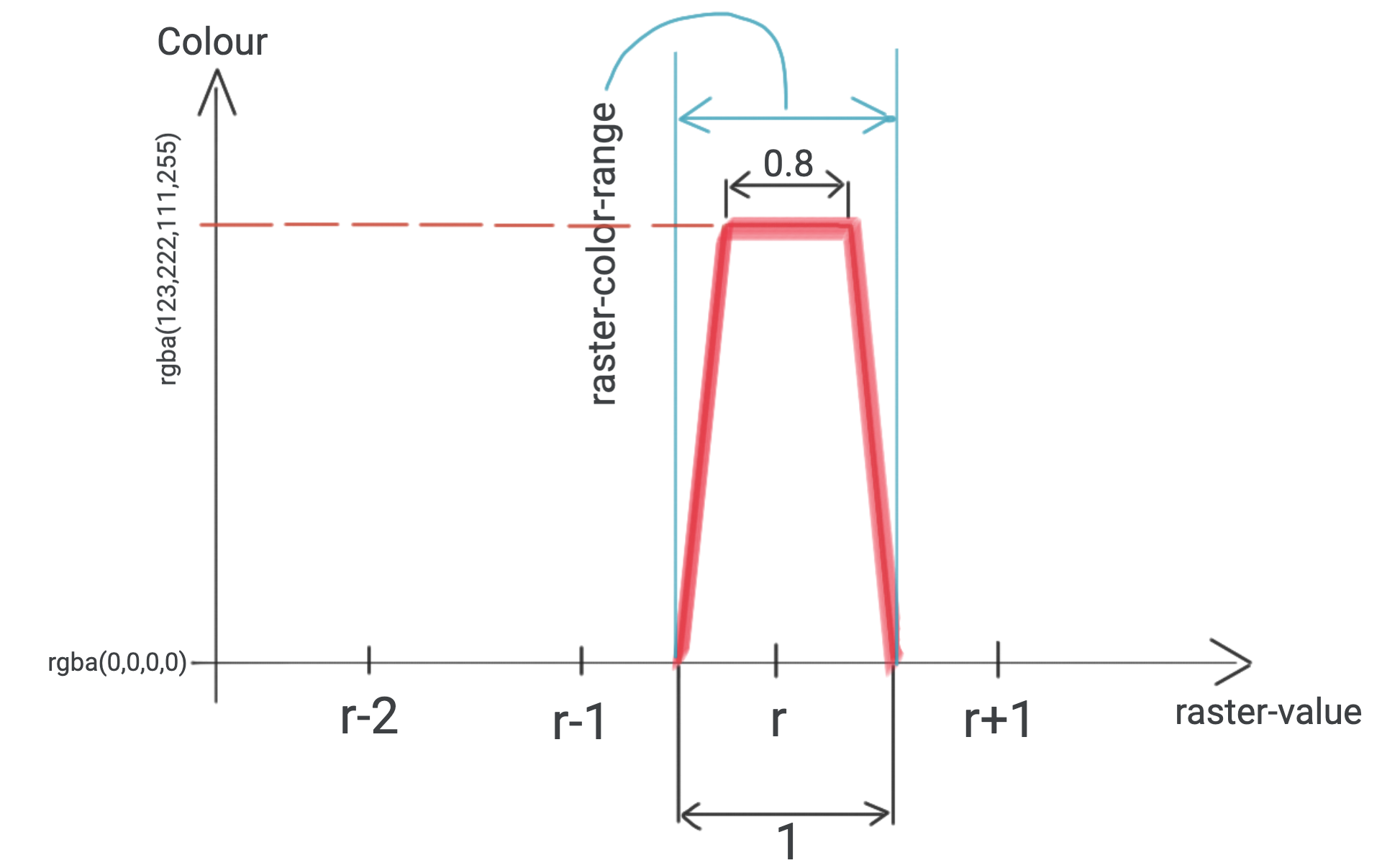
I created 256 WEBP images to test this approach. (I used this script.) Each have pixels with RGB=(r,0,0), and r is indicated in the filename. I choose raster-color-mix to be [1, 0, 0, 0], so that the r value equals raster-value everywhere. I try to add R151.webp:
 to the Ecuadorian shores. (All pixels of R151.webp have
 RGB=(151,0,0)).
Based on the (raster) documentation, my initial attempt for constructing a workingpaint was:
paint: {
"raster-color": [
    "interpolate",
    ["linear"],
    ["raster-value"],
    (151 - 0.5),
    "rgba(0,0,0,0)",
    (151 - 0.4),
    "rgba(123,222,111,255)",
    (151 + 0.4),
    "rgba(123,222,111,255)",
    (151 + 0.5),
    "rgba(0,0,0,0)",
],
"raster-color-mix": [1, 0, 0, 0],
"raster-color-range": [
    (151 - 0.5),
    (151 + 0.5),
],
"raster-resampling": "nearest",
},
This did not work: the raster did not show up. I found that I have to divide every number in raster-color (and less importantly, raster-color-range) by 258, to make the square show up. Based on experiments, using any other integer than 258 results in R151.webp being completely transparent.
A demo of this observation, largely based on Add a raster image to a map layer:
<!DOCTYPE html>
<html>
  <head>
    <meta charset="utf-8" />
    <meta
      name="viewport"
      content="initial-scale=1,maximum-scale=1,user-scalable=no"
    />
    <link
      href="https://api.mapbox.com/mapbox-gl-js/v3.4.0/mapbox-gl.css"
      rel="stylesheet"
    />
    <script src="https://api.mapbox.com/mapbox-gl-js/v3.4.0/mapbox-gl.js"></script>
    <style>
      body {
        margin: 0;
        padding: 0;
      }
      #map {
        position: absolute;
        top: 0;
        bottom: 0;
        width: 100%;
      }
    </style>
  </head>
  <body>
    <div id="map"></div>
    <script>
      mapboxgl.accessToken =
        "pk.eyJ1IjoicGFsc3phYm8iLCJhIjoiY2xrNWY3cDhuMGpiajNwbzdlNzlscHc1eSJ9.Sppso1puTUCwR03aaWUHsQ";
      const map = new mapboxgl.Map({
        container: "map",
        maxZoom: 10,
        minZoom: 0,
        zoom: 6,
        center: [-82, 0],
        style: "mapbox://styles/mapbox/dark-v11",
      });
      const r = 151; // choose any integer between 0 and 255 both inclusive, and a square will show up
      const normalizer = 258; // choose any other integer, and no square will show up
      map.on("load", () => {
        map.addSource("image", {
          type: "image",
          url:
            "https://raw.githubusercontent.com/zabop/mapboxDebug/master/webps/R" +
            r +
            ".webp",
          coordinates: [
            [-83, 1],
            [-81, 1],
            [-81, -1],
            [-83, -1],
          ],
        });
        map.addLayer({
          id: "radar-layer",
          type: "raster",
          source: "image",
          paint: {
            "raster-color": [
              "interpolate",
              ["linear"],
              ["raster-value"],
              (r - 0.5) / normalizer,
              "rgba(0,0,0,0)",
              (r - 0.4) / normalizer,
              "rgba(123,222,111,255)",
              (r + 0.4) / normalizer,
              "rgba(123,222,111,255)",
              (r + 0.5) / normalizer,
              "rgba(0,0,0,0)",
            ],
            "raster-color-mix": [1, 0, 0, 0],
            "raster-color-range": [
              (r - 0.5) / normalizer,
              (r + 0.5) / normalizer,
            ],
            "raster-resampling": "nearest",
          },
        });
      });
    </script>
  </body>
</html>

To emphasize the 2 most important parts of the above code, I highlight them here. First, I define which r values I would like to recolour, and what normalizer I want to use as divisor in raster-color and raster-color-range:
const r = 151; // choose any integer between 0 and 255 both inclusive, and a square will show up
const normalizer = 258; // choose any other integer, and no square will show up
Then, the paint:
paint: {
"raster-color": [
    "interpolate",
    ["linear"],
    ["raster-value"],
    (r - 0.5) / normalizer,
    "rgba(0,0,0,0)",
    (r - 0.4) / normalizer,
    "rgba(123,222,111,255)",
    (r + 0.4) / normalizer,
    "rgba(123,222,111,255)",
    (r + 0.5) / normalizer,
    "rgba(0,0,0,0)",
],
"raster-color-mix": [1, 0, 0, 0],
"raster-color-range": [
    (r - 0.5) / normalizer,
    (r + 0.5) / normalizer,
],
"raster-resampling": "nearest",
},
Having to divide by 258 was surprising. After looking into Mapbox source code, I found COLOR_MIX_FACTOR:
export const COLOR_RAMP_RES = 256;
export const COLOR_MIX_FACTOR = (Math.pow(COLOR_RAMP_RES, 2) - 1) / (255 * COLOR_RAMP_RES * (COLOR_RAMP_RES + 3));
It evaluates to be 1 over 257.992217899, which is suspiciously close to 258. This is the only link I found between Mapbox source code and the number 258 (in other words, I couldn't explain why 258 is so significant).
I am planning on using raster-color to recolour rasters displaying categorical data, so it is vital that the recolouring is reliable: I would like to be able to recolour those and only those values which have a specific value in their R channel. This leads me to two questions:
Question 1
Why does raster-color expect raster-value to be divided by 258?
Question 2
Are there plans to change this in a future version, or can I reliably configure my raster layers using 258 as raster-value divisor and always use the latest Mapbox version?
Links to related documentation
I believe it would be helpful to explain these matters in the raster-color or raster-color-mix section. Or perhaps creating a new section for the concept of raster-value could also be very useful, as it is such an important issue for raster colours.

I'd just like to concur that having more documentation on raster-color, raster-color-mix, and raster-value would be very helpful. I've been attempting to use a scheme similar to Terrain-RGB tiles to encode raster values and have made a lot of progress, but the inability to see what raster-value is being evaluated to is very frustrating, especially when trying to match exact values for categorical rasters. Swapping 256 for 258 in one of the formulas helped a great deal, but I'm not exactly sure why or whether that will still work in the future.

I've been trying to use this functionality recently and there's a lot of oddities with Mapbox's rendering. It doesn't appear to be able to render a fully white tile. A tile that is all 0xFFFFFF will come out as 0xFEFEFE if you query the WebGL context for its value. This is probably related to why the scaling is needed.
Also, if I use a step expression for the raster-color it's rendering colours that aren't included in the steps. Near the steps it sometimes renders a colour somewhere in between the two colours. The following example I don't think shouldn't have two orange colours.
[ "step", [ "raster-value" ], "rgba(0, 0, 0, 0)",
      0, "#0000FF",
      74, "#00E000",
      84, "#FFFF00",
      88, "#E0A000",
      91, "#FF0000"
]
