
mapbox-gl-directions
 mapbox-gl-directions copied to clipboard
 mapbox
MapboxDirections was not found
@tristen @mapsam @willwhite @tmcw
I am using this package for a react app and the steps i have followed are:
npm install --save @mapbox/mapbox-gl-directions
then inside of my App.js
import MapboxDirections from "@mapbox/mapbox-gl-directions";

export default class MyMap extends Component{

componentDidMount(){
mapboxgl.accessToken = my token is placed here;
var map = new mapboxgl.Map({
container: 'map',
style: 'mapbox://styles/mapbox/basic-v9',
zoom: 4,
center: [77.4126, 23.2599]
});
map.addControl(new mapboxgl.FullscreenControl());
map.addControl(new mapboxgl.GeolocateControl());
map.addControl(new MapboxGeocoder({accessToken:mapboxgl.accessToken}));
map.addControl(new mapboxgl.NavigationControl());
map.addControl(new MapboxDirections({accessToken: mapboxgl.accessToken}), 'top-left');
}
the error is as follows:
 "export 'default' (imported as 'MapboxDirections') was not found in '@mapbox/mapbox-gl-
   directions'
If you do something like this, even though it is a "default export"
import { MapboxDirections } from "@mapbox/mapbox-gl-directions";
the previous error gets fixed and a new error shows up about Geocoder or something else.


Thanks for submitting this issue @sathya9897 - sorry you're having trouble! I'm not too familiar with react these days unfortunately, perhaps @mollymerp or @lbud can have a look?

@sathya9897 Not sure if you figured it out. I have a work around to get it to work in react. Importing the dist folder instead of src will avoid the errors.
import Directions from '@mapbox/mapbox-gl-directions/dist/mapbox-gl-directions';
Maybe it's not the ideal solution, if not, let me know.

@davidyu37 it worked for me too but they would have to fix this bug or update the documentation
it worked for me too
Great to hear. Thanks @davidyu37 for providing a workaround!
but they should have fixed the bug or update the documentation
No one has said we aren't fixing this. This ticket is how we learn! Looks like @lbud is thinking about it ❤️ https://github.com/mapbox/mapbox-gl-directions/issues/160
For reference, if you are using react you might want to do something like this. I've hacked some values for simplicty (the original code uses redux).
import React from 'react'
import mapboxgl from 'mapbox-gl'
import MapboxDirections from '@mapbox/mapbox-gl-directions/dist/mapbox-gl-directions'

import 'mapbox-gl/dist/mapbox-gl.css' // Updating node module will keep css up to date.
import '@mapbox/mapbox-gl-directions/dist/mapbox-gl-directions.css' // Updating node module will keep css up to date.

mapboxgl.accessToken = 'pk....'

export default class Map extends React.Component {
  componentDidMount () {
    const { lng, lat, zoom } = {
      lng: 144.9685 ,
      lat:  -37.8101,
      zoom: 13.4
    }

    const map = new mapboxgl.Map({
      container: this.mapContainer, // See https://blog.mapbox.com/mapbox-gl-js-react-764da6cc074a
      style: 'mapbox://styles/mapbox/streets-v9',
      center: [lng, lat],
      zoom
    })

    var directions = new MapboxDirections({
      accessToken: mapboxgl.accessToken,
      unit: 'metric',
      profile: 'mapbox/cycling'
    })

    map.addControl(directions, 'top-left')
  }

  render () {
    return (
      <div className="map-wrapper">
        <div ref={el => (this.mapContainer = el)} className="map" />
      </div>
    )
  }
}
```

Oh, and I think I needed to add this CSS.

```
.map {
  position: absolute;
  z-index: 1;
  top: 0px;
  bottom: 0px;
  left: 0px;
  right: 0px;

  display: -webkit-box;
  display: -webkit-flex;
  display: -ms-flexbox;
  display: flex;
}
```

@davidyu37 @mapsam @lbud
Maybe it's not the ideal solution, if not, let me know.
It appears that using this workaround in production causes the following message to appear in the browser.
You are currently using minified code outside of NODE_ENV ...
This comes from the file @mapbox/mapbox-gl-directions/dist/mapbox-gl-directions ~line 5000 of V3.1.3
Guessing this also means much larger production bundles from webpack.
Anyone know if an import (ES6) compatible version is in the pipeline?
Maybe a better workaround is to include the module like this in your index.html.
<script src='https://api.mapbox.com/mapbox-gl-js/plugins/mapbox-gl-directions/v3.1.3/mapbox-gl-directions.js'></script>
<link rel='stylesheet' href='https://api.mapbox.com/mapbox-gl-js/plugins/mapbox-gl-directions/v3.1.3/mapbox-gl-directions.css' type='text/css' />
Then reference it in your react code like this:
const MapboxDirections = window.MapboxDirections
Anyone see any issues doing that? It fixes the issue mentioned above.
@hutch120 Bumped into the same problem from a Vue application. Also when importing the full dist path to get around that browserify issue. You're workaround works fine, although I agree with you there should be an ES6 way...
For reference, the full error-message is this:
You are currently using minified code outside of NODE_ENV === 'production'.
This means that you are running a slower development build of Redux.
You can use loose-envify (https://github.com/zertosh/loose-envify) for browserify or DefinePlugin for webpack (http://stackoverflow.com/questions/30030031) to ensure you have the correct code for your production build.
UPDATE: nevermind... the hosted library has several flaws:
- not minified (but still workable)
- uses
unsafe-evalin the JS file, which does not play nice if you use CSP which blocks this.
I'm now considering to rewrite it, so that the html-templating will not be using the fs library anymore, which will make the use of browserify obsolete...

hay everyone, i try add this code to my project but form direction that created before not showing, this form show behind the map,
here is my code
`import { Component, ViewChild, ElementRef } from '@angular/core'; import { IonicPage, NavController, NavParams } from 'ionic-angular'; import leaflet from 'leaflet'; import mapboxgl from 'mapbox-gl'; import 'leaflet-search'; import MapboxGeocoder from '@mapbox/mapbox-gl-geocoder';
import Directions from '@mapbox/mapbox-gl-directions/dist/mapbox-gl-directions';
/**
- Generated class for the MapPage page.
- See https://ionicframework.com/docs/components/#navigation for more info on
- Ionic pages and navigation. */
declare var mapboxgl; declare var MapboxDirections;
@IonicPage() @Component({ selector: 'page-map', templateUrl: 'map.html', }) export class MapPage { @ViewChild('map') mapContainer : ElementRef; map : any; searchControl : any; constructor(public navCtrl: NavController, public navParams: NavParams, ) {
}
ionViewDidEnter() { this.loadmap(); }
loadmap() {
this.map = leaflet.map("map").fitWorld();
leaflet.control.scale().addTo(this.map);
var i
var data = [
{"loc":[-2.95913579,104.7293931], "title":"60019", "siteName":"Sei Talo - Siring Agung"},
{"loc":[-2.96388887,104.7436908], "title":"60018", "siteName":"Jend. Sudirman Pahlawan"},
{"loc":[41.807149,13.162994], "title":"blue"}
];
leaflet.tileLayer('https://api.mapbox.com/styles/v1/owly05/cjwrddd0x04wc1cpsy3lgeqq5/tiles/256/{z}/{x}/{y}@2x?access_token=pk.eyJ1Ijoib3dseTA1IiwiYSI6ImNqd3JmZG51azA0dHY0YW53djQxMWU1dGQifQ.__iSaUCwxAgRfzwa9SKRRg', {
attribution: 'Map data © <a href="https://www.openstreetmap.org/">OpenStreetMap</a> contributors, <a href="https://creativecommons.org/licenses/by-sa/2.0/">CC-BY-SA</a>, Imagery © <a href="https://www.mapbox.com/">Mapbox</a>',
maxZoom: 18
}).addTo(this.map);
mapboxgl.accessToken = 'pk.eyJ1Ijoib3dseTA1IiwiYSI6ImNqd3JmZG51azA0dHY0YW53djQxMWU1dGQifQ.__iSaUCwxAgRfzwa9SKRRg';
var map = new mapboxgl.Map({
container: 'map',
style: 'mapbox://styles/mapbox/basic-v9',
zoom: 4,
center: [77.4126, 23.2599]
});
map.addControl(new mapboxgl.FullscreenControl());
map.addControl(new mapboxgl.GeolocateControl());
map.addControl(new MapboxGeocoder({accessToken:mapboxgl.accessToken}));
map.addControl(new mapboxgl.NavigationControl());
map.addControl(new MapboxDirections({accessToken: mapboxgl.accessToken}), 'top-left');
var markersLayer = new leaflet.LayerGroup(); //layer contain searched elements
this.map.addLayer(markersLayer);
var controlSearch = new leaflet.Control.Search({
position:'topright',
layer: markersLayer,
initial: false,
zoom: 12,
marker: false
});
this.map.addControl( controlSearch );
for(i in data) {
var title = data[i].title, //value searched
loc = data[i].loc, //position found
marker = new leaflet.Marker(new leaflet.latLng(loc), {title: title} );//se property searched
marker.bindPopup('Site '+ title + name);
markersLayer.addLayer(marker);
}
this.map.addControl(leaflet.control.locate({
locateOptions: {
enableHighAccuracy: true
}}));
this.map.locate({

  setView: true,
  maxZoom: 10
})
}
componentDidMount(){
}
} `
and there is my html code `<!-- Generated template for the MapPage page.
See http://ionicframework.com/docs/components/#navigation for more info on
Ionic pages and navigation.
-->
<div id="map" style="width:100%; height:100%;"></div>
<div class='pointer'></div>

<div id="post-it"></div>
can u help me ?

@adifajar This issue is about a valid reference to the MapboxDirections object, and/or and ES6 version... looks like you have a valid reference, but you have some issue with the UI. Please check the issue reports for a similar report, or raise a new issue. Tks.

For all new people have problem for import do this;
import MapboxDirections from '@mapbox/mapbox-gl-directions/dist/mapbox-gl-directions'
import '@mapbox/mapbox-gl-directions/dist/mapbox-gl-directions.css'
work on Quasar Framework / Vue 2

README's usage instructions doesn't work, I get same error as in #91
Uncaught (in promise): TypeError: fs.readFileSync is not a function(…) in input.js
@itsalb3rt comment does work, thanks!

@mariusa Please reference @itsalb3rt's answer. The method of importing Mapbox GL Directions seems to work properly. Initially I encountered the same error you mentioned and resolved it with his proposed import method.


import MapboxDirections from '@mapbox/mapbox-gl-directions/dist/mapbox-gl-directions'
import '@mapbox/mapbox-gl-directions/dist/mapbox-gl-directions.css'
I really hoped this would work. Just doing this tells me that it cannot find the module. Attempting to install it gives the following:
$ npm i @mapbox/mapbox-gl-directions/dist/mapbox-gl-directions
npm ERR! code ENOENT
npm ERR! syscall open
npm ERR! path C:\Development\ride-with-ryan\app\@mapbox\mapbox-gl-directions\dist\mapbox-gl-directions/package.json
npm ERR! errno -4058
npm ERR! enoent ENOENT: no such file or directory, open 'C:\Development\ride-with-ryan\app\@mapbox\mapbox-gl-directions\dist\mapbox-gl-directions\package.json'
npm ERR! enoent This is related to npm not being able to find a file.
npm ERR! enoent
What's the deal?

syscall open
Maybe you are in the wrong directory, check if you package.json is on your directory and run again.
More about this: https://stackoverflow.com/questions/60319237/npm-start-errors-with-err-code-enoent-syscall-open
Maybe you are in the wrong directory, check if you
package.jsonis on your directory and run again.
From my project root, I've cd app before running npm install .... So I most definitely should be in the correct directory. Why it's looking in ...app/@mapbox... is rather suspicious, now that you mention it. The file should be inside node_modules, inside my app folder.
Any ideas?
Maybe you are in the wrong directory, check if you
package.jsonis on your directory and run again.From my project root, I've
cd appbefore runningnpm install .... So I most definitely should be in the correct directory. Why it's looking in...app/@mapbox...is rather suspicious, now that you mention it. The file should be inside node_modules, inside my app folder.Any ideas?
No idea but I have some recommendations;
- Check the
node_modulesdirectory and find the@mapboxpackage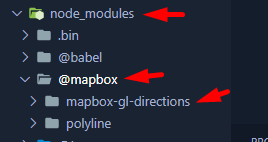
- Check if the package already installed in the
dependenciesno indevdependencies - The text editor/IDE give to you the auto complete ? Like this

anyone solve this problem ? `import React, { useRef, useEffect } from 'react'; import mapboxgl from 'mapbox-gl'; import MapboxDirections from '@mapbox/mapbox-gl-directions/dist/mapbox-gl-directions' import '@mapbox/mapbox-gl-directions/dist/mapbox-gl-directions.css'
mapboxgl.accessToken = 'pk.....';
const App2 = () => { const mapContainerRef = useRef(null);
useEffect(() => { const map = new mapboxgl.Map({ container: mapContainerRef.current, style: 'mapbox://styles/mapbox/streets-v11', center: [-74.5, 40], zoom: 9 });
const directions = new MapboxDirections({
  accessToken: mapboxgl.accessToken
});

map.addControl(directions, 'top-left');

return () => map.remove();
}, []);
return <div ref={mapContainerRef} style={{ width: '100%', height: '400px' }} />; };
export default App2; ` Module not found: Error: Can't resolve '@mapbox/mapbox-gl-directions/dist/mapbox-gl-directions.css' in 'C:\Users\hakim\OneDrive\Bureau\NEXTJS\mapbox\src'

npm : 10.1.0 node: v20.7.0 @quasar/app-vite 1.6.2 (@quasar/cli 2.3.0)
mapbox-gl work well
When i want test mapbox-gl-directions, i cant even install it.
npm install @mapbox/mapbox-gl-directions
npm ERR! While resolving: [email protected] npm ERR! Found: [email protected] npm ERR! node_modules/mapbox-gl npm ERR! mapbox-gl@"^2.15.0" from the root project npm ERR! npm ERR! Could not resolve dependency: npm ERR! peer mapbox-gl@"^0.41.0 <2.0.0" from @mapbox/[email protected] npm ERR! node_modules/@mapbox/mapbox-gl-directions npm ERR! @mapbox/mapbox-gl-directions@"*" from the root project
Is there any future release of this component for vue ?
