

 maoschanz
tablet+stylus input method not fully supported
Description
Holding BTN_TOOL_RUBBER stylus button doesn't temporary switch to eraser tool.
Steps to reproduce the bug:
- Draw something with stylus tilt
- Try to erase part of the drawing with stylus by holding BTN_TOOL_RUBBER button.
Expected behavior
As long as user hold BTN_TOOL_RUBBER button current tool is switched to eraser. When user is no longer holding BTN_TOOL_RUBBER button app should switch back from eraser to previous tool.
System
- Device: HP Elite x2 1013 G3
- OS: Ubuntu 19.04
- Desktop environment: Gnome Shell 3.32.2
- Package format: deb
- App version: 0.4.1

Sadly i don't own any tablet/stylus so this input method is just not supported at all for now...
(and i didn't except people to use such a pro artist hardware with a clone of Paint! even if you have issues erasing it, i'm glad to learn you can draw things)

i didn't except people to use such a pro artist hardware with a clone of Paint!
Some people not intended to buy stylus initially (they got it for free as laptop accessory or when they bought someone else used tablet from eBay) but eventually they find that it actually useful for a wide range of tasks that don't require drawing skills and professional drawing software, such as taking notes, drawing on screenshots (example) basic sketching (like drawing diagram for a colleague on tablet instead of using pen and paper).
There is no software comparable with OneNote on Linux, so I not talking about "taking notes" right now, but there is little problem with the other two. Unless I missing something, right now on Linux there is either software with outdated UI (which causes issues with using such software on HiDPI screens, with a stylus, etc.) or professional drawing software like Krita. And, you know, using professional drawing software for drawing on screenshots or basic sketching is a bit of overkill, and actually tedious in practice (I know because I tried).
So it looks like Drawing is in perfect positing to cover these two tasks. What is missing is a couple of features here and there, such as this one. Another one would be utilizing the second stylus button for moving canvas, or maybe calling color choosing dialogue, or something else useful.
There is no software comparable with OneNote on Linux, so I not talking about "taking notes" right now
I didn't test it but if you're interested i think "Xournal" is doing this
Unless I missing something, right now on Linux there is either software with outdated UI (which causes issues with using such software on HiDPI screens, with a stylus, etc.) or professional drawing software like Krita.
Exact (at least on GTK desktops, for KDE or LXQt there is KolourPaint), i began this project because i was missing MS Paint and GIMP was too fat
And, you know, using professional drawing software for drawing on screenshots or basic sketching is a bit of overkill, and actually tedious in practice (I know because I tried).
I know too, it's indeed the point of this app, i just didn't know people would use a stylus for this
Another one would be utilizing the second stylus button for moving canvas, or maybe calling color choosing dialogue, or something else useful.
As i said i don't own a stylus, and actually i've no idea how these devices look like, but these manipulations look like what the right-click and the (pan gesture with the) middle-click currently do, so maybe it's not hard to implement
As i said i don't own a stylus, and actually i've no idea how these devices look like
And now i own one!
Probably not the same as you, it's a wacom intuos S. There are 2 buttons on the stylus, and i'm not sure to entirely understand but... it looks like one button emulates the right-click, but it draws with secondary color only if i'm near the tablet (not touching it), the other emulates the middle click and works too (exchanging colors or moving the canvas) but with the same behavior (which is maybe normal? Krita does the same). If i can make this basic tablet work correctly it would be a good start
(edit: that's probably the mess i'm supposed to implement https://developer.gnome.org/gdk3/stable/GdkDevice.html https://developer.gnome.org/gtk3/stable/GtkGestureStylus.html 2 ideas regarding pressure: make the pen more or less narrow, or more or less alpha)
I didn't test it but if you're interested i think "Xournal" is doing this
Unfortunately, it's not nearly comparable :(
which is maybe normal? Krita does the same
For me Krita switch to eraser with one button and show this with another. Check if your stylus is supported by installed libwacom version and displayed in Gnome Control Center. By the way, regarding "drawing on screenshots" I filled feature request to Gnome Control Center regarding this feature (but for this to work with HP Active Pun G2 this should be solved first). Hopefully someday it will be possible to edit screenshot in Drawing via press of top stylus button :)
Check if your stylus is supported by installed libwacom version and displayed in Gnome Control Center
It seems supported but i only have quite basic options (buttons can emulate clicks basically) :(
But anyway, you're here so you will be able to test it for me when i'll try to implement it!
It seems supported but i only have quite basic options (buttons can emulate clicks basically) :(
If time permit, can you please post screenshots of what you see in Wacom configuration in Gnome Control Center?
Screenshots of what i can configure:
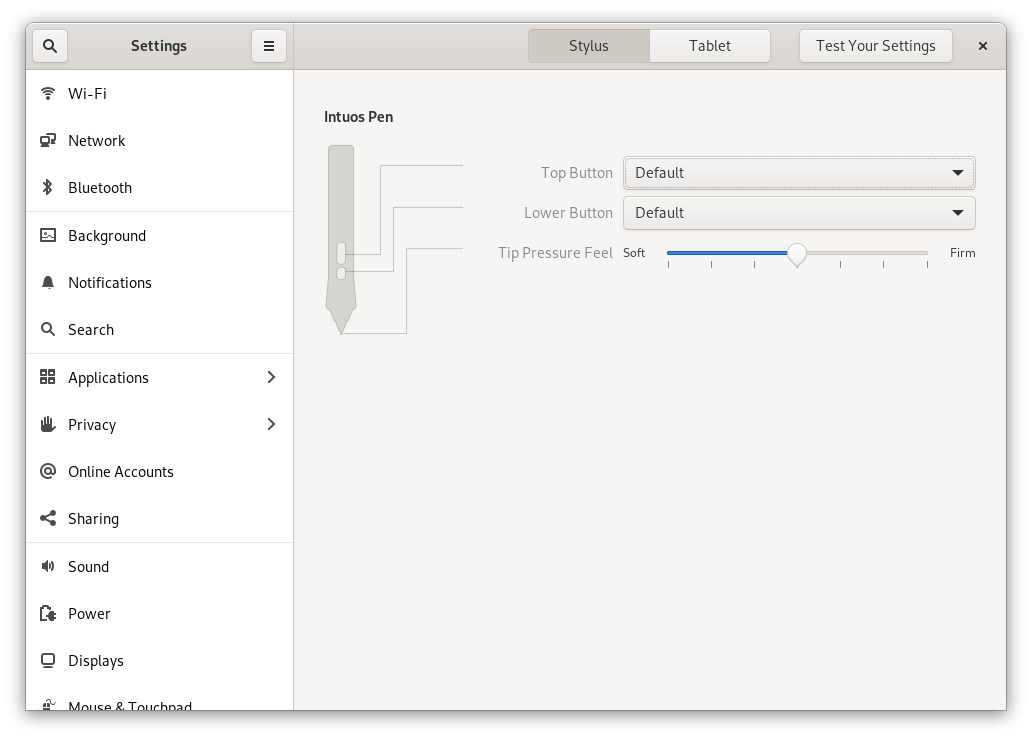

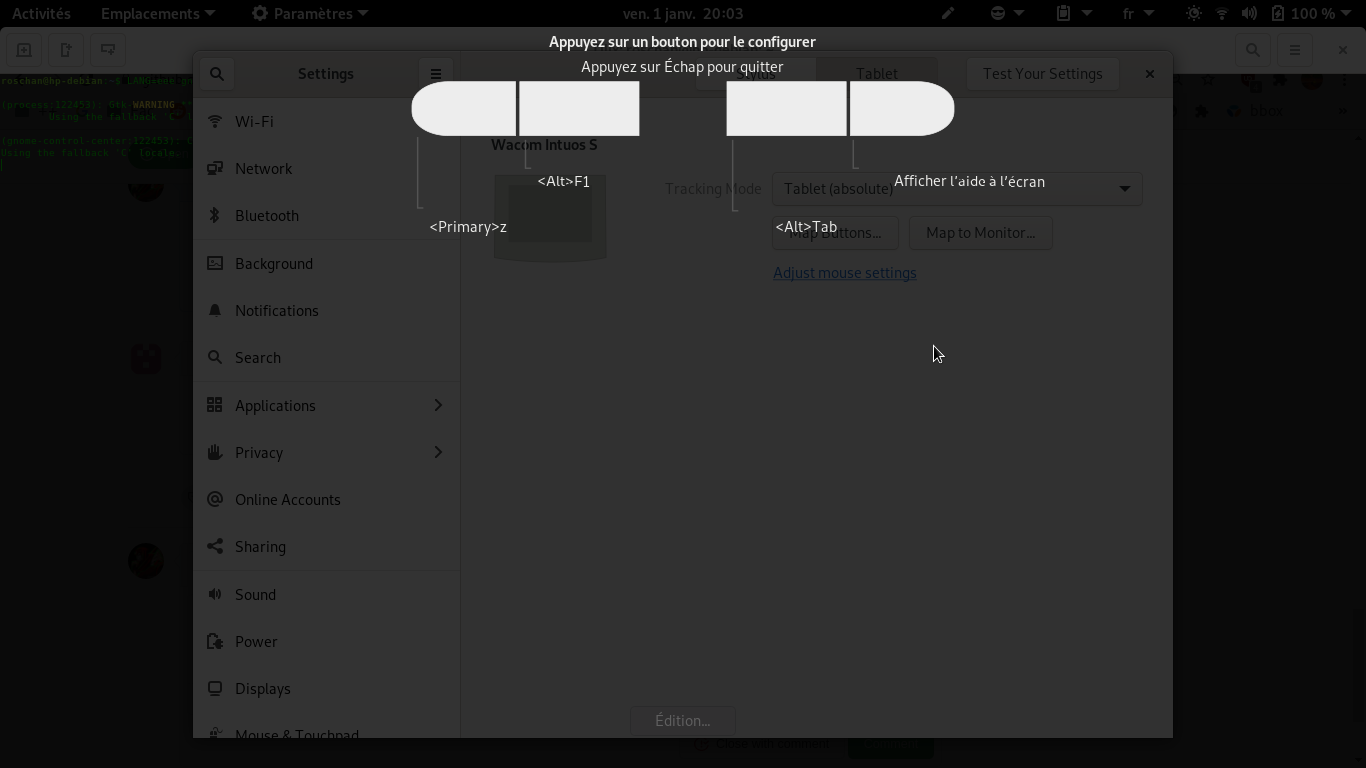
Based on gtk3-demo's "Touch and Drawing tablet" example source code, i suspect there is faaaaaaaar more than what my tablet can do, but for now i'll focus on a pressure sensitive pen
I have this example https://gitlab.gnome.org/GNOME/gnome-control-center/-/blob/master/panels/wacom/cc-drawing-area.c but it's not that great it has the same kind of issues as the ones blocking me...