

 manucaralmo
Google Analytics cookies still remain after Rejecting All Cookies
Hi,
I've added your script to our web site - https://www.sheffieldmca.org.uk
However if I choose to reject all cookies I can still see the GA cookies listed when I reload the pages.
Can you help please?
Andy



I don't see the GTA code when I view the source.
Are you looking at the home page of: https://www.sheffieldmca.org.uk ?
This is the code I added:
Sorry, was my mistake.
I have just tested it again and the GTM code does not fire if the cookie banner is shown. But if I tap on Reject the GTM is fired.
After a reload of the page it works and the GTM code is not fired again. Strange. Haven't found why this happens.
so do you think there's a bug in the GlowCookie system?
How can the GTM code appear if I haven't added it in the first place?
Yes I think this could be a bug, but I wonder because this does not happen on my website I have added this script. Any hint: @manucaralmo ?
@manucaralmo would you be able to look at https://www.sheffieldmca.org.uk to see if GlowCookie is working for you?
Can you choose to reject all cookies and then see if they are being blocked when you refresh the page?
Thanks
@sensibleandy After refresh GA is blocked. But after clicking on "reject" GA will be loaded once. After refresh, it is not loaded again.
Which browser are you using? Sometimes it seems to work properly and then other times it doesn't work properly.
Hi guys,
I found out where the problem comes from. I had to take a look into the GlowCookies JS.
The problem is caused by the disableTracking() function, which is also injecting Analytics. I removed this highlighted line as you can see in the screenshot. After that it works as expected. Tested and it works in both cases (accept/reject).
Didn't go deeper but I guess there is a logical gap with this.tracking.AnalyticsCode which has to be fixed.
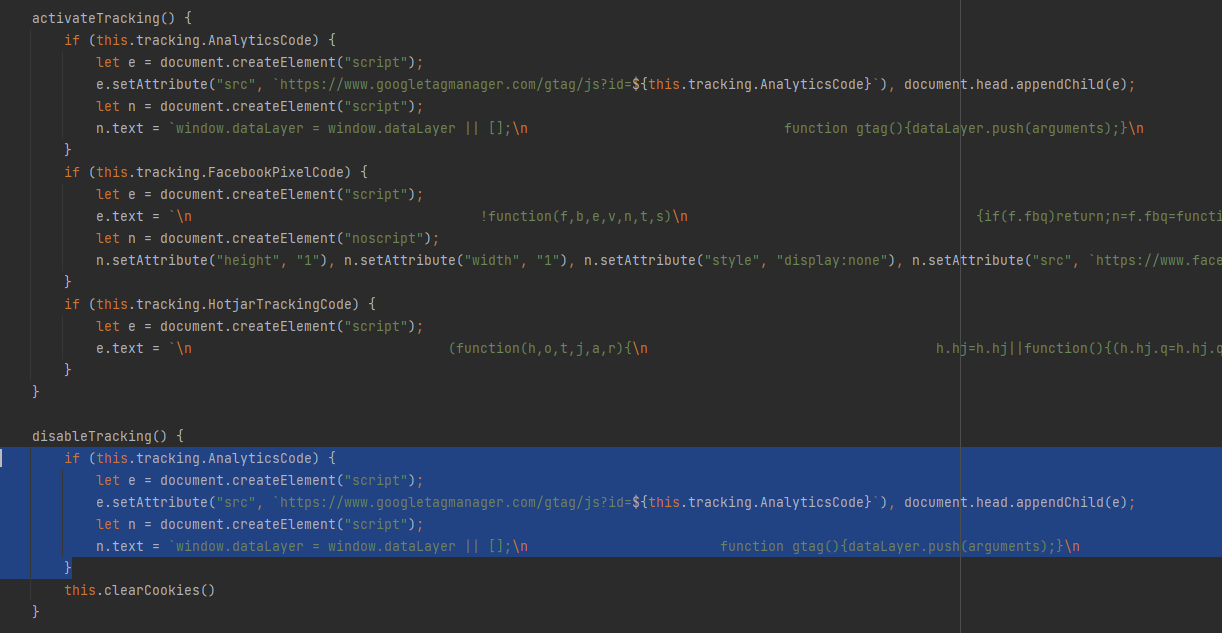

@manucaralmo will you be updating the javascript as a result of what @ra7khan found?
Does this even work at all? It keeps letting the cookies be initialized even if I reject and reload. I've also tried commenting the code demonstrated above by @ra7khan. Anyone has a good alternative in mind?

I found the solution that civicuk.com provide is the best at managing the cookies. The free version works fine!
https://www.civicuk.com/cookie-control/download?product=pro
you need to edit glowcookies.js disableTracking() function and add the following code:
gtag('consent', 'default', { 'ad_storage': 'denied', 'analytics_storage': 'denied' });
here is the full function:
disableTracking() {
	  // Google Analytics Tracking ('client_storage': 'none')
	  if (this.tracking.AnalyticsCode) {
		let Analytics = document.createElement('script');
		Analytics.setAttribute('src', `https://www.googletagmanager.com/gtag/js?id=${this.tracking.AnalyticsCode}`);
		document.head.appendChild(Analytics);
		let AnalyticsData = document.createElement('script');
		AnalyticsData.text = `window.dataLayer = window.dataLayer || [];
						  function gtag(){dataLayer.push(arguments);}
						  gtag('js', new Date());
						  // from: https://stackoverflow.com/questions/58801416/disabling-cookies-in-google-analytics-gtag-js
						  gtag('consent', 'default', {
							  'ad_storage': 'denied',
							  'analytics_storage': 'denied'
						  });
						  gtag('config', '${this.tracking.AnalyticsCode}' , {
							  'client_storage': 'none',
							  'anonymize_ip': true
						  });`;
		document.head.appendChild(AnalyticsData);
	  }

	  // Clear cookies - not working 100%
	  this.clearCookies()
	}
ive tested and i can confirm that GA will no longer use a cookie once this is done
