

 mantinedev
Modals styling issues when using @mantine/remix
What package has an issue
@mantine/modals
Describe the bug
Steps to reproduce:
- I started with mantine-remix-template
- I added
@mantine/modalsto package.json - In root.tsx I added ModalsProvider
<ModalsProvider
  modalProps={{ centered: true }}
>
  <Outlet />
</ModalsProvider>
- I added this code to index.tsx
import { Text, Button, Stack } from '@mantine/core';
import { openConfirmModal } from '@mantine/modals';

export default function Index() {
  const openModal = () =>
    openConfirmModal({
      title: 'Please confirm your action',
      children: (
        <Text size="sm">
          This action is so important that you are required to confirm it with a modal. Please click
          one of these buttons to proceed.
        </Text>
      ),
      labels: { confirm: 'Confirm', cancel: 'Cancel' },
      onCancel: () => console.log('Cancel'),
      onConfirm: () => console.log('Confirmed'),
    });

  return (
    <Stack align="center" mt={50}>
      <Text size="xl" weight={500}>
        Welcome to Mantine!
      </Text>
      <Button onClick={openModal}>Click the button</Button>
    </Stack>
  );
}
While the modal looks good in dev mode, after a yarn build + yarn start the styles are off:

What version of @mantine/hooks page do you have in package.json?
5.1.0
If possible, please include a link to a codesandbox with the reproduced problem
No response
Do you know how to fix the issue
No
Are you willing to participate in fixing this issue and create a pull request with the fix
Yes
Possible fix
No response


it seems to be related to this - https://github.com/mantinedev/mantine/issues/1734#issuecomment-1208272101
Hi @viczam, I've updated the remix template and guide to support react 18, can you please check whether your issue can be reproduced there?
Hi, @rtivital I have a problem with React 18 and Remix.
Trying to use your example of integrating Mantine into Remix, but Remix is using now renderToPipeableStream instead of renderToString. And I don't know where to put injectStyles method as I don't have a markup to use it.
This is an example code you will get after initialization of the new remix app entry.server.tsx:
export default function handleRequest(
  request: Request,
  responseStatusCode: number,
  responseHeaders: Headers,
  remixContext: EntryContext
) {
  const callbackName = isbot(request.headers.get("user-agent"))
    ? "onAllReady"
    : "onShellReady";

  return new Promise((resolve, reject) => {
    let didError = false;

    const { pipe, abort } = renderToPipeableStream(
      <RemixServer context={remixContext} url={request.url} />,
      {
        [callbackName]: () => {
          const body = new PassThrough();

          responseHeaders.set("Content-Type", "text/html");

          resolve(
            new Response(body, {
              headers: responseHeaders,
              status: didError ? 500 : responseStatusCode,
            })
          );

          pipe(body);
        },
        onShellError: (err: unknown) => {
          reject(err);
        },
        onError: (error: unknown) => {
          didError = true;

          console.error(error);
        },
      }
    );

    setTimeout(abort, ABORT_DELAY);
  });
}

@Beardless it is not related to the issue, template works correctly with react 18. Emotion does not support server streaming, see – https://github.com/emotion-js/emotion/issues/2800
~~I've updated everything to the latest template and I am still experiencing the modal bug in production builds~~
~~Never mind - retested and seems to be working as expected now on latest template~~
I am back to having this issue. Not sure what changed but I suspect the issue was never actually "fixed" for me either.

When run npm run build && npm run start or in production, seems like the emotion styling does not applied in modal's portal.
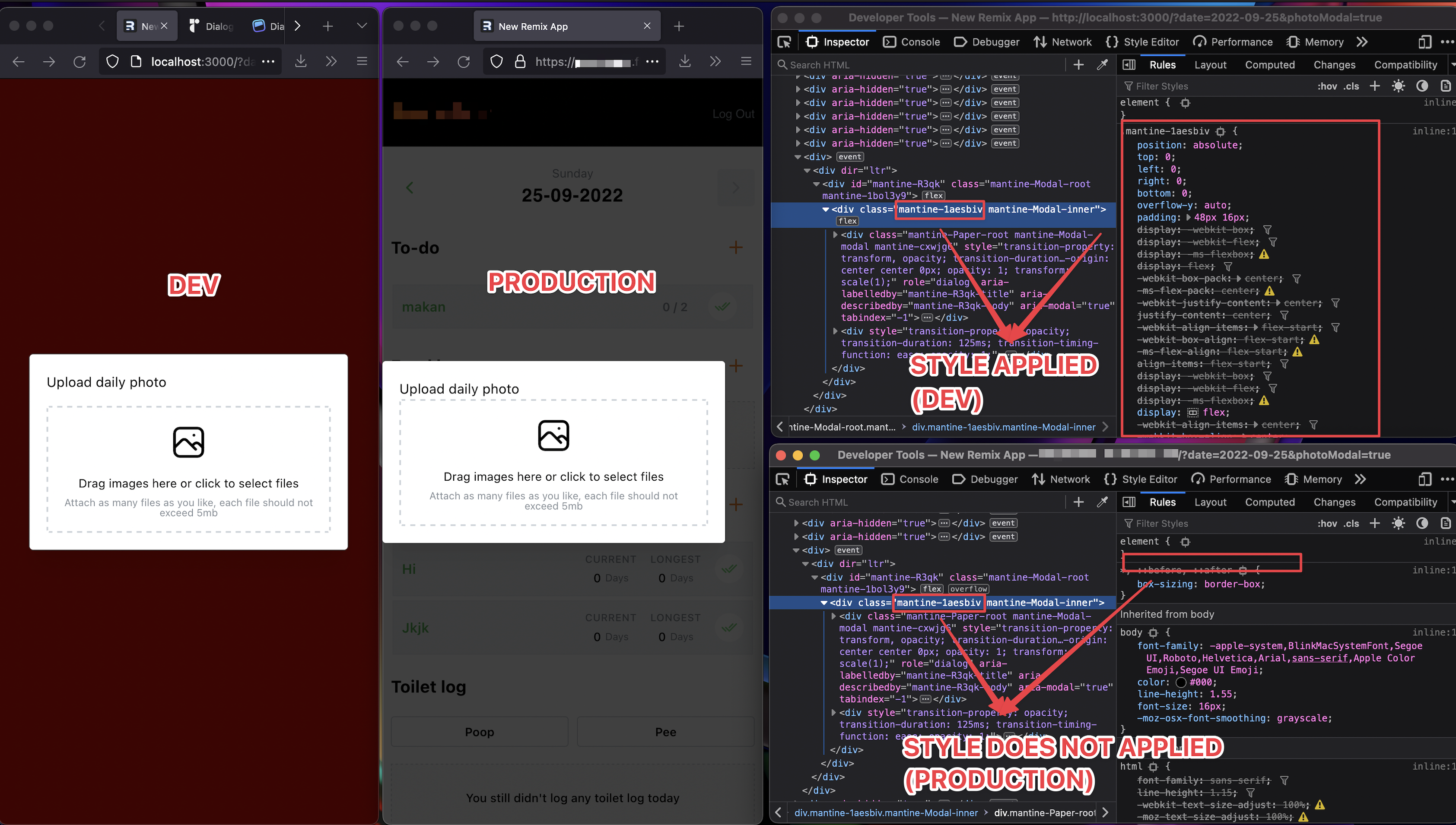

Interestingly... removing the <ClientProvider> ... </ClientProvider> from entry.client.tsx fixes this issue for me in production.
I am wondering if anyone has any insight on this? Or whether this is a safe change?
Interestingly... removing the
<ClientProvider> ... </ClientProvider>fromentry.client.tsxfixes this issue for me in production.I am wondering if anyone has any insight on this? Or whether this is a safe change?
same, but i see a content flash now. does that happen with you?
EDIT: nvm forgot about <StylesPlaceholder />. It's rendering fine

Interestingly... removing the
<ClientProvider> ... </ClientProvider>fromentry.client.tsxfixes this issue for me in production.I am wondering if anyone has any insight on this? Or whether this is a safe change?
You mean from this:
hydrateRoot(
  document,
  <ClientProvider>
    <RemixBrowser />
  </ClientProvider>
)
to this ?:
hydrateRoot(document);
For the record, removing the ClientProvider brings up the following hydration bugs for me:
- https://reactjs.org/docs/error-decoder.html?invariant=418
- https://reactjs.org/docs/error-decoder.html?invariant=423
Reproducible example found here: https://github.com/alukach/mantine-remix-rendering-issue

I managed to temporarily solve the problem by wrapping my modals in React.lazy and dynamically importing them. They open dynamically anyway so this doesn't affect SSR. Depending on your case this might even be beneficial for performance.

I just ended up copying the non-dynamic styles into a global css file, doesn't work perfectly but is a bearable hack for now. Hoping this gets solved soon.

I am facing a similar issue. Happens only on a production build for me as well. did anyone manage to find any workaround for it? I would also love to help if someone can guide me on where i should look to get started

Interestingly... removing the
<ClientProvider> ... </ClientProvider>fromentry.client.tsxfixes this issue for me in production.I am wondering if anyone has any insight on this? Or whether this is a safe change?
I'm noticing the same behavior as this comment - if <ClientProvider /> is removed, then the modal renders correctly. The styling issue only happens in a remix production build and run (with NODE_ENV=production), not in a dev build. I was also able to reproduce with the mantine-remix-template as OP mentioned. However, this is not the right solution as ClientProvider is necessary to properly maintain styles in other situations.


any update on this? This is a production critical bug for me.
Have you tried removing the <ClientProvider>...</ClientProvider> ? After remove that line, it works for me on production
hydrateRoot( <RemixBrowser />, document )
^ Removing the ClientProvider works like a charm for me. Thanks.

I'm running into this issue. I found that removing ClientProvider means that you no longer get to take advantage of Emotion caching so I found a different workaround: Hard coding modal styles! If you want to do the same, here's what I did:
diff --git a/app/integrations/mantine/styles.css b/app/integrations/mantine/styles.css
new file mode 100644
index 0000000..1186223
--- /dev/null
+++ b/app/integrations/mantine/styles.css
@@ -0,0 +1,21 @@
+.mantine-Modal-inner {
+  position: absolute;
+  top: 0;
+  left: 0;
+  right: 0;
+  bottom: 0;
+  overflow-y: auto;
+  padding: 48px 16px;
+  display: -webkit-box;
+  display: -webkit-flex;
+  display: -ms-flexbox;
+  display: flex;
+  -webkit-box-pack: center;
+  -ms-flex-pack: center;
+  -webkit-justify-content: center;
+  justify-content: center;
+  -webkit-align-items: flex-start;
+  -webkit-box-align: flex-start;
+  -ms-flex-align: flex-start;
+  align-items: flex-start;
+}
+
+.mantine-Modal-header {
+  display: -webkit-box;
+  display: -webkit-flex;
+  display: -ms-flexbox;
+  display: flex;
+  -webkit-align-items: center;
+  -webkit-box-align: center;
+  -ms-flex-align: center;
+  align-items: center;
+  -webkit-box-pack: justify;
+  -webkit-justify-content: space-between;
+  justify-content: space-between;
+  margin-bottom: 16px;
+  margin-right: -9px;
+}
diff --git a/app/routes/dashboard.tsx b/app/routes/dashboard.tsx
index 6de7e57..68c4ab6 100644
--- a/app/routes/dashboard.tsx
+++ b/app/routes/dashboard.tsx
@@ -1,8 +1,13 @@
-import type { LoaderFunction } from "@remix-run/node";
+import type { LinksFunction, LoaderFunction } from "@remix-run/node";
 import { Outlet, useLoaderData } from "@remix-run/react";
+import styles from "app/integrations/mantine/styles.css";
 import { getSession } from "~/session.server";

+export const links: LinksFunction = () => {
+  return [{ rel: "stylesheet", href: styles }];
+};
+
 export const loader: LoaderFunction = async ({ request }) => {
   const session = await getSession(request);
   const user = session.get("user");
There may be styles that I'm missing here so add more if you find additional differences between your dev and non-dev builds.

Not sure if this was posted / updated elsewhere, but i was able to get rid of the modal issue by doing the following:
let emotionCache = createEmotionCache({ key: "mantine" });

hydrateRoot(
    document,
    <ClientProvider emotionCache={emotionCache}>
        <RemixBrowser />
    </ClientProvider>
);

Not sure if this was posted / updated elsewhere, but i was able to get rid of the modal issue by doing the following:
let emotionCache = createEmotionCache({ key: "mantine" });

hydrateRoot(
    document,
    <ClientProvider emotionCache={emotionCache}>
        <RemixBrowser />
    </ClientProvider>
);
This seems to work for me, don't see hydration related errors in the console either. Are there any downsides to this approach? (i.e moving the createEmotionCache from root.tsx to entry.client.tsx)
Not sure if this was posted / updated elsewhere, but i was able to get rid of the modal issue by doing the following:
let emotionCache = createEmotionCache({ key: "mantine" });

hydrateRoot(
    document,
    <ClientProvider emotionCache={emotionCache}>
        <RemixBrowser />
    </ClientProvider>
);
Was wondering why this is the case, just realised emotion cache is creating a copy of CSS stylesheets based on what it can parse. When using Remix, we have to go through SSR on the server-side but components like modal rely on window which the server-side with NodeJS env (entry.server.tsx) wouldn't have that. (I'm not sure if polyfill window object would force emotion cache to parse and generate correctly though)
Putting the emotion cache into entry.client.tsx works 'cause it's only getting triggered when the Remix codebase starts running on browser side. The downside would be there's now overhead to initiate the emotion cache on browser (slower app bootstrapping, should be negligible if your app isn't with big JS chunks). Though, i'm not sure if the emotion cache initialisation will run every time or only when the cache key is changed, seems to me it will always re-initialise.

This issue is closed for one of these reasons:
- It was fixed in 7.0
- It is no longer reproducible in 7.0
- It is no longer applicable in 7.0
- It does not have a reproduction
If you think that this issue was closed by mistake and it is still an issue in version 7.0, please reopen it.