

 manijak
iOS Safe Area / image stretch
My code is below - updated to 6.1.0 but still not working. I'm not sure if it's safe area or stretch that is the actual issue, but I think it's the stretch not working.
Instead of filling the entire component as the image should do, if an image has a different aspect ratio (height for example) then a grey bar is shown at the top of the image. Image attached.
<Carousel iosOverflowSafeArea="true" #myCarousel debug="true" [items]="photos" height="100%" width="100%" color="white" autoPagerInterval="true" showIndicator="true">
    <CarouselItem iosOverflowSafeArea="true" *ngFor="let item of photos" height="100%">
        <Image iosOverflowSafeArea="true" stretch="aspectFill" [src]="item"></Image>
    </CarouselItem>
</Carousel>

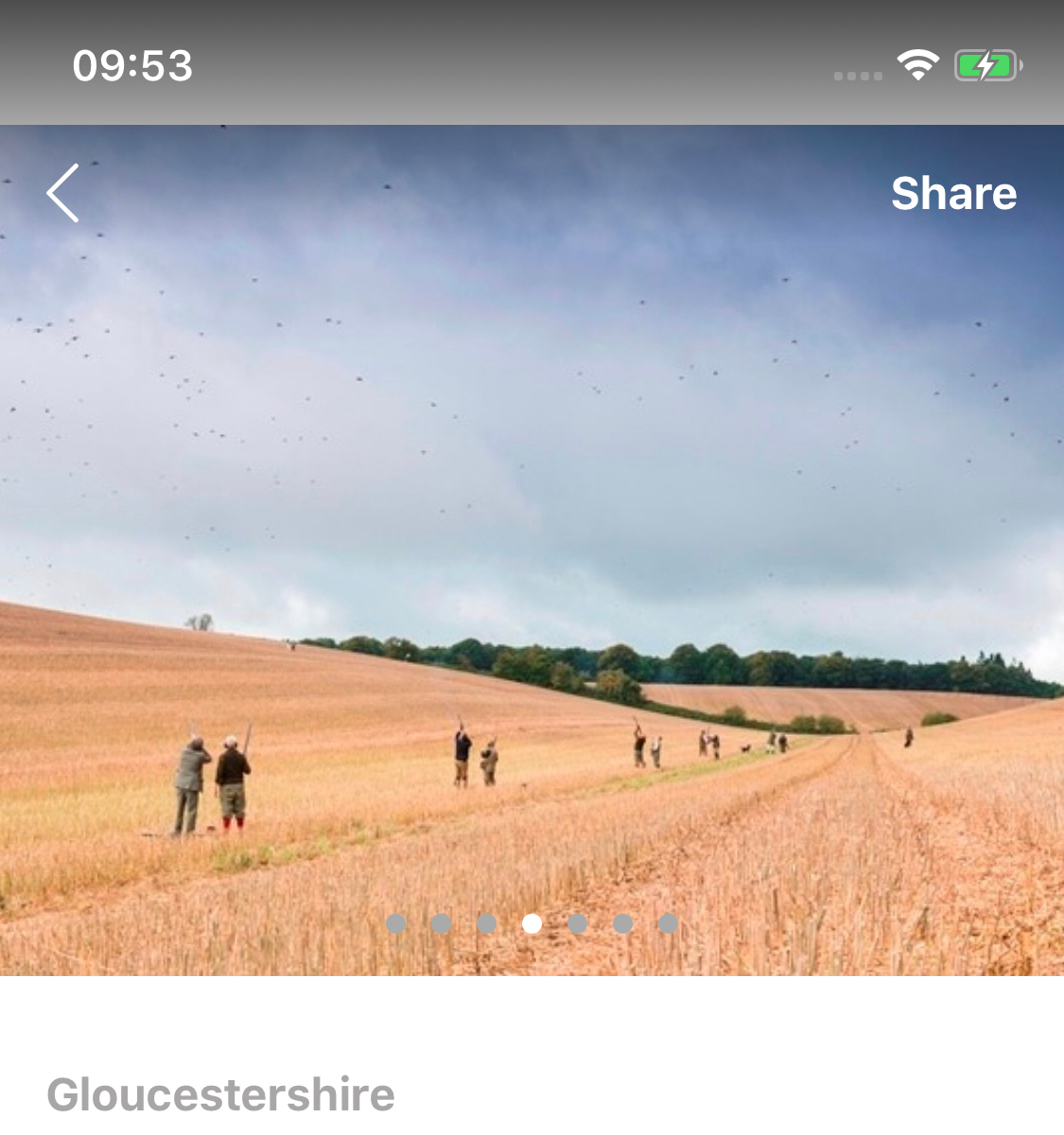
Hmm, interesting. Could be the image streching... Can you post the xml of the entire Page? Just to see if there could be any elements that affect the size.

Posted below. However the stretching works fine if I have a static image, and when I used previous plugins (which did the same, just didn't preload and was slow - yours is better), so I'm guessing it's not the XML.
To confirm the first image(s) shows ok, it seems to only happen if the next image has a different aspect ratio
<ActionBar [visibility]="'collapsed'"></ActionBar>
<GridLayout rows="*, auto" columns="*">
    <ScrollView row="0" col="0" style="z-index: 1" *ngIf="pageLoaded && location" (scroll)="onScroll($event)">

        <StackLayout iosOverflowSafeArea="true" marginBottom="16">
            <GridLayout iosOverflowSafeArea="true" rows="*" height="300">

                <Carousel iosOverflowSafeArea="true" #myCarousel debug="true" [items]="photos" height="100%" width="100%" color="white"
                    autoPagerInterval="true" showIndicator="true">
                    <CarouselItem iosOverflowSafeArea="true" *ngFor="let item of photos" height="100%">
                        <Image iosOverflowSafeArea="true" stretch="aspectFill" [src]="item"></Image>
                    </CarouselItem>
                </Carousel>

            </GridLayout>

            <StackLayout class="mainContent">
                <Label class="address" [text]="location.address.county"></Label>
                <Label class="title" [text]="location.name"></Label>

                <StackLayout [class.cropped]="cropView">
                    <Label class="summary" [text]="location.summary" textWrap="true"></Label>
                </StackLayout>
                <Label class="readMoreTrigger" (tap)="cropView = !cropView"
                    [text]="cropView ? 'Show more' : 'Show less'"></Label>

                <YoutubePlayer *ngIf="location.video" [options]="youtubeOptions" class="player" id="player"
                    apiKey="AIzaSyCNwZHFWSR8VnbBnfMwtXzsK6rHiu38cjg" src="{{location.video.id}}" height="250" width="100%"
                    backgroundColor="gray"></YoutubePlayer>

                <StackLayout class="dateBoxOuter">
                    <Label class="datesHeader" text="Availability"></Label>
                    <GridLayout columns="*, auto" class="followBox">
                        <Label col="0" class="followText" text="Keep track of new availability" textWrap="true"></Label>
                        <Button (tap)="onFollowTap()" col="1" text="{{!location.following ? 'F' : 'Unf' }}ollow location"
                            class="followBtn" [class.followBtnActive]="location.following"></Button>
                    </GridLayout>
                    <StackLayout *ngIf="events.length===0">
                        <Label class="noDates" textWrap="true"
                            text="This location has not added any dates. Please follow the location to be notified when days are added."></Label>
                    </StackLayout>
                    <ng-template ngFor let-event [ngForOf]="events" let-i="index" *ngIf="events.length > 0">
                        <GridLayout (tap)="openDate(i)" *ngIf="i<showDates" columns="auto, *, auto, 32"
                            rows="auto, auto, auto, auto, auto" class="dateBox">
                            <Label col="0" row="0" class="dateTxt" [text]="event.start_date | date:'dd MMM'"></Label>
                            <Label col="1" row="0" class="dateInfo" [text]="event.quarry_types | join:'quarry'"></Label>
                            <Label col="1" row="1" class="dateInfo" text="Bag: {{event.bag_target}}"></Label>
                            <Label col="1" row="2" class="dateInfo"
                                text="Guns: {{event.guns_available}} available, {{event.num_guns}} total"></Label>
                            <Label col="2" row="0" class="datePrice" text="£{{event.cost_pp_day}}"></Label>
                            <Label col="2" row="1" class="dateItalic" text="Per gun"></Label>
                            <Label col="3" row="0" rowSpan="3" class="fal chevron" *ngIf="extendDate !== i"
                                [text]="icons.chevronRight"></Label>
                            <Label col="3" row="0" rowSpan="3" class="fal chevron" *ngIf="extendDate === i"
                                [text]="icons.chevronDown"></Label>

                            <Label col="1" colSpan="2" row="3" *ngIf="extendDate === i" class="dateInfo eventDesc"
                                textWrap="true" [text]="event.description"></Label>

                            <GridLayout iosOverflowSafeArea=false *ngIf="extendDate === i" row="4" col="1" colSpan="2"
                                columns="auto, *" rows="auto,auto,auto,auto,auto,auto,auto,auto">
                                <Label class="eventHead" text="VAT" row="0" col="0"></Label>
                                <Label class="eventBody" text="{{ event.vat_included ? 'Included' : 'Not included' }}"
                                    row="0" col="1"></Label>

                                <Label class="eventHead" text="Trip" row="1" col="0"></Label>
                                <Label class="eventBody" text="{{ event.type === 2 ? 'Yes' : 'No' }}" row="1"
                                    col="1"></Label>

                                <Label class="eventHead" text="Full team" row="2" col="0"></Label>
                                <Label class="eventBody" text="{{ event.full_teams_only ? 'Yes' : 'No' }}" row="2"
                                    col="1"></Label>

                                <Label class="eventHead" text="Lunch" row="3" col="0"></Label>
                                <Label class="eventBody" text="{{ lunch_provided ? 'Yes' : 'No' }}" row="3"
                                    col="1"></Label>

                                <Label class="eventHead" text="Cartridges" row="4" col="0"></Label>
                                <Label class="eventBody" [text]="CartridgeType[event.cartridges]" row="4"
                                    col="1"></Label>

                                <Label class="eventHead" text="Dogs" row="5" col="0"></Label>
                                <Label class="eventBody" text="{{ event.dogs ? 'Allowed' : 'Not allowed' }}" row="5"
                                    col="1"></Label>

                                <Label class="eventHead" text="Overage" row="6" col="0"></Label>
                                <Label class="eventBody" [text]="event.overage" row="6" col="1"></Label>

                                <Button col="0" colspan="2" row="7" width="150" height="50" text="Enquire"
                                    (tap)="openEnquiry(i)" class="button"></Button>
                            </GridLayout>
                        </GridLayout>

                    </ng-template>
                    <Label *ngIf="events.length > 4" text="See {{showDates > 4 ? 'less' : 'more'}} location dates"
                        (tap)="triggerDates()" class="allDates"></Label>
                </StackLayout>
            </StackLayout>

            <StackLayout class="modalBox">
                <FlexboxLayout *ngIf="location.topography" class="modalLink" justifyContent="space-between"
                    (tap)="openModal('topography')">
                    <Label class="modalText" text="Land and topography"></Label>
                    <Label class="far chevron" [text]="icons.chevronRight"></Label>
                </FlexboxLayout>

                <FlexboxLayout *ngIf="location.itinerary" class="modalLink" justifyContent="space-between"
                    (tap)="openModal('itinerary')">
                    <Label class="modalText" text="Typical itinerary"></Label>
                    <Label class="far chevron" [text]="icons.chevronRight"></Label>
                </FlexboxLayout>

                <FlexboxLayout *ngIf="location.hospitality" class="modalLink" justifyContent="space-between"
                    (tap)="openModal('hospitality')">
                    <Label class="modalText" text="Hospitality"></Label>
                    <Label class="far chevron" [text]="icons.chevronRight"></Label>
                </FlexboxLayout>

                <FlexboxLayout *ngIf="location.about_hosts" class="modalLink" justifyContent="space-between"
                    (tap)="openModal('about_hosts')">
                    <Label class="modalText" text="About the hosts"></Label>
                    <Label class="far chevron" [text]="icons.chevronRight"></Label>
                </FlexboxLayout>
            </StackLayout>

            // TODO Add a review via website
            <StackLayout class="reviewBoxOuter"  *ngIf="location.review_count > 0">
                <Label class="reviewHeader" text="Reviews"></Label>
                <StackLayout *ngFor="let review of location.reviews | slice:0:3; let i=index" [class.bototmBorder]="i==2"
                    (tap)="onReviewsClick()" class="reviewBox">
                    <GridLayout columns="*, auto">
                        <Label col="0" class="reviewTxt" textWrap="true" [text]="review.comment"></Label>
                        <Label col="1" class="reviewScore" [text]="review.averageScore"
                            *ngIf="review.averageScore > 0"></Label>
                    </GridLayout>
                    <GridLayout columns="*, auto" class="reviewBottomRow">
                        <StackLayout col="0">
                            <Label [text]="review.author.name" class="reviewName"></Label>
                            <Label [text]="review.created_at | date:'MMM yyyy'" class="reviewDate"></Label>
                        </StackLayout>
                    </GridLayout>
                </StackLayout>

                <Label text="Read all reviews" (tap)="onReviewsClick()" class="reviewLink" verticalAlignment="bottom"
                    horizontalAlignment="right"></Label>
            </StackLayout>

            <GridLayout *ngIf="location.quarry_types.length > 0" columns="auto, *" rows="auto, auto" class="infoBox">
                <Label *ngIf="location.quarry_types.length > 0" class="infoTitle" text="Quarries" col="0" row="0"
                    verticalAlignment="top"></Label>
                <Label *ngIf="location.quarry_types.length > 0" class="infoTxt" [text]="location.quarry_types | join:'quarry'"
                    col="1" row="0" textWrap="true"></Label>

                <Label *ngIf="location.locationing_types.length > 0" class="infoTitle infoRow2" text="Format" col="0" row="1"
                    verticalAlignment="top"></Label>
                <Label *ngIf="location.locationing_types.length > 0" class="infoTxt infoRow2"
                    [text]="location.locationing_types | join:'format'" col="1" row="1" textWrap="true"></Label>
            </GridLayout>

            <!--<StackLayout class="mapBox">
                <Label class="mapHeader" text="Location"></Label>
                <ContentView width="100%" height="250" class="mapView">
                    <Mapbox
                        accessToken=""
                        mapStyle="streets" [latitude]="location.location.lat" [longitude]="location.location.lng"
                        hideCompass="true" zoomLevel="8" showUserLocation="false" disableScroll="true" (tap)="openMap()"
                        disableRotation="true" disableTilt="true" (mapReady)="onMapReady($event)">
                    </Mapbox>
                </ContentView>
            </StackLayout>-->

        </StackLayout>
    </ScrollView>

    <ContentView *ngIf="showStatusBar" verticalAlignment="top" row="0" col="0" class="bottom-gradient">
        <StackLayout marginTop="12">
            <header-bar [leftButton]="icons.back" rightButton="Share" (leftFunc)="goBack()" (rightFunc)="share()">
            </header-bar>
        </StackLayout>
    </ContentView>

    <ContentView class="top-gradient" *ngIf="!showStatusBar" row="0" col="0" colSpan="2" verticalAlignment="top">
        <GridLayout columns="*, auto" rows="auto" class="headerBar">
            <Label verticalAlignment="top" row="0" col="0" [text]="icons.back" class="fal backIcon"
                (tap)="goBack()"></Label>
            <Label verticalAlignment="center" (tap)="share()" class="shareIcon" row="0" col="1" text="Share"></Label>
        </GridLayout>
    </ContentView>


    <FlexboxLayout justifyContent="center" alignItems="center" flexDirection="column" *ngIf="!pageLoaded || !location">
        <ActivityIndicator [busy]="!pageLoaded || !location" width="100" height="100"></ActivityIndicator>
        <Label text="Could not load location" *ngIf="timeout"></Label>
        <Button text="Try again" *ngIf="timeout" backgroundColor="#EEE" (tap)="loadData()" marginTop=16
            padding=8></Button>
    </FlexboxLayout>

    <GridLayout *ngIf="(pageLoaded && location) && location.profile_contact" background="white" class="buttonBox"
        columns="*, *" row="1">
        <Button *ngIf="location.profile_contact" col="0" text="Call location" (tap)="calllocation()" class="button2"></Button>
        <Button col="1" text="Send enquiry" (tap)="openEnquiry()" class="button"></Button>
    </GridLayout>

    <GridLayout *ngIf="(pageLoaded && location) && !location.profile_contact" background="white" class="buttonBox" columns="*"
        row="1">
        <Button col="0" width="50%" text="Send enquiry" (tap)="openEnquiry()" class="button"></Button>
    </GridLayout>
</GridLayout>
No sorry, have tried several ways to make it render properly but without success. My knowledge of iOS is not enough in order to solve this :-).
The iOS pod that the carousel uses is also available here on my git so feel free to try it for yourself, I simply do not have the time...
I have no idea either. I've just noticed it has nothing to do with the image aspect ratio - I have 2 images that are the exact same size, yet one has a different height when using this plugin.
More debug information. New code is below, with heights etc changing. It seems the issue is definitely the overflow safe area still. Without marginTop on the <Image> the top of the image is being cut off. But I still have padding under the image now (theyre all the same height if I enforce height on imge)
Oh yeah it's definetly the safe area. It is beeing applied to the CarouselItem subviews even tho I have told scrollView to ignore safearea insets.
scrollView.contentInsetAdjustmentBehavior = UIScrollViewContentInsetAdjustmentNever;
scrollView.contentInset = UIEdgeInsetsMake(0, 0, 0, 0);
Still the subviews render with insets, even if I override the frame of the subviews they still show up...
Once I have a fully working work-around I'll post it, so at least people can get around it.
What I have done is set the height of Carousel, CarouselItem and Image to all be the same. I then added a marginTo of 44 onto the image , which has alinged it correctly.
44 is actually the navigation bar height, if that helps.
<Carousel height="300" iosOverflowSafeArea="true" [items]="photos" autoPagerInterval="true" showIndicator="true">
    <CarouselItem  height="300" iosOverflowSafeArea="true" *ngFor="let item of photos">
        <Image height="300" marginTop="44" iosOverflowSafeArea="true" stretch="aspectFill" [src]="item"></Image>
    </CarouselItem>
</Carousel>
Another note for the workaround, in case others require it.
Then 44 on marginTop is for notch, it's 20 without. This is on iOS, not tested Android yet.