

 mandiant
Request: Provide automated install of WSL2 on supported Windows 10 versions
The Bug
DOCKER (docker.fireeye in default COMMANDO install) requires Windows Subsystem for Linux (WSL) version 2 in order to run. Unfortunately, there currently isn't a supported WSL2 Chocolatey repo, so interested users will not be able to use docker until WSL2 is installed from Microsoft.
NOTE
- Microsoft officially supports WSL2 on Win10 (2004) or higher only! https://docs.microsoft.com/en-us/windows/wsl/wsl2-index
- WSL2 needs virtualization to be enabled in the hypervisor CPU and Windows OS. If not enabled in Windows, run:
Enable-WindowsOptionalFeature -Online -FeatureName VirtualMachinePlatform -All
To Reproduce
- The default COMMANDO install or any profile with a docker entry.
- DOCKER will install, but not run until WSL2 installed/setup.
Screenshots
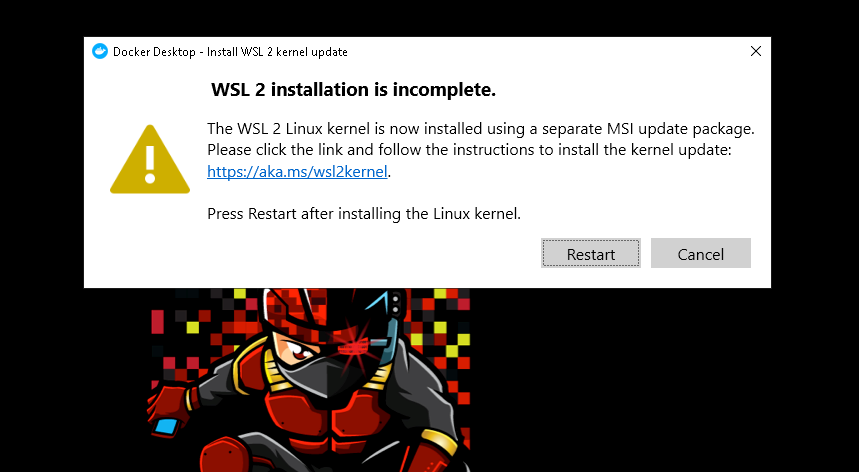
Version
- Win10 (2004)
Additional Context Users on 1909 SHOULD still be able to install WSL2 and use docker. However, I recommend that 1909 users leave Linux distros on WSL1 and simply use WSL2 for DOCKER only.
To Fix the issue
This solution will set 2004 users to WSL2
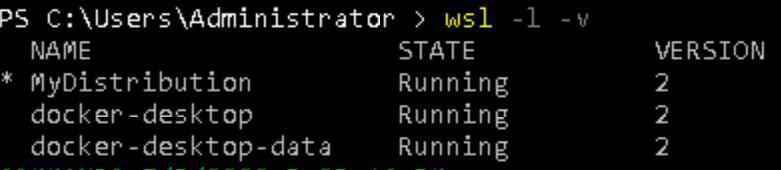
Please replace commando-vm-master\commando-vm-master\commandovm.win10.installer.fireeye\tools\chocolateyinstall.ps1
with this code:
$ErrorActionPreference = 'Continue'

Import-Module Boxstarter.Chocolatey
Import-Module "$($Boxstarter.BaseDir)\Boxstarter.Common\boxstarter.common.psd1"

$packageName      = 'commandovm.win10.installer.fireeye'
$toolsDir         = "$(Split-Path -parent $MyInvocation.MyCommand.Definition)"
$fireeyeFeed      = "https://www.myget.org/F/fireeye/api/v2"
$cache            =  "$env:userprofile\AppData\Local\ChocoCache"
$globalCinstArgs  = "--cacheLocation $cache -y"
$pkgPath          = Join-Path $toolsDir "packages.json"
$releaseID        = (Get-ItemProperty -Path "HKLM:\SOFTWARE\Microsoft\Windows NT\CurrentVersion" -Name ReleaseId).ReleaseId


# https://stackoverflow.com/questions/28077854/powershell-2-0-convertfrom-json-and-convertto-json-implementation
function ConvertFrom-Json([object] $item) {
  Add-Type -Assembly system.web.extensions
  $ps_js = New-Object system.web.script.serialization.javascriptSerializer

  #The comma operator is the array construction operator in PowerShell
  return ,$ps_js.DeserializeObject($item)
}

function LoadPackages {
  try {
    $json = Get-Content $pkgPath -ErrorAction Stop
    $packages = ConvertFrom-Json $json
  } catch {
    return $null
  }
  return $packages
}

function InstallNonChocolateyPackage {
    # WSL2 Install
    if ((Select-String $pkgPath -Pattern ".*docker\..*") -and -not (Test-Path "$cache\wsl_update_x64.msi")) {
        Start-BitsTransfer "https://wslstorestorage.blob.core.windows.net/wslblob/wsl_update_x64.msi" -Destination $cache
        Start-Process msiexec.exe -Wait -ArgumentList "/I $cache\wsl_update_x64.msi /QUIET"

        if ($releaseID -ge "2004") {
            wsl.exe --set-default-version 2
            wsl.exe --set-version MyDistribution 2
        } elseif ($releaseID -lt "2004") {
            wsl.exe --set-version docker-desktop-data 2
            wsl.exe --set-version docker-desktop 2
        }
        Invoke-Reboot # Ask BoxStarter to reboot in order to set WSL2
        }

 }


function InstallOnePackage {
  param([hashtable] $pkg)
  $name = $pkg.name
  $pkgargs = $pkg.args
  try {
    $is64Only = $pkg.x64Only
  } catch {
    $is64Only = $false
  }

  if ($is64Only) {
    if (Get-OSArchitectureWidth -Compare 64) {
      # pass
    } else {
      Write-Warning "[!] Not installing $name on x86 systems"
      return $true
    }
  }

  if ($pkgargs -eq $null) {
    $args = $globalCinstArgs
  } else {
    $args = $pkgargs,$globalCinstArgs -Join " "
  }

  if ($args) {
    Write-Warning "[!] Installing using host choco.exe! Errors are ignored. Please check to confirm $name is installed properly"
    Write-Warning "[!] Executing: iex choco upgrade $name $args"
    $rc = iex "choco upgrade $name $args"
    Write-Host $rc
  } else {
    choco upgrade $name $args
  }

  if ($([System.Environment]::ExitCode) -ne 0 -And $([System.Environment]::ExitCode) -ne 3010) {
    Write-Host "ExitCode: $([System.Environment]::ExitCode)"
    return $false
  }
  return $true
}

function InitialSetup {
  # Basic system setup
  Update-ExecutionPolicy Unrestricted
  Set-WindowsExplorerOptions -EnableShowProtectedOSFiles -EnableShowFileExtensions -EnableShowHiddenFilesFoldersDrives
  Disable-MicrosoftUpdate
  Disable-BingSearch
  Disable-GameBarTips
  Disable-ComputerRestore -Drive ${Env:SystemDrive}

  # Chocolatey setup
  Write-Host "Initializing chocolatey"
  iex "choco sources add -n=fireeye -s $fireeyeFeed --priority 1"
  iex "choco feature enable -n allowGlobalConfirmation"
  iex "choco feature enable -n allowEmptyChecksums"

  # Create the cache directory
  New-Item -Path $cache -ItemType directory -Force

  # Update old env var if it points to a directory vs a file (.lnk)
  $toolListDirShortcut = [Environment]::GetEnvironmentVariable("TOOL_LIST_SHORTCUT", 2)
  if (-Not ($toolListDirShortcut -eq $null) -And ((Get-Item $toolListDirShortcut) -is [System.IO.Directory])) {
    try {
      $toolListDirShortcut = Join-Path ${Env:UserProfile} "Desktop\Tools.lnk"
      [Environment]::SetEnvironmentVariable("TOOL_LIST_SHORTCUT", $toolListDirShortcut, 2)
    } catch {}
  }

  # BoxStarter setup
  Set-BoxstarterConfig -NugetSources "$fireeyeFeed;https://chocolatey.org/api/v2"

  # Tweak power options to prevent installs from timing out
  & powercfg -change -monitor-timeout-ac 0 | Out-Null
  & powercfg -change -monitor-timeout-dc 0 | Out-Null
  & powercfg -change -disk-timeout-ac 0 | Out-Null
  & powercfg -change -disk-timeout-dc 0 | Out-Null
  & powercfg -change -standby-timeout-ac 0 | Out-Null
  & powercfg -change -standby-timeout-dc 0 | Out-Null
  & powercfg -change -hibernate-timeout-ac 0 | Out-Null
  & powercfg -change -hibernate-timeout-dc 0 | Out-Null
}


function CleanUp
{
  # clean up the cache directory
  Remove-Item $cache -Recurse

  # Final commandovm installation
  iex "choco upgrade commandovm.win10.config.fireeye $globalCinstArgs"
}


function Main {
  InitialSetup

  $json = LoadPackages $pkgPath
  if ($json -eq $null -Or $json.packages -eq $null) {
    Write-Host "Packages property not found! Exiting"
    return -1
  }

  $packages = $json.packages
  foreach ($pkg in $packages) {
    $name = $pkg.name
    if (-Not $(Test-Path $(Join-Path $Env:ProgramData "chocolatey\lib\$name"))){
      FE-Write-Log "INFO" "Attempting install of $name"
      $rc = InstallOnePackage $pkg
      if ($rc) {
        FE-Write-Log "INFO" "Install of $name finished successfully"
        # Try not to get rate-limited
        if (-Not ($name.Contains(".flare") -or $name.Contains(".fireeye"))) {
          Start-Sleep -Seconds 5
        } elseif (Test-PendingReboot) {
          Invoke-Reboot
        }
      } else {
        FE-Write-Log "ERROR" "Failed to install $name"
      }
    }
  }

  InstallNonChocolateyPackage
  CleanUp
  return 0
}


Main

@BashSTuff Thank you very much for the issue! I will work to have this implemented in some way.

@BashSTuff Thank you very much for the issue! I will work to have this implemented in some way.
Agreed

Hi BashSTuff, with the latest 3.0 release, we are not yet supporting either the installation of WSL or Docker. We are working on these as new features but have been focused on getting core functionality complete.
We have also moved all of our packages to the https://github.com/mandiant/VM-Packages repo, so feel free to create an issue there.
