

 maharmstone
Btrfs properties tab shows "space savings" instead of the reported "compression ratio"
This isn't really a bug per se, but it did confuse me when I first saw it.
In the "Btrfs properties" tab of a file or folder, it shows the "compression ratio", but the value shown would usually actually be considered "space savings", as a value of 0% would mean no compression was achieved at all (no space saved), and a value close to 100% would mean almost perfect compression (all of the space saved).
The Wikipedia article on this for reference https://en.wikipedia.org/wiki/Data_compression_ratio
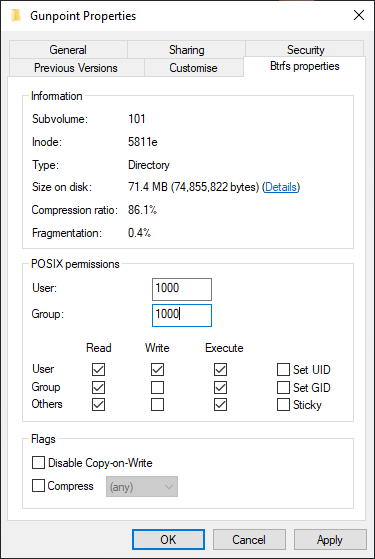
In this example I used the game "Gunpoint" which compresses very well from 512MB down to 71.4MB, which would be a compression ratio of 7.17, or space savings of 86.1% as shown in the dialogue.
Just for comparisons sake, the https://github.com/kilobyte/compsize utility shows compressed/uncompressed, which is 1 - the value shown in this. That could also be considered something like "size on disk", and would be 13.9% in this case.

I see what you mean - it's the opposite way round to compsize.
I'd tend to view "Compression ratio: 100%" as meaning a file that's perfectly compressed, rather than not compressed at all, but obviously it's a little subjective.

Maybe just display the number instead of the percentage, and add a separate field called "Space Savings" that shows the percentage?

