
btrfs
 btrfs copied to clipboard
 maharmstone
Checksum errors when running virtual machines from a subvolume with nodatacow enabled
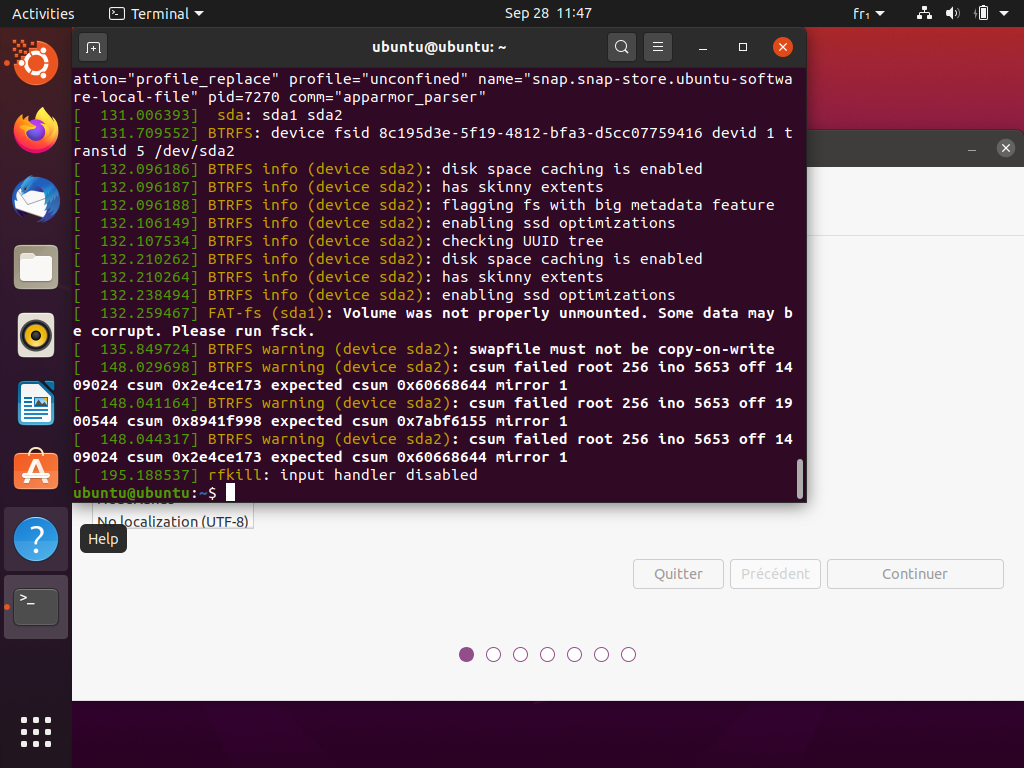
As I had some issues with my VMs not installing properly, I decided to try using BTRFS on the guest VM. After starting installing, I almost immediately faced csum failures on the guest BTRFS. It might be related to the incomplete writes issues with something as simple as notepad like in #301 Screenshot of the guest Ubuntu included.

Is this definitely an issue with the driver - as in, it no longer manifests if you move the VM image to NTFS?
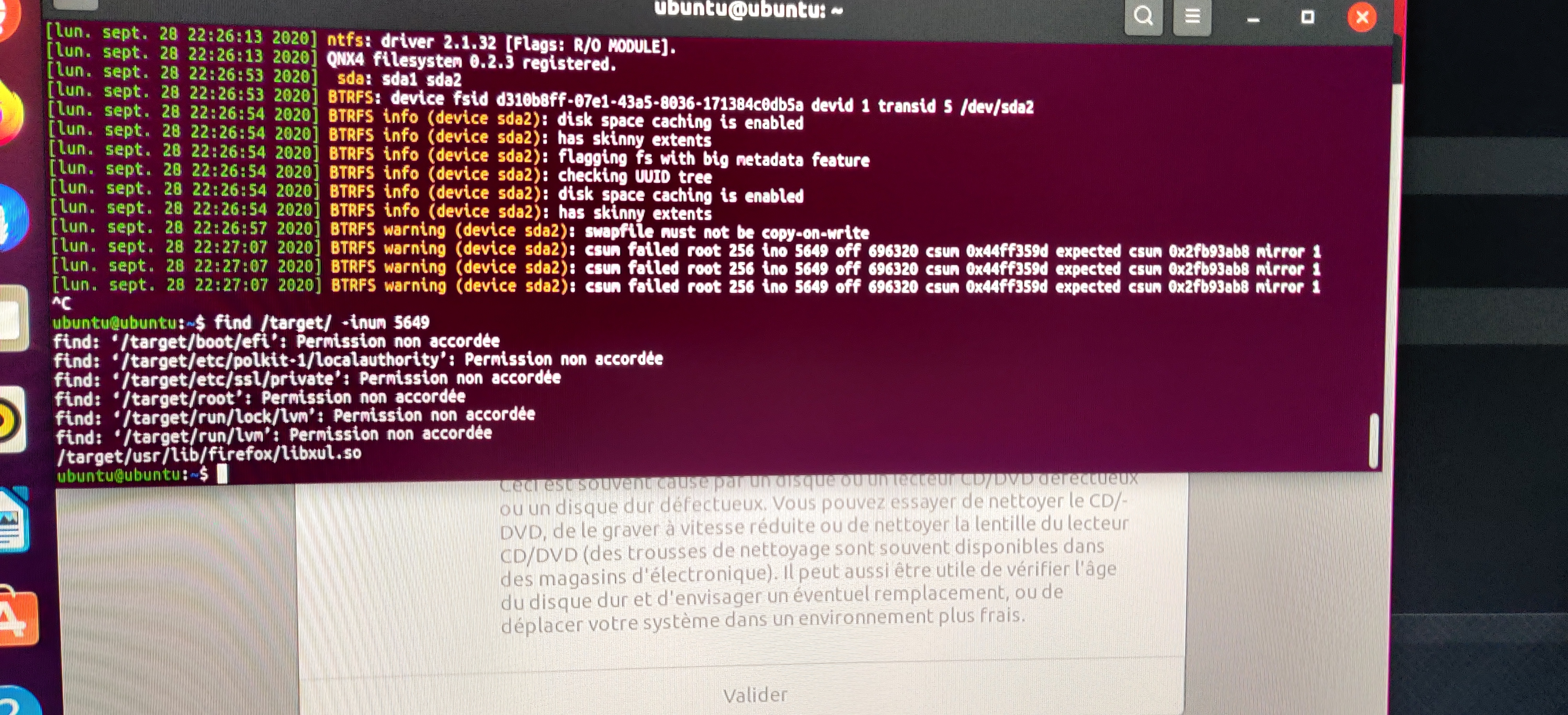
The line "swapfile must not be copy-on-write" is a bit suspicious. What's inode 5653 - your swapfile? (Try find / -inum 5653 as root.)

Sorry, I deleted the swap file because it is created by default during the install on ext4 and the installer isn't BTRFS-aware enough to set nodatacow on it (and with all the other limitations of a single device and very recent kernel).
The first thing I did is create a new VM on NTFS since I didn't have much time to debug this during the day, the VM works just fine when hosted on another partition of the same physical device. It is still using BTRFS in the guest.
It really looks like direct IO on BTRFS for Windows isn't writing data correctly according to the checksum failures.
I can give some more tries this evening if you wish to get more details.
I repeated the installation and the swap file was inode 260.
This time I used the SATA adapter for disk instead of virtio-scsi, with the image in a folder in the root subvolume. I didn't get checksum errors even after scrub.
I'll try once again but this time with virtio-scsi and with the image in a nodatacow subvolume like I did the first time.
Using virtio-scsi + disabling CoW on host subvolume results in wild corruption on many blocks and bad tree block start in VM. I'll try SATA with CoW disabled to rule out virtio-scsi.
The issue persists on SATA, also, the NTFS installation was done on virtio-scsi.
This is VirtualBox using KVM paravirtualization (I didn't know it was using KVM on Windows and don't know how it does neither, it was a surprise to me).
Since I recreated my VM subvolume without enabling "nodatacow", everything has been going much more smoothly, no more random lock ups, no corruption, no more Windows freezing for minutes at a time. I'm not sure what is going on with that but I'll make sure I keep it off for now. It might not be linked to other issues in the end.
Linux btrfs has a direct-io checksum gotcha btw. Not sure if this applies to winbtrfs. https://btrfs.wiki.kernel.org/index.php/Gotchas#Direct_IO_and_CRCs

Good find @uroni, luckily, I don't think this happens anymore on modern Linux kernels.
In this issue however, that checksum errors aren't benign and happen inside the guest, which means real data corruption has occurred on the host. And it only happens when nodatacow is enabled on the subvolume hosting the VM images.
I'm not quite sure that it is anything to do with this, but I never had corruption before running this VM, so I'll add those logs here until we decide if it is related or another issue. It seems the space cache was corrupt. I tried to move a file and everything was freezing, rebooted, tried again, same thing. I did a btrfs scrub and btrfsck to find out the space cache was corrupted, I mounted -o clear_cache on Linux, then scrub was fine, however, I had to btrfsck --repair to make it clear it completely, then everything was back to normal.
Log from both dmesg and btrfsck are attached.
btrfsck-corrupt.txt btrfs-corrupt2.txt
Wait a second... Keep in mind I had a LVM snapshot of this BTRFS on the host. I shouldn't have used the host to mount/btrfsck this FS, all this data may be wrong because it might have read the snapshot (which was in-use, so it shouldn't have). Just keep that in mind when reading the logs.
This line made me think it might not have been the right volume: [602363.820186] BTRFS: error (device dm-59) in cleanup_transaction:1894: errno=-5 IO failure
I still must add that btrfsck --repair has fixed the problem even if the snapshot was not read/writeable (it was a 100% snapshot, should issue I/O errors permanently).
Edit: Snapshot should've been named /dev/vgP4/win10btrfs1snap, and this name doesn't appear in the logs.
@ticpu - It's been a few years since I played around with LVM snapshots and Btrfs, but at the time it was a sure-fire way to confuse the OS. The issue is that it appears to Linux that there's multiple block devices with the same UUID, and it doesn't know which one to pick.
Can you reproduce the issue if you start from scratch, but don't use LVM at all? I would be surprised if this is an issue with the driver, as for large nocow IO it just forwards the request directly to the HDD.
The snapshot doesn't affect the first part of the report, I only made the snapshot before doing the scrub and repairs and I absolutely forgot to deactivate it before proceeding, thus it was visible to the tools and Linux driver. I'll still give a try to create the nodatacow VM then scrub+btrfsck to see if this is also reproducible. But I guess it won't.
Just to clarify, this still happens and have just been bitten by this problem, virtualbox 7, windows host with btrfs drive, created a windows vm and played with virtio-scsi and "Use Host I/O Cache" option, this resulted in severe slowdowns and the physical drive in windows dissapearing and appearing again, booting from linux this drive presents several csum corruption errors, maybe the documentation should add warnings against this, in linux the folder where vm images are stored are marked with the no-CoW attribute, in Windows i don't think this is modified, causing no barriers to corrupt your vm's.
This problem is known for years, but never have i experienced it till now:
https://www.virtualbox.org/ticket/17200
https://www.virtualbox.org/ticket/11862

I don't understand what you (and VirtualBox) are doing. Are you trying to pass through a mounted drive to a VM? In which case, yes, that will absolutely cause corruption.
Nope, the corruption problems arise because the hypervisor is writing data to CoW enabled drives, please check the links, they suggest to disable CoW completly on the drive, that disables checksums and data integrity checks:
https://archive.kernel.org/oldwiki/btrfs.wiki.kernel.org/index.php/FAQ.html#Can_I_have_nodatacow_.28or_chattr_.2BC.29_but_still_have_checksumming.3F
To reproduce: Windows 10 Host with VirtualBox 7 SSD drive with BTRFS mounted with WinBTRFS Create a new Windows 10 or 11 VM in the BTRFS disk. As disk controller select "virtio-scsi" and disable/enable "Use Host I/O Cache".
VirtualBox slowly will degrade the disk and corrupt the files.
I met with the same problem described by r3tr0g4m3r. Some details: Windows 10 host, VirtualBox 7, SSD drive with btrfs partition mounted with WinBtrfs and disabled Copy on Write in folder properties in which I put VM Disk Image. After several attempts to unsuccessfully install various Linux distributions in a virtual machine, I turned off the laptop and walked away. Upon returning, booting into Linux, I was faced with the fact that I could not get the contents of the directory using the ls. Btrfs scrub command found 1000+ uncorrectable errors.
I also had problems installing apps and games from Steam into the nodatacow folder. At the last stage of verification, Steam gave an error. After turning CoW back on, Steam was able to install the apps.
